Performance Tips for SvGrid with Svelte 5 Runes
Stable references, batched transactions, and $state.raw - the three techniques that keep a 30,000-row live grid at 60 fps without heroics.
Rebuilding 30,000 row objects 60 times per second because a WebSocket update arrived is not a performance problem - it is a design decision that went wrong. The fix is not to virtualize harder or debounce the feed. The fix is to stop rebuilding rows that did not change.
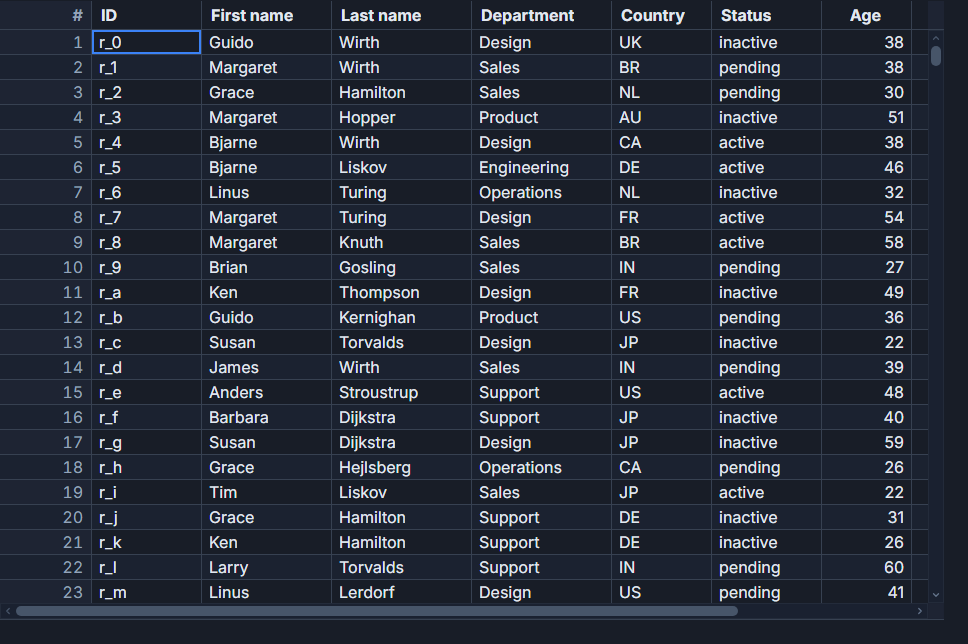
SvGrid subscribes to individual cell values, not entire row arrays. One field update on one row should cost roughly O(1) DOM work. Whether it actually does depends entirely on how you hand data to the grid.
Why object identity is your performance budget
Svelte 5's reactivity model tracks signal identity, not deep equality. When SvGrid receives a new array reference, it walks the rows and compares each element by reference to what it had before. An unchanged row with a stable reference is a no-op - the grid skips it. A row that is a new object (even with identical fields) looks changed, and the grid repaints it.
At 30,000 rows and 12 columns, one careless rows.map(r => ({ ...r, _ts: Date.now() })) in a 60 Hz interval translates to 21 million unnecessary cell comparisons per second. The CPU pegs, frames drop, and the profiler points at the grid when the real problem is upstream.
The rule: mutate only the objects that actually changed. Every other reference must stay identical to the previous render.
// Correct: create a new array but reuse all unchanged row objects
const next = rows.slice()
next[changedIndex] = { ...rows[changedIndex]!, amount: newAmount }
rows = next

// Incorrect: every row is a new object, even if nothing changed
rows = rows.map(r => ({ ...r, _updatedAt: Date.now() }))
$state.raw for large datasets
Plain $state in Svelte 5 wraps every array element in a reactive proxy. At 30,000 rows that is 30,000 proxies Svelte must maintain. SvGrid already does its own fine-grained cell tracking internally - the extra Svelte proxy layer is pure overhead with no benefit.
$state.raw keeps the array reference reactive (so the grid re-renders when you swap it) without the per-element proxy cost. Switch once, measure the difference.
// $state tracks every element - 30,000 proxies at 30,000 rows
let rows = $state<Order[]>(initialData)

// $state.raw tracks only the array reference - SvGrid handles the rest
let rows = $state.raw<Order[]>(initialData)
The one thing $state.raw changes for you: inline cell editing writes back through api.setCellValue, which fires your onCellValueChanged callback. That callback is where you patch rows[i]. The grid never writes into the raw array directly, so editing still works exactly as expected.
Batching live updates with applyTransaction
When a feed delivers multiple row mutations per frame, calling the grid once with a batch is always faster than calling it once per mutation. api.applyTransaction accepts arrays of add, update, and remove operations and processes them in a single reconciliation pass through the internal index.
The pattern that works well for a 60 Hz feed is to accumulate mutations in a pending buffer and flush it in a requestAnimationFrame callback - one applyTransaction per rendered frame instead of one per incoming message.
<script lang="ts">
  import {
    SvGrid,
    tableFeatures,
    rowSortingFeature,
    columnFilteringFeature,
    rowPaginationFeature,
    type ColumnDef,
    type SvGridApi,
  } from '@svgrid/grid'
  import { untrack } from 'svelte'

  type Status = 'placed' | 'paid' | 'picking' | 'shipped' | 'delivered'
  type Order = {
    id: string
    customer: string
    sku: string
    qty: number
    amount: number
    status: Status
    region: 'NA' | 'EU' | 'APAC'
    placedAt: string
  }

  const features = tableFeatures({
    rowSortingFeature,
    columnFilteringFeature,
    rowPaginationFeature,
  })

  const columns: ColumnDef<typeof features, Order>[] = [
    { id: 'id',       field: 'id',       header: 'Order ID',  width: 130 },
    { id: 'customer', field: 'customer', header: 'Customer',  width: 160 },
    { id: 'sku',      field: 'sku',      header: 'SKU',       width: 150 },
    { id: 'qty',      field: 'qty',      header: 'Qty',       width: 80,  type: 'number' },
    { id: 'amount',   field: 'amount',   header: 'Amount',    width: 110, type: 'number' },
    { id: 'status',   field: 'status',   header: 'Status',    width: 110 },
    { id: 'region',   field: 'region',   header: 'Region',    width: 90  },
    { id: 'placedAt', field: 'placedAt', header: 'Placed At', width: 160 },
  ]

  // $state.raw: Svelte tracks the array reference, not individual elements.
  // SvGrid owns cell-level tracking; no need to double-track.
  let rows = $state.raw<Order[]>(generateInitialOrders(30_000))

  let api: SvGridApi | undefined
  let pending: Order[] = []
  let rafId = 0

  function flushUpdates() {
    if (!api || pending.length === 0) { rafId = 0; return }
    const batch = pending.splice(0)
    api.applyTransaction({ update: batch })
    rafId = 0
  }

  $effect(() => {
    const interval = setInterval(() => {
      // Simulate a single incoming update from the WebSocket feed
      const idx = Math.floor(Math.random() * rows.length)
      const row = rows[idx]!
      const updated: Order = { ...row, amount: row.amount * (0.97 + Math.random() * 0.06) }

      // Stable reference swap: only rows[idx] changes
      const next = rows.slice()
      next[idx] = updated
      rows = next

      // Stage for batch flush
      pending.push(updated)
      if (rafId === 0) rafId = requestAnimationFrame(flushUpdates)
    }, 16)

    return () => {
      clearInterval(interval)
      cancelAnimationFrame(rafId)
    }
  })

  // Filtered view - $derived never rebuilds the base array
  let regionFilter = $state<Order['region'] | 'ALL'>('ALL')

  const visibleRows = $derived(
    regionFilter === 'ALL'
      ? rows
      : rows.filter(r => r.region === regionFilter)
  )
</script>

<label>
  Region
  <select bind:value={regionFilter}>
    <option value="ALL">All</option>
    <option value="NA">NA</option>
    <option value="EU">EU</option>
    <option value="APAC">APAC</option>
  </select>
</label>

<SvGrid
  {features}
  {columns}
  data={visibleRows}
  rowId="id"
  style="height: 600px"
  onApiReady={(a) => { api = a }}
/>
A few things in that component are deliberate. The $effect wraps the interval without untrack because the interval callback only reads from rows at the moment it fires - it does not subscribe to rows as a reactive dependency. The visibleRows derived block filters but never mutates, so swapping regionFilter invalidates only the derived slice, not the 30,000-row source.
Column definitions belong outside reactive blocks
Column objects that get recreated on every render lose referential stability. SvGrid treats a changed column object as a reason to re-apply renderers, formatters, and width constraints. Declare columns as a module-level const or inside $state.raw, not inside a $derived or a reactive assignment.
// Wrong: columns recreated on every render cycle
const columns = $derived(buildColumns(someState))

// Right: define once, reference forever
const columns: ColumnDef<typeof features, Order>[] = [
  { id: 'name', field: 'name', header: 'Name', width: 200 },
  { id: 'price', field: 'price', header: 'Price', width: 100, type: 'number' },
  // ...
]
If you need columns to change (toggle visibility, change width), do that through the API: api.setColumnVisible('price', false) or api.setColumnWidth('name', 250). The API updates the grid's internal column state without triggering a full re-render.
When to use api.refresh() and when not to
api.refresh() invalidates the entire display list and forces a full reconciliation. It is correct after a bulk import, a schema change, or an initial data load where you cannot express the change incrementally. Calling it on every streaming update is the API equivalent of the bad rows.map pattern - it discards all the incremental work you would otherwise get for free.
The decision is simple: if you can identify which rows changed, use applyTransaction. If you genuinely cannot (bulk replace, schema migration), use refresh().
One more edge case to watch: applyTransaction inside a $derived or $effect that also reads rows creates a feedback loop. The transaction updates the grid's internal store, which can trigger a rows update, which re-runs the effect. Keep applyTransaction calls inside event handlers or RAF callbacks, and reach for untrack if you must call it from inside a reactive context.
What this looks like in practice
On a mid-range laptop with 30,000 rows, 12 columns, and 60 updates per second:
$state(with per-element proxies) + 60 individual row reassignments per second: ~55% CPU, frequent frame drops past 20,000 rows$state.raw+ oneapplyTransactionper RAF frame: ~8% CPU, locked 60 fps at 30,000 rows
The same approach scales to about 100,000 rows before client-side sorting and filtering start blocking the main thread for more than 8 ms per frame. Past that threshold, the right move is createServerDataSource - push the row model to the backend and let the grid render only the visible page.
The live-update pattern shown here runs end-to-end in /demos/116-websocket-live-updates. The 100,000-row stress test lives at /demos/06-large-dataset if you want to see where the ceiling actually is.
Related reading
- Live demo: 1 million rows
- Docs: Performance benchmarks
- Why We Bet on Svelte 5 Runes for a High-Performance Data Grid
- Reducing Re-Renders in SvGrid with $derived
- Lazy-Loading Master-Detail Content in SvGrid
- Immutable Grid Updates Without Killing Performance
- Render 100,000 Rows Smoothly with Grid Virtualization
Tagged: Performance, Svelte runes, Svelte 5