An End-to-End Typed Svelte Data Grid with tRPC
Wire SvGrid to a tRPC router and get full TypeScript enforcement from the Zod schema on the server down to the column field strings in the browser - no type assertions required.
Field renames break data grids in silence. You rename firstName to first_name in the database migration, update the query, and ship it. The grid still renders - it just shows empty cells where names used to be, because the column field: 'firstName' is a string that TypeScript never checked against anything. You find out in production.
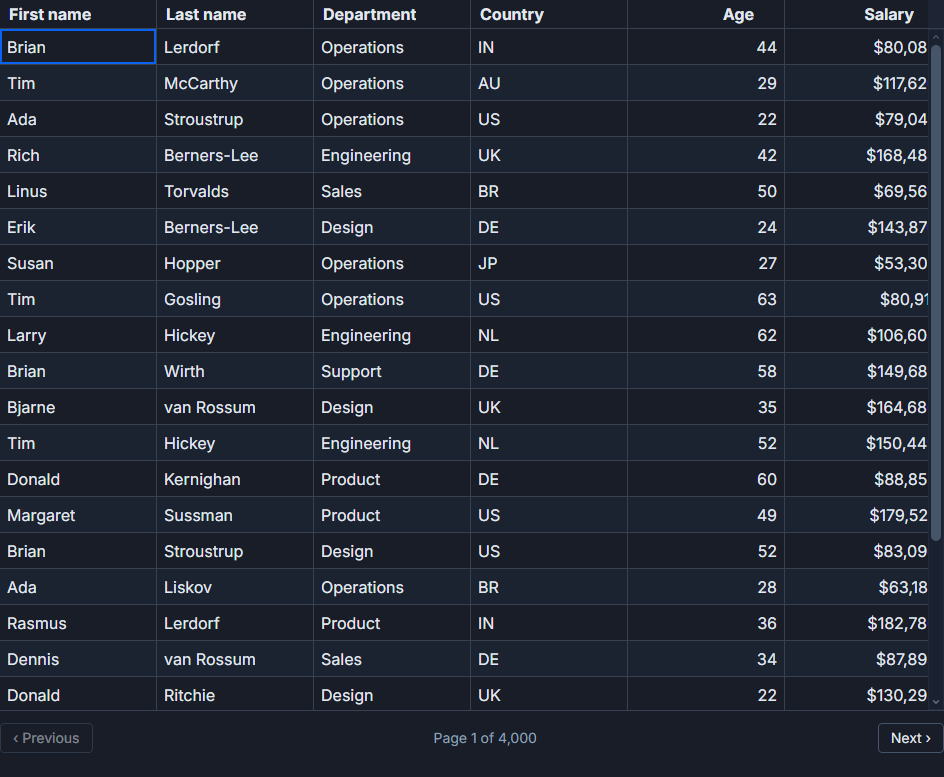
tRPC fixes this by making your API contract a type. The moment the server-side resolver changes its return shape, every ColumnDef that references an old field name turns into a compile error. This post shows exactly how to wire that up with SvGrid - a people directory with 100,000 rows, server-side paging and sorting, and a live search box.
Defining the contract on the server
The router owns everything the client is allowed to ask for. Sortable columns are an explicit enum - that prevents both arbitrary-string SQL injection and the class of bugs where the client sends sort=fullName after a field rename.
// src/lib/server/routers/people.ts
import { z } from 'zod'
import { publicProcedure, router } from '../trpc'
import { queryPeople } from '../db/people'

// Derive the union type from the array so it stays in sync automatically.
const SORTABLE = [
  'firstName', 'lastName', 'department',
  'country', 'age', 'salary',
] as const

export type SortField = (typeof SORTABLE)[number]

export const peopleRouter = router({
  list: publicProcedure
    .input(
      z.object({
        page: z.number().int().min(0).default(0),
        size: z.number().int().min(1).max(200).default(25),
        sort: z.enum(SORTABLE).default('lastName'),
        desc: z.boolean().default(false),
        q:    z.string().max(200).default(''),
      })
    )
    .query(async ({ input }) => {
      const { rows, total } = await queryPeople(input)
      return { rows, total }
    }),
})

// Export the inferred row type separately so the client can import it
// without pulling in server-only modules (db drivers, env vars, etc.).
export type PersonRow = Awaited<
  ReturnType<typeof peopleRouter.list._def.resolve>
>['rows'][number]
z.enum(SORTABLE) gives you the Zod validation and the TypeScript SortField union from the same source of truth. Add a column later, add it to SORTABLE, and both the Zod rejection and the TypeScript union update together.
Column definitions that know about your schema
Because PersonRow is derived from the router's resolver return, ColumnDef<typeof features, PersonRow> makes every field string a keyof the actual row type. Typos become compiler errors.
// src/lib/components/PeopleGrid.svelte - <script lang="ts"> block
import {
  SvGrid,
  tableFeatures,
  rowSortingFeature,
  rowPaginationFeature,
  columnFilteringFeature,
  type ColumnDef,
  type SvGridApi,
} from '@svgrid/grid'
import { trpc } from '$lib/trpc'
import type { PersonRow } from '$lib/server/routers/people'

const features = tableFeatures({
  rowSortingFeature,
  rowPaginationFeature,
  columnFilteringFeature,
})

// TypeScript checks every `field` value against the keys of PersonRow.
// If the server renames a field, this file fails to compile.
const columns: ColumnDef<typeof features, PersonRow>[] = [
  { field: 'firstName',  header: 'First name',  width: 130 },
  { field: 'lastName',   header: 'Last name',   width: 130 },
  { field: 'department', header: 'Department',  width: 150 },
  { field: 'country',    header: 'Country',     width: 110 },
  { field: 'age',        header: 'Age',         width: 80,  type: 'number' },
  {
    field:  'salary',
    header: 'Salary',
    width:  140,
    type:   'number',
    format: { type: 'currency', currency: 'USD', options: { maximumFractionDigits: 0 } },
  },
]
The format on salary is resolved by SvGrid at render time using Intl.NumberFormat under the hood. You get locale-aware currency formatting without a custom cell renderer.
The state machine and the data loader
Server-side paging with SvGrid requires you to manage four things: what page you are on, what the sort state is, what the search string is, and when to trigger a fetch. The key constraint is avoiding double-fetches - if a sort change also resets the page to 0, that should fire one network request, not two.
<script lang="ts">
  // ... (imports and features from above) ...

  type SortClause = { id: string; desc: boolean }

  let page    = $state(0)
  let size    = $state(25)
  let sort    = $state<string>('lastName')
  let desc    = $state(false)
  let q       = $state('')
  let rows    = $state<PersonRow[]>([])
  let total   = $state(0)
  let loading = $state(false)
  let api     = $state<SvGridApi<typeof features, PersonRow> | null>(null)

  async function load() {
    loading = true
    try {
      const res = await trpc.people.list.query({ page, size, sort, desc, q })
      rows  = res.rows
      total = res.total
    } finally {
      loading = false
    }
  }

  // Initial load only. All subsequent loads are triggered explicitly
  // from handlers below. Using $effect for every state change would
  // cause double-fetches when two variables change together.
  $effect(() => { void load() })

  function onSortingChange(clauses: SortClause[]) {
    sort = clauses[0]?.id   ?? 'lastName'
    desc = clauses[0]?.desc ?? false
    page = 0   // reset to page 0 whenever sort changes
    void load()
  }

  function onPaginationChange(info: { pageIndex: number; pageSize: number }) {
    page = info.pageIndex
    size = info.pageSize
    void load()
  }

  let searchTimeout: ReturnType<typeof setTimeout>
  function onSearchInput(e: Event) {
    const val = (e.target as HTMLInputElement).value
    clearTimeout(searchTimeout)
    searchTimeout = setTimeout(() => {
      q    = val
      page = 0
      void load()
    }, 300)
  }
</script>

<div class="toolbar">
  <input type="search" placeholder="Search people..." oninput={onSearchInput} />
  {#if loading}<span class="loading-indicator" aria-live="polite">Loading...</span>{/if}
</div>

<SvGrid
  {features}
  data={rows}
  {columns}
  showPagination
  rowCount={total}
  pageSize={size}
  serverSide
  onApiReady={(a) => { api = a }}
  onSortingChange={onSortingChange}
  onPaginationChange={onPaginationChange}
/>
The 300ms debounce on search keeps the request count sane while typing. On a fast connection it is almost invisible; on a slower one it prevents queuing up a dozen stale requests.
Three props you cannot skip
serverSide, rowCount, and pageSize are the three props that make server-side paging work correctly. Omit any one of them and you get a subtly broken grid.
serverSide disables SvGrid's built-in client-side sort and filter. Without it, the grid applies a second sort pass on the 25 rows it holds locally. The first page looks fine (it happens to sort correctly), but page two will appear sorted differently from page one because only the local slice is being re-sorted.
rowCount is the total count from the server, not rows.length. The pagination controls use this to calculate how many pages exist. If you pass rows.length (always 25 in this setup), the "next page" button disappears after the first page because the grid thinks the data is exhausted.
pageSize keeps the grid's internal state in sync with the size variable you are managing manually. Without it, the page size selector shows a stale value after the user changes it.
Type safety end to end, practically
The TypeScript chain here is worth spelling out: SORTABLE defines the valid column names as a const array. z.enum(SORTABLE) validates inputs at runtime. (typeof SORTABLE)[number] produces the union 'firstName' | 'lastName' | .... PersonRow is inferred from the resolver's return type, not written by hand. ColumnDef<typeof features, PersonRow> constrains field to keyof PersonRow.
Rename firstName to givenName in your database and update the query. The resolver now returns givenName. PersonRow changes automatically. Every field: 'firstName' in your column definitions fails to compile. You fix them before the PR merges.
That chain only holds if you export PersonRow from the router file and import it on the client, rather than writing a parallel interface type by hand. Manual type duplication is where the safety breaks down - someone updates one side and forgets the other. Let tRPC own the type.
One thing Zod does not catch
tRPC infers client-side types from the resolver's TypeScript return type, not from a runtime schema. If your ORM can return null for a field and your resolver is typed as returning string (because you trust a NOT NULL constraint), TypeScript will not warn you. The grid renderer will receive null, and depending on the column formatter, you may see "null" rendered as a string or an empty cell.
The safe pattern is to add explicit nullability to the PersonRow shape for any field that could plausibly be absent, then handle it in the column's format or cell prop. A column formatter that receives null | string and renders an em-dash placeholder is more honest than one that assumes a NOT NULL constraint will always hold.
Related reading
- Live demo: Server-side data
- Docs: Server-Side Row Model (SSRM)
- A Svelte Data Grid with SvelteKit and Supabase
- A Svelte Data Grid with Drizzle ORM
- A Svelte Data Grid with Prisma
- Using SvGrid with TanStack Query in Svelte
- A Svelte Data Grid with a Plain REST API
Tagged: SvelteKit, Server-side data