A Svelte Data Grid with Prisma
Wire SvGrid to a Prisma backend in SvelteKit - server-side pagination, sorting, and filtering that scales to millions of rows without a custom query builder.
Prisma's findMany API was designed for exactly this problem. orderBy maps to sort, where maps to filter, skip/take is the page window, and a parallel count gives the pager its total. When you pair it with SvGrid's server-side data contract, you get a grid that handles 200,000 rows with 10 ms query times and a 4 KB page payload - without writing a single custom query builder.
The catch is that the wiring has three distinct failure modes that only show up in production. This post covers the correct pattern and all three traps.
What the grid actually needs from the server
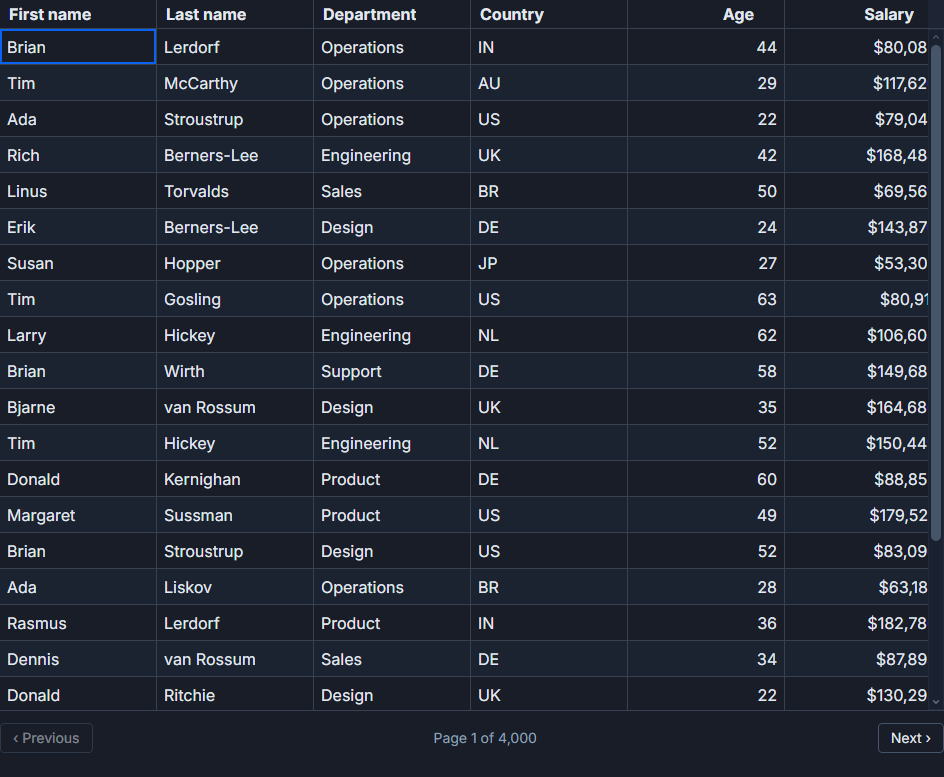
SvGrid's server-side mode separates data ownership from display. You pass the current page's rows as data and the full row count as rowCount. The grid never sees the rest of the dataset - it derives page counts, navigation state, and virtual row heights entirely from rowCount and the configured pageSize.
When the user clicks a column header or a page control, the grid fires onSortingChange or onPaginationChange. Your job is to translate those callbacks into a new server request, then update data and rowCount. SvelteKit's load system makes this straightforward: encode the grid state as URL search params, call goto(), and the load function does the rest.
The query helper
Start with a single function that accepts all four axes - page, page size, sort, and filter - and returns rows plus a total. Running findMany and count in Promise.all cuts the round trips in half and keeps the where object guaranteed-identical between both calls (the source of one of the three traps below).
// src/lib/server/people.ts
import { prisma } from '$lib/server/prisma'

// Allowlist prevents injection via orderBy - see the "Sort field validation" section
const SORTABLE_FIELDS = new Set([
  'firstName', 'lastName', 'department', 'country', 'age', 'salary',
])

export type PersonRow = {
  id: number
  firstName: string
  lastName: string
  department: string
  country: string
  age: number
  salary: number
}

export async function queryPeople(opts: {
  page: number
  pageSize: number
  sortField: string
  sortDesc: boolean
  q: string
}): Promise<{ rows: PersonRow[]; total: number }> {
  // Fall back to a safe default if the field is not in the allowlist
  const sortField = SORTABLE_FIELDS.has(opts.sortField) ? opts.sortField : 'lastName'

  const where = opts.q
    ? {
        OR: [
          { firstName:  { contains: opts.q, mode: 'insensitive' as const } },
          { lastName:   { contains: opts.q, mode: 'insensitive' as const } },
          { department: { contains: opts.q, mode: 'insensitive' as const } },
        ],
      }
    : {}

  const [rows, total] = await Promise.all([
    prisma.person.findMany({
      where,
      orderBy: { [sortField]: opts.sortDesc ? 'desc' : 'asc' },
      skip: opts.page * opts.pageSize,
      take: opts.pageSize,
      select: {
        id: true, firstName: true, lastName: true,
        department: true, country: true, age: true, salary: true,
      },
    }),
    prisma.person.count({ where }),
  ])

  return { rows, total }
}
The select clause is worth keeping even when it feels redundant. On a Prisma model with 20+ columns, selecting only the displayed fields typically reduces the JSON payload by 30-40%.
The SvelteKit wiring
The server load function reads search params and calls the query helper. The component translates grid callbacks into URL updates.
// src/routes/people/+page.server.ts
import { queryPeople } from '$lib/server/people'
import type { PageServerLoad } from './$types'

export const load: PageServerLoad = async ({ url }) => {
  const page      = Math.max(0, Number(url.searchParams.get('page')      ?? '0'))
  const pageSize  = Math.min(100, Math.max(10,
                      Number(url.searchParams.get('pageSize') ?? '25')))
  const sortField =              url.searchParams.get('sortField') ?? 'lastName'
  const sortDesc  =              url.searchParams.get('sortDesc')  === 'true'
  const q         =              url.searchParams.get('q')         ?? ''

  return queryPeople({ page, pageSize, sortField, sortDesc, q })
}
<!-- src/routes/people/+page.svelte -->
<script lang="ts">
  import { goto } from '$app/navigation'
  import {
    SvGrid,
    tableFeatures,
    rowSortingFeature,
    rowPaginationFeature,
    columnFilteringFeature,
    type ColumnDef,
    type SvGridApi,
  } from '@svgrid/grid'
  import type { PageData } from './$types'
  import type { PersonRow } from '$lib/server/people'

  let { data }: { data: PageData } = $props()

  const features = tableFeatures({
    rowSortingFeature,
    rowPaginationFeature,
    columnFilteringFeature,
  })

  type F = typeof features

  const columns: ColumnDef<F, PersonRow>[] = [
    { id: 'firstName',  field: 'firstName',  header: 'First name',  width: 130 },
    { id: 'lastName',   field: 'lastName',   header: 'Last name',   width: 130 },
    { id: 'department', field: 'department', header: 'Department',  width: 150 },
    { id: 'country',    field: 'country',    header: 'Country',     width: 110 },
    { id: 'age',        field: 'age',        header: 'Age',         width: 80,
      type: 'number' },
    { id: 'salary',     field: 'salary',     header: 'Salary',      width: 130,
      type: 'number',
      format: { type: 'currency', currency: 'USD', options: { maximumFractionDigits: 0 } } },
  ]

  let api = $state<SvGridApi<F, PersonRow> | null>(null)

  function navigate(patch: Partial<{
    page: number; sortField: string; sortDesc: boolean; q: string
  }>) {
    const url = new URL(window.location.href)
    for (const [k, v] of Object.entries(patch)) {
      if (v !== undefined) url.searchParams.set(k, String(v))
    }
    // Changing sort or filter resets to page 0
    if (patch.sortField !== undefined || patch.q !== undefined) {
      url.searchParams.set('page', '0')
    }
    goto(url.toString(), { invalidateAll: true })
  }
</script>

<SvGrid
  data={data.rows}
  {columns}
  {features}
  pageable
  rowCount={data.total}
  pageSize={25}
  showGlobalFilter
  onSortingChange={(clauses) => navigate({
    sortField: clauses[0]?.id ?? 'lastName',
    sortDesc:  !!clauses[0]?.desc,
  })}
  onPaginationChange={(p) => navigate({ page: p.pageIndex })}
  onGlobalFilterChange={(q) => navigate({ q })}
  onApiReady={(g) => (api = g)}
/>
The grid fires no request on mount because data is already populated by the server load during SSR. Only user interactions produce network calls.
Sort field validation
Passing orderBy: { [userInput]: 'asc' } directly to Prisma is a real problem. On an invalid field name, Prisma throws a runtime error. On a valid-but-non-indexed column of a large table, it silently runs a full sequential scan. On a relation field, you get a query that Prisma transforms in an unexpected way.
The SORTABLE_FIELDS allowlist is the correct fix. It is three lines of code and eliminates the entire class of problems. There is no good reason to skip it.
Three traps in production
The pager shows the wrong total. This happens when count runs with a different where than findMany - for example, because you construct the filter object twice (once for each call). The Promise.all pattern with a single shared where variable is the fix. If you filter down to 12 results but count runs without the filter, the pager tells the user they have 8,000 pages.
The page number goes stale after a sort or filter change. A user on page 4 changes the sort. The load function runs with page=4, which means skip: 100. On a newly sorted or filtered set with fewer rows, that offset may skip past all results entirely. Always reset page to 0 when sort or filter changes - the navigate() helper above does this explicitly.
Free-text filter fires on every keystroke. The onGlobalFilterChange callback is synchronous. Without debouncing, typing "engineering" sends nine database queries. Add a 300 ms debounce before calling navigate({ q }). If you want to cancel in-flight requests when a new one starts, pass an AbortController signal through the SvelteKit fetch - but the debounce alone handles most cases.
Column-level filters
The free-text q parameter above is a global search. If you want per-column filters (age greater than 40, salary between 60,000 and 90,000), use the showFilterRow prop and the onFilterChange callback instead. The callback receives an array of { id, operator, value, valueTo? } objects that map directly to Prisma where conditions:
// In the component, translate filter state to Prisma where
function buildWhere(filters: { id: string; operator: string; value: string }[]) {
  const where: Record<string, unknown> = {}
  for (const f of filters) {
    if (f.id === 'age' || f.id === 'salary') {
      const n = Number(f.value)
      if      (f.operator === 'greaterThan')         where[f.id] = { gt: n }
      else if (f.operator === 'greaterThanOrEqual')  where[f.id] = { gte: n }
      else if (f.operator === 'lessThan')            where[f.id] = { lt: n }
      else if (f.operator === 'equals')              where[f.id] = { equals: n }
    } else {
      where[f.id] = { contains: f.value, mode: 'insensitive' }
    }
  }
  return where
}
Encode the filters as JSON in a single search param (url.searchParams.set('filters', JSON.stringify(state))), decode them in the load function, and pass the result to buildWhere. Reset page to 0 on every filter change.
Realistic performance numbers
With a Postgres index on the sort column, a sorted, filtered, paginated query against 200,000 rows takes 6-12 ms. The 25-row page payload is typically 3-6 KB of JSON. SvelteKit's streaming responses can cut the perceived latency further - start the query immediately and stream the rows as they arrive, though for a single-page table this is usually not worth the complexity.
The main performance lever is the index. If the country column has no index and users sort by it frequently, add one. Prisma's @@index model attribute handles this in the schema.
The live demo at /demos/09-server-side simulates 100,000 rows with an in-memory filter so you can inspect the callback wiring. The source for the SvelteKit load integration lives in examples/src/routes/demos/19-ssr.
Related reading
- Live demo: Server-side data
- Docs: Server-Side Row Model (SSRM)
- A Svelte Data Grid with SvelteKit and Supabase
- A Svelte Data Grid with Drizzle ORM
- Using SvGrid with TanStack Query in Svelte
- A Svelte Data Grid with a Plain REST API
- A Svelte Data Grid with PocketBase
Tagged: SvelteKit, Server-side data