A Svelte Data Grid with Drizzle ORM
Wire SvGrid's server-side mode to a Drizzle ORM backend in SvelteKit for type-safe sorting, filtering, and pagination across hundreds of thousands of rows.
Drizzle's query builder and SvGrid's server-side mode share the same conceptual shape: both think in terms of a current page, a sort clause, and a set of filter conditions. Wiring them together takes maybe 80 lines of code. What you get is a grid that pages through 250,000 rows in under 10 ms per request with TypeScript catching column renames before your users ever see a broken sort.
The schema and why types flow all the way to the grid
Start with a Drizzle table definition. The $inferSelect trick is the reason this whole stack is worth bothering with.
// src/lib/server/schema.ts
import { pgTable, serial, text, integer } from 'drizzle-orm/pg-core'

export const people = pgTable('people', {
  id:         serial('id').primaryKey(),
  firstName:  text('first_name').notNull(),
  lastName:   text('last_name').notNull(),
  department: text('department').notNull(),
  country:    text('country').notNull(),
  age:        integer('age').notNull(),
  salary:     integer('salary').notNull(),
})

export type Person = typeof people.$inferSelect
That Person type flows into your ColumnDef array. If you rename first_name to given_name in the schema, every field: 'firstName' in your column definitions breaks at compile time. No silent mismatch, no runtime "undefined is not a number" from a sorted column that no longer exists.
The API endpoint
The SvelteKit route handler does three things: parse and validate the query string, build Drizzle conditions, and run the data and count queries in parallel.
// src/routes/people/+server.ts
import { json }                             from '@sveltejs/kit'
import type { RequestHandler }              from './$types'
import { db }                               from '$lib/server/db'
import { people }                           from '$lib/server/schema'
import { asc, desc, ilike, and, sql }       from 'drizzle-orm'

// Explicit allowlist - never use client-supplied sort keys directly as object keys.
const SORTABLE = new Set(['firstName','lastName','department','country','age','salary'])

const col = {
  firstName:  people.firstName,
  lastName:   people.lastName,
  department: people.department,
  country:    people.country,
  age:        people.age,
  salary:     people.salary,
}

export const GET: RequestHandler = async ({ url }) => {
  const page     = Math.max(0, Number(url.searchParams.get('page')     ?? 0))
  const pageSize = Math.min(200, Math.max(1, Number(url.searchParams.get('pageSize') ?? 25)))
  const sortId   = url.searchParams.get('sort') ?? 'lastName'
  const sortDesc = url.searchParams.get('desc') === 'true'
  const nameQ    = url.searchParams.get('name') ?? ''
  const deptQ    = url.searchParams.get('department') ?? ''

  const safeSort = SORTABLE.has(sortId) ? sortId : 'lastName'
  const orderCol = col[safeSort as keyof typeof col]
  const order    = sortDesc ? desc(orderCol) : asc(orderCol)

  const conditions = [
    nameQ ? ilike(people.firstName, `%${nameQ}%`) : undefined,
    deptQ ? ilike(people.department, `%${deptQ}%`) : undefined,
  ].filter(Boolean)

  const where = conditions.length ? and(...conditions) : undefined

  const [rows, [{ total }]] = await Promise.all([
    db.select().from(people)
      .where(where)
      .orderBy(order)
      .limit(pageSize)
      .offset(page * pageSize),
    db.select({ total: sql<number>`cast(count(*) as int)` })
      .from(people)
      .where(where),
  ])

  return json({ rows, total })
}
Two things are worth calling out here. First, the SORTABLE allowlist. If you skip it and use url.searchParams.get('sort') directly as a key into col, a request with sort=__proto__ or any unexpected string produces an undefined Drizzle column and a crash. Three lines prevent the whole class. Second, Promise.all runs both queries against the database simultaneously. On a remote Postgres host the sequential version doubles your roundtrip time - this matters at p95 latency.
The Math.min(200, ...) cap on pageSize matters too. Without it, a client can request pageSize=999999 and your endpoint will happily try to serialize and transfer every matching row.
The Svelte component
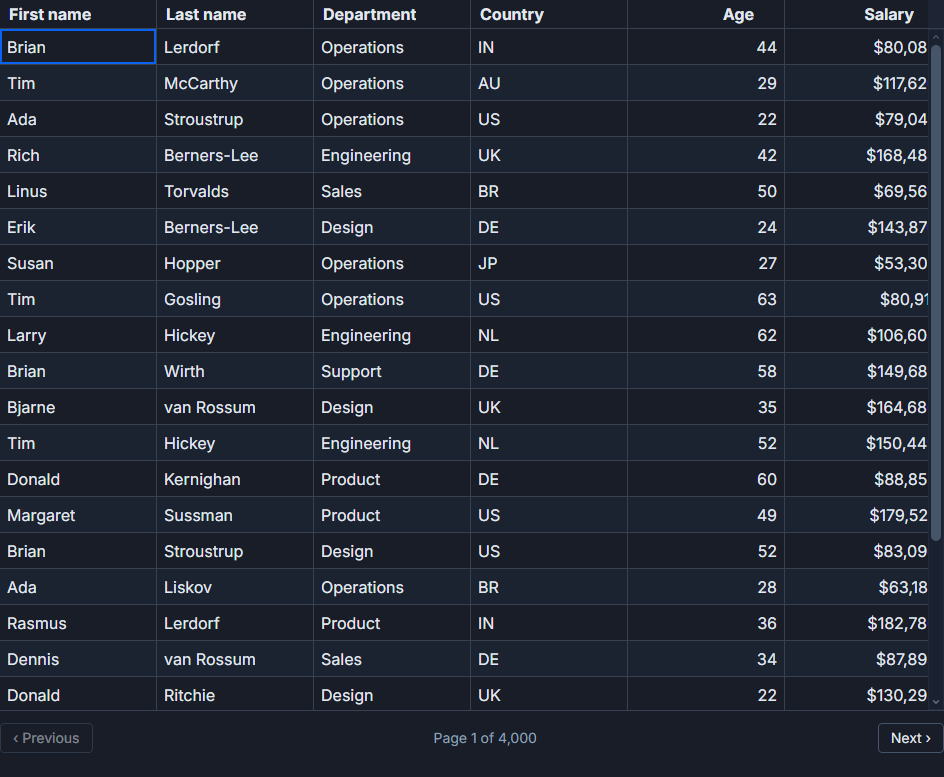
In server-side mode, SvGrid does no local sorting or filtering. It treats the rows prop as the already-processed current page and uses rowCount to compute pagination math - page count, disabled buttons, accessible announcements - without ever seeing the full dataset.
<!-- src/routes/people/+page.svelte -->
<script lang="ts">
  import SvGrid, {
    tableFeatures,
    rowSortingFeature,
    columnFilteringFeature,
    rowPaginationFeature,
    type ColumnDef,
    type SvGridApi,
  } from '@svgrid/grid'
  import type { Person } from '$lib/server/schema'

  const features = tableFeatures({
    rowSortingFeature,
    columnFilteringFeature,
    rowPaginationFeature,
  })

  const columns: ColumnDef<typeof features, Person>[] = [
    { field: 'firstName',  header: 'First name',  width: 130 },
    { field: 'lastName',   header: 'Last name',   width: 130 },
    { field: 'department', header: 'Department',  width: 150 },
    { field: 'country',    header: 'Country',     width: 120 },
    { field: 'age',        header: 'Age',         width: 80, type: 'number' },
    {
      field: 'salary',
      header: 'Salary',
      width: 130,
      type: 'number',
      format: { type: 'currency', currency: 'USD', options: { maximumFractionDigits: 0 } },
    },
  ]

  let api     = $state<SvGridApi<typeof features, Person> | null>(null)
  let rows    = $state<Person[]>([])
  let total   = $state(0)
  let loading = $state(false)

  async function loadPage(
    page: number,
    pageSize: number,
    sortId = 'lastName',
    sortDesc = false,
    nameQ = '',
    deptQ = '',
  ) {
    loading = true
    const params = new URLSearchParams({
      page:       String(page),
      pageSize:   String(pageSize),
      sort:       sortId,
      desc:       String(sortDesc),
      name:       nameQ,
      department: deptQ,
    })
    const res  = await fetch(`/people?${params}`)
    const data = await res.json()
    rows    = data.rows
    total   = data.total
    loading = false
  }

  $effect(() => { loadPage(0, 25) })

  function currentSort() {
    const clauses = api?.getState().sorting ?? []
    return { id: clauses[0]?.id ?? 'lastName', desc: clauses[0]?.desc ?? false }
  }

  function currentPage() {
    const info = api?.getPageInfo()
    return { page: info?.pageIndex ?? 0, pageSize: info?.pageSize ?? 25 }
  }
</script>

<SvGrid
  {features}
  {columns}
  {rows}
  rowCount={total}
  serverSide={true}
  {loading}
  pageable
  sortable
  filterable
  showFilterRow={true}
  onApiReady={(a) => { api = a }}
  onSortChange={(clauses) => {
    const { page, pageSize } = currentPage()
    const first = clauses[0]
    loadPage(page, pageSize, first?.id ?? 'lastName', first?.desc ?? false)
  }}
  onPageChange={(pageIndex, pageSize) => {
    const { id, desc } = currentSort()
    loadPage(pageIndex, pageSize, id, desc)
  }}
  onFilterChange={(filters) => {
    const { id, desc } = currentSort()
    const nameFilter = filters.find(f => f.id === 'firstName')
    const deptFilter = filters.find(f => f.id === 'department')
    loadPage(0, currentPage().pageSize, id, desc, nameFilter?.value ?? '', deptFilter?.value ?? '')
  }}
/>
The onApiReady callback hands you the SvGridApi instance. Reading page state with api.getPageInfo() and sort state with api.getState().sorting means you have a single source of truth for what the grid is showing. There is no parallel $state for page index that can drift out of sync with what the grid is rendering.
Column filters and the onFilterChange callback
The onFilterChange callback receives an array of active filter descriptors, each with an id matching your column field, an operator ('equals', 'contains', 'between', etc.), and a value. The pattern is to extract the filter you care about, pull its value, and include it in your next loadPage call.
For ILIKE-style text search in Postgres you want a pg_trgm GIN index on the filtered columns, otherwise a filter on 250,000 rows is a sequential scan that can take several hundred milliseconds. For exact-match or range comparisons a standard B-tree index is fine.
SQLite works the same way with two changes: swap pg-core for sqlite-core in the schema import, and replace ilike with like. SQLite's LIKE is case-insensitive on ASCII characters by default, so the behavior is equivalent for Latin text.
Rendering the first page from the server
The fetch-on-mount pattern in the $effect above means there is a loading flash on first render. If you want data available before JavaScript runs, move the initial Drizzle query into +page.server.ts:
// src/routes/people/+page.server.ts
import type { PageServerLoad } from './$types'
import { db }                  from '$lib/server/db'
import { people }              from '$lib/server/schema'
import { asc, sql }            from 'drizzle-orm'

export const load: PageServerLoad = async () => {
  const [rows, [{ total }]] = await Promise.all([
    db.select().from(people).orderBy(asc(people.lastName)).limit(25),
    db.select({ total: sql<number>`cast(count(*) as int)` }).from(people),
  ])
  return { rows, total }
}
In the component, accept the data prop and initialize your state from it instead of fetching in $effect:
<script lang="ts">
  let { data } = $props()
  let rows  = $state(data.rows)
  let total = $state(data.total)
  // Remove the $effect(() => loadPage(0, 25)) call
</script>
Now the first page is part of the HTML document. The grid hydrates against it and subsequent sort, filter, and page events go through the normal fetch callback. The user sees data immediately; no spinner, no layout shift.
Related reading
- Live demo: Server-side data
- Docs: Server-Side Row Model (SSRM)
- A Svelte Data Grid with SvelteKit and Supabase
- A Svelte Data Grid with Prisma
- Using SvGrid with TanStack Query in Svelte
- A Svelte Data Grid with a Plain REST API
- A Svelte Data Grid with PocketBase
Tagged: SvelteKit, Server-side data