Migrating from Handsontable to SvGrid
A practical migration guide for moving from Handsontable to SvGrid - covering data shape, column config, editors, change callbacks, and the licensing differences that often trigger the move.
Handsontable's commercial license is what usually starts this conversation. You built something that grew past the non-commercial threshold, or you looked at the per-developer pricing for a team of twelve and decided there had to be a better path. There usually is.
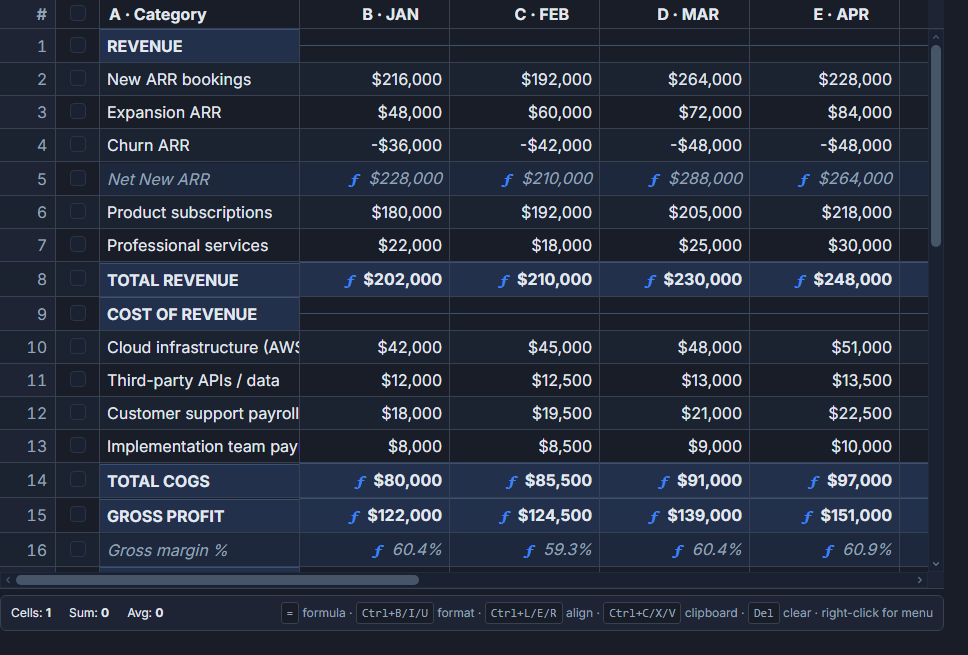 A spreadsheet-style SvGrid grid.
SvGrid's core is MIT-licensed, full stop. No license key, no seat count, no audit risk. The Enterprise pack adds pivot tables, Excel import/export, and a few other heavy features - but for everything a typical data grid needs, the community package covers it.
If your application is Svelte-based, there is a second reason: Handsontable is a standalone library with a Svelte wrapper. SvGrid is native Svelte 5 with reactivity baked in. That distinction matters the moment you try to sync grid state with $state or pass a Svelte snippet as a cell renderer.
The honest comparison
| Handsontable | SvGrid |
|---|---|
data (array of arrays or objects) |
data (array of objects) |
colHeaders |
column header |
columns: [{ data, type }] |
columns: [{ field, editorType }] |
type: 'numeric' / 'date' / 'checkbox' |
editorType: 'number' / 'date' / 'checkbox' |
renderer callback |
cell snippet via renderSnippet or renderComponent |
afterChange hook |
onCellValueChange event |
columnSorting plugin |
rowSortingFeature |
filters plugin + dropdown menu |
columnFilteringFeature with filterMode="menu" |
mergeCells |
spreadsheetLayout + spansToMerges |
| Cell range selection | enableCellSelection prop |
| Non-commercial free / commercial paid | MIT core; Enterprise pack for heavy features |
The core API concepts map one-to-one. The migration is mostly mechanical once you know the name equivalences.
Getting data into the right shape
Handsontable accepts both arrays-of-arrays and arrays-of-objects. SvGrid expects arrays-of-objects where each column's field names a key on the row. If you were using the matrix format, convert first:
// Before: matrix format
const hot = new Handsontable(el, {
  data: [
    ['Alice', 92000, true],
    ['Bob',   78000, false],
  ],
  colHeaders: ['Name', 'Salary', 'Active'],
})

// After: convert to objects once, at the data layer
const rows = matrix.map(([name, salary, active]) => ({ name, salary, active }))
If you were already using objects, nothing changes here.
Column definitions and editors
Handsontable's column type string maps directly to SvGrid's editorType. The rest of the shape is nearly identical:
import SvGrid from '@svgrid/grid'
import type { ColumnDef } from '@svgrid/grid'

// Handsontable columns config
const hotColumns = [
  { data: 'name',   type: 'text' },
  { data: 'salary', type: 'numeric', numericFormat: { pattern: '$0,0' } },
  { data: 'active', type: 'checkbox' },
  { data: 'hired',  type: 'date', dateFormat: 'YYYY-MM-DD' },
]

// SvGrid equivalent
const columns: ColumnDef[] = [
  { id: 'name',   field: 'name',   header: 'Name',   width: 180 },
  { id: 'salary', field: 'salary', header: 'Salary', width: 120, editorType: 'number', type: 'number' },
  { id: 'active', field: 'active', header: 'Active', width: 80,  editorType: 'checkbox' },
  { id: 'hired',  field: 'hired',  header: 'Hired',  width: 130, editorType: 'date' },
]
The type: 'number' on the salary column tells SvGrid how to sort and filter numerically. The editorType controls what input appears on edit. They are separate concerns - you often want both.
Replacing afterChange
This is the biggest behavioral difference. Handsontable mutates its data array in place and calls afterChange as a side-effect notification. SvGrid emits an event and leaves the write to you. That sounds like more work, but it lines up with how Svelte 5 reactivity actually works:
<script>
  import SvGrid from '@svgrid/grid'
  import type { ColumnDef } from '@svgrid/grid'

  let rows = $state([
    { id: 1, name: 'Alice', salary: 92000, active: true },
    { id: 2, name: 'Bob',   salary: 78000, active: false },
  ])

  const columns: ColumnDef[] = [
    { id: 'name',   field: 'name',   header: 'Name',   width: 180 },
    { id: 'salary', field: 'salary', header: 'Salary', width: 120, editorType: 'number', type: 'number' },
    { id: 'active', field: 'active', header: 'Active', width: 80,  editorType: 'checkbox' },
  ]

  function handleCellChange(e: { rowIndex: number; columnId: string; newValue: unknown; row: typeof rows[0] }) {
    // Write the change back to state explicitly
    rows[e.rowIndex] = { ...e.row, [e.columnId]: e.newValue }
  }
</script>

<SvGrid
  data={rows}
  {columns}
  editable
  onCellValueChange={handleCellChange}
/>
The explicit write feels different if you are used to Handsontable's mutation model, but it means your rows state is always the source of truth. Undo/redo, autosave, and optimistic updates all become straightforward because you control when and how the data changes.
Custom cell renderers
Handsontable uses renderer functions that receive a DOM element and manipulate it imperatively. SvGrid uses Svelte 5 snippets, which means you write Svelte markup and it just works:
<script>
  import SvGrid, { renderSnippet } from '@svgrid/grid'
  import type { ColumnDef } from '@svgrid/grid'

  let rows = $state([
    { id: 1, name: 'Alice', salary: 92000, active: true  },
    { id: 2, name: 'Bob',   salary: 78000, active: false },
  ])
</script>

{#snippet salaryCell({ value }: { value: number })}
  <span style:color={value > 90000 ? 'var(--sg-accent)' : 'inherit'}>
    ${value.toLocaleString()}
  </span>
{/snippet}

{#snippet activeCell({ value }: { value: boolean })}
  <span class="badge" class:active={value}>
    {value ? 'Active' : 'Inactive'}
  </span>
{/snippet}

<SvGrid
  data={rows}
  columns={[
    { id: 'name',   field: 'name',   header: 'Name',   width: 180 },
    { id: 'salary', field: 'salary', header: 'Salary', width: 130, cell: salaryCell },
    { id: 'active', field: 'active', header: 'Status', width: 100, cell: activeCell },
  ]}
/>
The snippet gets the full row context too (row, rowIndex, api) if you need it. No DOM manipulation, no cleanup hooks, no lifecycle gymnastics.
Range selection and spreadsheet behavior
If your app relied on Handsontable's range selection so users could copy a block of cells and paste into Excel, SvGrid covers that with enableCellSelection. Selected ranges copy as tab-separated values, which paste correctly into both Excel and Google Sheets.
<SvGrid
  data={rows}
  {columns}
  editable
  enableCellSelection
  selectionMode="cell"
/>
For merged cells - the Handsontable mergeCells option - SvGrid has spreadsheetLayout and spansToMerges from the same package. For full Excel file import and export (.xlsx), that lives in @svgrid/enterprise.
What does not migrate
A few Handsontable features do not have direct equivalents. The password cell type is a custom cell snippet over editorType: 'text', and nested column headers are column groups (columns: [...] on a column definition) rather than a header matrix. The rest of the spreadsheet feel has moved into the product since this post was first written: the grid has a right-click context menu (contextMenu prop, api.openContextMenu) and the spreadsheet shell in @svgrid/enterprise has a formula bar, a formula engine, a workbook, named ranges and the Excel ribbon; the free grid keeps the createHyperFormulaSheet adapter for cell-level formulas without the shell.
The migration from a licensing standpoint is usually the easier part. The API surface is close enough that a moderately-sized Handsontable integration - ten to twenty column types, a few custom renderers, afterChange autosave - typically converts in an afternoon.
Related reading
- Evaluating SVAR Svelte DataGrid? What Changes if You Pick SvGrid
- Porting a React MUI X DataGrid Screen to Svelte
- Migrating from DataTables.net to a Svelte Data Grid
- Migrating from ag-grid-react to a Svelte Stack
- Svelte Data Grid Comparisons and Alternatives (2026)
- SvGrid vs Handsontable - the comparison page, with a source and date for every claim
Tagged: Migrating to SvGrid