Evaluating SVAR Svelte DataGrid? What Changes if You Pick SvGrid
A fair comparison of SVAR Svelte DataGrid and SvGrid - both MIT, both Svelte-native - covering suite breadth, grouping and pivot, the headless engine, download numbers, and what porting actually costs.
If you are evaluating SVAR Svelte DataGrid you have already filtered out most of the market, and you filtered it the right way. SVAR is one of the few grids that is genuinely written for Svelte rather than wrapped for it, and it is MIT, and it is free for commercial use with no asterisk. That is a short list.
I work on SvGrid, so read this knowing where it comes from. What follows is the comparison I would want if I were on the other side of it, including the parts where SVAR is the better answer.
Where they are the same
More than the marketing on either side suggests.
Both are Svelte-native components, not wrappers around a framework-agnostic core. Both take an array of data and an array of column objects. Both are MIT-licensed, which means the grid itself costs nothing in a closed-source commercial product for either of them. Both do the table fundamentals - sorting, filtering, editing, virtualized scrolling - well enough that a demo of one looks like a demo of the other.
If your requirement is "a good Svelte table", you can stop reading and pick either. The differences below only start to matter past that point.
Where SVAR is ahead
It is the more established package. Read from npm on 12 Sep 2026, wx-svelte-grid had 62,800 downloads in the previous 30 days against @svgrid/grid's 16,900 (the comparison page refreshes both figures with their date). Several times the users means more paths already walked, more edge cases already hit by somebody else, and a longer track record. That is a real, unglamorous advantage and it should weigh on a decision.
The suite is wider today. SVAR ships a Gantt and a Scheduler alongside the grid, from one vendor with one visual language. If your app needs a project timeline and a table and a calendar, buying them as a set is less integration work than assembling them, and the consistency is free rather than something you maintain.
It is multi-framework. SVAR's components exist for React and Vue as well. If your organisation runs more than one framework, or you think it might, one vendor across all of them is a genuinely strong position. SvGrid is deliberately Svelte-only and has no plans to change that.
The whole grid is free. SVAR monetises the Gantt and leaves the grid complete, including CSV export and print. SvGrid's core is MIT too, but advanced XLSX and PDF export, pivot, import, AI features and a support SLA live in the paid @svgrid/enterprise package. If your needs stop at CSV, SVAR gives you that at no cost and SvGrid does too - but the line is drawn in a different place, and it is worth knowing where before you commit.
Where SvGrid is ahead
Data analysis features. Row grouping with aggregation, master-detail rows, pinned rows, left and right column freezing, an Excel-style filter menu, Excel-style cell-range selection with TSV copy, a fill handle, integrated charts, and an in-grid pivot mode. This is the cluster people usually leave a simpler grid for, and it is the main reason anyone ports.
Grouping is the one worth showing, because it is what most ports are actually for:
<script lang="ts">
  import { SvGrid, type GridColumns } from '@svgrid/grid'

  type Sale = { region: string; rep: string; product: string; amount: number; units: number }

  let { sales }: { sales: Sale[] } = $props()

  const columns: GridColumns<Sale> = [
    { field: 'region',  header: 'Region' },
    { field: 'rep',     header: 'Rep' },
    { field: 'product', header: 'Product', width: 220 },
    // The aggregator runs per group and again for the grand total, so the
    // footer and every group header agree without a second calculation.
    { field: 'amount',  header: 'Amount', width: 130, summary: 'sum',
      format: { type: 'currency', currency: 'USD' } },
    { field: 'units',   header: 'Units',  width: 90,  summary: 'sum' },
  ]
</script>

<SvGrid
  data={sales}
  {columns}
  groupBy={['region', 'rep']}
  summary
  groupable
  sortable
/>
Two levels of grouping, per-group subtotals and a grand total row, from three props. That is the shape of the capability gap: not that the other grid cannot show a table, but that this class of feature is either there or it is a week of your time.
A headless engine underneath. createSvGrid plus row models exists as a separate layer from the component, so you can build a card list, a Kanban board or a mobile view over the same sorting and filtering state without a second implementation. The board and scheduler views in SvGrid are literally that: different renderers over one engine.
AI grounding. @svgrid/mcp is an MCP server that answers questions about the grid accurately, so an assistant writing your code gets the real prop names instead of plausible ones. Whether that matters depends entirely on how your team works; if half your code arrives from a model, it matters a lot.
What porting actually costs
Because both are component-first with array-of-object columns, this is a rename pass and not a rewrite. Budget two to four hours per grid, most of which is re-theming:
<script lang="ts">
  import {
    SvGrid,
    tableFeatures,
    rowSortingFeature,
    columnFilteringFeature,
    type ColumnDef,
  } from '@svgrid/grid'

  type Row = { name: string; amount: number }

  let { data }: { data: Row[] } = $props()

  const features = tableFeatures({ rowSortingFeature, columnFilteringFeature })

  // The column shape is the same idea with different names: `id` becomes
  // `field`, and a per-column `editor` becomes `editorType`.
  const columns: ColumnDef<typeof features, Row>[] = [
    { field: 'name',   header: 'Name',   width: 200 },
    { field: 'amount', header: 'Amount', width: 120, editorType: 'number' },
  ]
</script>

<SvGrid
  data={data}
  columns={columns}
  features={features}
  enableInlineEditing
  onCellValueChange={(e) => console.log(e.field, e.newValue)}
/>
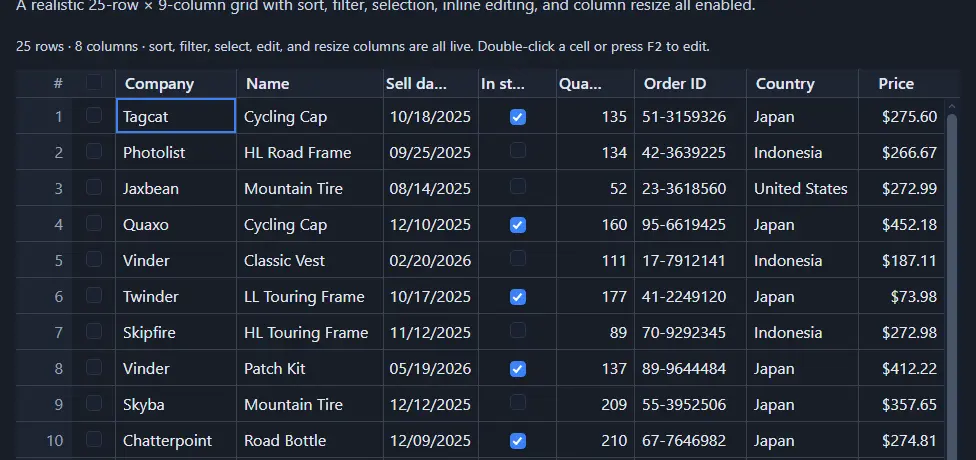
The mapping in full: id becomes field, a per-column editor becomes editorType, a per-column template becomes a cell snippet, edit events consolidate into onCellValueChange, theme classes become --sg-* CSS custom properties, and the imperative API arrives through onApiReady rather than a component ref.
Theming is where the hours go, and it is worth understanding why. SvGrid has no skin classes to override - every colour, radius and spacing value is a CSS custom property:
/* One block, applied everywhere. No per-component overrides, no !important. */
:root {
  --sg-accent: #2563eb;
  --sg-border: #e5e7eb;
  --sg-header-bg: #f8fafc;
  --sg-row-hover: #f1f5f9;
  --sg-radius: 6px;
  --sg-font-size: 13px;
}
That is less work than it sounds if you are coming from a class-based skin, and more work if you had customised deeply, because you are re-expressing the customisation rather than porting it.
SVAR's exact prop and event names move between releases, so check their current documentation against this mapping rather than trusting a table I wrote on a particular Tuesday.
The other options, briefly
Two more sit in the same evaluation and are worth a sentence each so the comparison is not artificially narrow.
@tanstack/svelte-table is the headless-first choice - 231,000 downloads in the 30 days to 10 Sep 2026, the largest Svelte-adjacent number here - and it gives you a table model with no rendering at all. You write every cell, every header, every scroll container. That is the right trade when your design system is non-negotiable and the wrong one when you wanted a grid this week.
AG Grid is the feature ceiling for the whole category, at 12,400,000 downloads of ag-grid-community in the same window. Nothing here matches its breadth. It is also not a Svelte component - you drive the vanilla API from onMount - and its most-wanted features are enterprise-licensed. If you need the ceiling, that is where it is.
svelte-headless-table still appears in search results and is worth naming only to say that it has not moved to Svelte 5. If you are starting a new project, do not start there.
How I would actually decide
Pick SVAR if you need the Gantt or the Scheduler from the same vendor, if you run more than one framework, or if "the largest Svelte-native user base" is the risk-reduction you want. Those are good reasons and none of them is a consolation prize.
Pick SvGrid if the grid is doing analysis rather than display - grouping with aggregates, pivot, range selection, master-detail - or if you want to render the same data as a board or a calendar from one engine, or if you care about how well an AI assistant writes against it.
Pick TanStack if you are building the UI yourself anyway.
The honest summary is that the two Svelte-native grids overlap heavily at the fundamentals and diverge at the edges, and the edge you need is a property of your application rather than of the grids. If your table is mostly a table, the decision matters less than the time you would spend making it.
The SVAR migration guide has the full concept map and a before-and-after diff, and the quick start demo is the fastest way to see what the ported result looks like.
Related reading
- Porting a React MUI X DataGrid Screen to Svelte
- Migrating from DataTables.net to a Svelte Data Grid
- Migrating from ag-grid-react to a Svelte Stack
- Svelte Data Grid Comparisons and Alternatives (2026)
- SvGrid vs TanStack Table - A Deep Dive
- SvGrid vs SVAR Svelte DataGrid - the comparison page, with a source and date for every claim
Tagged: Migrating to SvGrid