Keyboard Navigation and Accessibility in SvGrid
WAI-ARIA grid semantics, roving tabindex, and live-region announcements are built into SvGrid from the start. Here is what that means in practice and where custom cells require your attention.
Keyboard accessibility in a data grid is harder than it looks. The WAI-ARIA grid pattern is a composite widget - meaning the browser hands you a single tab stop, and you are responsible for routing all arrow-key focus internally. Get it wrong and you get one of two failure modes: focus disappears into the void when you press an arrow key, or Tab forces the user through every one of 120 rows x 6 columns before they can leave the widget.
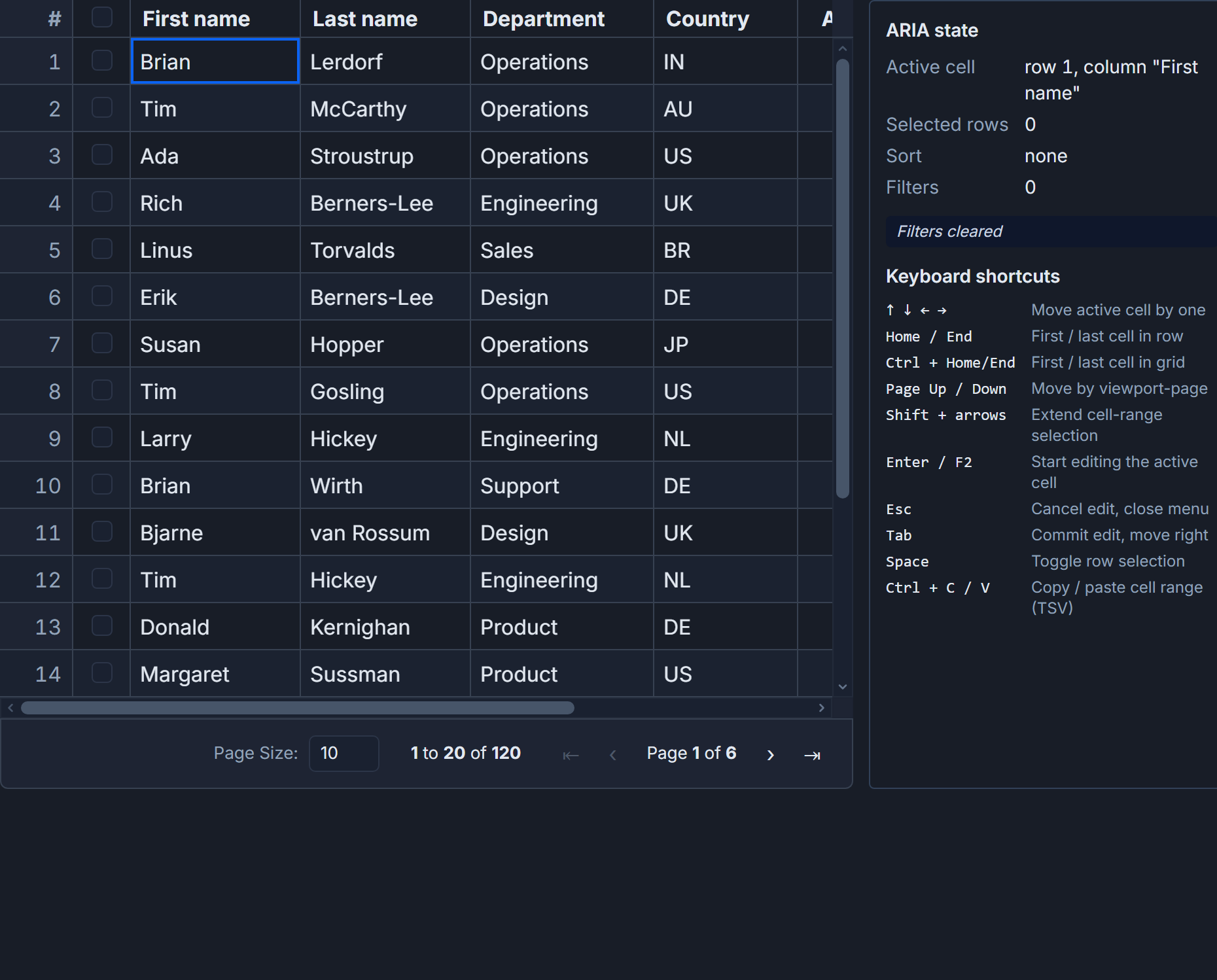
SvGrid handles this correctly by default. The ARIA roles, roving tabindex, and sort announcements come from the rendering layer, not from a separate accessibility layer bolted on later. What follows is what that looks like in code and where you still need to make decisions.
What ships without any configuration
The moment you mount a <SvGrid> component, the root element receives role="grid", header cells get role="columnheader", and data cells get role="gridcell". Every row carries a 1-based aria-rowindex and the root carries aria-rowcount equal to the total number of rows - even when virtual scrolling means only 30 of those rows exist in the DOM at a time. Screen readers can announce "row 47 of 500" accurately because the attributes are there, not because the rows are rendered.
Roving tabindex keeps exactly one cell in the tab sequence at a time. Arrow into a new cell and SvGrid sets tabindex="0" on it and tabindex="-1" on the previous one. Tab out and focus moves to the next focusable element in the page, bypassing the remaining grid cells entirely. That is the correct behavior per the spec, and it is what sighted keyboard users expect.
The built-in key bindings:
| Key | Action |
|---|---|
| Arrow keys | Move active cell in any direction |
| Enter | Open cell editor |
| Escape | Cancel edit, return focus to cell |
| Space | Toggle row selection (requires rowSelectionFeature) |
| Home / End | First / last cell in current row |
| Ctrl+Home / Ctrl+End | First / last cell in the grid |
| Page Up / Page Down | Scroll one viewport |
None of these require you to write an event handler.
Feature composition and the ARIA it emits
ARIA attributes in SvGrid are conditional on which features you register. rowSortingFeature adds aria-sort cycling through "none", "ascending", "descending" on header cells. rowSelectionFeature adds aria-selected on every data row. columnFilteringFeature does not currently add ARIA - but filter result counts need to be announced manually, which I will cover below.
This means feature composition is also your accessibility configuration:
// features.ts
import {
  tableFeatures,
  rowSortingFeature,
  columnFilteringFeature,
  rowSelectionFeature,
} from '@svgrid/grid'

export const features = tableFeatures({
  rowSortingFeature,
  columnFilteringFeature,
  rowSelectionFeature,
})
Leave rowSortingFeature out and no aria-sort attribute appears - the DOM stays clean. Include it and every column header becomes a sortable button with a screen-reader-readable sort direction, no extra markup required.
Wiring a live region for state announcements
The grid manages cell focus and ARIA roles, but it cannot know about state changes that happen outside the grid - filtered row counts, bulk-action results, or dialog confirmations. Those need a live region you control.
The pattern below is a complete Svelte 5 component. It tracks the active cell position, announces selection count changes, and uses the double-blank trick to force re-announcement when the same string fires twice in a row (a known Firefox quirk with aria-live):
<script lang="ts">
  import SvGrid, {
    tableFeatures,
    rowSortingFeature,
    columnFilteringFeature,
    rowSelectionFeature,
    type ColumnDef,
    type SvGridApi,
  } from '@svgrid/grid'

  type Employee = {
    id: number
    firstName: string
    lastName: string
    department: string
    country: string
    salary: number
  }

  const rows: Employee[] = Array.from({ length: 120 }, (_, i) => ({
    id: i + 1,
    firstName: `First${i + 1}`,
    lastName: `Last${i + 1}`,
    department: ['Engineering', 'Product', 'Sales', 'Design'][i % 4],
    country: ['USA', 'Canada', 'Germany', 'UK'][i % 4],
    salary: 50_000 + (i % 50) * 1_000,
  }))

  const features = tableFeatures({
    rowSortingFeature,
    columnFilteringFeature,
    rowSelectionFeature,
  })

  const columns: ColumnDef<typeof features, Employee>[] = [
    { id: 'firstName',  field: 'firstName',  header: 'First name',  width: 130 },
    { id: 'lastName',   field: 'lastName',   header: 'Last name',   width: 130 },
    { id: 'department', field: 'department', header: 'Department',  width: 140 },
    { id: 'country',    field: 'country',    header: 'Country',     width: 110 },
    {
      id: 'salary',
      field: 'salary',
      header: 'Salary',
      width: 130,
      type: 'number',
    },
  ]

  let api = $state<SvGridApi<typeof features, Employee> | null>(null)
  let announcement = $state('')
  let activeCellInfo = $state('row 1, column "First name"')
  let selectedCount = $state(0)

  function announce(msg: string) {
    announcement = ''
    setTimeout(() => (announcement = msg), 30)
  }

  function syncStatus() {
    if (!api) return
    const cell = api.getActiveCell()
    if (cell) {
      const col = columns.find((c) => c.id === cell.columnId)
      activeCellInfo = `row ${cell.rowIndex + 1}, column "${col?.header ?? cell.columnId}"`
    }
    const sel = api.getSelectedRows()
    if (sel.length !== selectedCount) {
      selectedCount = sel.length
      if (selectedCount > 0) {
        announce(`${selectedCount} row${selectedCount === 1 ? '' : 's'} selected`)
      } else {
        announce('Selection cleared')
      }
    }
  }

  function onApiReady(readyApi: SvGridApi<typeof features, Employee>) {
    api = readyApi
    document.addEventListener('focusin', syncStatus)
    document.addEventListener('keyup', syncStatus)
  }
</script>

<!-- Render unconditionally - a live region inside {#if} misses the first announcement -->
<div role="status" aria-live="polite" aria-atomic="true" class="sr-only">
  {announcement}
</div>

<p aria-live="polite" class="cell-status">
  Active: {activeCellInfo}
</p>

{#if selectedCount > 0}
  <button onclick={() => api?.clearRowSelection()}>
    Clear {selectedCount} selection{selectedCount === 1 ? '' : 's'}
  </button>
{/if}

<SvGrid
  {features}
  data={rows}
  {columns}
  sortable
  filterable
  rowHeight={34}
  enableCellSelection={true}
  {onApiReady}
/>

<style>
  .sr-only {
    position: absolute;
    width: 1px;
    height: 1px;
    padding: 0;
    margin: -1px;
    overflow: hidden;
    clip: rect(0 0 0 0);
    white-space: nowrap;
    border: 0;
  }
  .cell-status {
    font-size: 0.875rem;
    color: #555;
    margin-bottom: 0.5rem;
  }
</style>
Filter results need a manual announcement
When a column filter reduces 120 rows to 3, sighted users see the grid shrink. A screen reader user sees nothing unless you tell them. The grid does not know whether that filter came from a column header dropdown, a toolbar input, or an API call, so the announcement is your responsibility:
function applyDepartmentFilter(dept: string) {
  if (!api) return
  api.setFilter('department', { operator: 'equals', value: dept })
  // Give the grid one tick to process the filter before reading the result
  setTimeout(() => {
    const visible = api!.getDisplayedRows().length
    announce(`Filtered to ${visible} row${visible === 1 ? '' : 's'}`)
  }, 50)
}

function clearFilters() {
  if (!api) return
  api.clearAllFilters()
  setTimeout(() => {
    const total = api!.getDisplayedRows().length
    announce(`Filter cleared - showing all ${total} rows`)
  }, 50)
}
The 50 ms delay is not arbitrary - it ensures the grid has re-rendered the filtered rows before getDisplayedRows() is called. Calling it synchronously after setFilter can return the pre-filter count.
Where custom cells require your attention
SvGrid manages the outer gridcell focus correctly regardless of what you render inside. But custom cell renderers introduce two common accessibility failures:
Interactive elements without keyboard operability. A progress bar or status badge that uses <div onclick=...> is invisible to keyboard users. Any interactive element inside a cell must be a <button>, <a>, or other native control with a visible focus ring. The outer gridcell focus is separate from inner element focus - a user can be "in" the cell and still need Tab to reach a button inside it.
Losing focus position across conditional renders. If you unmount the grid with {#if showGrid} and remount it later, focus resets to the document body. Save the active cell before unmounting with api.getActiveCell() and restore it after mount with api.setActiveCell(rowIndex, columnId). Losing keyboard position mid-task is a WCAG 2.4.3 failure.
High-contrast mode and semantic color. Windows Forced Colors overrides background-color on arbitrary elements. Status badges that convey information purely through color (green = active, red = inactive) become indistinguishable. Use forced-color-adjust: none only where color carries meaning, and always pair color with a text label or icon.
Programmatic focus control
api.setActiveCell(rowIndex, columnId) updates the roving tabindex and dispatches a native focus event. Screen readers announce the new position immediately. Pair it with api.scrollToRow(rowIndex) if the target row might be outside the current viewport:
// After a dialog confirms an edit, return focus to the edited cell
function onDialogConfirm(rowIndex: number, columnId: string) {
  api?.scrollToRow(rowIndex)
  // Small delay to let scroll settle before focusing
  setTimeout(() => {
    api?.setActiveCell(rowIndex, columnId)
  }, 50)
}
getActiveCell() returns { rowIndex, columnId } synchronously, so reading it inside a focus handler is cheap. Use it to build breadcrumb-style position indicators or to persist the active cell to session storage across page navigations.
Automated testing
SvGrid passes axe audits out of the box for the default configuration - correct role="grid" structure with aria-rowcount, aria-colcount, aria-rowindex, and aria-colindex on every element that needs them. Custom cell renderers are not audited automatically. Axe will flag missing labels on interactive controls you add inside cells, and it will not catch color-only status indicators - manual testing with a screen reader (NVDA + Firefox or VoiceOver + Safari) remains necessary for full coverage.
One thing to verify manually: after a re-sort or filter change, confirm that the active cell is still inside the visible row set. If you sort a column while row 80 is active and that row scrolls off the virtualized viewport, SvGrid clamps the active cell to the nearest visible row. That is correct behavior, but your live region should announce the new position so keyboard users know where they landed.
Related reading
- Live demo: Keyboard shortcuts + a11y
- Docs: Accessibility
- Choosing the Most Accessible Svelte Data Grid
- Cell Tooltips Done Right in a Data Grid
- End-to-End Testing SvGrid with Playwright
- What Makes a Data Table Accessible? (WCAG)
- Using SvGrid with Cursor, Zed, and Windsurf
Tagged: Accessibility