Internationalisation & RTL
The grid is locale-agnostic by design: every text label is yours to
translate, every formatted value goes through Intl, and right-to-left
layout flips via standard CSS logical properties.
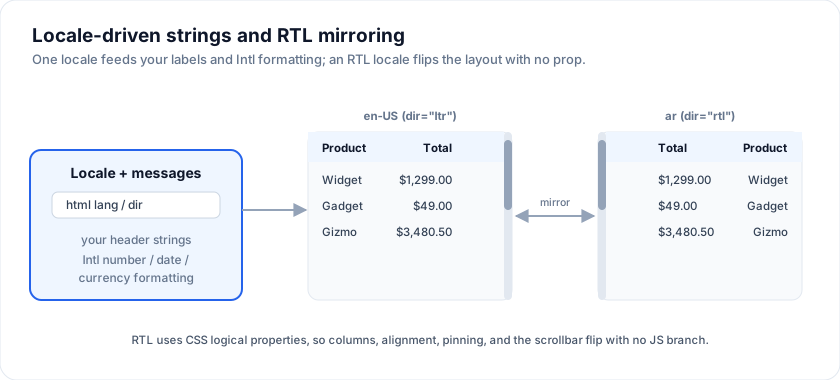
Try the live RTL + i18n demo - switch between six locales (en, de, fr-CA, ja, ar, he); the headers, dates, currencies, and the grid's own scrollbar position all flip:
Open the live example: RTL + i18n stress (Integrations)
What ships translated
No catalogues, English defaults, every string overridable. What a reader sees in the grid comes from four places:
- Your column
headerstrings. - Your cell snippet content.
- The
Intl.NumberFormat/Intl.DateTimeFormatoutput the grid uses forformat: { type: 'number' | 'currency' | 'percent' | 'date' }. - The grid's own chrome: the empty and loading states, the pager, the tool
panel, the status bar, the group labels, the filter operators, the
context menu, the selection bar and its bulk-edit dialog, the screen
reader announcements, the chart panel and its builder. These are English
out of the box and live in one flat map,
GridMessages; pass any subset aslocalization.textand unset keys stay English. Sentences with{placeholders}(the announcements, "Remove {title}") let a translator control the word order.defaultGridMessagesanddefaultChartPanelMessagesare exported, so the full English maps are there to copy from.
<SvGrid {data} {columns} pageable charting
  localization={{
    locale: 'de-DE',
    text: { noRows: 'Keine Zeilen', pageSize: 'Zeilen pro Seite:', opContains: 'Enthält', chartPanelTitle: 'Diagramm' },
  }} />
The charts the grid draws have a map of their own (localeText, see
chart localization), and so does
the spreadsheet shell (SheetMessages, passed as <SvSheet localization>;
see the shell's Localisation section).
If you see an
English string that none of the four covers, it's a bug - please file it.
(The unlicensed Enterprise watermark and the console nudge are the only
literal strings the package itself emits, and both are off when a license
key is set.)
Number, currency, date formatting
The built-in format config calls Intl under the hood. Locale is
inherited from <html lang="..."> by default; override per-column:
The examples on this page run against these rows:
<script lang="ts">
  import { SvGrid, type GridColumns, type SvGridApi } from '@svgrid/grid'

  type Person = {
    id: number
    name: string
    department: string
    city: string
    age: number
    salary: number
  }

  const people: Person[] = [
    { id: 1, name: 'Ada Lovelace',   department: 'Engineering', city: 'London',   age: 36, salary: 142000 },
    { id: 2, name: 'Grace Hopper',   department: 'Engineering', city: 'New York', age: 45, salary: 168000 },
    { id: 3, name: 'Linus Torvalds', department: 'Platform',    city: 'Portland', age: 54, salary: 155000 },
    { id: 4, name: 'Radia Perlman',  department: 'Networking',  city: 'Seattle',  age: 49, salary: 161000 },
    { id: 5, name: 'Barbara Liskov', department: 'Platform',    city: 'Boston',   age: 52, salary: 172000 },
  ]

  const columns: GridColumns<Person> = [
    { field: 'name',       header: 'Name',       width: 190 },
    { field: 'department', header: 'Department', width: 150 },
    { field: 'city',       header: 'City',       width: 130 },
    { field: 'age',        header: 'Age',        width: 80 },
    { field: 'salary',     header: 'Salary',     width: 130, format: { type: 'currency', currency: 'USD' } },
  ]
</script>
const columns: ColumnDef<F, Order>[] = [
  // Inherits the document locale (most apps want this).
  { field: 'total', header: 'Total',
    format: { type: 'currency', currency: 'USD' } },

  // Pin to a specific locale - useful for tables of money that should
  // ALWAYS read as USD-grouped regardless of viewer.
  { field: 'usdTotal', header: 'Total (USD)',
    format: { type: 'currency', currency: 'USD', locales: 'en-US' } },

  // Custom Intl options.
  { field: 'createdAt', header: 'Created',
    format: {
      type: 'date',
      pattern: 'long',
      options: { dateStyle: 'medium', timeStyle: 'short' },
    },
  },
]
locales accepts the same string or array the Intl constructors do.
For mixed-locale columns inside a single grid, pass an explicit
locales.
Translating headers and cell content
Use whatever i18n library your app already runs. The grid's only expectation is "a string, or a render template that returns one":
<script lang="ts">
  import { t } from 'svelte-i18n'

  const columns: ColumnDef<F, Order>[] = [
    { field: 'orderId', header: $t('grid.orderId') },
    { field: 'total',   header: $t('grid.total') },
  ]
</script>
Because header is a string (or a snippet), the column definition
re-evaluates whenever your translation store updates - no extra
re-mount required.
For dynamically-translated cells, use renderSnippet:
{#snippet StatusCell(props: { row: Order })}
  <span class={`status-${props.row.status}`}>
    {$t(`order.status.${props.row.status}`)}
  </span>
{/snippet}

const columns = [
  { field: 'status', header: $t('grid.status'),
    cell: (ctx) => renderSnippet(StatusCell, { row: ctx.row.original }) },
]
Right-to-left (RTL)
RTL is a single attribute. Set dir="rtl" on the <html> element (or
on the grid's container) and the layout flips:
<html dir={locale.startsWith('ar') || locale.startsWith('he') ? 'rtl' : 'ltr'}>
The grid uses logical properties (inset-inline-start,
inset-inline-end, padding-inline-start, etc.) for every position
that depends on direction, including:
- The vertical scrollbar (slides to the left in RTL).
- Column pinning sticky positions.
- The filter row inputs.
- The fill handle on the active cell.
- Sort indicator + filter menu button alignment in headers.
No prop flips; no JS branch. If your layout doesn't flip, look at
your own CSS first - explicit left / right in your styles will
override the grid's logical-property choices.
Mixed-direction text
Numbers, currency, and dates inside RTL cells often need an
<bdi> wrap so the writing direction doesn't get scrambled by the
surrounding RTL context:
{#snippet AmountCell(props: { row: Order })}
  <bdi class="tabular-nums">{fmtMoney(props.row.amount)}</bdi>
{/snippet}
The built-in format configs already wrap their output - this only
matters for your custom snippets.
Pluralisation + cardinal rules
Intl.PluralRules covers the cases ICU MessageFormat usually
handles. The grid never pluralises on your behalf - your i18n
library should. A common pattern in the gallery demos:
const status = api.getDisplayedRows().length === 1
  ? '1 result'
  : `${api.getDisplayedRows().length} results`
For more languages than "English", use a real plural-rules library:
const pr = new Intl.PluralRules(locale)
const key = pr.select(count)                    // 'one' | 'other' | ...
const message = i18n[locale][`result_${key}`]
Column ordering by locale
A column called "Cancel" in English might be "Annuler" in French - or
"Stornieren" in German. If users want to find "Cancel" first when
sorting columns alphabetically, sort the column list with
Intl.Collator:
const collator = new Intl.Collator(locale)
const sorted = [...columns].sort((a, b) =>
  collator.compare(String(a.header ?? a.id), String(b.header ?? b.id)),
)
The grid never reorders columns on its own (except through
api.addColumn(..., position)), so locale-aware sorting is your call.
CJK column widths
CJK glyphs (Chinese, Japanese, Korean) are roughly double the width
of Latin characters at the same point size. If your default
columnWidth was tuned for English, CJK columns will look cramped.
Two options:
Set wider defaults when a CJK locale is active. A
columnWidthof 180 reads ~10 characters in CJK, vs ~20 in Latin.const isCJK = ['ja', 'zh', 'ko'].some((l) => locale.startsWith(l)) const columns: ColumnDef<F, T>[] = baseColumns.map((c) => ({ ...c, width: c.width ? c.width * (isCJK ? 1.3 : 1) : undefined, }))Let the user resize. All grids ship with column resize handles; if you let the user save their layout (see Saved views) you only need to get the default close, not perfect.
Date / time picker editors
There are two families, and the difference matters for localisation.
editorType: 'date' | 'datetime' | 'time' mount the built-in
SvDateTimePicker - a formatted text input plus a calendar / clock
popover the package draws itself. It renders identically in every
browser, and it reads the locale you pass on the grid's localization
prop rather than the browser's.
editorType: 'date-native' | 'datetime-native' | 'time-native' fall
back to the browser's own <input type="date"> / datetime-local /
time. Locale, first day of week, and 24h vs 12h then come from the
user's OS and browser settings, which you cannot control or test. Pick
these when matching the platform's own picker matters more than
consistency - typically on mobile, where the native wheel is what users
expect.
If neither fits, register your own against the editor registry with
registerCellEditor('my-date', Component) and set
editorType: 'my-date'; the type is open, so custom names still
typecheck.
A11y interaction with i18n
- Update
<html lang="...">whenever the locale changes. Screen readers pick the right voice from this attribute. - Update
<html dir="...">whenever the script flips. - Keep
aria-labels in the user's locale; the grid never overrides yours.
Frequently asked questions
Does SvGrid support right-to-left (RTL) languages?
Yes. Layout flips via standard CSS logical properties, so setting dir="rtl" on
a container reverses the grid - columns, scrolling, and pinning included - with
no special configuration.
How do I localize the grid?
The grid is locale-agnostic: every text label is yours to translate, and every
formatted value (number, currency, percent, date) goes through Intl with the
locale you pass. Wire your own i18n strings into headers and custom cells. The
grid's own chrome (pager, tool panel, filter operators, context menu) and the
chart panel translate through localization.text; the
chart localization page lists the
chart keys.
Does SvGrid format numbers and dates per locale?
Yes, through cached Intl formatters. Set a column's format and the locale,
and values render with the correct separators, currency symbols, and date
patterns automatically.
More examples
Localization
Same data re-rendered as locale + currency change - headers, dates, numbers, RTL.
Open the live example: Localization (Integrations)
Try it
Formatting is Intl-driven, so a locale change is a data change rather than a
translation file. The same rows, three ways:
<script lang="ts">
  let locale = $state('en-US')
  let currency = $state('USD')

  const localised = $derived<GridColumns<Person>>([
    { field: 'name',   header: 'Name',   width: 190 },
    { field: 'city',   header: 'City',   width: 130 },
    { field: 'salary', header: 'Salary', width: 150,
      format: { type: 'currency', currency, locales: locale } },
  ])

  const pick = (l: string, c: string) => { locale = l; currency = c }
</script>

<div>
  <button type="button" onclick={() => pick('en-US', 'USD')}>en-US</button>
  <button type="button" onclick={() => pick('de-DE', 'EUR')}>de-DE</button>
  <button type="button" onclick={() => pick('ja-JP', 'JPY')}>ja-JP</button>
</div>

<SvGrid data={people} columns={localised} />
Watch the thousands separator and the symbol position move together - that is
Intl.NumberFormat doing the work, not a lookup table we maintain.
Right to left
dir="rtl" mirrors the whole grid: column order, header alignment, the scroll
origin and the resize handles.
<div dir="rtl">
  <SvGrid data={people} {columns} sortable />
</div>
See also
- Tailwind integration - the
--sg-*tokens and how they interact withdir="rtl". - Accessibility - all of the above respects forced-colors / reduced-motion / screen-reader announcements per locale.
- Demo #38 RTL + i18n
- full locale + direction toggle reference.
Live examples
- RTL + i18n stress - Six locales (en, de, fr-CA, ja, ar, he). Direction flips, full string translation, Intl-driven currency/date/number, mixed-direction safe via <bdi>.
- Localization - Same data re-rendered as locale + currency change - headers, dates, numbers, RTL.
Related articles
- Locale-Aware Number, Date, and Currency Formatting - How SvGrid keeps raw primitives in the row model while rendering locale-correct display strings - so sort and filter never silently break.