Set filter
A "set filter" (a.k.a. value filter, list filter) shows a checklist of all distinct values in a column and lets the user pick which to include. It's what you reach for to filter status to "active OR pending", or department to a few specific teams.
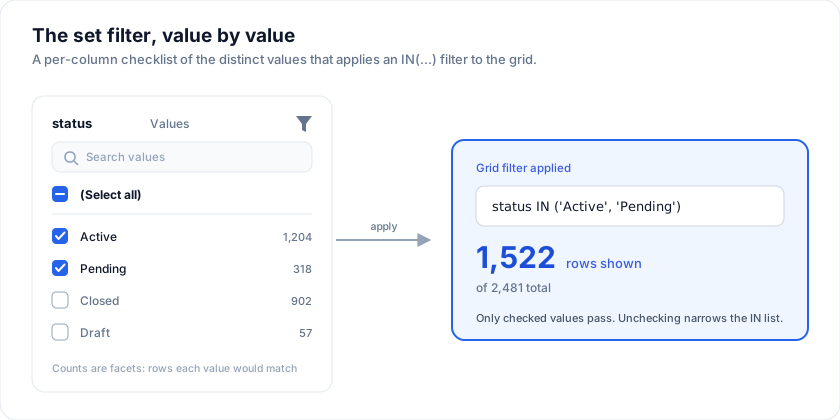
Open the live example: Set filter (tree / async / Excel) (Filtering & Search)
Three patterns are supported, all wired through the imperative api.setFacetFilter(columnId, values | null):
| Mode | UI | Built-in? | When to use |
|---|---|---|---|
| Excel-style | Column-menu Values tab | Yes | Most columns. Distinct values are enumerated from the loaded data; search box + select-all + clear ship out of the box. |
| Async | Side panel that loads values from a server endpoint | User-land (one screen of code) | The column has too many distinct values to list at full data load. Lazy-fetch on demand. |
| Tree-list | Hierarchical checkboxes (parent ↔ descendants) | User-land (cascade logic) | Nested taxonomies: Region → Country → City; Department → Team → Employee. |
1. Excel-style (built-in)
The column menu's Values tab is the default set filter. Click the funnel icon on any header to open it.
What you get without writing any code:
- Distinct values from the current dataset, labelled the way the cells show them.
- Type-ahead search.
- Select-all / clear toggle.
- Mixed-state preserved as the user scrolls.
Labels from the cells (Enterprise)
The free grid lists the stored values. With @svgrid/enterprise,
enableFilterLabels() (setup) lists each value under the text its cell shows, and the
filter still matches the stored value. The label comes from the first of these
the column has:
- a
cellrenderer that returns a string, - static
editorOptions({ value, label }), formatterorformat.
So a status stored as MARKED_AS_FAILED and drawn as "Failed" is offered as
"Failed", and the column's accessor can stay the raw value that sorting needs:
// after enableFilterLabels() from @svgrid/enterprise has run once
const STATUS_TEXT: Record<string, string> = { APPROVED: 'Approved', MARKED_AS_FAILED: 'Failed' }
const columns = [
  { field: 'status', header: 'Status', cell: ({ getValue }) => STATUS_TEXT[String(getValue())] },
  { field: 'reviews', header: 'Reviews', cellDataType: 'number' },
]
Text values are ordered by label. Number and date values stay in value order,
since "$1,000" would collate before "$200". A cell that renders markup has
no text to borrow, so its column falls through to the next source. The search
box above the list matches the stored values. Demo 701 shows it.
The grid side is the extension's facetOptions hook, which runs in the menu
chunk, so a grid without the module carries none of it.
Programmatic equivalent for "remember and restore":
// Capture the current set
const filters = api.getFilters() // includes selectedValues per column

// Restore later (e.g. saved view, URL persistence)
api.setFacetFilter('status', ['active', 'pending'])
api.setFacetFilter('status', null) // clear
2. Async values (server-loaded)
When a column has tens of thousands of distinct values, you don't want to pre-render them all. Pattern: render a side panel beside the grid, load values from the server on first open, drive the grid via api.setFacetFilter:
let state = $state<{
  status: 'idle' | 'loading' | 'ready' | 'error'
  values: string[]
}>({ status: 'idle', values: [] })
let selected = $state<Set<string>>(new Set())

async function loadValues() {
  state = { status: 'loading', values: [] }
  const res = await fetch('/api/orders/customers')
  const values = await res.json()
  state = { status: 'ready', values }
}

function toggle(value: string) {
  const next = new Set(selected)
  if (next.has(value)) next.delete(value); else next.add(value)
  selected = next
  api.setFacetFilter('customer', next.size === 0 ? null : Array.from(next))
}
Key benefits vs the Excel tab:
- Lazy load - no client-side enumeration for millions of distinct values.
- Server can apply policy - hide values the current user shouldn't see.
- Static label / dynamic value - the panel can show pretty labels while the filter applies on the underlying id.
See demo 111 ("Async values" card) for a complete implementation with loading state, retry, and search.
3. Tree-list (hierarchical)
For nested taxonomies, render a tree of checkboxes. Parent checked = all descendants checked. Some descendants checked = parent shows the "indeterminate" state. On any change, compute the leaf set and apply it to the column.
// Taxonomy: Region → Country → City
const GEO = {
  Americas: { 'United States': ['New York', 'San Francisco'], Canada: ['Toronto'] },
  EMEA:     { Germany: ['Berlin', 'Munich'], France: ['Paris'] },
}

let selectedCities = $state<Set<string>>(new Set())

function toggleNode(node: TreeNode, on: boolean) {
  const next = new Set(selectedCities)
  for (const city of node.cities) {  // pre-computed leaf set
    if (on) next.add(city); else next.delete(city)
  }
  selectedCities = next
  api.setFacetFilter('city', next.size === 0 ? null : Array.from(next))
}

function isChecked(node: TreeNode): boolean {
  return node.cities.every((c) => selectedCities.has(c))
}
function isPartial(node: TreeNode): boolean {
  const hits = node.cities.filter((c) => selectedCities.has(c)).length
  return hits > 0 && hits < node.cities.length
}
The grid is unaware of the hierarchy - it just receives a flat list of allowed leaf values. The hierarchy lives in your panel UI.
See demo 111 ("Tree" card) and demo 102: Tree checkbox cascade for the cascade-logic recipe.
API surface
type SvGridApi<…> = {
  // Set a multi-select set filter. Pass null or [] to clear.
  setFacetFilter(columnId: string, values: ReadonlyArray<string> | null): void

  // Read the current filters (includes the facet selection per column).
  getFilters(): Record<string, { operator: ..., selectedValues?: string[] }>

  // Snapshot of the rows the grid currently displays - useful when your
  // filter UI needs to count matches without re-running the search.
  getDisplayedRows(): ReadonlyArray<TData>
}
Filtering to a set of values
A set filter is a checklist of the distinct values in the column, which is the right shape when the domain is small and closed - a department, a status, a country. Typing an operator for those is slower than ticking a box.
Three things the checklist does on its own:
- It counts. Each row shows how many rows that value would keep, so you can see the shape of the column before touching it.
- It offers only what is reachable. The values are taken from the rows that pass every other column's filters, not from the whole dataset - narrow Country to Germany and the City list stops offering cities that would leave you with an empty grid. The column's own filter is excluded, so unticking one value never makes the rest of the list move.
- Search then "select all" means the results. With a query typed the row reads (Select all results) and applies to the matches only, leaving the rest of your selection alone.
<script lang="ts">
  import { SvGrid, renderSnippet, type GridColumns, type SvGridApi } from '@svgrid/grid'

  type Person = {
    id: number
    name: string
    department: string
    city: string
    age: number
    salary: number
    active: boolean
  }

  const people: Person[] = [
    { id: 1, name: 'Ada Lovelace',   department: 'Engineering', city: 'London',   age: 36, salary: 142000, active: true },
    { id: 2, name: 'Grace Hopper',   department: 'Engineering', city: 'New York', age: 45, salary: 168000, active: true },
    { id: 3, name: 'Linus Torvalds', department: 'Platform',    city: 'Portland', age: 54, salary: 155000, active: false },
    { id: 4, name: 'Radia Perlman',  department: 'Networking',  city: 'Seattle',  age: 49, salary: 161000, active: true },
  ]

  const columns: GridColumns<Person> = [
    { field: 'name',       header: 'Name',       width: 180 },
    { field: 'department', header: 'Department', width: 170 },
    { field: 'city',       header: 'City',       width: 150 },
  ]
</script>

<SvGrid data={people} {columns} filterable filterMode="menu" />
Building the value list yourself
When the choices should come from your domain rather than from whatever happens to be loaded, derive them and filter the array. A set the user can see but not currently reach is often the point - it tells them the value exists.
<script lang="ts">
  import { SvGrid, renderSnippet, type GridColumns, type SvGridApi } from '@svgrid/grid'

  type Person = {
    id: number
    name: string
    department: string
    city: string
    age: number
    salary: number
    active: boolean
  }

  const people: Person[] = [
    { id: 1, name: 'Ada Lovelace',   department: 'Engineering', city: 'London',   age: 36, salary: 142000, active: true },
    { id: 2, name: 'Grace Hopper',   department: 'Engineering', city: 'New York', age: 45, salary: 168000, active: true },
    { id: 3, name: 'Linus Torvalds', department: 'Platform',    city: 'Portland', age: 54, salary: 155000, active: false },
    { id: 4, name: 'Radia Perlman',  department: 'Networking',  city: 'Seattle',  age: 49, salary: 161000, active: true },
  ]

  const DEPARTMENTS = ['Engineering', 'Platform', 'Networking', 'Design'] as const

  let picked = $state<string[]>([])

  const shown = $derived(
    picked.length === 0 ? people : people.filter((p) => picked.includes(p.department)),
  )

  function toggle(d: string) {
    picked = picked.includes(d) ? picked.filter((x) => x !== d) : [...picked, d]
  }

  const columns: GridColumns<Person> = [
    { field: 'name',       header: 'Name',       width: 180 },
    { field: 'department', header: 'Department', width: 170 },
  ]
</script>

<div>
  {#each DEPARTMENTS as d}
    <label><input type="checkbox" checked={picked.includes(d)} onchange={() => toggle(d)} /> {d}</label>
  {/each}
</div>

<SvGrid data={shown} {columns} />
See also
- Demo 111: Set filter - tree / async / Excel mode
- Demo 102: Tree checkbox cascade - the cascade recipe used inside the tree filter
api.setFacetFilter- Filter API overview
Live examples
- Set filter (tree / async / Excel) - Three set-list filter patterns: the built-in Excel-style column menu, async-loaded values for huge enums, and a tree-list (Region → Country → City) with cascading checkboxes. All driven through api.setFacetFilter.
- Tree checkbox cascade - Permissions matrix as a tree: workspaces → resources → actions. Checking a parent checks descendants; partial state on parents. Live cost rollup.
Related articles
- How We Built Excel-Style Filters - How SvGrid implements per-column filter menus, type-aware operators, and a shared filter model that works identically for in-memory and server-side data.
- Set Filters and Custom Filter Logic in SvGrid - Build Excel-style checkbox set filters with live facet counts and a custom numeric range filter - using four API calls and plain Svelte markup.