Filtering - overview
Click any column header's filter icon to open the operator + value popover; numeric and date columns range-bucket their distinct values so the menu stays usable on big datasets:
Open the live example: Excel-style filters (Filtering & Search)
Transcript
Set filterMode to menu, and each column header shows a filter button on hover. Click it to open the menu.
The menu lists every distinct value. Untick one, and the grid re-filters right away.
Long value lists have a search box. Type a few letters to narrow the choices.
Done closes the menu. The filtered column keeps its marker, and Clear filter in the same menu resets it.
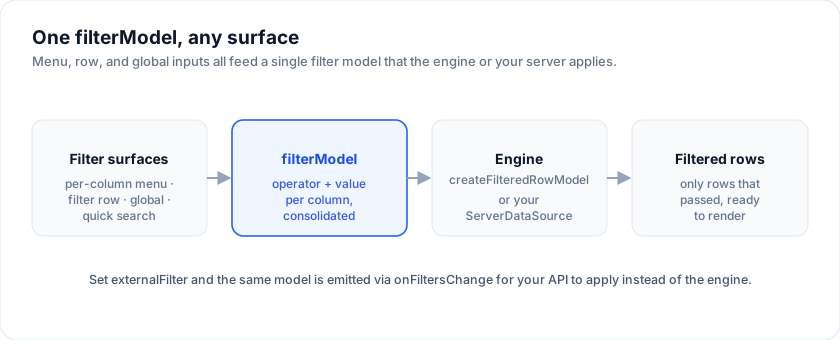
SvGrid offers four filtering surfaces. You opt into the one(s) you need
through the filterMode prop on <SvGrid>:
filterMode |
What it shows |
|---|---|
'menu' (default) |
A "filter icon" in each header opens a per-column operator + value popover. |
'row' |
A filter row under the header - one input per column. |
'global' |
A single search box above the grid that searches all visible columns. |
'none' |
No filter UI. Drive filters programmatically only. |
<SvGrid {data} {columns} features={features} filterMode="row" />
Per-surface props (showColumnFilters, showFilterRow, showGlobalFilter)
override filterMode when set explicitly - useful when you want two
surfaces simultaneously.
Feature registration
Filtering is gated by columnFilteringFeature plus
createFilteredRowModel. Both must be registered for the column filter UI
to actually filter rows:
import {
  tableFeatures, columnFilteringFeature, createFilteredRowModel,
} from '@svgrid/grid'

const features = tableFeatures({ columnFilteringFeature })
The wrapper auto-registers createFilteredRowModel when the feature is
present.
Operators
All built-in operators:
| Operator | Applies to | Behaviour |
|---|---|---|
contains |
text | case-insensitive substring |
equals |
text, num, date, bool | strict equality (numeric where possible) |
startsWith |
text | case-insensitive prefix |
greaterThan |
num, date | strict > |
lessThan |
num, date | strict < |
between |
num, date | inclusive range - requires valueTo |
isBlank |
any | empty / null / undefined / whitespace |
The set of operators offered per column depends on editorType:
editorType |
operators |
|---|---|
'text' (default) |
contains, equals, startsWith, isBlank |
'number' |
equals, greaterThan, lessThan, isBlank |
'date' / 'datetime' |
equals, lessThan, greaterThan, isBlank |
'checkbox' |
equals, isBlank |
Built-in filterFns
For programmatic filtering (without the menu), pass a filterFn on the
column or use the headless createFilteredRowModel directly.
import { filterFns } from '@svgrid/grid'

filterFns.includesString(cellValue, query)
filterFns.equals(cellValue, query)
Frequently asked questions
How do I filter a column in SvGrid?
Click a column header's filter icon to open the operator + value popover. Text
columns get contains / equals / startsWith / isBlank; number and date
columns add greaterThan / lessThan / between. Filtering is on by default
once the filtering feature is registered.
Does SvGrid have Excel-style set filters?
Yes. A set filter shows a checklist of a column's distinct values so users can include "active OR pending" with checkboxes. Numeric and date columns range-bucket their values so the list stays usable on large datasets.
Can I filter on the server?
Yes. Set externalFilter so the grid records filter state but your API does the
filtering. The grid emits the consolidated filter payload via onFiltersChange
for you to forward to the server.
Row mode
The filter row is the low-friction option: one input per column, always visible, no click to reach it. Best when filtering is the main verb on the screen.
<script lang="ts">
  import { SvGrid, renderSnippet, type GridColumns, type SvGridApi } from '@svgrid/grid'

  type Person = {
    id: number
    name: string
    department: string
    city: string
    age: number
    salary: number
    active: boolean
  }

  const people: Person[] = [
    { id: 1, name: 'Ada Lovelace',   department: 'Engineering', city: 'London',   age: 36, salary: 142000, active: true },
    { id: 2, name: 'Grace Hopper',   department: 'Engineering', city: 'New York', age: 45, salary: 168000, active: true },
    { id: 3, name: 'Linus Torvalds', department: 'Platform',    city: 'Portland', age: 54, salary: 155000, active: false },
    { id: 4, name: 'Radia Perlman',  department: 'Networking',  city: 'Seattle',  age: 49, salary: 161000, active: true },
  ]

  const columns: GridColumns<Person> = [
    { field: 'name',       header: 'Name',       width: 180 },
    { field: 'department', header: 'Department', width: 160 },
    { field: 'city',       header: 'City',       width: 140 },
  ]
</script>

<SvGrid data={people} {columns} filterable filterMode="row" />
Menu mode
The menu trades a click for a header row and gives the full operator list. Best when the grid is short, or when the operators matter more than the speed of reaching them.
<script lang="ts">
  import { SvGrid, renderSnippet, type GridColumns, type SvGridApi } from '@svgrid/grid'

  type Person = {
    id: number
    name: string
    department: string
    city: string
    age: number
    salary: number
    active: boolean
  }

  const people: Person[] = [
    { id: 1, name: 'Ada Lovelace',   department: 'Engineering', city: 'London',   age: 36, salary: 142000, active: true },
    { id: 2, name: 'Grace Hopper',   department: 'Engineering', city: 'New York', age: 45, salary: 168000, active: true },
    { id: 3, name: 'Linus Torvalds', department: 'Platform',    city: 'Portland', age: 54, salary: 155000, active: false },
    { id: 4, name: 'Radia Perlman',  department: 'Networking',  city: 'Seattle',  age: 49, salary: 161000, active: true },
  ]

  const columns: GridColumns<Person> = [
    { field: 'name',   header: 'Name',   width: 180 },
    { field: 'age',    header: 'Age',    width: 90, editorType: 'number' },
    { field: 'salary', header: 'Salary', width: 150, editorType: 'number',
      format: { type: 'currency', currency: 'USD' } },
  ]
</script>

<SvGrid data={people} {columns} filterable filterMode="menu" sortable />
See also
- Text filter
- Number filter
- Date filter
- Set filter
- Advanced filter - OR across columns, nested groups, and comparisons against an aggregate
- Filter API
- demos/03-excel-filters.svelte
Related articles
- Excel-Style Filtering for Your Svelte Data Grid - Per-column filter menus, a filter row, global search, and server-side filtering - all wired through a single columnFilteringFeature in SvGrid.