The Northwind sample on Supabase
A ready-made, relational public dataset you can host on Supabase in one paste
and connect to from the browser. It is the classic Northwind database -
categories, customers, products, orders, order_details - plus an order_lines
join view, so you get a real multi-table schema, not a single flat table.
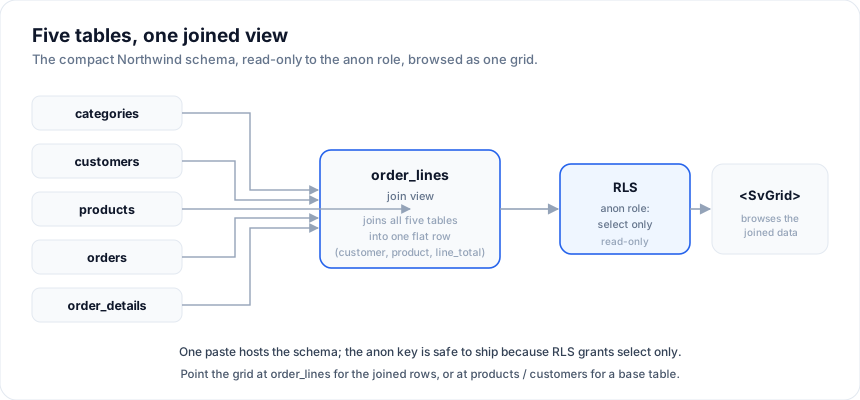
It is the same dataset as the in-browser Northwind on PGlite demo; this page hosts it on real Postgres so the anon key works from any browser app, and so Supabase realtime and Row-Level Security apply.
The public anon key is read-only here (RLS
selectforanon). That is what makes it safe to expose in a client-side demo. To allow writes, scope a policy to authenticated users - see making it writable.
Step 1 - Create a project
Sign in at supabase.com, click New project, and wait
for it to provision. Then open Project Settings -> API and copy the
Project URL (https://xxxx.supabase.co) and the anon public key.
Step 2 - Run the setup SQL
Open the SQL Editor, paste the whole script below, and click Run. It
creates the tables, seeds them, builds the order_lines view, and opens
read-only access to the anon role via RLS.
-- Northwind (compact) + read-only public access. Safe to run more than once.
drop view if exists order_lines;
drop table if exists order_details, orders, products, customers, categories cascade;

create table categories (
  id   integer primary key,
  name text not null
);

create table customers (
  id      integer generated by default as identity primary key,
  company text not null,
  contact text,
  city    text,
  country text
);

create table products (
  id             integer generated by default as identity primary key,
  name           text not null,
  category_id    integer references categories(id),
  unit_price     double precision not null,
  units_in_stock integer not null default 0,
  discontinued   boolean not null default false
);

create table orders (
  id           integer primary key,
  customer_id  integer references customers(id),
  order_date   date not null,
  ship_country text
);

create table order_details (
  id         integer primary key,
  order_id   integer references orders(id),
  product_id integer references products(id),
  quantity   integer not null,
  unit_price double precision not null
);

insert into categories (id, name) values
  (1,'Beverages'),(2,'Condiments'),(3,'Confections'),(4,'Dairy Products'),
  (5,'Grains/Cereals'),(6,'Meat/Poultry'),(7,'Produce'),(8,'Seafood');

insert into customers (id, company, contact, city, country) values
  (1,'Alfreds Futterkiste','Maria Anders','Berlin','Germany'),
  (2,'Ana Trujillo Emparedados','Ana Trujillo','México D.F.','Mexico'),
  (3,'Antonio Moreno Taquería','Antonio Moreno','México D.F.','Mexico'),
  (4,'Around the Horn','Thomas Hardy','London','UK'),
  (5,'Berglunds snabbköp','Christina Berglund','Luleå','Sweden'),
  (6,'Blauer See Delikatessen','Hanna Moos','Mannheim','Germany'),
  (7,'Bólido Comidas preparadas','Martín Sommer','Madrid','Spain'),
  (8,'Bon app''','Laurence Lebihan','Marseille','France'),
  (9,'Bottom-Dollar Markets','Elizabeth Lincoln','Tsawassen','Canada'),
  (10,'B''s Beverages','Victoria Ashworth','London','UK');

insert into products (id, name, category_id, unit_price, units_in_stock, discontinued) values
  (1,'Chai',1,18.00,39,false),(2,'Chang',1,19.00,17,false),
  (3,'Aniseed Syrup',2,10.00,13,false),(4,'Chef Anton''s Cajun Seasoning',2,22.00,53,false),
  (5,'Grandma''s Boysenberry Spread',2,25.00,120,false),(6,'Uncle Bob''s Organic Dried Pears',7,30.00,15,false),
  (7,'Northwoods Cranberry Sauce',2,40.00,6,false),(8,'Mishi Kobe Niku',6,97.00,29,true),
  (9,'Ikura',8,31.00,31,false),(10,'Queso Cabrales',4,21.00,22,false),
  (11,'Konbu',8,6.00,24,false),(12,'Tofu',7,23.25,35,false),
  (13,'Genen Shouyu',2,15.50,39,false),(14,'Pavlova',3,17.45,29,false),
  (15,'Alice Mutton',6,39.00,0,true),(16,'Carnarvon Tigers',8,62.50,42,false);

insert into orders (id, customer_id, order_date, ship_country) values
  (10248,5,'2023-07-04','Sweden'),(10249,6,'2023-07-05','Germany'),
  (10250,3,'2023-07-08','Mexico'),(10251,7,'2023-07-08','Spain'),
  (10252,9,'2023-07-09','Canada'),(10253,3,'2023-07-10','Mexico'),
  (10254,10,'2023-07-11','UK'),(10255,1,'2023-07-12','Germany'),
  (10256,5,'2023-07-15','Sweden'),(10257,4,'2023-07-16','UK');

insert into order_details (id, order_id, product_id, quantity, unit_price) values
  (1,10248,11,12,6.00),(2,10248,14,10,17.45),(3,10248,1,5,18.00),
  (4,10249,8,9,97.00),(5,10249,16,40,62.50),
  (6,10250,9,10,31.00),(7,10250,12,35,23.25),(8,10250,2,15,19.00),
  (9,10251,6,6,30.00),(10,10251,13,15,15.50),
  (11,10252,5,40,25.00),(12,10252,10,25,21.00),
  (13,10253,3,20,10.00),(14,10253,4,42,22.00),(15,10253,1,40,18.00),
  (16,10254,16,15,62.50),(17,10254,11,21,6.00),
  (18,10255,2,20,19.00),(19,10255,9,35,31.00),(20,10255,14,25,17.45),
  (21,10256,7,15,40.00),(22,10256,5,12,25.00),
  (23,10257,12,25,23.25),(24,10257,6,6,30.00);

create view order_lines
  with (security_invoker = on)  -- the view runs with the caller's RLS, so anon's select policies apply
as
  select d.id, d.order_id, o.order_date, c.company as customer,
         p.name as product, cat.name as category,
         d.quantity, d.unit_price, (d.quantity * d.unit_price) as line_total,
         o.ship_country
  from order_details d
  join orders o       on o.id = d.order_id
  join customers c    on c.id = o.customer_id
  join products p     on p.id = d.product_id
  join categories cat on cat.id = p.category_id;

-- Read-only public access: enable RLS and grant the anon role SELECT only.
do $
declare t text;
begin
  foreach t in array array['categories','customers','products','orders','order_details']
  loop
    execute format('alter table %I enable row level security', t);
    execute format('drop policy if exists "public read" on %I', t);
    execute format('create policy "public read" on %I for select to anon using (true)', t);
  end loop;
end $;
Step 3 - Connect
No-code (fastest): open the
Supabase demo, paste your
Project URL + anon key, and set the table to order_lines to browse the
joined data, or products / customers for the base tables. The grid
introspects the columns and renders sort / filter / search / paging - all pushed
to PostgREST.
In code, it is one createSupabaseDataSource call:
import { createClient } from '@supabase/supabase-js'
import { createServerDataSource } from '@svgrid/grid'
import { createSupabaseDataSource, schemaToColumns } from '@svgrid/enterprise'
import { orderLinesSchema } from './northwind' // the EntitySchema for the view

const client = createClient(import.meta.env.PUBLIC_SUPABASE_URL, import.meta.env.PUBLIC_SUPABASE_ANON_KEY)

const source = createSupabaseDataSource({ client, table: 'order_lines', schema: orderLinesSchema })
const controller = createServerDataSource(source, {
  pageSize: 25,
  getRowId: (r) => String(r.id),
  onChange: (s) => (view = s),
})
controller.refresh()

const columns = schemaToColumns(orderLinesSchema)
The matching EntitySchemas (productsSchema, customersSchema,
orderLinesSchema) are the ones the PGlite demo uses - copy them from the demo
source, or let the demo's introspectSupabaseTable build them from the live
table.
Making it writable
The policies above grant anon select only, so create / update /
delete from an unauthenticated browser are blocked by RLS (the grid surfaces
the permission error). That is the right default for a public sample. For an
app where signed-in users edit their data, replace the read policy with one
scoped to authenticated (and add insert/update/delete policies), exactly as in
the Supabase CRUD grid tutorial.
Why this over a flat table
The tiny customers table in supabase.md is the fastest way to
see CRUD. This Northwind sample exists for the next question: relations. The
order_lines view joins five tables into one grid, so you can demo grouping,
totals, and filtering across the whole schema - the shape real business data
takes. The same dataset runs with zero backend in the
Northwind on PGlite demo when
you want to show it offline.
See also
- Supabase - the flat-table quickstart this sample builds on.
- Tutorial: a Supabase CRUD grid - the full create / read / update / delete walkthrough, including how to make the sample writable.
- Relations & master-detail - turn the joined
order_linesview into expandable master-detail screens. - Real-time (Supabase) - make the grid live as rows change in Postgres.
- Databases - the other databases Studio can introspect the same way.