Local database (no setup)
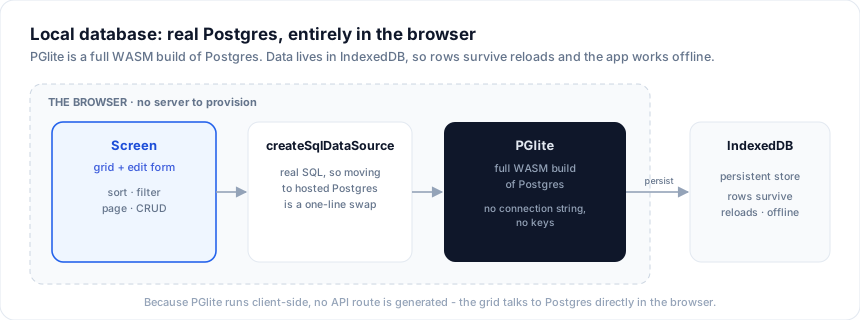
The local database source gives a generated app a real, persistent Postgres that runs entirely in the browser - no connection string, no keys, no server to provision. It is powered by PGlite, a full WASM build of Postgres that stores its data in IndexedDB, so rows survive reloads and the app works offline.
Pick it in the designer's Data source menu (or per entity, Bind ... to →
Local database) when you want a running, saving app on the first npm run dev
without standing up a database. It is the zero-friction default for demos,
prototypes, internal tools, and workshops - and because it speaks real SQL
through createSqlDataSource, moving to hosted Postgres later
is a one-line source swap with the same schema.
What Studio generates
Choosing Local database emits a single shared PGlite client in src/lib/data.ts,
creates a table per entity from its schema, seeds it once with your sample rows,
and binds every screen through createSqlDataSource:
// src/lib/data.ts (generated)
import { PGlite } from '@electric-sql/pglite'
import { createSqlDataSource } from '@svgrid/enterprise'
import { customersSchema, type CustomersRow } from './customers.schema'

// One embedded Postgres for the whole app, persisted in IndexedDB.
const pg = new PGlite('idb://svgrid-studio')

const pgReady = (async () => {
  await pg.exec(`CREATE TABLE IF NOT EXISTS "customers" (
    "id" text primary key,
    "name" text,
    "email" text,
    "mrr" double precision,
    "active" boolean
  )`)
  await _pgSeed('customers', customersSeed, ['id', 'name', 'email', 'mrr', 'active'])
})()

export const customers = createSqlDataSource<CustomersRow>({
  schema: customersSchema,
  table: 'customers',
  dialect: { placeholders: '#39;, ilike: true },
  execute: async (text, params) => {
    await pgReady
    return (await pg.query(text, params)).rows as Record<string, unknown>[]
  },
})
Because PGlite runs client-side, no +server.ts API route is generated - the
grid talks to Postgres directly in the browser. Field types map to Postgres
columns automatically (number → double precision, boolean → boolean,
date → date, datetime → timestamptz, json → jsonb, everything else text;
the id field becomes the primary key).
Persistence and reset
Data lives in the browser's IndexedDB under svgrid-studio, so it persists
across reloads and tabs on the same origin. Seeding runs once - the app only
inserts sample rows when a table is empty, so your edits are never overwritten on
the next load. To start clean, clear the site's IndexedDB (DevTools → Application
→ Storage) or bump the store name (new PGlite('idb://svgrid-studio-v2')).
Going to production
The local database is real SQL, so promotion is a swap of the execute function -
point it at hosted Postgres (Neon, Supabase, or your own) and keep the schema,
grid, form, and every screen unchanged:
// Same createSqlDataSource, hosted execute:
execute: async (text, params) => {
  const res = await sql.query(text, params)   // pg / postgres / Neon serverless
  return res.rows
}
See Databases for the hosted path (server route,
createKitHandlers, RBAC / validation / audit), and Supabase for
managed Postgres with auth.
When to use which
| You want | Source |
|---|---|
| A running, saving app with zero setup, persisted in the browser | Local database (this page) |
| Prototype a schema with data that resets on restart | In-memory |
| Managed Postgres with auth and realtime | Supabase |
| Your own Postgres / MySQL / SQL Server / SQLite | Databases |
| An existing REST API or custom backend | REST & custom APIs |