The WAI-ARIA Grid Pattern Explained
A practical breakdown of the ARIA grid pattern - the roles, keyboard model, and live-region wiring that make interactive data grids actually usable by keyboard and screen-reader users.
Most accessibility audits fail data grids on the same three things: missing aria-sort on sortable headers, aria-rowcount set to the virtualised window size instead of the full dataset, and a roving-tabindex model that breaks the moment someone drops a custom cell renderer in. Fix those three and you will cover roughly 80% of screen-reader complaints in a data grid.
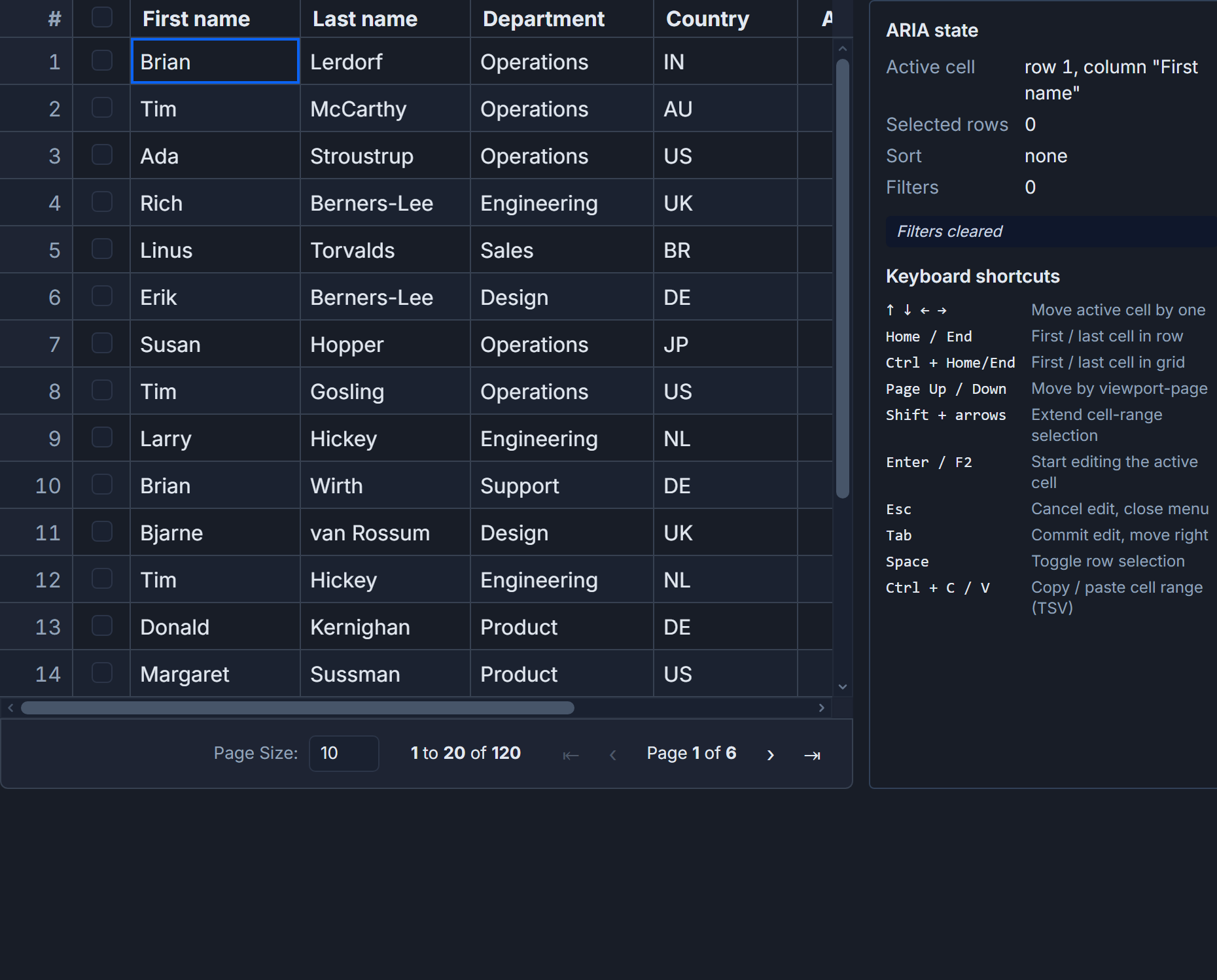
The WAI-ARIA grid pattern is the formal contract that governs all of them. It is not a style guide - it specifies exact roles, attributes, and keyboard behaviour that assistive technologies depend on. Knowing what the spec requires, and what SvGrid does automatically versus what you have to wire yourself, is the fastest path to a grid that passes an audit on the first try.
Table versus grid: the distinction that actually matters
The ARIA spec draws a hard line between role="table" and role="grid". A table is for static, read-only data - the user reads it, never interacts with cells directly. A grid is for interactive data where cells can receive focus, accept keyboard navigation, and optionally be edited. The difference in user experience is significant: in a table, every focusable element inside it is its own tab stop. In a grid, the entire component is one tab stop, and arrow keys handle internal navigation.
If you leave an editable data grid as a plain <table>, keyboard users hit Tab once and jump straight out of it. Applying role="grid" to a display-only table is the opposite problem - it tells screen readers to expect arrow-key navigation that will never happen, which confuses the user.
The rule: can a cell receive focus and be edited, or does the user navigate between cells with arrow keys? Use grid. Is it read-only and the user never navigates cell-by-cell? Use table.
The roving tabindex model
The core mechanism of the grid pattern is roving tabindex. At any moment, exactly one cell in the grid carries tabindex="0" - the active cell. Every other cell has tabindex="-1". When the user tabs into the grid, focus lands on that one entry point. Arrow keys move the active cell: the current cell's tabindex is set to -1, the next cell's is set to 0, and .focus() is called on it. The grid never creates N x M tab stops; it is always one stop in the page tab order.
SvGrid implements this automatically. The element with role="grid" receives tabindex="0" initially and hands focus to the first cell on activation. From there the keyboard handler manages the roving model. If you replace the host element or add a wrapper <div> that intercepts keyboard events before they reach the grid container, the model breaks silently - arrow keys stop working and focus gets stuck.
The required keyboard operations per the spec:
- Arrow keys: move focus one cell in the direction pressed
- Tab: move focus out of the grid to the next page element
- Enter / F2: enter edit mode on the active cell
- Escape: cancel editing and return focus to the cell
- Home / End: first or last cell in the current row
- Ctrl+Home / Ctrl+End: first or last cell in the entire grid
- Page Up / Page Down: move focus by one visible page of rows
Required ARIA attributes
Beyond the keyboard model, the spec mandates specific attributes on each node type:
role="grid"on the container elementrole="row"on each rowrole="columnheader"on header cells, witharia-sortset to"ascending","descending", or"none"on sortable columnsrole="gridcell"on body cells, witharia-readonly="true"on non-editable cells andaria-readonly="false"when a cell enters edit modearia-rowcounton the grid element set to the total row count, not the virtualised window sizearia-colcounton the grid element set to the total column countaria-rowindexon each rendered row set relative to the full dataset (not the render window)aria-colindexon each rendered cell
The aria-rowcount / aria-rowindex pair is where virtualised grids most commonly fail. If your grid renders 30 rows of 120, aria-rowcount must be 120 and aria-rowindex on the first rendered row must be whatever that row's position is in the full sorted/filtered dataset - not 1 by default.
SvGrid sets all of these automatically based on the active sort/filter/pagination state. If you use a server-side data source, pass the total row count through the data source return value so the grid can set aria-rowcount correctly.
Setting up an accessible employee roster
Below is a complete setup: 120-row employee data with sorting, filtering, selection, a live-region announcement for active-cell position, and a status bar that reports selection and filter counts.
// columns.ts - column definitions for the employee roster
import {
  tableFeatures,
  rowSortingFeature,
  columnFilteringFeature,
  rowSelectionFeature,
  type ColumnDef,
} from '@svgrid/grid'

export type Person = {
  id: number
  firstName: string
  lastName: string
  department: string
  country: string
  age: number
  salary: number
}

export const features = tableFeatures({
  rowSortingFeature,
  columnFilteringFeature,
  rowSelectionFeature,
})

export const columns: ColumnDef<typeof features, Person>[] = [
  { id: 'firstName',  field: 'firstName',  header: 'First name',  width: 130, editable: true },
  { id: 'lastName',   field: 'lastName',   header: 'Last name',   width: 130, editable: true },
  { id: 'department', field: 'department', header: 'Department',  width: 140 },
  { id: 'country',    field: 'country',    header: 'Country',     width: 110 },
  { id: 'age',        field: 'age',        header: 'Age',         width: 80,  type: 'number' },
  {
    id: 'salary',
    field: 'salary',
    header: 'Salary',
    width: 130,
    type: 'number',
    editable: true,
  },
]
<!-- EmployeeRoster.svelte -->
<script lang="ts">
  import SvGrid from '@svgrid/grid'
  import type { SvGridApi } from '@svgrid/grid'
  import { features, columns, type Person } from './columns'

  // Replace with a real data source or server-side fetch.
  const rows: Person[] = Array.from({ length: 120 }, (_, i) => ({
    id: i + 1,
    firstName: ['Ada', 'Grace', 'Linus', 'Tim', 'Margaret'][i % 5],
    lastName:  ['Lovelace', 'Hopper', 'Torvalds', 'Berners-Lee', 'Hamilton'][i % 5],
    department: ['Engineering', 'Design', 'Product', 'Data', 'Compliance'][i % 5],
    country:    ['US', 'UK', 'FI', 'UK', 'US'][i % 5],
    age: 28 + (i % 20),
    salary: 80_000 + (i % 10) * 5_000,
  }))

  let api = $state<SvGridApi<typeof features, Person> | null>(null)

  // Live region state - double-assignment forces re-announcement of identical strings.
  let liveText = $state('')
  function announce(msg: string) {
    liveText = ''
    setTimeout(() => (liveText = msg), 30)
  }

  let selectedCount = $state(0)
  let filterCount   = $state(0)

  function onCellFocus() {
    if (!api) return
    const cell = api.getActiveCell()
    if (cell) {
      const colLabel = columns.find(c => c.id === cell.colId)?.header ?? cell.colId
      announce(`row ${cell.rowIndex + 1}, column ${colLabel}`)
    }
    selectedCount = api.getSelectedRows().length
    filterCount   = Object.keys(api.getFilters?.() ?? {}).length
  }

  function onEditStart() {
    announce('Editing. Press Escape to cancel, Enter to confirm.')
  }

  function onEditStop() {
    announce('Edit complete.')
  }
</script>

<!-- Polite live region - screen readers announce without interrupting. -->
<div
  role="status"
  aria-live="polite"
  aria-atomic="true"
  class="sr-only"
>
  {liveText}
</div>

<p aria-live="polite" aria-atomic="true" class="status-bar">
  {selectedCount} {selectedCount === 1 ? 'row' : 'rows'} selected
  {#if filterCount > 0}
    - {filterCount} {filterCount === 1 ? 'filter' : 'filters'} active
  {/if}
</p>

<SvGrid
  {features}
  data={rows}
  {columns}
  sortable
  filterable
  enableCellSelection={true}
  onApiReady={(g) => { api = g }}
  onCellFocus={onCellFocus}
  onEditStart={onEditStart}
  onEditStop={onEditStop}
/>

<style>
  .sr-only {
    position: absolute;
    width: 1px; height: 1px;
    padding: 0; margin: -1px;
    overflow: hidden;
    clip: rect(0, 0, 0, 0);
    white-space: nowrap;
    border: 0;
  }

  .status-bar {
    font-size: 0.875rem;
    color: var(--sg-fg);
    margin-block: 0.5rem;
  }
</style>
What breaks when you add custom cell renderers
Custom cell renderers are the most common source of ARIA regressions. The pattern to avoid: a custom renderer that wraps content in a <div> with tabindex="0". That creates a second focusable element inside the gridcell, which forks the focus chain and makes arrow-key navigation unpredictable.
The rule is: one element per gridcell can be the focus target. If your renderer contains an interactive element (a button, a link, a checkbox), let that element receive focus when the user presses Enter or F2, but let arrow keys bubble up to the grid container without stopping them. Only intercept Space and Enter inside the cell.
<!-- StatusCell.svelte - a renderer with an interactive button inside the gridcell. -->
<script lang="ts">
  import { renderComponent } from '@svgrid/grid'

  let { value, row }: { value: string; row: any } = $props()

  function onKeyDown(e: KeyboardEvent) {
    // Arrow keys must NOT be stopped here - let them reach the grid container.
    if (e.key === 'Enter' || e.key === ' ') {
      e.stopPropagation()
      // handle activation
    }
  }
</script>

<!-- No tabindex here. The gridcell itself manages tabindex via the roving model. -->
<span
  role="button"
  aria-pressed={value === 'active'}
  onkeydown={onKeyDown}
>
  {value}
</span>
The other common mistake is setting aria-live="assertive" on the cell-position announcer. Assertive interrupts whatever the screen reader is currently saying. Active-cell position is not urgent enough to warrant interruption - use polite. Reserve assertive for genuine errors: validation failures, network timeouts, anything that requires immediate attention before the user takes the next action.
Virtualisation and the aria-rowcount pitfall
When the grid virtualises rows, the DOM contains only 30-50 rows even if the dataset has 10,000. Without aria-rowcount, screen readers count the DOM nodes and announce "30 rows" instead of "10,000 rows". The fix is two attributes on the role="grid" element:
aria-rowcount: total rows in the dataset (filtered total if a filter is active, not the unfiltered total)aria-colcount: total columns, including any that are hidden
Each rendered row also needs aria-rowindex set to its position in the full sorted/filtered list, not its position in the render window. Row 401 in the dataset is row 401 in the DOM, even if only rows 381 to 430 are currently rendered.
SvGrid handles both automatically. If you use createServerDataSource, the total field you return from the fetch callback is what SvGrid uses for aria-rowcount. Getting that number right from your API is the only thing you need to think about.
Related reading
- Live demo: Accessibility
- Docs: Accessibility
- What Makes a Data Table Accessible? (WCAG)
- Optimistic UI Explained
- Debounce vs Throttle (for Grids and Beyond)
- Controlled vs Uncontrolled Grid State
- Column Virtualization Explained
Tagged: Accessibility