A Svelte Data Grid with Laravel and Inertia
Wire SvGrid to a Laravel backend through Inertia - partial reloads handle sorting and pagination without a separate API layer.
Inertia's partial reload is underused. Most tutorials show it for a single prop refresh after a form submit. It is actually the right primitive for driving a server-paged grid - each sort click or page change fires a targeted fetch that returns only the rows prop, not a full HTML page. The round-trip is typically 8 to 15 KB and under 100 ms on a warm connection.
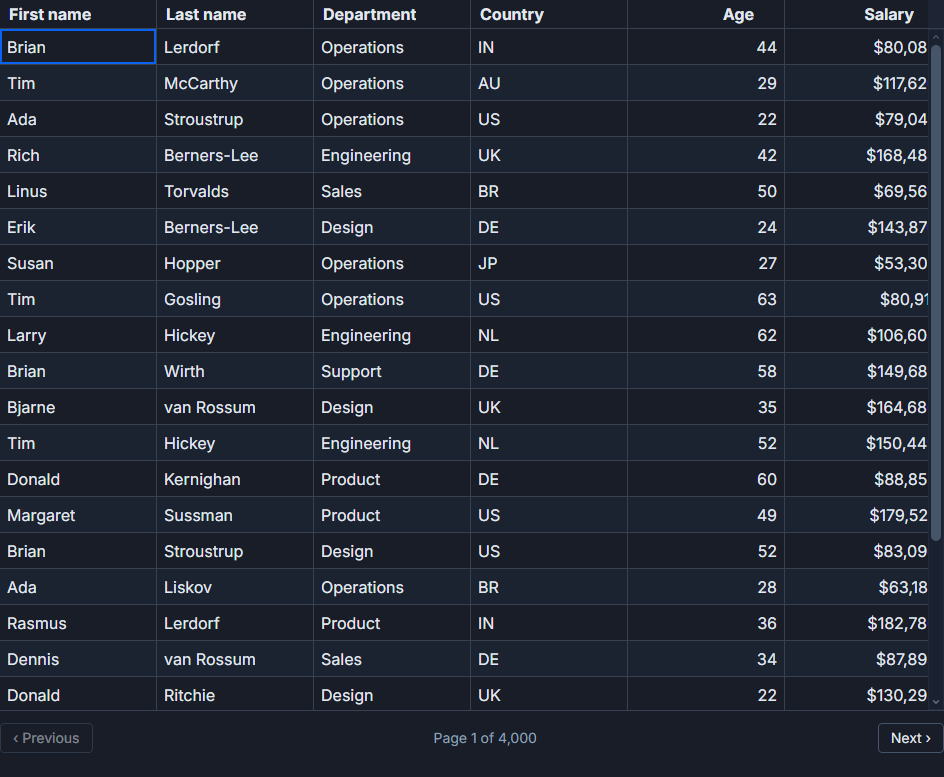
This post shows the complete wiring: a Laravel controller using LengthAwarePaginator, a Svelte 5 page component that connects the paginator shape to SvGrid, and the page-number offset that bites everyone the first time.
What the controller needs to produce
SvGrid needs two things from the server for server-side pagination: the rows for the current page, and the total unfiltered (or post-filter) row count. Laravel's paginator JSON serialisation gives you exactly those as data and total. You do not need to build a custom response shape.
The controller below serves a people table with 200,000 rows. It reads sort, direction, global search, page, and page size from the request. The explicit allowlist on SORTABLE is not optional - passing the sort parameter directly to orderBy is a SQL injection vector.
<?php

namespace App\Http\Controllers;

use App\Models\Person;
use Illuminate\Http\Request;
use Inertia\Inertia;

class PeopleController extends Controller
{
    private const SORTABLE = [
        'first_name', 'last_name', 'department', 'country', 'age', 'salary',
    ];

    public function index(Request $request)
    {
        $request->validate([
            'size'  => ['nullable', 'integer', 'between:10,200'],
            'page'  => ['nullable', 'integer', 'min:1'],
            'sort'  => ['nullable', 'string', 'in:' . implode(',', self::SORTABLE)],
            'desc'  => ['nullable', 'boolean'],
            'q'     => ['nullable', 'string', 'max:100'],
        ]);

        $sort = $request->input('sort', 'last_name');
        $desc = $request->boolean('desc', false);
        $q    = $request->input('q');
        $size = $request->integer('size', 50);

        $people = Person::query()
            ->when($q, fn ($query) =>
                $query->where('first_name', 'like', "%{$q}%")
                      ->orWhere('last_name', 'like', "%{$q}%")
            )
            ->orderBy($sort, $desc ? 'desc' : 'asc')
            ->paginate($size)
            ->withQueryString();

        return Inertia::render('People/Index', [
            'people'  => $people,
            'filters' => $request->only(['q', 'sort', 'desc', 'size']),
        ]);
    }
}
withQueryString() is there because it makes paginator links in other parts of the page preserve sort state. If this controller only serves the grid, you can drop it, but it costs nothing.
Connecting the paginator shape to SvGrid
The Svelte page component receives people (the paginator JSON) and filters (the current request params) as Inertia page props. SvGrid needs data for rows, rowCount for the true total, and pageSize to know how many rows fit one page.
Sorting and pagination callbacks call router.get with only: ['people', 'filters']. That header tells Inertia to ask Laravel for only those two props on the next request. The rest of the page - nav, auth state, anything else - does not re-render.
<script lang="ts">
  import { router } from '@inertiajs/svelte'
  import SvGrid from '@svgrid/grid'
  import {
    tableFeatures,
    rowSortingFeature,
    rowPaginationFeature,
    columnFilteringFeature,
    type ColumnDef,
    type SvGridApi,
  } from '@svgrid/grid'

  type LaravelPage<T> = {
    data: T[]
    total: number
    current_page: number
    per_page: number
    last_page: number
  }

  type Person = {
    id: number
    first_name: string
    last_name: string
    department: string
    country: string
    age: number
    salary: number
  }

  let { people, filters } = $props<{
    people: LaravelPage<Person>
    filters: { q?: string; sort?: string; desc?: boolean; size?: number }
  }>()

  const features = tableFeatures({
    rowSortingFeature,
    rowPaginationFeature,
    columnFilteringFeature,
  })

  const columns: ColumnDef<typeof features, Person>[] = [
    { field: 'first_name',  header: 'First name',  width: 140 },
    { field: 'last_name',   header: 'Last name',   width: 140 },
    { field: 'department',  header: 'Department',  width: 150 },
    { field: 'country',     header: 'Country',     width: 120 },
    { field: 'age',         header: 'Age',         width: 80,  type: 'number' },
    {
      field: 'salary',
      header: 'Salary',
      width: 140,
      type: 'number',
      format: { type: 'currency', currency: 'USD', options: { maximumFractionDigits: 0 } },
    },
  ]

  let api = $state<SvGridApi<typeof features, Person> | null>(null)

  function reload(params: Record<string, string | number | boolean | undefined>) {
    router.get(
      '/people',
      { ...filters, ...params },
      {
        preserveState:  true,
        preserveScroll: true,
        only: ['people', 'filters'],
      },
    )
  }
</script>

<SvGrid
  data={people.data}
  {columns}
  {features}
  showPagination
  pageSize={people.per_page}
  rowCount={people.total}
  onApiReady={(a) => (api = a)}
  onSortingChange={(sortState) => {
    const col = sortState[0]
    reload({ sort: col?.id, desc: col?.desc ? 1 : 0, page: 1 })
  }}
  onPaginationChange={(p) => {
    reload({ page: p.pageIndex + 1, size: p.pageSize })
  }}
/>
data={people.data} gives SvGrid the 50 rows for the current page. rowCount={people.total} tells it the full dataset size without sending all 200,000 rows to the browser. The grid computes page count from those two numbers and renders the pagination controls correctly.
The page number offset
SvGrid uses 0-based page indexes internally. onPaginationChange fires with pageIndex: 0 on the first page. Laravel expects page=1 for the first page and silently returns empty results if you send page=0.
The fix is a single + 1: page: p.pageIndex + 1.
The symmetric issue shows up with sorting. If the user is on page 5 and changes the sort column, the new result set may have fewer rows than page 5 expects. Always reset to page: 1 inside onSortingChange. The example above does this - that line is not optional.
Adding column-level filters
The global search above goes through a single q parameter. Column-level filters need a different approach. SvGrid's onFilterChange callback hands you an array of filter objects - each has id, operator, and value. You can JSON-encode that array and pass it as one query parameter, then decode and apply it in the controller.
<!-- Add to the SvGrid component above -->
  onFilterChange={(filterState) => {
    reload({
      columnFilters: JSON.stringify(filterState),
      page: 1,
    })
  }}
// In the controller, after decoding:
$columnFilters = json_decode($request->input('columnFilters', '[]'), true);

foreach ($columnFilters as $filter) {
    $field    = in_array($filter['id'], self::SORTABLE) ? $filter['id'] : null;
    $operator = $filter['operator'] ?? 'contains';
    $value    = $filter['value'] ?? '';

    if (!$field || $value === '') continue;

    match ($operator) {
        'equals'   => $query->where($field, $value),
        'contains' => $query->where($field, 'like', "%{$value}%"),
        'gt'       => $query->where($field, '>', $value),
        'lt'       => $query->where($field, '<', $value),
        default    => null,
    };
}
The allowlist check on $filter['id'] against SORTABLE matters here too - do not pass user-supplied column names into a where call without validation.
What partial reload actually sends
If you open the network tab while paging, the Inertia request has two headers that distinguish it from a full page load: X-Inertia: true and X-Inertia-Partial-Data: people,filters. Laravel's Inertia server package reads X-Inertia-Partial-Data and only evaluates the props in that list. The response is a JSON object - no HTML, no layout re-render. For 50 rows with six string and number fields, it is around 10 KB uncompressed.
That is why preserveScroll: true matters. Without it, the browser resets scroll position on each navigation because Inertia is technically navigating to the same URL with new query params. With it, the viewport stays put and only the grid's row area updates.
Session expiry during paging
One edge case worth handling: if a user's session expires while they are paging through results, the partial reload will get a redirect response (302 to /login) rather than the expected JSON. Inertia fires a router.on('invalid', ...) event in this case. Wiring a toast or redirect there is straightforward:
import { router } from '@inertiajs/svelte'
import { onMount } from 'svelte'

onMount(() => {
  const stop = router.on('invalid', (e) => {
    e.preventDefault()
    window.location.href = '/login'
  })
  return stop
})
Without this, the grid silently stops responding - rows do not update, no error is shown. The default Inertia behaviour on a non-200 partial response is to show a modal, but that modal is styled for Inertia's own error page, not for a session timeout.
What to add next
Column visibility, sorting state, and page size are natural candidates for persistence across reloads. SvGrid's createNamedViews with localStorageViews covers that - the state object it produces maps cleanly to what api.setState() accepts. If you also want to keep those settings per-user in the database, store the JSON blob in a user_preferences column and return it as an additional Inertia prop.
For exports, api.getData() returns the current page rows only. If you need a full export of the filtered, sorted dataset, that should be a separate Laravel endpoint - a people/export route that runs the same query without pagination and streams a CSV or Excel file. Do not try to buffer 200,000 rows in the browser.
Related reading
- Live demo: Server-side data
- Docs: Server-side data
- Using SvGrid with TanStack Query in Svelte
- A Svelte Data Grid with SvelteKit and Supabase
- A Svelte Data Grid with Drizzle ORM
- A Svelte Data Grid with Prisma
- A Svelte Data Grid with a Plain REST API
Tagged: Server-side data