Pagination Patterns - Offset, Cursor, and Infinite Scroll
A practical breakdown of offset, cursor, and infinite-scroll pagination for SvGrid - when each pattern fits, how to wire it, and where each one breaks.
Most pagination bugs come down to one mistake: treating all three pagination patterns as interchangeable flavors of the same thing. They are not. Offset paging, keyset/cursor paging, and infinite scroll make fundamentally different trade-offs - and wiring them to SvGrid requires understanding which part of the state the grid owns versus what you manage externally.
Offset paging: simple, fragile at depth
Offset pagination is what most people reach for first: SELECT * FROM orders ORDER BY created_at DESC LIMIT 50 OFFSET 5000. It works well on small datasets. On large ones, the database has to scan through all the skipped rows even if it never returns them, so latency grows linearly with page depth. Page 1 might return in 5 ms; page 1,000 might take 800 ms on an unindexed column.
The SvGrid wiring looks like this:
<script lang="ts">
  import SvGrid from '@svgrid/grid'
  import {
    tableFeatures,
    rowSortingFeature,
    columnFilteringFeature,
    rowPaginationFeature,
    type ColumnDef,
    type SvGridApi,
  } from '@svgrid/grid'

  type Order = {
    id: number
    created_at: string
    customer: string
    amount: number
    status: 'pending' | 'fulfilled' | 'cancelled'
  }

  const features = tableFeatures({
    rowSortingFeature,
    columnFilteringFeature,
    rowPaginationFeature,
  })

  const columns: ColumnDef<typeof features, Order>[] = [
    { id: 'id',         field: 'id',         header: 'ID',       width: 80 },
    { id: 'created_at', field: 'created_at',  header: 'Date',     width: 160 },
    { id: 'customer',   field: 'customer',    header: 'Customer', width: 220 },
    { id: 'amount',     field: 'amount',      header: 'Amount',   width: 110, type: 'number' },
    { id: 'status',     field: 'status',      header: 'Status',   width: 120 },
  ]

  const PAGE_SIZE = 50
  let rows:     Order[]     = $state([])
  let total:    number      = $state(0)
  let page:     number      = $state(0)
  let loading:  boolean     = $state(false)
  let api:      SvGridApi | undefined

  async function loadPage(p: number, sort = '', filter = '') {
    if (loading) return
    loading = true
    try {
      const q = new URLSearchParams({
        offset: String(p * PAGE_SIZE),
        limit:  String(PAGE_SIZE),
      })
      if (sort)   q.set('sort',   sort)
      if (filter) q.set('filter', filter)

      const res  = await fetch(`/api/orders?${q}`)
      const json = await res.json() as { rows: Order[]; total: number }
      rows  = json.rows
      total = json.total
      page  = p
    } finally {
      loading = false
    }
  }

  $effect(() => { loadPage(0) })
</script>

<div class="pager">
  <button disabled={page === 0 || loading} onclick={() => loadPage(page - 1)}>
    Previous
  </button>
  <span>Page {page + 1} of {Math.ceil(total / PAGE_SIZE)}</span>
  <button
    disabled={(page + 1) * PAGE_SIZE >= total || loading}
    onclick={() => loadPage(page + 1)}
  >
    Next
  </button>
</div>

<SvGrid
  {features}
  {columns}
  data={rows}
  onApiReady={(a) => (api = a)}
  style="height: 520px;"
/>
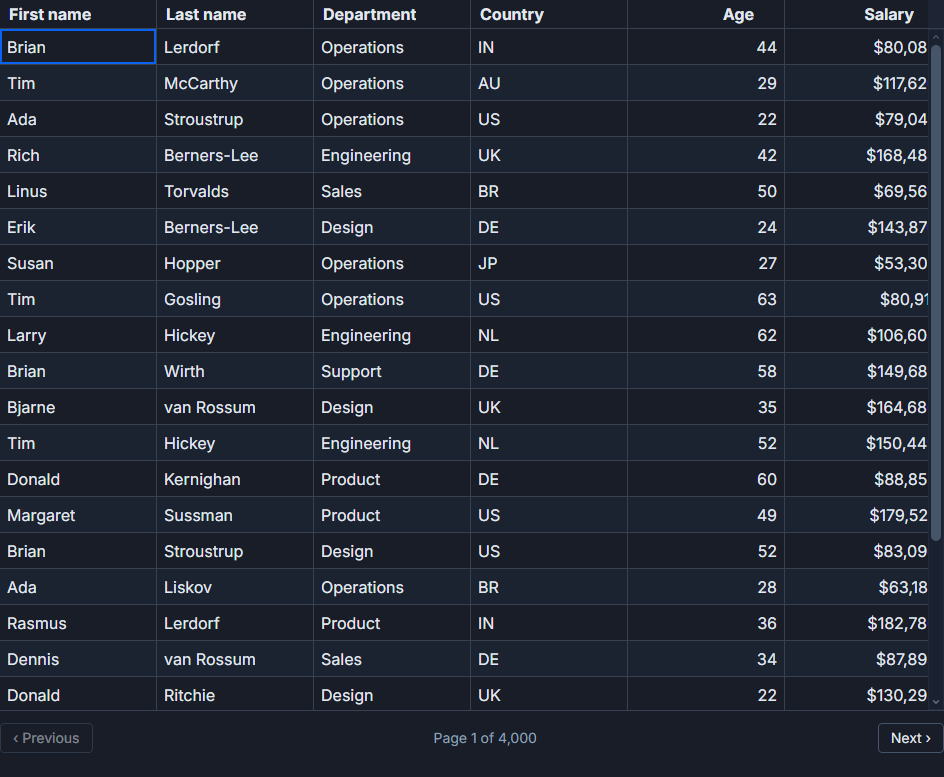
The grid receives only the current page slice. It has no knowledge of rows it has never seen, so you own the pager UI entirely. Notice that rowPaginationFeature is included in features but the grid's built-in pager is bypassed - you render your own controls and call loadPage() manually. This is usually the cleaner approach for server-driven offset paging, because the built-in pager assumes the grid has the full dataset in memory.
The critical pitfall: when the user changes sort order while on page 8, you must reset to page 0 and re-fetch with the new sort param. Forgetting this renders a stale mid-dataset slice sorted client-side over the 50 rows currently in memory. It looks plausible and is completely wrong.
Keyset pagination: fast at depth, forward-only
Cursor or keyset paging encodes position in the sort index rather than a row count. A typical cursor is a base64 blob containing the last-seen (sort_value, id) pair. The query becomes something like WHERE (created_at, id) < ($last_created_at, $last_id) ORDER BY created_at DESC LIMIT 50. That is an index seek with constant cost regardless of depth.
The trade-off is that you cannot jump to page 847. Navigation is forward and backward through a stack of visited cursors, not random access by page number.
<script lang="ts">
  import SvGrid from '@svgrid/grid'
  import {
    tableFeatures,
    rowSortingFeature,
    rowPaginationFeature,
    type SvGridApi,
  } from '@svgrid/grid'
  import { columns } from './order-columns'

  const features = tableFeatures({ rowSortingFeature, rowPaginationFeature })

  const PAGE_SIZE = 50
  let rows:         any[]        = $state([])
  let nextCursor:   string|null  = $state(null)
  let cursorStack:  string[]     = $state([])  // each entry is the cursor used to GET that page
  let loading:      boolean      = $state(false)
  let api: SvGridApi | undefined

  async function fetchCursor(cursor: string | null) {
    if (loading) return
    loading = true
    try {
      const q = new URLSearchParams({ limit: String(PAGE_SIZE) })
      if (cursor) q.set('cursor', cursor)
      const res  = await fetch(`/api/orders/cursor?${q}`)
      const json = await res.json() as { rows: any[]; nextCursor: string | null }
      rows       = json.rows
      nextCursor = json.nextCursor
    } finally {
      loading = false
    }
  }

  function goNext() {
    if (!nextCursor) return
    cursorStack = [...cursorStack, nextCursor]
    fetchCursor(nextCursor)
  }

  function goPrev() {
    const stack = [...cursorStack]
    stack.pop()
    cursorStack = stack
    fetchCursor(stack.at(-1) ?? null)
  }

  // Whenever sort changes, the cursor is invalidated - start over
  function onSortChange(sortState: any) {
    cursorStack = []
    nextCursor  = null
    fetchCursor(null)
  }

  $effect(() => { fetchCursor(null) })
</script>

<div class="pager">
  <button disabled={cursorStack.length === 0 || loading} onclick={goPrev}>Previous</button>
  <button disabled={!nextCursor || loading} onclick={goNext}>Next</button>
</div>

<SvGrid
  {features}
  {columns}
  data={rows}
  onApiReady={(a) => (api = a)}
  style="height: 520px;"
/>
Filter changes require the same reset as sort changes - clear the cursor stack, set nextCursor to null, and re-fetch from the beginning. A changed filter means a different result set, and the old cursor points to a position in the previous result set that is now meaningless.
Infinite scroll: accumulating rows until it hurts
Infinite scroll is the right choice when users naturally browse forward through data and rarely want to jump to a specific page - think an activity feed or audit log. The grid renders all accumulated rows at once; SvGrid's virtualization keeps it responsive because only the visible rows hit the DOM.
<script lang="ts">
  import SvGrid from '@svgrid/grid'
  import {
    tableFeatures,
    rowSortingFeature,
    columnFilteringFeature,
    type SvGridApi,
  } from '@svgrid/grid'
  import { columns } from './order-columns'

  const features = tableFeatures({ rowSortingFeature, columnFilteringFeature })

  const CHUNK = 200
  const MAX_ROWS = 10_000  // cap before memory pressure matters

  let rows:    any[]   = $state([])
  let done:    boolean = $state(false)
  let loading: boolean = $state(false)
  let api: SvGridApi | undefined

  async function loadChunk() {
    if (loading || done) return
    loading = true
    try {
      const res  = await fetch(`/api/orders?offset=${rows.length}&limit=${CHUNK}`)
      const json = await res.json() as { rows: any[]; total: number }
      const next = [...rows, ...json.rows]
      rows = next
      if (rows.length >= json.total || rows.length >= MAX_ROWS) done = true
    } finally {
      loading = false
    }
  }

  $effect(() => { loadChunk() })
</script>

<SvGrid
  {features}
  {columns}
  data={rows}
  onApiReady={(a) => (api = a)}
  onScrollEnd={() => loadChunk()}
  style="height: 600px;"
/>
{#if done}
  <p class="end-marker">All rows loaded ({rows.length.toLocaleString()})</p>
{/if}
The onScrollEnd callback fires when the visible viewport reaches the last rendered row. Guard it with the loading flag - fast scrollers on a slow network will fire it multiple times before the first fetch returns, and without the guard you queue up duplicate requests and duplicate rows.
The memory cap matters in practice. At 100,000 rows of typical business data you are looking at 20-40 MB of JS heap before GC starts competing with rendering. For internal tools with short sessions, that is usually fine. For public-facing apps where users may stay on a page for hours, set MAX_ROWS to something like 5,000-10,000 and consider switching to cursor paging once the cap is hit.
Picking the right pattern
Offset paging is correct when users need random access by page number, the dataset is under about 50,000 rows, and query latency at depth is acceptable. It is the easiest to implement and the easiest to debug.
Cursor paging is correct when datasets are large (100k+ rows), deep-page performance is a real concern, and the UI can be forward/backward navigation rather than numbered pages. The implementation is slightly more complex - you own the cursor stack - but the database stays happy.
Infinite scroll is correct when the natural usage pattern is linear browsing rather than searching for a specific row. It works best with virtualization and a memory cap. Combine it with a fast search/filter so users have an escape hatch when they need to find something specific rather than scroll to it.
One thing that surprises people
Sorting with any server-driven pattern requires re-fetching from the beginning, which resets the user's scroll position. For offset paging this is obvious - the page number resets to 0. For cursor paging it is less obvious - the cursor stack becomes invalid. For infinite scroll it is the most disruptive: the accumulated row buffer must be cleared and rebuilt from scratch.
There is no good way around this. The cleanest approach is to make the reset explicit in the UI - show a spinner and return to the top of the list when sort changes - rather than trying to preserve position across a sort. Users generally accept this trade-off; it matches how databases actually work.
The packages/grid/src/features/row-pagination/ directory in the SvGrid source shows exactly when the row model re-slices relative to sorting and filtering, which is worth reading if you hit ordering bugs with any of these patterns.
Related reading
- Live demo: Cursor (keyset) pagination
- Docs: Row pagination
- Server-Side Data - Pagination, Sorting, and Filtering on the Backend
- Using SvGrid with Cursor, Zed, and Windsurf
- Prompts That Build a Svelte Data Grid (Claude & Cursor)
- Build Svelte Grids Faster with AI and the SvGrid MCP Server
- Saved Views - Persist Grid Layout and Filters
Tagged: AI and LLMs