Named views
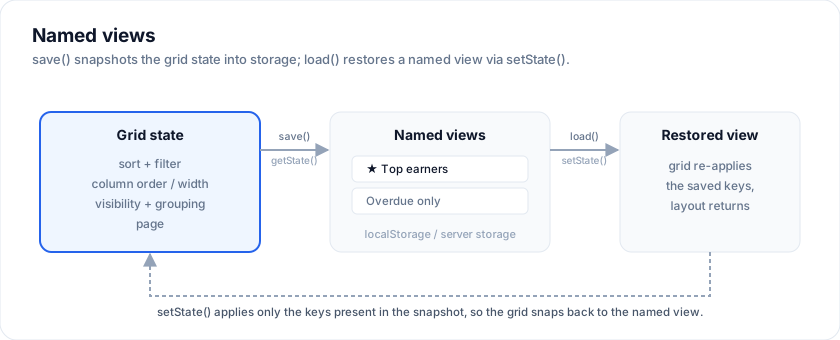
A "view" is a saved snapshot of the grid's state - sort, filters, column
order/width/visibility, page, grouping. Named views let a user save the layout
they like and switch between them. SvGrid ships this as a small manager over
the grid's getState() / setState(), with pluggable storage.
Open the live example: Named views (Rows & Cells)
<script lang="ts">
  import { SvGrid, createNamedViews, localStorageViews, type SvGridApi } from '@svgrid/grid'

  let views: ReturnType<typeof createNamedViews> | null = null

  function onApiReady(api: SvGridApi<F, Row>) {
    views = createNamedViews(api, { storage: localStorageViews('my-grid-views') })
  }
</script>

<SvGrid {data} {columns} {features} onApiReady={onApiReady} />

<button onclick={() => views?.save('Top earners')}>Save</button>
<button onclick={() => views?.load('Top earners')}>Restore</button>
The manager API
createNamedViews(api, { storage }) returns:
| Method | Does |
|---|---|
list() |
All saved views, oldest first. |
save(name) |
Capture the current state under name (overwrites a dup). |
load(name) |
Apply a saved view. Returns false if unknown. |
remove(name) |
Delete a view. Returns false if unknown. |
rename(a, b) |
Rename, unless b already exists. |
has(name) |
Whether a view exists. |
It's pure and synchronous - all persistence goes through the storage adapter.
Storage adapters
localStorageViews(key)- persists per browser. SSR-safe (no-ops whenlocalStorageis unavailable).memoryViews()- in-memory only (the default if you pass no storage).- Custom - implement
ViewStorage(read()/write(views)) to sync views to a server or a per-user account:
const serverStorage: ViewStorage = {
  read: () => cachedViews,
  write: (views) => { cachedViews = views; fetch('/api/views', { method: 'PUT', body: JSON.stringify(views) }) },
}
createNamedViews(api, { storage: serverStorage })
Notes
- A view stores whatever
api.getState()returns; restoring callsapi.setState(view.state), which applies only the keys present. - This is the building block; the demo wires a simple save-box + chips UI on top, but the manager is headless so you can render views however you like.
See the live Named views demo.
Save a view, change things, switch back
api.getState() hands you the whole view - sort, filters, column widths,
order, pinning, page - as one serializable object, and api.setState() puts a
snapshot back. A named view is nothing more than a record of those. Sort a
column, drag one wider, save it, disturb everything, then pick it from the list.
<script lang="ts">
  import { SvGrid, type GridColumns, type SvGridApi, type SvGridViewState } from '@svgrid/grid'

  type Person = { id: number; name: string; city: string; salary: number }

  const people: Person[] = [
    { id: 1, name: 'Ada Lovelace',   city: 'London',   salary: 142000 },
    { id: 2, name: 'Grace Hopper',   city: 'New York', salary: 168000 },
    { id: 3, name: 'Linus Torvalds', city: 'Portland', salary: 155000 },
    { id: 4, name: 'Radia Perlman',  city: 'Seattle',  salary: 161000 },
  ]

  const columns: GridColumns<Person> = [
    { field: 'name',   header: 'Name',   width: 180 },
    { field: 'city',   header: 'City',   width: 150 },
    { field: 'salary', header: 'Salary', width: 140,
      format: { type: 'currency', currency: 'USD' } },
  ]

  let api = $state<SvGridApi<{}, Person> | null>(null)
  let views = $state<Record<string, SvGridViewState>>({})
  let current = $state('')

  function save() {
    const snapshot = api?.getState()
    if (!snapshot) return
    const name = 'View ' + (Object.keys(views).length + 1)
    views = { ...views, [name]: snapshot }
    current = name
  }

  function restore(name: string) {
    const view = views[name]
    if (!view) return
    api?.setState(view)
    current = name
  }
</script>

<div>
  <button type="button" onclick={save}>Save this view</button>
  <select value={current} onchange={(e) => restore(e.currentTarget.value)}>
    <option value="">(pick a view)</option>
    {#each Object.keys(views) as name}
      <option value={name}>{name}</option>
    {/each}
  </select>
</div>

<SvGrid
  data={people}
  {columns}
  sortable
  filterable
  filterMode="row"

  onApiReady={(next) => (api = next)}
/>
Views survive a reload when you put them somewhere
The only difference between a view that disappears on refresh and one that
does not is where the object lives. The snapshot is plain JSON, so localStorage
is the cheapest place; a row keyed by user is the one you actually want once
views are shared. setState takes a partial, which is why restoring an old
snapshot that predates a column still works - the keys it does not carry are
simply left alone.
<script lang="ts">
  import { SvGrid, type GridColumns, type SvGridApi, type SvGridViewState } from '@svgrid/grid'

  type Person = { id: number; name: string; city: string }

  const people: Person[] = [
    { id: 1, name: 'Ada Lovelace',   city: 'London' },
    { id: 2, name: 'Grace Hopper',   city: 'New York' },
    { id: 3, name: 'Linus Torvalds', city: 'Portland' },
  ]

  const KEY = 'svgrid-docs-named-view'

  const columns: GridColumns<Person> = [
    { field: 'name', header: 'Name', width: 190 },
    { field: 'city', header: 'City', width: 160 },
  ]

  let api = $state<SvGridApi<{}, Person> | null>(null)
  let status = $state('nothing saved yet')

  function save() {
    const snapshot = api?.getState()
    if (!snapshot) return
    localStorage.setItem(KEY, JSON.stringify(snapshot))
    status = 'saved (sorting: ' + JSON.stringify(snapshot.sorting) + ')'
  }

  function load() {
    const raw = localStorage.getItem(KEY)
    if (!raw) {
      status = 'nothing saved yet'
      return
    }
    // A partial is fine: only the keys present are applied.
    api?.setState(JSON.parse(raw) as Partial<SvGridViewState>)
    status = 'restored'
  }
</script>

<div>
  <button type="button" onclick={save}>Save</button>
  <button type="button" onclick={load}>Load</button>
  <span>{status}</span>
</div>

<SvGrid data={people} {columns} sortable onApiReady={(next) => (api = next)} />
Related articles
- Saved Views - Persist Grid Layout and Filters - Give users named, switchable snapshots of column order, sorting, filters, and grouping - persisted to localStorage or a server adapter - using SvGrid's createNamedViews API.