State maintenance
The pattern for snapshotting every dimension the user can change about the grid - sort, filters, group-by, column visibility + widths, pagination, expansion, selection, active cell - into a single JSON bag, and rehydrating the grid from one. Builds on Saved views but adds undo / redo, named bookmarks, JSON import / export, and debounced auto-save.
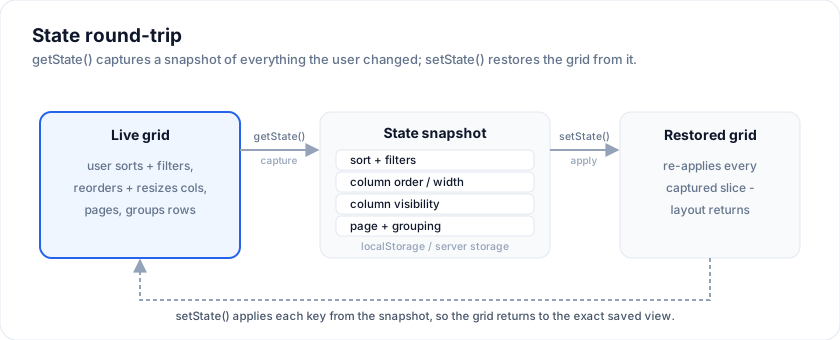
Live reference - the demo wires all five surfaces:
Open the live example: State maintenance (Rows & Cells)
Why a "snapshot" instead of saved views
The two patterns differ in intent:
- Saved views is the end-user flow: "save the layout I'm looking at; load it again next week."
- This page's snapshot is the mechanism: capture / apply, with undo / redo as a first-class concern.
You'd build saved views on top of snapshots: a saved view is just a
snapshot with a label, persisted server-side.
The snapshot shape
The examples on this page run against these rows:
<script lang="ts">
  import { SvGrid, type GridColumns, type SvGridApi } from '@svgrid/grid'

  type Person = {
    id: number
    name: string
    department: string
    city: string
    age: number
    salary: number
  }

  const people: Person[] = [
    { id: 1, name: 'Ada Lovelace',   department: 'Engineering', city: 'London',   age: 36, salary: 142000 },
    { id: 2, name: 'Grace Hopper',   department: 'Engineering', city: 'New York', age: 45, salary: 168000 },
    { id: 3, name: 'Linus Torvalds', department: 'Platform',    city: 'Portland', age: 54, salary: 155000 },
    { id: 4, name: 'Radia Perlman',  department: 'Networking',  city: 'Seattle',  age: 49, salary: 161000 },
    { id: 5, name: 'Barbara Liskov', department: 'Platform',    city: 'Boston',   age: 52, salary: 172000 },
  ]

  const columns: GridColumns<Person> = [
    { field: 'name',       header: 'Name',       width: 190 },
    { field: 'department', header: 'Department', width: 150 },
    { field: 'city',       header: 'City',       width: 130 },
    { field: 'age',        header: 'Age',        width: 80 },
    { field: 'salary',     header: 'Salary',     width: 130, format: { type: 'currency', currency: 'USD' } },
  ]
</script>
export type GridStateSnapshot = {
  v: 1                                                 // schema version
  capturedAt: number                                   // Date.now() at capture
  label?: string                                       // free-form

  sorting: Array<{ columnId: string; desc: boolean }>
  filters: Record<string, { operator: string; value: string }>
  columnVisibility: Record<string, boolean>            // missing key = visible
  columnWidths: Record<string, number>                 // missing key = default

  extras: Record<string, unknown>                      // demo-defined slices
}
The extras bucket is the escape hatch: the engine doesn't track
page index, row selection, expansion, etc. internally, so the demo
passes them in via extras at capture time and reads them back at
apply time.
Capture
import { captureGridState } from '$lib/state-snapshot'

function snapshotNow(label?: string): GridStateSnapshot {
  return captureGridState(api, {
    label,
    extras: {
      // These live in your $state, not on the grid - mirror them in.
      sorting,
      columnVisibility,
      columnWidths,
      // Anything else the demo cares about:
      page,
      rowSelection,
      expanded,
    },
  })
}
Calling snapshotNow() is cheap (microseconds); call it whenever a
meaningful change happens.
Apply
import { applyGridState } from '$lib/state-snapshot'

function applySnapshot(snap: GridStateSnapshot) {
  applyGridState(api, snap, {
    onReset: () => {
      // Wipe any consumer-owned state that doesn't appear in the
      // snapshot - prevents stale entries from surviving the apply.
    },
    onSlots: (s) => {
      // The wrapper-owned slots come back through this callback.
      sorting = s.sorting
      columnVisibility = s.columnVisibility
      columnWidths = s.columnWidths
    },
    onExtras: (extras) => {
      // Demo-specific slices.
      page = (extras.page as number) ?? 0
      rowSelection = (extras.rowSelection as RowSelectionState) ?? {}
      expanded = (extras.expanded as ExpandedState) ?? {}
    },
  })
}
The helper itself calls api.clearAllFilters(), api.clearSort(),
the relevant api.setFilter / api.setSort / api.setColumnVisible
methods, and your onSlots / onExtras callbacks for everything that
lives in component state.
Undo / redo
A bounded ring of snapshots plus a cursor:
const HISTORY_CAP = 30
let history = $state<GridStateSnapshot[]>([])
let historyIndex = $state<number>(-1)

function pushHistory(snap: GridStateSnapshot) {
  // Trim the redo tail when a new action happens after an undo.
  const trimmed = history.slice(0, historyIndex + 1)
  const next = [...trimmed, snap]
  history = next.slice(Math.max(0, next.length - HISTORY_CAP))
  historyIndex = history.length - 1
}

function undo() { if (historyIndex > 0) { historyIndex -= 1; applySnapshot(history[historyIndex]!) } }
function redo() { if (historyIndex < history.length - 1) { historyIndex += 1; applySnapshot(history[historyIndex]!) } }
Trigger pushHistory(snapshotNow(label)) from each grid event that
should be undoable - onSortingChange, onFiltersChange,
onRowSelectionChange, onCellValueChange. Column-visibility,
width, and pinning callbacks aren't shipped yet (see
Missing features); for those, push history
manually when the user clicks "Save view" or similar.
Named bookmarks
Bookmarks are snapshots that don't get pruned by the ring. Store them separately:
let bookmarks = $state<GridStateSnapshot[]>([])

function captureBookmark() {
  const label = prompt('Bookmark name:', `View ${bookmarks.length + 1}`)
  if (!label) return
  bookmarks = [...bookmarks, snapshotNow(label)]
}

function restoreBookmark(bm: GridStateSnapshot) {
  applySnapshot(bm)
}
Persisting bookmarks - localStorage for per-browser, your server for cross-device:
function saveBookmarks() {
  localStorage.setItem('myapp:bookmarks:v1', JSON.stringify(bookmarks))
}
Auto-save
For "reload the page and come back to where you were", debounce a localStorage write on every state change:
import { autoSaveSnapshot, loadAutoSavedSnapshot } from '$lib/state-snapshot'

const STORAGE_KEY = 'myapp:grid:state:v1'
let autoSaveOn = $state(false)

// Wire to every grid event:
function onAnyChange() {
  if (autoSaveOn) autoSaveSnapshot(STORAGE_KEY, snapshotNow('auto'))
}

// On mount, rehydrate:
$effect(() => {
  if (!api) return
  const saved = loadAutoSavedSnapshot(STORAGE_KEY)
  if (saved) applySnapshot(saved)
})
The helper debounces writes at 250 ms so a flurry of resize events doesn't hit storage 60×/s.
JSON import / export
A snapshot is plain JSON - serialise to share, restore from paste:
import { snapshotToJson, snapshotFromJson } from '$lib/state-snapshot'

function copyState() {
  const text = snapshotToJson(snapshotNow('export'))
  navigator.clipboard.writeText(text)
}

function applyFromText(text: string) {
  try {
    const snap = snapshotFromJson(text)
    applySnapshot(snap)
  } catch (e) {
    // Show the error in your UI.
  }
}
This is the easiest "send a teammate the exact view I'm looking at" flow - paste into Slack, click the link in a ticket, etc.
Forward-compatible migrations
When the snapshot shape changes (new field, renamed field), bump v
and add a migration arm. The migrateStateSnapshot helper is the
single switch:
export function migrateStateSnapshot(input: Partial<GridStateSnapshot>): GridStateSnapshot {
  if (!input || typeof input !== 'object') return emptySnapshot()
  if (input.v === 1) return { ...emptySnapshot(), ...input } as GridStateSnapshot
  if (input.v === 2) {
    // New "extras.groupBy" -> top-level "groupBy".
    return { ...emptySnapshot(), ...input, groupBy: input.extras?.groupBy ?? [] }
  }
  // Unknown version - start fresh rather than crash.
  return emptySnapshot()
}
Old saved snapshots keep working; new fields are filled with defaults.
Composing with shared-config
A common production setup: snapshots stay per-user in localStorage,
named bookmarks live server-side under the user's account, and
team views live on a shared endpoint. The shape doesn't care
where each kind lives - the helper produces a GridStateSnapshot
that any storage backend accepts.
What NOT to capture
- Cell content (
rows). The snapshot describes the grid's view of your data, not the data itself. Storing rows in a snapshot bloats it and races with your real data source. - Volatile UI state. Active cell + focus restoration on load is jarring. Capture them by all means, but consider not applying them.
- Editor session state. "I was mid-edit on a cell" doesn't survive a reload cleanly.
More examples
State maintenance (auto)
CRM contacts grid with editable cells. attachAutoSavedView reserves one slot inside createNamedViews + localStorageViews and mirrors the grid view to it: sort / filter / hide / reorder / resize a column, reload the tab, the layout is right where you left it. Same store is reusable for additional named layouts.
Open the live example: State maintenance (auto) (Rows & Cells)
Try it
Sort, filter and page state are reported through callbacks, which is what lets you persist them. Change the grid below and the snapshot underneath is what you would store.
<script lang="ts">
  let sorting = $state<Array<{ id: string; desc: boolean }>>([])
  let page = $state({ pageIndex: 0, pageSize: 3 })

  const snapshot = $derived(JSON.stringify({ sorting, ...page }))
</script>

<SvGrid
  data={people}
  {columns}
  sortable
  pageable
  pageSize={3}
  onSortingChange={(s) => (sorting = s)}
  onPaginationChange={(p) => (page = p)}
/>

<pre>{snapshot}</pre>
See also
- Saved views - the end-user flow built on snapshots.
- Columns hierarchy - the tree state is
another slice to capture in
extras. - Architecture - which slices live where.
- Demo #55 State maintenance
- the reference implementation.
Live examples
- State maintenance - Capture / restore the grid's sort, filters, visibility, widths, page, selection. Undo / redo history, named bookmarks, JSON import/export, debounced localStorage auto-save.
- State maintenance (auto) - CRM contacts grid with editable cells. attachAutoSavedView reserves one slot inside createNamedViews + localStorageViews and mirrors the grid view to it: sort / filter / hide / reorder / resize a column, reload the tab, the layout is right where you left it. Same store is reusable for additional named layouts.
Related articles
- $state Deep Dive for Data-Heavy Svelte Apps - A working engineer's guide to $state, $state.raw, and $state.snapshot - when each one is the right tool, and the exact failure modes when you pick the wrong one.
- Runes vs Stores in Svelte 5 - When to Use Which - Svelte 5 runes and stores are not competitors - they solve different problems. Here is a concrete breakdown of when $state wins, when writable still earns its place, and how to mix both without subtle bugs.
- Empty, Loading, and Error States for a Svelte Data Grid - How to handle the three non-data states in a Svelte grid - empty (with two subtypes), skeleton loading that does not flash, and recoverable errors that keep existing rows visible.