Server tree data (load on demand)
When a hierarchy is too large to ship up front - a file system, an org chart with tens of thousands of people, a geographic drill-down - you do not want to fetch every node before the grid renders. The answer is to seed only the roots, then fetch each node's children the first time the user expands it.
This page covers self-referential tree data (a node's children are more
rows of the same shape, found by parentId). That is still a pattern you
assemble over the grid's data prop: you keep a flat allNodes array plus an
expanded map, derive the visible rows, and run an async toggle(id) that
fetches, appends, and caches. If that flat-tree derivation is new to you, read
Tree data first - this page is its lazy-loading
extension.
First-class tree mode
createServerGroupModel handles self-referential trees too - turn on
treeData and give it getRowId (the node id) and hasChildren (whether a
node can expand). It owns the lazy expand/collapse, per-node caching, and
race-safety; each expand calls getRows with groupKeys set to the path of
node ids, and you return that node's direct children:
<script lang="ts">
  import { SvGrid, createServerGroupModel, serverGroupRows, SvGroupCell, renderComponent } from '@svgrid/grid'

  const ctl = createServerGroupModel<Node>(source, {
    treeData: true,
    getRowId: (n) => n.id,
    hasChildren: (n) => n.expandable,
    onChange: (s) => (view = s),
  })
  ctl.refresh() // load the roots (getRows with groupKeys: [])

  const rows = $derived(serverGroupRows(view))
  const columns = [
    { field: 'name', header: 'Name',
      cell: (ctx) => renderComponent(SvGroupCell, { row: ctx.row.original, onToggle: ctl.toggleGroup, leafField: 'name' }) },
  ]
</script>

<SvGrid data={rows} {columns} />
The source's getRows returns a node's children for the requested path; a row
is expandable when hasChildren returns true. See
Server grouping for the full contract and the aggregate
case. The rest of this page is the roll-your-own alternative, for when you
want to own the flat-row derivation yourself.
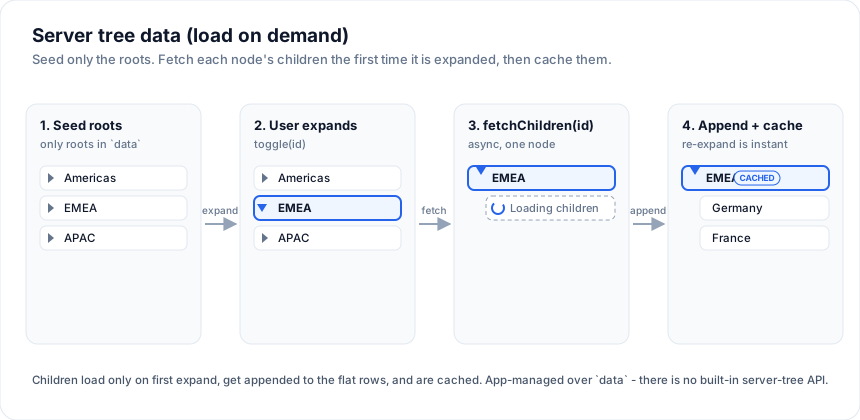
The moving parts
Four pieces of state, and one async action:
allNodes- a flat array of every node loaded so far. It starts as just the roots and grows as the user expands branches.expanded- aRecord<string, boolean>of which node ids are open.- each node carries a
loadState: 'unloaded' | 'loading' | 'loaded'and anexpandableflag, so you know whether a fetch is still needed. visibleRows- derived: a depth-first walk from the roots that stops descending at collapsed nodes and injects a placeholder row while a node is loading.toggle(id)- the async action that expands/collapses and fetches.
Seeding the roots
Load only the top level into allNodes. Every seeded node is marked
unloaded so the first expand triggers a fetch:
type LoadState = 'unloaded' | 'loading' | 'loaded'

type Node = {
  id: string
  parentId: string | null
  depth: number
  name: string
  expandable: boolean
  loadState: LoadState
  childIds: string[]
}

let allNodes = $state<Node[]>(await fetchChildren('root')) // roots only
let expanded = $state<Record<string, boolean>>({})
fetchChildren(id) is your function - a fetch() to your API, a SQL
call in a SvelteKit endpoint, whatever. It returns that node's direct
children, each seeded unloaded with an empty childIds.
Toggle: fetch on first expand, cache after
toggle flips the expanded flag, and - only when opening a node that has
not been loaded yet - sets loadState: 'loading', awaits
fetchChildren, then marks it 'loaded' and appends the children to the
flat array. A node already 'loaded' never fetches again, so re-expand
is instant:
async function toggle(id: string) {
  const isOpen = !!expanded[id]
  expanded = { ...expanded, [id]: !isOpen }
  if (isOpen) return // collapsing - nothing to fetch

  const node = allNodes.find((n) => n.id === id)
  if (!node || !node.expandable || node.loadState === 'loaded') return // cached

  allNodes = allNodes.map((n) => (n.id === id ? { ...n, loadState: 'loading' } : n))

  try {
    const children = await fetchChildren(id)
    allNodes = allNodes
      .map((n) =>
        n.id === id
          ? { ...n, loadState: 'loaded', childIds: children.map((c) => c.id) }
          : n,
      )
      .concat(children)
  } catch (err) {
    // roll back so the user can retry
    allNodes = allNodes.map((n) => (n.id === id ? { ...n, loadState: 'unloaded' } : n))
    console.error('fetchChildren failed', err)
  }
}
Two things worth calling out:
- Immutable updates. Each step reassigns
allNodes/expandedso Svelte's$statereactivity fires. Never mutate a node in place. - The
catchrollsloadStateback to'unloaded', so a failed request leaves the node collapsible and retryable instead of stuck on a spinner.
The visible rows and the loading placeholder
Derive what the grid renders. Walk from the roots; at an expanded node
that is still loading, push a synthetic placeholder row instead of
descending:
type ViewRow = Node | { id: string; parentId: string; depth: number; placeholder: true }

const visibleRows = $derived.by(() => {
  const out: ViewRow[] = []
  const byId = new Map(allNodes.map((n) => [n.id, n]))
  function walk(id: string) {
    const node = byId.get(id)
    if (!node) return
    out.push(node)
    if (!expanded[id]) return
    if (node.loadState === 'loading') {
      out.push({ id: `${id}__loading`, parentId: id, depth: node.depth + 1, placeholder: true })
      return
    }
    for (const cid of node.childIds) walk(cid)
  }
  for (const root of allNodes.filter((n) => n.parentId === null)) walk(root.id)
  return out
})
Hand visibleRows to <SvGrid data={visibleRows} ...> like any other
dataset. Render the placeholder as a spinner row inside the name-column
cell snippet (see Tree data for the chevron +
indentation cell), keying off a placeholder type guard.
Keyboard navigation
Give the tree column standard tree-grid keys. Intercept at the window level with a capture listener so your handler runs before the grid's own arrow-key cell mover, and only act when the active cell is on the name column:
let activeCol = $state('')
let activeRowIndex = $state(0)

$effect(() => {
  function onKey(e: KeyboardEvent) {
    if (activeCol !== 'name') return
    const row = visibleRows[activeRowIndex]
    if (!row || 'placeholder' in row || !row.expandable) return
    const isOpen = !!expanded[row.id]
    if (e.key === 'ArrowRight' && !isOpen) { e.preventDefault(); void toggle(row.id) }
    else if (e.key === 'ArrowLeft' && isOpen) { e.preventDefault(); void toggle(row.id) }
    else if (e.key === 'Enter' || e.key === ' ') { e.preventDefault(); void toggle(row.id) }
  }
  window.addEventListener('keydown', onKey, true)
  return () => window.removeEventListener('keydown', onKey, true)
})
- Right expands a collapsed node (firing the fetch on first open).
- Left collapses an expanded one.
- Enter / Space toggle.
Track the active cell by wiring onActiveCellChange on the grid:
<SvGrid
  data={visibleRows}
  {columns}
  onActiveCellChange={(args) => { activeCol = args.columnId; activeRowIndex = args.rowIndex }}
/>
Regular arrow keys still move the active cell on non-tree columns - the tree keys only fire when focus is on the name column.
Why this stays a pattern
Because the tree lives entirely in your derived state, everything else -
sorting, custom cells, roll-up totals, styling - is the same code you
would write for a fully-seeded tree. The only difference is that
allNodes grows over time. There is no server-tree mode to configure and
no contract to satisfy; you own the fetch, the cache, and the shape of
the rows.
See also
- Server-Side Row Model - the page-based datasource contract for flat data that lives on the server.
- Server grouping - the sibling pattern: the backend returns pre-aggregated group rows and expanding one drills into its detail rows.
- Tree data - the flat-list + derived-visible-rows foundation this page extends, including the chevron cell and roll-ups.