Server grouping
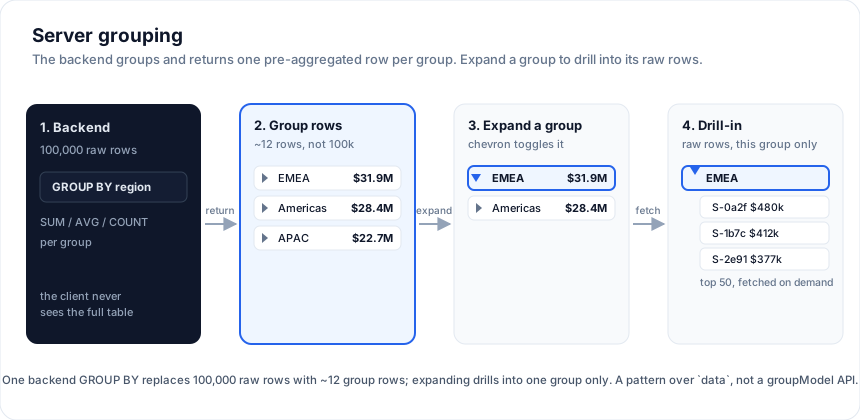
Grouping a hundred thousand rows in the browser means shipping all hundred
thousand rows first. Server grouping flips that: the backend runs the
GROUP BY, and the grid receives one pre-aggregated row per group - a key
plus its subtotals. Expanding a group then lazily drills into the next level (or
the raw rows) for that group only, so the network never carries the full
table.
This is first-class in SvGrid: grouping flows through the same
ServerDataSource.getRows contract as paging, sorting, and filtering.
The request carries groupBy (the columns grouped on) and groupKeys (the path
of the group being expanded); createServerGroupModel owns the group tree -
lazy fetch per level, caching, race-safety, expand/collapse - and hands you a
flat list of display rows to render.
The contract
One getRows. When groupKeys.length < groupBy.length the server returns
group rows (one per distinct key at that level, carrying the group key and
its aggregates); when they are equal it returns the leaf rows under that
path.
async function getRows(req) {
  const level = req.groupKeys.length
  if (level < req.groupBy.length) {
    // GROUP row level: GROUP BY the column at this level, within groupKeys.
    const col = req.groupBy[level]                       // e.g. 'country', then 'city'
    // SELECT country AS key, SUM(amount) amount, COUNT(*) n
    //   FROM sales WHERE <groupKeys path> GROUP BY country
    return { rows: groupRows, rowCount: groupRows.length }
  }
  // LEAF level: the raw rows under the fully-specified path.
  // SELECT * FROM sales WHERE country = $1 AND city = $2 LIMIT ...
  return { rows: leafRows, rowCount: total }
}
Each group row is a plain object carrying the group column's value (under that column's field) and the aggregate values (under each aggregation column) - the controller reads them straight off the row.
Wiring the model
import { createServerGroupModel, type ServerGroupState } from '@svgrid/grid'

let view = $state<ServerGroupState<Sale>>()
const ctl = createServerGroupModel<Sale>(source, {
  groupBy: ['country', 'city'],                 // group two levels deep
  aggregations: [{ col: 'amount', fn: 'sum' }], // roll up per group
  onChange: (s) => (view = s),
})
ctl.refresh() // load the top level
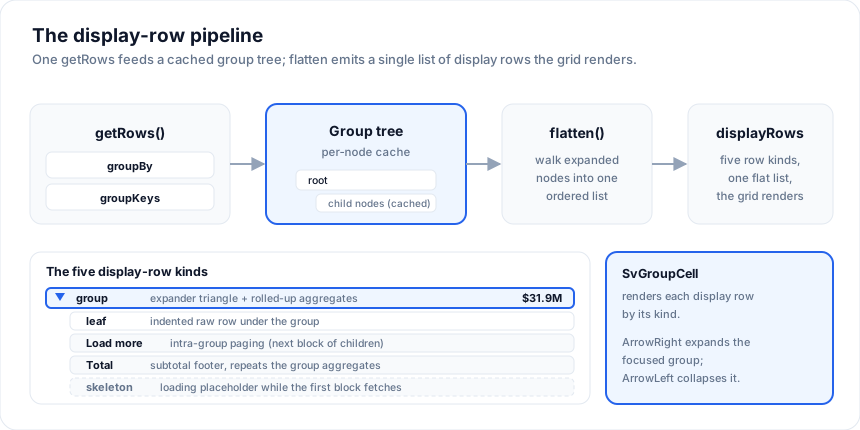
view.displayRows is the flattened tree: top-level groups, with each expanded
group's children spliced in beneath it. Every group row carries level (for
indentation), expanded, loading, key, and aggregates.
Rendering the display rows
Three built-ins do the work, so you write no cell markup. serverGroupRows
maps the display rows to grid rows (spreading each row's data, so a value column
shows the subtotal on a group row and the cell value on a leaf); the shipped
SvGroupCell draws the expander + indentation; and serverGroupNav(ctl) is one
handler that drives both the cell clicks and the grid's keyboard:
<script lang="ts">
  import { SvGrid, serverGroupRows, serverGroupNav, SvGroupCell, renderComponent } from '@svgrid/grid'

  const nav = serverGroupNav(ctl)
  const rows = $derived(serverGroupRows(view))
  const columns = [
    { field: 'country', header: 'Group', width: 280,
      cell: (ctx) => renderComponent(SvGroupCell, {
        row: ctx.row.original, onToggle: nav.onToggle, leafField: 'name',
      }) },
    { field: 'amount', header: 'Amount', align: 'right',
      format: { type: 'number', options: { style: 'currency', currency: 'USD' } } },
  ]
</script>

<SvGrid data={rows} {columns} serverGroup={nav} />
SvGroupCell renders the group key with an expander (indented by depth) for group
rows and the leafField value for leaves. Want full control? Every grid row
carries a __group marker (the ServerDisplayRow), so you can skip SvGroupCell
and render your own cell from it.
Keyboard and accessibility
serverGroup={nav} makes the grid handle tree navigation itself - built in, no
app key handling:
- ArrowRight expands the focused group row; ArrowLeft collapses it.
- The grid takes the
treegridrole and setsaria-level+aria-expandedon each row, so screen readers announce the depth and expanded state.
It works for tree mode the same way.
Load more within a group
By default the controller fetches up to pageSize (200) children per group in one
call. When a group has more, serverGroupRows emits a load more row at the
end of its loaded children, which SvGroupCell renders as a "Load N more" button;
clicking it (or calling ctl.loadMoreChildren(path)) appends the next block. Set
pageSize to control the block size:
createServerGroupModel(source, { groupBy: ['country'], pageSize: 50, onChange })
While a group's first block is loading, serverGroupRows emits placeholder
skeleton rows (count via skeletonRows, default 3) that SvGroupCell
renders as a shimmer, so an expand never shows an empty gap.
Subtotal footers
Turn on groupFooters and each expanded group gets a Total row after its
children, carrying the group's aggregates again so the value columns show the
subtotal under the detail:
createServerGroupModel(source, { groupBy: ['region', 'country'], aggregations, groupFooters: true, onChange })
A row-group panel (drag to group)
SvRowGroupPanel is a "group by" bar: it shows the current group columns as
chips you can remove or drag to reorder, plus a menu to add one, and it accepts a
column drop (text/sv-column). Wire its onChange to setGroupBy:
<script lang="ts">
  import { SvRowGroupPanel } from '@svgrid/grid'
  const groupCols = [{ id: 'region', label: 'Region' }, { id: 'country', label: 'Country' }]
</script>

<SvRowGroupPanel columns={groupCols} groupBy={view.groupBy} onChange={(g) => ctl.setGroupBy(g)} />
Multi-level grouping is automatic
Set groupBy: ['region', 'industry', 'quarter'] and the controller fetches each
level on demand: the top level returns regions, expanding a region fetches its
industries, expanding an industry fetches its quarters, and expanding a quarter
returns the raw rows. You never configure the levels - each expand is just
another getRows with a longer groupKeys. Change the grouping at runtime with
ctl.setGroupBy([...]); sorting and filtering re-fetch the visible tree via
ctl.setSort / ctl.setFilter.
The win
For a 100,000-row sales table grouped by three dimensions, the top level returns a handful of group rows instead of 100,000 raw rows. The client groups nothing and holds almost nothing. Grouping 100k rows in JS runs in hundreds of milliseconds; asking the server for the pre-grouped result returns a few rows in tens of milliseconds, and the payload shrinks by orders of magnitude.
Without the controller (manual pattern)
If your backend or UI needs something bespoke, you can still assemble grouping by
hand: fetch pre-grouped rows, render them as ordinary rows, and expand each into
a second <SvGrid data={detailRows}> or an expandable detail row
(isDetailRow + renderDetailRow), keeping the expanded group id and its lazily
fetched detail rows in your own state. The tree toggle pattern
is a third option for a single flat, indented list. createServerGroupModel is
the batteries-included version of exactly this.
See also
- Server-Side Row Model - the datasource contract that grouping, paging, sort, and filter all share.
- Server tree data - load-on-demand hierarchies (self-referential trees).
- Tree data - the client-side flat-list + toggle pattern.