Server filtering
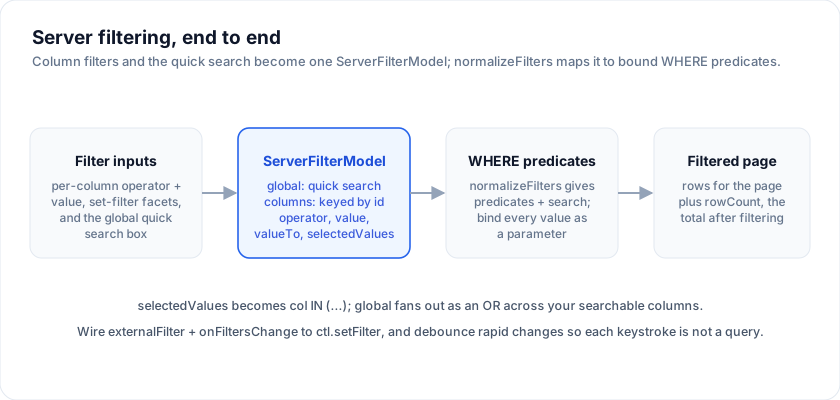
When the data lives on the server, the grid does not filter rows itself. It
records what the user typed and emits a single ServerFilterModel, and your
backend turns that model into a WHERE clause. This page is a deep dive into
that model: its exact shape, the operator set, set-filter faceting, the global
quick search, and how to map all of it to a parameterized query with the
normalizeFilters helper from @svgrid/enterprise.
It builds on the Server-Side Row Model, where
createServerDataSource owns the request lifecycle.
The ServerFilterModel shape
Every getRows(request) call receives the current filter as
request.filterModel. It has two parts: a global quick-search string and a
columns map keyed by column id.
type ServerFilterModel = {
  global?: string                 // the quick-filter search box
  columns?: Record<string, {      // keyed by column id
    operator: string              // equals | contains | startsWith | greaterThan | lessThan | between | isBlank
    value: string
    valueTo?: string              // second bound, for `between`
    selectedValues?: string[]     // set-filter (facet checklist) selection
  }>
}
A populated model:
{
  "global": "berlin",
  "columns": {
    "status":  { "operator": "equals",   "value": "active" },
    "age":     { "operator": "between",  "value": "18", "valueTo": "65" },
    "country": { "operator": "contains", "value": "", "selectedValues": ["DE", "FR"] }
  }
}
Each entry may carry an operator-style filter (value plus, for between, a
valueTo) or a set-filter selection (selectedValues), or both. When
selectedValues is present it wins - the checklist selection takes precedence
over the operator value.
The operator set
operator is one of seven values. Map each to a predicate:
operator |
SQL |
|---|---|
equals |
col = $value |
contains |
`col ILIKE '%' |
startsWith |
`col ILIKE $value |
greaterThan |
col > $value |
lessThan |
col < $value |
between |
col BETWEEN $value AND $valueTo |
isBlank |
col IS NULL OR col = '' |
Any unrecognized operator is treated as contains - the safe, permissive
default.
Set filters and faceting
A set filter (facet checklist) is expressed with selectedValues: the list of
values the user ticked. It maps to an IN (...) predicate:
col IN ($v0, $v1, $v2) -- one bound parameter per selected value
Because selectedValues takes precedence over operator / value, a column
that has both a checklist selection and a typed value filters by the checklist.
Build the facet list itself with a separate SELECT DISTINCT col (or a
pre-computed facet count) query - the model carries only the selection, not the
available options.
The global quick filter
global is the free-text quick-search box. It is not scoped to one column: it
is an OR across your searchable columns. You decide which columns are
searchable.
-- global = 'berlin'
(name ILIKE '%' || $q || '%' OR city ILIKE '%' || $q || '%' OR country ILIKE '%' || $q || '%')
Combine the global OR group with the per-column predicates using AND: a row
must match the quick search and every active column filter.
Mapping to a parameterized WHERE
The one rule that matters: never string-concatenate user values into SQL.
Bind every value as a parameter so a value like '; DROP TABLE ... is data, not
code. The IN (...) list gets one placeholder per selected value; between
gets two.
You do not have to hand-write the operator switch. @svgrid/enterprise ships
normalizeFilters(model), which flattens the model into one uniform list of
predicates plus the trimmed search term - the same helper the built-in REST and
SQL sources use.
import { normalizeFilters } from '@svgrid/enterprise'

const { predicates, search } = normalizeFilters(filterModel)
// predicates: Array of backend-neutral predicates over one column each -
//   { column, op: 'in',       values }          // set filter
//   { column, op: 'isNull' }                     // isBlank
//   { column, op: 'contains' | 'startsWith' | 'eq' | 'gt' | 'lt', value }
//   { column, op: 'between',  value, valueTo }
// search: the trimmed global term (or undefined)
normalizeFilters also does the tidying you would otherwise repeat in every
backend: it drops empty operator filters, trims values, prefers selectedValues
when present, and for between fills a missing bound from the other. Turning
that neutral list into bound SQL is then a small, safe switch:
function buildWhere(filterModel, searchable) {
  const { predicates, search } = normalizeFilters(filterModel)
  const clauses = []
  const params = []

  for (const p of predicates) {
    switch (p.op) {
      case 'in': {
        // one bound placeholder per selected value
        const start = params.length
        p.values.forEach((v) => params.push(v))
        const list = p.values.map((_, i) => `${start + i + 1}`).join(', ')
        clauses.push(`${p.column} IN (${list})`)
        break
      }
      case 'isNull':     clauses.push(`(${p.column} IS NULL OR ${p.column} = '')`); break
      case 'contains':   clauses.push(`${p.column} ILIKE '%' || ${params.push(p.value)} || '%'`); break
      case 'startsWith': clauses.push(`${p.column} ILIKE ${params.push(p.value)} || '%'`); break
      case 'eq':         clauses.push(`${p.column} = ${params.push(p.value)}`); break
      case 'gt':         clauses.push(`${p.column} > ${params.push(p.value)}`); break
      case 'lt':         clauses.push(`${p.column} < ${params.push(p.value)}`); break
      case 'between':    clauses.push(`${p.column} BETWEEN ${params.push(p.value)} AND ${params.push(p.valueTo)}`); break
    }
  }

  if (search) {
    const p = params.push(search)
    const or = searchable.map((c) => `${c} ILIKE '%' || ${p} || '%'`).join(' OR ')
    clauses.push(`(${or})`)
  }

  return { where: clauses.length ? 'WHERE ' + clauses.join(' AND ') : '', params }
}
Every value goes through params.push; nothing user-supplied is interpolated
into the SQL text.
Wiring the grid to the controller
Run the grid with externalFilter so it emits intent instead of filtering
locally, and forward the change to ctl.setFilter. Debounce the rapid changes -
each keystroke should not become its own round trip.
<script lang="ts">
  import { SvGrid } from '@svgrid/grid'
  import { createServerDataSource, type ServerFilterModel } from '@svgrid/grid'

  let view = $state({ rows: [], loading: false, total: 0 })
  const ctl = createServerDataSource(source, {
    pageSize: 50,
    onChange: (s) => (view = s),
  })
  ctl.refresh()

  // Debounce so typing in the quick search does not fire a query per keystroke.
  let timer: ReturnType<typeof setTimeout>
  function applyFilter(model: ServerFilterModel) {
    clearTimeout(timer)
    timer = setTimeout(() => ctl.setFilter(model), 250)
  }

  // Adapt the grid's filter change into a ServerFilterModel.
  function onFiltersChange(f: { global?: string; columns?: any }) {
    applyFilter({ global: f.global, columns: toColumnModel(f.columns) })
  }
</script>

<SvGrid
  data={view.rows}
  {columns} {features}
  filterable
  externalFilter
  loading={view.loading}
  pageable={false}
  {onFiltersChange}
/>
setFilter resets to page 0 and re-fetches, so a new filter always shows its
first page of matches. The controller's monotonic request id means a slow
response for an old filter can never land after a newer one.
Index the columns you filter
The model pushes filtering to the database, so the database has to be ready for
it. Add an index on each column you filter or sort by. contains
(ILIKE '%x%') cannot use a plain B-tree index - reach for a trigram
(pg_trgm) index or a full-text column for large tables, and prefer
startsWith or equals where the UX allows, since those are index-friendly.
Set-filter values from the server
A column's filter checklist normally lists the distinct values found in the rows
the grid has loaded - but in server mode that is only the current page, so values
that live on other pages never appear. Pass serverFilterValues and the grid
fetches the full distinct list from your backend the first time a column's filter
menu opens (cached per column):
<SvGrid
  {columns}
  serverFilterValues={async (columnId) => {
    const res = await fetch(`/api/values?column=${columnId}`) // SELECT DISTINCT col ...
    return res.json() // string[]
  }}
/>
Now the checklist shows every value, not just the ones on screen; selecting them
drives filterModel.columns[col].selectedValues as usual.
See also
- Server-Side Row Model - the datasource contract and request lifecycle.
- Server editing - the write side: create / update / delete with optimistic updates.