Scheduling: automate exports and reminders
Two jobs turn up in almost every data app the moment it goes into daily use: "email me this report every weekday at 17:30" and "remind the desk at 09:00 to reconcile." The reflex is to stand up a backend job runner. But in a long-lived data app - a dashboard that stays open on a wall screen, an ops console a team lives in all day - a schedule is just a timer plus an action you already have: an export or a toast alert.
Scheduling ships in the paid
@svgrid/enterprise
add-on. It supplies the missing middle - a pure cron matcher and a small
client-side runtime that fires your callback when a schedule comes due - and
leaves the action to you. A scheduled report reuses the same
exportCsv / Excel / PDF path as the toolbar button; a scheduled alert reuses
the same toast you already call on save. Nothing new to learn on the action
side, only a trigger.
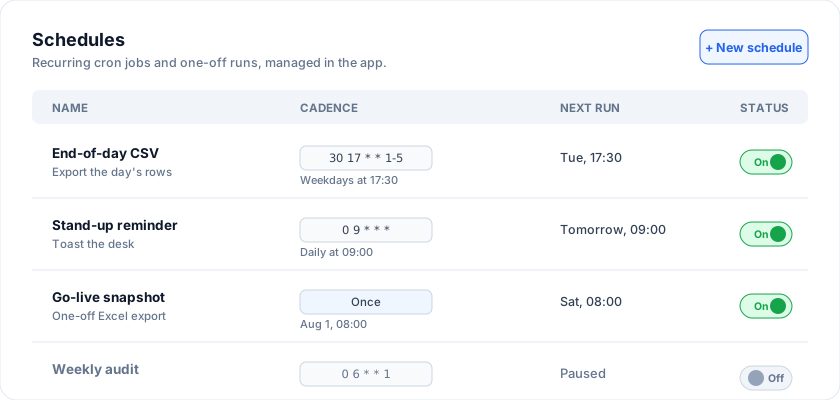
At a glance
| Triggers | Recurring (5-field cron) or one-off (ISO datetime) |
| Actions | Any export (CSV/TSV/JSON free, Excel/PDF/HTML enterprise) or any toast |
| Runtime | Client-side, ticks twice a minute, one fire per schedule per minute |
| Guarantees | One-offs fire exactly once, ever; disabled schedules never fire |
| Testable | Pure matcher with an injectable clock - no wall-clock flakiness |
| Package | @svgrid/enterprise (the trigger); actions use whatever tier you own |
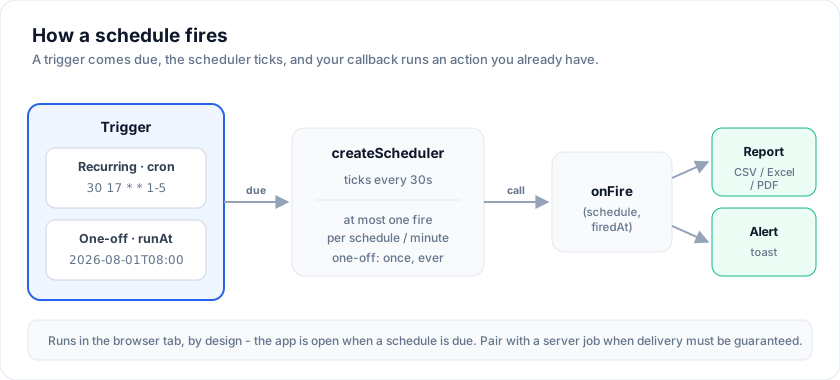
By design, schedules run in the browser tab, so the app has to be open when a schedule is due. That is exactly right for the always-on dashboard case where a server cron is overkill; when you need guaranteed delivery whether or not anyone is watching, pair it with a server job.
How it works
A schedule flows through three stages. A trigger (a cron expression or a
one-off runAt) comes due; the scheduler notices on its next tick and calls
your onFire callback; the callback runs an action - an export or an alert.
The scheduler owns the timing and the de-duplication so your callback stays a
plain function of "which schedule fired."
The Schedule shape
A schedule is plain data - store it in app state, a database row, or a saved view. It fires recurring on a cron expression, or once at an ISO datetime.
import type { Schedule } from '@svgrid/enterprise'

const schedules: Schedule[] = [
  // Recurring: every weekday at 17:30.
  { id: 'eod', name: 'End-of-day CSV', cron: '30 17 * * 1-5' },
  // Recurring: every morning at 09:00.
  { id: 'standup', name: 'Stand-up reminder', cron: '0 9 * * *' },
  // One-off: fire a single time, then never again.
  { id: 'launch', name: 'Go-live snapshot', runAt: '2026-08-01T08:00:00' },
  // Kept but paused - no code change to re-enable.
  { id: 'audit', name: 'Weekly audit', cron: '0 6 * * 1', enabled: false },
]
| Field | Meaning |
|---|---|
id |
Stable id. Keys your onFire switch and dedupes fires. |
name |
Human label for a panel or toast. |
cron |
5-field cron "min hour day-of-month month day-of-week" (recurring). |
runAt |
ISO datetime for a one-off. Takes precedence over cron. |
enabled |
Set false to keep the definition but stop it firing. Default true. |
That enabled flag matters more than it looks: keeping a schedule around while
switched off - no code edit, no deletion - is the difference between a demo and
something a team can actually manage.
Running the scheduler
createScheduler ticks on an interval (twice a minute by default), fires
onFire for every schedule due in the current minute, and guarantees at most
one fire per schedule per minute - and exactly one, ever, for a one-off. Start
it once when your view mounts and stop it on teardown.
<script lang="ts">
  import { createScheduler } from '@svgrid/enterprise'
  import { toast, type SvGridApi } from '@svgrid/grid'

  let api = $state<SvGridApi<typeof features, Row> | null>(null)

  $effect(() => {
    if (!api) return
    const scheduler = createScheduler({
      schedules,
      onFire(schedule) {
        if (schedule.id === 'eod') {
          // Scheduled report: reuse the same export path as the toolbar button.
          api!.exportCsv({ filename: 'end-of-day' })
          toast.success('End-of-day report downloaded')
        } else {
          // Scheduled alert: a plain reminder, no data-change trigger needed.
          toast.info(schedule.name ?? 'Reminder', { duration: 0 })
        }
      },
    })
    scheduler.start()
    return () => scheduler.stop() // cleanup when the effect re-runs / unmounts
  })
</script>

<SvGrid {data} {columns} {features} onApiReady={(a) => (api = a)} />
Returning scheduler.stop from the $effect ties the timer's lifetime to the
component - no leaked interval when the view unmounts.
Scheduled reports
Any export the grid can do on demand, it can do on a schedule - the callback
just calls the export API. CSV / TSV / JSON are free in @svgrid/grid; Excel,
PDF, and styled HTML come from @svgrid/enterprise, reusing the same call site:
onFire(schedule) {
  if (schedule.id !== 'eod') return
  // Free: exportCsv / exportTsv / exportJson on the community grid.
  api.exportCsv({ filename: 'eod', rows: 'all' })
  // Enterprise: the richer formats reuse the same call site.
  // await exportGrid(api, { format: 'xlsx', filename: 'eod' })
}
Because the export defaults to the current view, a scheduled report honors whatever filters and sort the user left in place - you are scheduling the view, not a query frozen at config time.
Scheduled alerts
An alert is just a toast on a timer - a daily stand-up nudge, a market-open
banner, an end-of-shift prompt. Use duration: 0 to make it sticky until
dismissed:
onFire(schedule) {
  if (schedule.id === 'standup') {
    toast.info('Daily stand-up in 5 minutes', { title: schedule.name, duration: 0 })
  }
}
Mount a single <SvToaster /> near your app root so the queue renders. See
SvToaster for the toast API.
Cron reference
Scheduling parses standard 5-field cron: *, lists (1,15), ranges (1-5),
and steps (*/15, 9-17/2). Day-of-week is 0-6 with Sunday 0 (7 also
means Sunday). When both day-of-month and day-of-week are restricted, cron
fires if either matches - the usual "1st of the month or every Monday"
semantics that most hand-rolled matchers get wrong.
 ┌───────── minute        (0-59)
 │ ┌─────── hour          (0-23)
 │ │ ┌───── day-of-month  (1-31)
 │ │ │ ┌─── month         (1-12)
 │ │ │ │ ┌─ day-of-week   (0-6, Sun=0)
 │ │ │ │ │
 30 17 * * 1-5    ->  weekdays at 17:30
| Cron | Fires |
|---|---|
* * * * * |
Every minute |
*/15 * * * * |
Every 15 minutes |
0 * * * * |
Hourly, on the hour |
0 9 * * 1-5 |
Weekdays at 09:00 |
30 17 * * 1-5 |
Weekdays at 17:30 |
0 0 * * * |
Daily at midnight |
0 8 * * 1 |
Monday mornings at 08:00 |
0 6 1 * * |
The 1st of each month at 06:00 |
The same list ships as CRON_PRESETS for populating a picker:
import { CRON_PRESETS } from '@svgrid/enterprise'
// [{ label: 'Weekdays at 17:30', cron: '30 17 * * 1-5' }, ...]
A malformed expression throws at parseCron / createScheduler setup time, not
silently at 3am - so a typo fails loudly where you can see it.
Time zones
Cron matches against the browser's local time (getHours, getDay, and so
on). A 30 17 * * * schedule fires at 17:30 in whatever zone the user's machine
is set to - which is usually what a person means by "half five." If you need a
fixed zone regardless of where the viewer sits (say, exchange hours), convert the
target time into the user's local offset when you build the cron, or gate the
action inside onFire on a zone-aware check.
Missed runs while the tab is closed
The scheduler only fires when a tick lands inside the matching minute. If the tab
is closed at 17:30 and reopened at 17:45, that day's 30 17 run is skipped -
it is not replayed on reopen. This is the honest consequence of client-side
timing, and the reason guaranteed delivery belongs on a server.
When "did we miss one while away?" matters, persist the last time the app was
live and check it on startup with nextRun:
import { nextRun } from '@svgrid/enterprise'

// `lastSeen` (ms) is persisted when the app last ran; start from the minute
// AFTER it so a run you already processed at that minute is not replayed.
const now = new Date()
for (const schedule of schedules) {
  const due = nextRun(schedule, new Date(lastSeen + 60_000))
  if (due && due <= now) {
    // A scheduled time elapsed while the app was closed - run catch-up.
    onFire(schedule, due)
  }
}
Persisting schedules
Because a Schedule is plain JSON, persistence is trivial - localStorage, a
database table, or a saved view. Read them back on load and hand the array
straight to createScheduler; the scheduler reads the array each tick, so you
can add, remove, or toggle schedules at runtime and the next tick picks up the
change.
// Restore
const schedules: Schedule[] = JSON.parse(localStorage.getItem('schedules') ?? '[]')
// Save
localStorage.setItem('schedules', JSON.stringify(schedules))
Building a schedules panel
nextRun and the scheduler's upcoming() give you the next fire time per
schedule - everything a management UI needs. Here is the panel from the image
above, wired to the same schedules array the scheduler runs:
<script lang="ts">
  import { nextRun, type Schedule } from '@svgrid/enterprise'

  let { schedules = $bindable() }: { schedules: Schedule[] } = $props()
  const now = new Date()
  const fmt = (d: Date | null) =>
    d ? d.toLocaleString(undefined, { weekday: 'short', hour: '2-digit', minute: '2-digit' }) : '-'
</script>

<table class="schedules">
  <thead>
    <tr><th>Name</th><th>Cadence</th><th>Next run</th><th>Status</th></tr>
  </thead>
  <tbody>
    {#each schedules as s (s.id)}
      <tr>
        <td>{s.name}</td>
        <td><code>{s.runAt ? 'Once' : s.cron}</code></td>
        <td>{fmt(nextRun(s, now))}</td>
        <td>
          <button onclick={() => (s.enabled = s.enabled === false)}>
            {s.enabled === false ? 'Off' : 'On'}
          </button>
        </td>
      </tr>
    {/each}
  </tbody>
</table>
Toggling a row flips enabled on the live array; the scheduler honors it on its
next tick, no restart needed.
Testing your schedules
Everything except createScheduler's timer is pure and clock-injectable, so you
can unit-test schedules against a fixed instant - no waiting on the wall clock,
no flaky CI:
import { isScheduleDue, nextRun, createScheduler } from '@svgrid/enterprise'

// Is this schedule due at a specific minute?
isScheduleDue({ id: 'eod', cron: '30 17 * * 1-5' }, new Date('2026-07-27T17:30')) // true

// Drive the runtime with a fake clock and assert onFire ran once.
let clock = new Date('2026-07-27T17:30')
const fired: string[] = []
const scheduler = createScheduler({
  schedules: [{ id: 'eod', cron: '30 17 * * 1-5' }],
  onFire: (s) => fired.push(s.id),
  now: () => clock,
})
scheduler.tick()
scheduler.tick()          // same minute again
// fired === ['eod']  (deduped to one fire per minute)
API summary
| Export | Purpose |
|---|---|
createScheduler({ schedules, onFire, now?, intervalMs? }) |
The runtime. Returns .start(), .stop(), .tick(at?), .upcoming(at?). |
cronMatches(expr, date) |
Does a cron expression match a Date to the minute? |
isScheduleDue(schedule, date) |
Is a schedule (cron or one-off) due in that minute? |
nextRun(schedule, from) |
Next fire time at/after from, or null. |
parseCron(expr) |
Parse + validate a cron expression (throws on error). |
CRON_PRESETS |
Common { label, cron } pairs for a picker. |
type Schedule, type Scheduler |
The data shape and the runtime handle. |
When to use a server instead
Client-side scheduling is the right tool when the tab is reliably open and the action is local: download a file, show a reminder, refresh a view for the always-on dashboard. Reach for a real backend job when you need delivery with no browser open (nightly emails to people who are asleep), an authoritative audit trail, or fan-out to many recipients. The two compose cleanly: run the interactive, always-on schedules here and let the server own the guaranteed ones.
More examples
Meridian Capital - research & earnings desk
One dataset, four synced views in a dockable workspace (SvDockManager): the same research events as a Scheduler, a Grid, a Kanban pipeline (by workflow stage), and a stacked exposure Chart. Edit in any view - it writes back to one array.
Northwind People - recruiting pipeline
One dataset, four synced views in a dockable workspace (SvDockManager): the same candidates as an interview Scheduler, a Grid, a Kanban hiring pipeline (Applied to Hired), and a stacked hiring-funnel Chart. Edit in any view - it writes back to one array.
Skill-based eligibility
A dispatch board where each job needs a skill and each technician has a set. A job only drops on a qualified technician - drag one to someone who lacks the skill and it snaps back with a "Not eligible" flash; ineligible rows hatch while you drag.
Open the live example: Skill-based eligibility (Scheduler)
Booking rules - buffers & lead time
A salon day where every appointment needs a 15-minute cleanup buffer around it, must be booked an hour ahead, and runs 30-90 minutes. Drag two back-to-back and it snaps back with the reason; the rules gate create and resize too.
Bookable slots - find a time
A Calendly-style booking page: pick a service (which sets the duration) and every open slot lights up on each provider - the free time after existing appointments, provider hours and a cleanup buffer. Click a slot to book it.
Free/busy - find a time
Schedule a meeting across attendees: each person busy time (their events plus an external free/busy feed shown as a hatch) is combined, and find-a-time surfaces the windows when everyone is free for the chosen length. Click a suggestion to book it for all.
Open the live example: Free/busy - find a time (Scheduler)
Clinic operations console
A whole clinic on the Scheduler: a NavPane switches modules; Schedule is a dockable workspace (SvDockManager) with the day scheduler as the hero over a live load chart and an Upcoming grid, providers grouped by department, every open slot bookable. Insights is a charting dashboard; Patients a records grid. Live KPIs.
Open the live example: Clinic operations console (Scheduler)
Live examples
- Meridian Capital - research & earnings desk - One dataset, four synced views in a dockable workspace (SvDockManager): the same research events as a Scheduler, a Grid, a Kanban pipeline (by workflow stage), and a stacked exposure Chart. Edit in any view - it writes back to one array.
- Northwind People - recruiting pipeline - One dataset, four synced views in a dockable workspace (SvDockManager): the same candidates as an interview Scheduler, a Grid, a Kanban hiring pipeline (Applied to Hired), and a stacked hiring-funnel Chart. Edit in any view - it writes back to one array.
- Skill-based eligibility - A dispatch board where each job needs a skill and each technician has a set. A job only drops on a qualified technician - drag one to someone who lacks the skill and it snaps back with a "Not eligible" flash; ineligible rows hatch while you drag.
- Booking rules - buffers & lead time - A salon day where every appointment needs a 15-minute cleanup buffer around it, must be booked an hour ahead, and runs 30-90 minutes. Drag two back-to-back and it snaps back with the reason; the rules gate create and resize too.
- Bookable slots - find a time - A Calendly-style booking page: pick a service (which sets the duration) and every open slot lights up on each provider - the free time after existing appointments, provider hours and a cleanup buffer. Click a slot to book it.
- Free/busy - find a time - Schedule a meeting across attendees: each person busy time (their events plus an external free/busy feed shown as a hatch) is combined, and find-a-time surfaces the windows when everyone is free for the chosen length. Click a suggestion to book it for all.
- Clinic operations console - A whole clinic on the Scheduler: a NavPane switches modules; Schedule is a dockable workspace (SvDockManager) with the day scheduler as the hero over a live load chart and an Upcoming grid, providers grouped by department, every open slot bookable. Insights is a charting dashboard; Patients a records grid. Live KPIs.
Related articles
- SvGrid Tips and Tricks: Get More from Your Svelte Data Grid - Practical SvGrid tips - fitColumns, cellFlash, Kanban board mode, server-side data, theming tokens and headless rendering - each with a code snippet and docs link.
- Scheduling - Automate Exports and Reminders Without a Backend - A schedule is just a timer plus an action you already have. SvGrid's client-side scheduler fires cron and one-off triggers to run exports and toast alerts, no job runner required.