Inline Editing with Validation in SvGrid
How to wire up typed cell editors, reject bad input before it reaches your data, and keep per-cell error state without a form library.
The most common data-entry bug I see in grid apps is not a validation failure - it is a missing validation entirely. A price column accepts -5, stock accepts 3.7, and nobody notices until an order ships incorrectly. SvGrid gives you a single onCellValueChange callback where you intercept every committed edit. You either accept the new value or you don't. Nothing else reaches your data array.
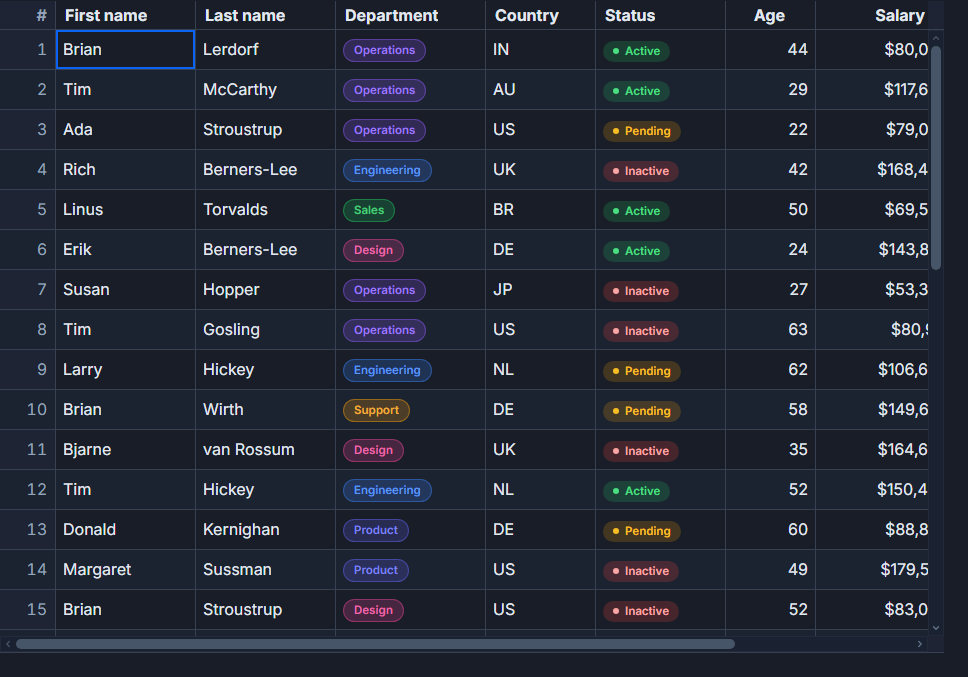
This post covers a product inventory table with four editable columns, each with its own constraint. The same pattern scales to any domain.
What makes a cell editable
Two things must be true for a cell to open an editor. The column needs an editorType - "text", "number", "checkbox", "date", or "datetime" - and the grid needs enableInlineEditing={true}. The grid then handles F2 and double-click to open, Enter to commit, and Escape to cancel, all keyboard-accessible with no extra event wiring.
Columns without editorType are read-only. That is the safest default: opt in to editing per column rather than opting out. A SKU or an auto-generated ID should never have editorType set.
The onCellValueChange callback fires after the editor closes. Its payload is { rowId, field, newValue, oldValue }. If you write a new value into your rows state, the cell updates. If you return without touching rows, the cell reverts to whatever is already there. No explicit reject call, no throw - just write or don't write.
Separating validators from the component
Validators are pure functions. Keeping them in their own module means they can be unit-tested in isolation, reused on the server side, and imported into form components without dragging in any grid dependency.
// src/lib/listing-validators.ts

export type Listing = {
  id: string
  sku: string
  title: string
  price: number
  stock: number
  active: boolean
}

export type ValResult = { ok: true } | { ok: false; message: string }

export function validatePrice(v: unknown): ValResult {
  const n = Number(v)
  if (!Number.isFinite(n) || n <= 0)
    return { ok: false, message: 'Price must be a positive number.' }
  if (n > 999_999)
    return { ok: false, message: 'Price cannot exceed 999,999.' }
  return { ok: true }
}

export function validateStock(v: unknown): ValResult {
  const n = Number(v)
  if (!Number.isInteger(n) || n < 0)
    return { ok: false, message: 'Stock must be a non-negative whole number.' }
  return { ok: true }
}

export function validateTitle(v: unknown): ValResult {
  const s = String(v ?? '').trim()
  if (s.length === 0) return { ok: false, message: 'Title cannot be blank.' }
  if (s.length > 120) return { ok: false, message: 'Title is limited to 120 characters.' }
  return { ok: true }
}

// Dispatch to the right validator by field name
export function validateField(field: string, value: unknown): ValResult {
  if (field === 'price')  return validatePrice(value)
  if (field === 'stock')  return validateStock(value)
  if (field === 'title')  return validateTitle(value)
  return { ok: true }
}
One thing to be careful about: number editors deliver a JavaScript number, not a string. An empty number input delivers NaN, not "". Using Number(v) and then checking Number.isFinite handles both cases cleanly - you never need to check if (v === '') in a number validator.
The grid component
The component below wires everything together: per-cell error state, column definitions with custom cell renderers that display error indicators, and an onCellValueChange handler that validates, mutates state, and kicks off an optimistic persist.
<script lang="ts">
  import SvGrid, {
    tableFeatures,
    rowSortingFeature,
    columnFilteringFeature,
    renderSnippet,
    type ColumnDef,
    type SvGridApi,
  } from '@svgrid/grid'
  import {
    validateField,
    type Listing,
  } from '$lib/listing-validators'

  // ---- reactive data -------------------------------------------------------
  let rows = $state<Listing[]>([
    { id: 'L-101', sku: 'TOTE-RED-M',     title: 'Canvas tote - red',         price:  29.95, stock: 148,  active: true  },
    { id: 'L-102', sku: 'TOTE-BLUE-M',    title: 'Canvas tote - blue',        price:  29.95, stock: 127,  active: true  },
    { id: 'L-103', sku: 'MUG-LOGO-12OZ',  title: 'Logo mug 12 oz',            price:  14.50, stock: 482,  active: true  },
    { id: 'L-104', sku: 'BOTTLE-INSU-32', title: 'Insulated bottle 32 oz',    price:  34.00, stock:  92,  active: true  },
    { id: 'L-105', sku: 'HAT-BB-NAVY',    title: 'Baseball hat - navy',       price:  24.00, stock: 201,  active: false },
    { id: 'L-106', sku: 'PEN-CHISEL-2PK', title: 'Calligraphy pens 2-pack',  price:   8.99, stock: 1240, active: true  },
    { id: 'L-107', sku: 'NOTEBOOK-A5',    title: 'Hardcover notebook A5',     price:  18.50, stock: 365,  active: true  },
    { id: 'L-108', sku: 'STICKER-PACK',   title: 'Sticker pack (10)',         price:   5.00, stock: 2895, active: false },
  ])

  // ---- per-cell error state ------------------------------------------------
  // Key format: "rowId::fieldName" - one message per cell, not per row
  type CellKey = `${string}::${string}`
  let cellErrors = $state<Record<CellKey, string>>({})
  const ck = (rowId: string, field: string): CellKey => `${rowId}::${field}`

  // ---- grid ----------------------------------------------------------------
  const features = tableFeatures({ rowSortingFeature, columnFilteringFeature })
  let api = $state<SvGridApi<typeof features, Listing> | null>(null)

  // ---- column definitions --------------------------------------------------
  const columns: ColumnDef<Listing>[] = [
    {
      accessorKey: 'sku',
      header: 'SKU',
      size: 160,
      // no editorType - read-only by design
    },
    {
      accessorKey: 'title',
      header: 'Title',
      size: 260,
      editorType: 'text',
      cell: (ctx) => renderSnippet(editableCell, {
        value: ctx.getValue<string>(),
        error: cellErrors[ck(ctx.row.original.id, 'title')],
      }),
    },
    {
      accessorKey: 'price',
      header: 'Price',
      size: 110,
      editorType: 'number',
      cell: (ctx) => renderSnippet(editableCell, {
        value: `$${ctx.getValue<number>().toFixed(2)}`,
        error: cellErrors[ck(ctx.row.original.id, 'price')],
      }),
    },
    {
      accessorKey: 'stock',
      header: 'Stock',
      size: 100,
      editorType: 'number',
      cell: (ctx) => renderSnippet(editableCell, {
        value: ctx.getValue<number>(),
        error: cellErrors[ck(ctx.row.original.id, 'stock')],
      }),
    },
    {
      accessorKey: 'active',
      header: 'Active',
      size: 80,
      editorType: 'checkbox',
      // boolean toggle - no domain constraint, no error display needed
    },
  ]

  // ---- commit handler ------------------------------------------------------
  function handleCellValueChange(params: {
    rowId: string
    field: string
    newValue: unknown
    oldValue: unknown
  }) {
    const { rowId, field, newValue } = params
    const key = ck(rowId, field)

    const result = validateField(field, newValue)

    if (!result.ok) {
      cellErrors[key] = result.message
      // Return without touching rows - the cell reverts to the prior value
      return
    }

    // Valid: clear any previous error, apply the change
    delete cellErrors[key]
    const idx = rows.findIndex((r) => r.id === rowId)
    if (idx !== -1) {
      rows[idx] = { ...rows[idx], [field]: newValue }
    }

    // Optimistic persist - fire and forget, handle rollback in catch
    persistChange(rowId, field, newValue).catch((err) => {
      console.error('Persist failed:', err)
      // Optional: reload the row from server, or surface an error banner
    })
  }

  async function persistChange(rowId: string, field: string, value: unknown) {
    await fetch(`/api/listings/${rowId}`, {
      method: 'PATCH',
      headers: { 'Content-Type': 'application/json' },
      body: JSON.stringify({ [field]: value }),
    })
  }
</script>

{#snippet editableCell({ value, error }: { value: unknown; error?: string })}
  <span class="cell-wrap" class:invalid={!!error} title={error ?? ''}>
    {value}
    {#if error}
      <span class="err-badge" aria-label={error}>!</span>
    {/if}
  </span>
{/snippet}

<SvGrid
  {features}
  {columns}
  data={rows}
  enableInlineEditing={true}
  onCellValueChange={handleCellValueChange}
  onApiReady={(g) => { api = g }}
  sortable
  class="inventory-grid"
/>

<style>
  .cell-wrap         { display: flex; align-items: center; gap: 4px; width: 100%; }
  .invalid           { color: #dc2626; }
  .err-badge         { font-size: 11px; font-weight: 700; color: #dc2626; cursor: help; }
</style>
How the error display stays in sync
The cellErrors map lives in component-level $state. Each cell renderer reads from it through renderSnippet, so when cellErrors changes, only the affected cells re-render - not the whole grid. The key rowId::field means you can have a price error on row L-103 and a title error on row L-106 simultaneously, each displayed independently.
The error indicator stays visible until the user successfully commits a corrected value for that cell. There is no timer, no dismiss button. The error clears only when a valid value passes the validator, which is the right default for data-entry grids where silent clearing would confuse users.
Programmatic editing and the API
You do not always want the user to initiate edits from the cell. A toolbar button labeled "Edit selected" or an accessibility shortcut might need to open a specific editor programmatically. Use api.startEditing() for this:
// Open the price editor on row L-103
api?.startEditing({ rowId: 'L-103', field: 'price' })

// Commit the current editor (fires onCellValueChange normally)
api?.stopEditing()

// If you need to cancel without committing:
api?.cancelEditing()
stopEditing() fires onCellValueChange the same way as pressing Enter. Your validation handler runs identically regardless of how the edit was committed. That consistency is worth preserving - do not add a separate "save from toolbar" code path that bypasses the validator.
Two constraints worth knowing before you ship
Checkbox columns bypass enableInlineEditing. A checkbox toggles on single click regardless of the grid-level flag. If you want toggles but not text/number editing, set editorType: 'checkbox' on specific columns and omit enableInlineEditing from the grid. This is useful for status flags that should be quick to flip but where you don't want every cell in the grid to become double-clickable.
Validation runs on commit, not on each keystroke. The built-in editors are intentionally minimal. If you need live feedback while the user is typing - a character counter, a format hint, a real-time uniqueness check - you need a custom cell renderer with its own <input> element. The onCellValueChange path is for commit-time gates only.
For async validation (checking SKU uniqueness against a server, for example), make handleCellValueChange an async function. The grid waits for the returned promise before considering the edit finished. Keep the user experience in mind: a 500 ms async check is acceptable for a commit action, but you may want a loading indicator on the cell while it resolves.
Related: async-cell-validation, custom-cell-renderers-with-render-snippet
Related reading
- Live demo: Validation while editing
- Docs: Validation
- Optimistic Updates - A Grid That Feels Instant
- Using SvGrid with Cursor, Zed, and Windsurf
- SvGrid vs TanStack Table - A Deep Dive
- SvGrid vs svelte-headless-table
- Evaluating SVAR Svelte DataGrid? What Changes if You Pick SvGrid
Tagged: Inline editing