<!-- https://svgrid.com/docs/help/web-components/ - SvGrid documentation as markdown. Index of every page: https://svgrid.com/llms.txt -->

# Web Components & Custom Elements

Ship SvGrid as a framework-agnostic web component and use the Svelte 5 data grid
in React, Vue, Angular, or plain HTML - no Svelte required in the host app.
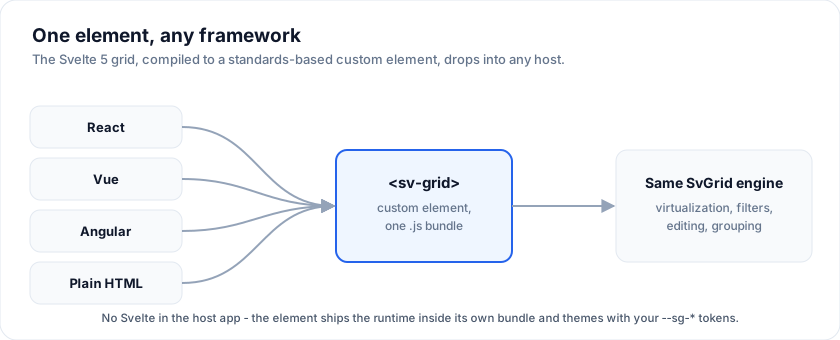
![React, Vue, Angular, and plain HTML each render the same sv-grid custom element, which wraps one shared SvGrid engine.](https://svgrid.com/docs-media/grid-web-components.svg)

SvGrid is authored in Svelte 5, but Svelte compiles to standards-based
[custom elements](https://developer.mozilla.org/en-US/docs/Web/API/Web_components).
`@svgrid/grid-wc` publishes two of them, prebuilt: drop in one `<script>` tag
and use `<sv-grid>` like any built-in element. If you searched for a "web
component data grid" or a "framework-agnostic Svelte table", this is the
integration path.

> Video: A data grid web component: one script tag, any framework (https://www.youtube.com/watch?v=_zWVutDXlVY)

## Start here

| Page | What it covers |
| --- | --- |
| [**React, Vue or Angular**](https://svgrid.com/docs/help/web-components/frameworks/) | **Start here if you use one.** A running project in about thirty seconds, and 27 examples you can open and edit. |
| [Quick start](https://svgrid.com/docs/help/web-components/quick-start/) | The CDN path, and the attribute-vs-property rule that trips everyone up once. |
| [`<sv-grid>` reference](https://svgrid.com/docs/help/web-components/sv-grid/) | Every property, attribute and event. Generated from the grid's own types. |
| [Shadow DOM](https://svgrid.com/docs/help/web-components/shadow-dom/) | `<sv-grid-shadow>`, for pages whose CSS you do not control. |
| [React](https://svgrid.com/docs/help/web-components/react/) | The `@svgrid/grid-wc/react` component, and why React 18 needs it. |
| [Vue](https://svgrid.com/docs/help/web-components/vue/) | The `@svgrid/grid-wc/vue` component - no `isCustomElement` config, no `.prop` modifiers. |
| [Angular](https://svgrid.com/docs/help/web-components/angular/) | The `@svgrid/grid-wc/angular` standalone component, with typed inputs and outputs. |
| [TypeScript](https://svgrid.com/docs/help/web-components/typescript/) | Typing the element, its properties and its events. |
| [Enterprise features](https://svgrid.com/docs/help/web-components/enterprise/) | Excel / PDF export, import, print and pivot from a non-Svelte host - and the two views that need a Svelte-aware bundler. |
| [Limitations](https://svgrid.com/docs/help/web-components/limitations/) | What cannot cross the boundary, and why. |

## Framework wrappers

The package ships a component for each of the three big frameworks, generated
from the same types as the element, as subpath imports:

| Framework | Import |
| --- | --- |
| React | `import { SvGrid } from '@svgrid/grid-wc/react'` |
| Vue | `import { SvGrid } from '@svgrid/grid-wc/vue'` |
| Angular | `import { SvGridComponent } from '@svgrid/grid-wc/angular'` |

Each framework is an OPTIONAL peer dependency, so a plain-HTML consumer never
installs any of them, and each wrapper is a couple of KB that reuses the one
element bundle rather than shipping a second copy of the grid.

**[Start here](https://svgrid.com/docs/help/web-components/frameworks/)** for the thirty-second path and
nine runnable examples per framework - each one opens as a full editable
project, with no local setup.

## Why a custom element

- **Use it anywhere.** React, Vue, Angular, Solid, Astro, Rails/Laravel
  server-rendered pages, or a plain `<script>` tag. The browser treats
  `<sv-grid>` like any built-in element.
- **One bundle, no framework lock-in.** Ship a single file to a CDN; consumers
  add one `<script type="module">` and a tag.
- **The whole grid.** 124 properties and 33 events, so virtualization,
  Excel-style filters, inline editing, grouping, tree data, pinning, pagination
  and the enterprise features are all reachable - not a hand-picked subset. The
  surface is **generated** from `<SvGrid>`'s own `Props` type and CI fails if
  the two drift. Exactly two props are left out, and the
  [reference](https://svgrid.com/docs/help/web-components/sv-grid/) says why.

If your team *is* on Svelte 5, use the component directly
([First grid](https://svgrid.com/docs/getting-started/2-first-grid/)) - the custom element exists
to reach non-Svelte hosts, and it costs you the Svelte runtime to do it.

## Quick look

```html
<script type="module" src="https://unpkg.com/@svgrid/grid-wc"></script>

<sv-grid id="grid" sortable filterable pageable page-size="25"
         style="display:block;height:420px"></sv-grid>

<script type="module">
  const grid = document.getElementById('grid')
  // Arrays and objects are properties; primitives can be attributes.
  grid.columns = [{ field: 'name', header: 'Name' }, { field: 'role', header: 'Role' }]
  grid.data = [{ name: 'Ada', role: 'Engineering' }, { name: 'Alan', role: 'Research' }]
  grid.addEventListener('cellvaluechange', (e) => console.log(e.detail))
</script>
```

Full walkthrough in [Quick start](https://svgrid.com/docs/help/web-components/quick-start/).

## Building your own element

The published package is the recommended path, but the wrapper is about sixty
lines and you may want a narrower surface, your own tag name, or extra
behaviour. The source is `packages/grid-wc/src` in the repository:
`sv-grid-element.svelte` is the light-DOM wrapper, `GridBody.svelte` is the part
both elements share, and `scripts/generate-surface.mjs` writes the prop and
event declarations from `<SvGrid>`'s `Props` type.

## See also

- [Enterprise features from the element](https://svgrid.com/docs/help/web-components/enterprise/) -
  export, import, print and pivot need no Svelte in your build; the board and
  scheduler views do.
- [Tailwind integration](https://svgrid.com/docs/help/tailwind/) - the full `--sg-*` token list.

---

SvGrid is the Svelte 5 data grid (`npm install @svgrid/grid`, MIT). This page: https://svgrid.com/docs/help/web-components/ . All docs: https://svgrid.com/llms.txt
