# Server tree data (load on demand) - Enterprise
When a hierarchy is too large to ship up front - a file system, an org
chart with tens of thousands of people, a geographic drill-down - you do
not want to fetch every node before the grid renders. The answer is to
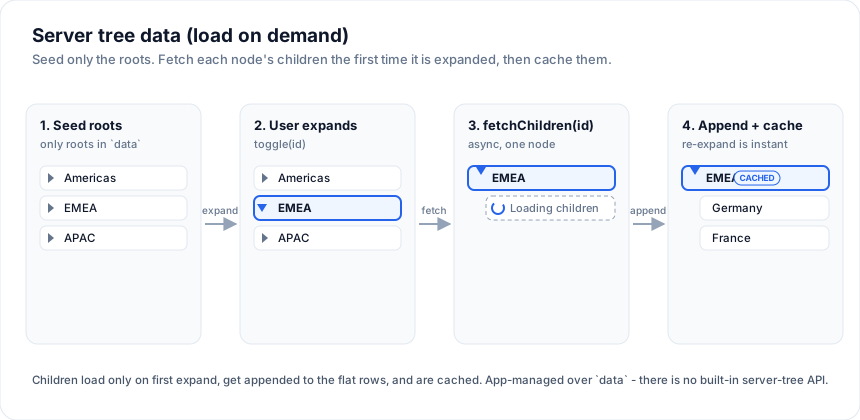
**seed only the roots**, then fetch each node's children the first time
the user expands it.
This page covers **self-referential tree data** (a node's children are more
rows of the same shape, found by `parentId`). That is still a pattern you
assemble over the grid's `data` prop: you keep a flat `allNodes` array plus an
`expanded` map, derive the visible rows, and run an async `toggle(id)` that
fetches, appends, and caches. If that flat-tree derivation is new to you, read
[Tree data](https://svgrid.com/docs/help/rows/tree-rows/) first - this page is its lazy-loading
extension.
## First-class tree mode
A file tree the grid never holds whole, each folder read on first expand:
> Live demo: Server tree data (row model) - https://svgrid.com/demos/469-server-tree-data/
`createServerRowModel` handles self-referential trees too - turn on
`treeData` and give it `getRowId` (the node id) and `hasChildren` (whether a
node can expand). It owns the lazy expand/collapse, a block cache per node,
refresh and retry per route, and race-safety; each expand calls `getRows`
with `groupKeys` set to the path of node ids, and you return that node's
direct children, one block at a time:
The examples on this page run against these rows:
```svelte
```
```svelte
```
The source's `getRows` returns a node's children for the requested path; a row
is expandable when `hasChildren` returns true. `rowModel` wires the rows, the
treegrid keyboard (ArrowRight / ArrowLeft), the visible range and the
placeholder rows; `refresh({ route })` reloads one node's children in place,
`applyRowData` fills a node from a payload that shipped with its parent, and
[transactions](https://svgrid.com/docs/help/server/server-transactions/) add or remove children without a
request. See [Server grouping](https://svgrid.com/docs/help/server/server-grouping/) for the full contract
and the aggregate case. The rest of this page is the **roll-your-own**
alternative, for when you want to own the flat-row derivation yourself.
### Moving rows
A file dragged onto a folder is a move on the server, not a reorder of the
rows the grid holds. Two pieces do it. The grid prop `onRowDrop` hands you
every drop instead of touching the data: the dragged row, the row it landed
on (or `null` below the last one), that row's display index, and a side.
Over the top or bottom edge the side is `before` or `after`; over the middle
of a group row it is `into`, and the grid tints the whole row rather than
drawing a line, so the user sees the difference. The middle band exists
only when `onRowDrop` is set. The model method `moveRow(id, toRoute,
{ patch?, addIndex? })` then writes the move through the source's
`updateRow` when you give it a patch, takes the row out of the level it
was in and puts it into `toRoute` at `addIndex` (the end when omitted):
```svelte
{
const t = target?.__group
// Into a folder: its path. Beside a row: that row's folder.
const toRoute = !t ? [] : side === 'into' && t.kind === 'group' ? [...t.path] : t.kind === 'group' ? t.path.slice(0, -1) : [...(t.route ?? [])]
const parent = toRoute.at(-1) ?? 'root'
await ctl.moveRow(row.id, toRoute, { patch: { parent } })
}}
/>
```
The result carries the row the server returned and the status of the add.
A target folder nothing has opened has no cached level to add to, so the
status is `storeNotFound`: the row is gone from its old level, the closed
folder's `childCount` badge already moved, and the folder shows the row
when it opens. Demo 469 above expands the folder in that case. `moveRow`
rejects a row that is not loaded; a folder moves with its subtree (the
cached levels under its old key are dropped and re-read on expand). Rows
dragged from another grid still go through `onRowDragEnd` / `rowDropTarget`.
> Live demo: Lazy tree (load on expand) - https://svgrid.com/demos/31-lazy-tree-load/
## The moving parts
Four pieces of state, and one async action:
- `allNodes` - a **flat** array of every node loaded *so far*. It starts
as just the roots and grows as the user expands branches.
- `expanded` - a `Record` of which node ids are open.
- each node carries a `loadState: 'unloaded' | 'loading' | 'loaded'` and
an `expandable` flag, so you know whether a fetch is still needed.
- `visibleRows` - derived: a depth-first walk from the roots that stops
descending at collapsed nodes and injects a placeholder row while a
node is loading.
- `toggle(id)` - the async action that expands/collapses and fetches.
## Seeding the roots
Load only the top level into `allNodes`. Every seeded node is marked
`unloaded` so the first expand triggers a fetch:
```ts
type LoadState = 'unloaded' | 'loading' | 'loaded'
type Node = {
id: string
parentId: string | null
depth: number
name: string
expandable: boolean
loadState: LoadState
childIds: string[]
}
let allNodes = $state(await fetchChildren('root')) // roots only
let expanded = $state>({})
```
`fetchChildren(id)` is **your** function - a `fetch()` to your API, a SQL
call in a SvelteKit endpoint, whatever. It returns that node's direct
children, each seeded `unloaded` with an empty `childIds`.
## Toggle: fetch on first expand, cache after
`toggle` flips the expanded flag, and - only when opening a node that has
not been loaded yet - sets `loadState: 'loading'`, awaits
`fetchChildren`, then marks it `'loaded'` and appends the children to the
flat array. A node already `'loaded'` never fetches again, so re-expand
is instant:
```ts
async function toggle(id: string) {
const isOpen = !!expanded[id]
expanded = { ...expanded, [id]: !isOpen }
if (isOpen) return // collapsing - nothing to fetch
const node = allNodes.find((n) => n.id === id)
if (!node || !node.expandable || node.loadState === 'loaded') return // cached
allNodes = allNodes.map((n) => (n.id === id ? { ...n, loadState: 'loading' } : n))
try {
const children = await fetchChildren(id)
allNodes = allNodes
.map((n) =>
n.id === id
? { ...n, loadState: 'loaded', childIds: children.map((c) => c.id) }
: n,
)
.concat(children)
} catch (err) {
// roll back so the user can retry
allNodes = allNodes.map((n) => (n.id === id ? { ...n, loadState: 'unloaded' } : n))
console.error('fetchChildren failed', err)
}
}
```
Two things worth calling out:
- **Immutable updates.** Each step reassigns `allNodes` / `expanded` so
Svelte's `$state` reactivity fires. Never mutate a node in place.
- **The `catch` rolls `loadState` back to `'unloaded'`**, so a failed
request leaves the node collapsible and retryable instead of stuck on
a spinner.
## The visible rows and the loading placeholder
Derive what the grid renders. Walk from the roots; at an expanded node
that is still `loading`, push a synthetic placeholder row instead of
descending:
```ts
type ViewRow = Node | { id: string; parentId: string; depth: number; placeholder: true }
const visibleRows = $derived.by(() => {
const out: ViewRow[] = []
const byId = new Map(allNodes.map((n) => [n.id, n]))
function walk(id: string) {
const node = byId.get(id)
if (!node) return
out.push(node)
if (!expanded[id]) return
if (node.loadState === 'loading') {
out.push({ id: `${id}__loading`, parentId: id, depth: node.depth + 1, placeholder: true })
return
}
for (const cid of node.childIds) walk(cid)
}
for (const root of allNodes.filter((n) => n.parentId === null)) walk(root.id)
return out
})
```
Hand `visibleRows` to `` like any other
dataset. Render the placeholder as a spinner row inside the name-column
cell snippet (see [Tree data](https://svgrid.com/docs/help/rows/tree-rows/) for the chevron +
indentation cell), keying off a `placeholder` type guard.
## Keyboard navigation
Give the tree column standard tree-grid keys. Intercept at the window
level **with a capture listener** so your handler runs before the grid's
own arrow-key cell mover, and only act when the active cell is on the
name column:
```ts
let activeCol = $state('')
let activeRowIndex = $state(0)
$effect(() => {
function onKey(e: KeyboardEvent) {
if (activeCol !== 'name') return
const row = visibleRows[activeRowIndex]
if (!row || 'placeholder' in row || !row.expandable) return
const isOpen = !!expanded[row.id]
if (e.key === 'ArrowRight' && !isOpen) { e.preventDefault(); void toggle(row.id) }
else if (e.key === 'ArrowLeft' && isOpen) { e.preventDefault(); void toggle(row.id) }
else if (e.key === 'Enter' || e.key === ' ') { e.preventDefault(); void toggle(row.id) }
}
window.addEventListener('keydown', onKey, true)
return () => window.removeEventListener('keydown', onKey, true)
})
```
- **Right** expands a collapsed node (firing the fetch on first open).
- **Left** collapses an expanded one.
- **Enter** / **Space** toggle.
Track the active cell by wiring `onActiveCellChange` on the grid:
```svelte
{ activeCol = args.columnId; activeRowIndex = args.rowIndex }}
/>
```
Regular arrow keys still move the active cell on non-tree columns - the
tree keys only fire when focus is on the name column.
## Why this stays a pattern
Because the tree lives entirely in your derived state, everything else -
sorting, custom cells, roll-up totals, styling - is the same code you
would write for a fully-seeded tree. The only difference is that
`allNodes` grows over time. There is no server-tree mode to configure and
no contract to satisfy; you own the fetch, the cache, and the shape of
the rows.
## More examples
### Server grouping (row model)
Server-side grouping through one getRows contract: the request carries groupBy + groupKeys, and createServerRowModel owns the group tree - a block cache per level, lazy expand, per-group sums and a subtotal footer, race-safety - mounted through the one rowModel prop. Leaves arrive by scroll, behind a Load N more row, or paged across the whole tree, and the group panel regroups on the fly. Here a 63,000-row in-memory server behind 200ms latency; the grid holds only the groups you expand. The row model ships in @svgrid/enterprise.
> Live demo: Server grouping (row model) - https://svgrid.com/demos/496-server-grouping-model/
## Try it
Server tree data is the same flat parent/child shape as the client version - the
only difference is where the rows come from. Loading a branch means appending
its children to the array you already hold.
```svelte
```
## See also
- [Server-Side Row Model](https://svgrid.com/docs/help/server/server-row-model/) - the page-based
datasource contract for flat data that lives on the server.
- [Server grouping](https://svgrid.com/docs/help/server/server-grouping/) - the sibling pattern: the
backend returns pre-aggregated group rows and expanding one drills into
its detail rows.
- [Tree data](https://svgrid.com/docs/help/rows/tree-rows/) - the flat-list + derived-visible-rows
foundation this page extends, including the chevron cell and roll-ups.
---
SvGrid is the Svelte 5 data grid (`npm install @svgrid/grid`, MIT). This page: https://svgrid.com/docs/help/server/server-tree-data/ . All docs: https://svgrid.com/llms.txt
 > Live demo: Lazy tree (load on expand) - https://svgrid.com/demos/31-lazy-tree-load/
## The moving parts
Four pieces of state, and one async action:
- `allNodes` - a **flat** array of every node loaded *so far*. It starts
as just the roots and grows as the user expands branches.
- `expanded` - a `Record
> Live demo: Lazy tree (load on expand) - https://svgrid.com/demos/31-lazy-tree-load/
## The moving parts
Four pieces of state, and one async action:
- `allNodes` - a **flat** array of every node loaded *so far*. It starts
as just the roots and grows as the user expands branches.
- `expanded` - a `Record