# Server-side data
The patterns for moving sort, filter, group, and pagination off the
client and onto your API. Three flavours, ranked by complexity:
1. **Plain paginated server fetch** - you fetch each page on demand
and replace the rows.
2. **Server-driven filter / sort** - the grid hands you the spec; you
round-trip and return matching rows + a total.
3. **Sparse infinite scroll** - the grid renders placeholder rows for
slots you haven't loaded yet; you fetch chunks as the user scrolls
through them, with debounce + cancellation.
All three are patterns you can assemble over the grid's props. The
packaged version is the [Server-Side Row Model](https://svgrid.com/docs/help/server/server-row-model/):
one `getRows` contract, `createServerDataSource` for paging or
[infinite block scroll](https://svgrid.com/docs/help/server/server-infinite-scroll/) (free), and
`createServerRowModel` for [lazy grouping](https://svgrid.com/docs/help/server/server-grouping/),
tree, [pivot](https://svgrid.com/docs/help/server/server-pivot/),
[transactions](https://svgrid.com/docs/help/server/server-transactions/) and
[selection across unloaded rows](https://svgrid.com/docs/help/server/server-selection/) (Enterprise),
all mounted through ``. This page is the
any-backend fallback: the same shapes, wired by hand.
> Live demos: **#33 Server-side infinite scroll** is the production
> reference for option 3. It's embedded below so you can scroll, sort,
> filter, and watch the network panel light up.
> Live demo: Server-side infinite scroll - https://svgrid.com/demos/33-server-infinite/
## Why move work to the server?
Two reasons - one is correctness, one is cost:
- **Correctness.** When your dataset has 5 million rows, you can't
ship them all to the browser. Server-side filtering + pagination is
the only way to keep the page responsive.
- **Cost.** Even for moderate datasets (10k-100k rows), pushing the
work down lets you cache aggregates at the DB layer (materialised
views, indexed sort orders, denormalised pre-joined tables) and pay
for that once per query rather than once per client.
If your dataset is < 50k rows and the user is the only one interacting
with it, **stay client-side**. The pipeline in
[Architecture](https://svgrid.com/docs/help/architecture/) is fast enough that you don't gain
much from a round-trip, and you lose offline-while-scrolling.
## Option 1: paginated server fetch
The simplest pattern. You own the rows; the grid only renders the
page you give it. Sort + filter UIs are off because the grid would
sort/filter only the visible page, which is wrong.
```svelte
Page {page + 1} of {Math.ceil(total / pageSize)}
```
Performance: O(pageSize) work in the browser; the server does the
rest. This is what you want for "give me a CRUD admin view of a
million-row table".
## Option 2: server-driven sort + filter
The grid still owns the UI. Each interaction emits a state change you
hand to the server.
```svelte
{ sortState = s; page = 0 }}
onFiltersChange={(next) => { filterState = next.columns; page = 0 }}
/>
```
Notes:
- **Reset to page 0 on filter / sort change** - a "page 5 of new
results" is almost never what the user wants.
- **`AbortController`** is mandatory in production. Without it a fast
user can land out-of-order results.
- **Don't register `createSortedRowModel` / `createFilteredRowModel`** -
they'd sort/filter the page you got back, which scrambles your
server's careful work.
## Option 3: sparse infinite scroll
The most polished pattern - the user scrolls a "1,000,000 rows" grid
that pulls slices on demand. `createServerDataSource({ mode: 'infinite' })`
is this pattern packaged, with an LRU block cache, retry and an
unknown-count mode; see
[Server-side infinite scroll](https://svgrid.com/docs/help/server/server-infinite-scroll/). Demo #33
above is the hand-wired version, for a backend the contract does not fit;
the engine of it boils down to:
```ts
// Sparse rows: one placeholder per unloaded slot, real Transaction per loaded.
const PLACEHOLDER: Transaction = Object.freeze({ id: '', /* zero values */ })
let rows = $state.raw(new Array(TOTAL_ROWS).fill(PLACEHOLDER))
// Bookkeeping
let loadedChunks = $state.raw(new Set())
let pendingChunks = $state.raw(new Set())
let abortedChunks = new Set()
let cacheGeneration = 0 // bumped on filter/sort change
const CHUNK_SIZE = 200
const SCROLL_DEBOUNCE_MS = 90 // coalesce scroll bursts
const FAST_SCROLL_PX_PER_MS = 3 // velocity threshold
function chunkOf(rowIndex: number) { return Math.floor(rowIndex / CHUNK_SIZE) }
```
On scroll, you:
1. Read `scrollContainer.scrollTop` + `clientHeight` to compute the
visible row range.
2. Compute `firstChunk` and `lastChunk` from that range.
3. Track velocity (px/ms between scroll events). If above ~3 px/ms,
fetch only the chunks currently in view and skip prefetch - the
user is flying through, you'd queue work for chunks they're about
to leave.
4. Mark any in-flight chunks that just dropped out of view as
"aborted" - their results will be discarded on arrival.
5. Issue a chunk request for any chunk in `[firstChunk - lookBehind,
lastChunk + lookAhead]` not already in `loadedChunks` or
`pendingChunks`.
6. Debounce step 5 by ~90 ms so a wheel-flick that traverses 50
chunks lands as one final fetch pass, not 50.
When a chunk lands:
```ts
if (generation !== cacheGeneration) return // filter/sort changed under us
if (abortedChunks.has(chunkIndex)) return // user scrolled away
// Splice into rows
const next = rows.slice()
for (let i = 0; i < result.rows.length; i += 1) next[result.rangeStart + i] = result.rows[i]
rows = next
loadedChunks.add(chunkIndex)
```
When the user changes sort or filter, **bump `cacheGeneration`** and
wipe `rows`/`loadedChunks`/`pendingChunks`. Any chunks still in flight
see the generation mismatch on arrival and discard themselves -
cheaper than tracking individual fetch promises.
### Cell snippet shape
Each cell needs to render a skeleton when the row is still
placeholder, real content otherwise. Cheap pattern: the placeholder
has an empty `id`; the snippet checks that.
```svelte
{#snippet AmountCell(props: { row: Transaction })}
{#if props.row.id === ''}
{:else}
{fmtMoney(props.row.amount)}
{/if}
{/snippet}
```
## Pushing other operations to the server
| Operation | Push-down pattern |
| ----------------- | ------------------------------------------------------------------------------ |
| Sort | Send `Array<{ id, desc }>` to your query builder; map to `ORDER BY`. |
| Filter | Send `Record`; map each operator to a SQL fragment. |
| Group + aggregate | Send `{ groupBy: string[], aggregators: Record }`. Build a `GROUP BY` per dimension and a `SELECT SUM(col)` per aggregator. |
| Search | Concatenate the searchable fields server-side: `WHERE field1 || ' ' || field2 ILIKE '%' || $1 || '%'`. |
Pivot by hand is not on this list - the pivot engine in [pivot.md](https://svgrid.com/docs/help/pivot/)
is designed for in-memory facts. Pivoting on the server is the Enterprise
row model's job: the request carries `pivotBy`, the backend answers with
the pivoted fields, and the grid builds the columns from them. See
[Server pivot](https://svgrid.com/docs/help/server/server-pivot/).
## Error handling
A few patterns that pay off in production:
- **Show the previous rows during a refetch**, not a spinner over an
empty grid. The `loading` prop is for empty-initial-load; once you
have rows, keep them visible while a new fetch is in flight.
- **Toast the error, don't clear the rows.** A network glitch on
`fetchPage` shouldn't wipe what the user is looking at.
- **Idempotent retries.** Send a client-generated request id with each
fetch; the server can return cached results if it sees the same id
twice in a row.
## Frequently asked questions
### How does SvGrid handle server-side data?
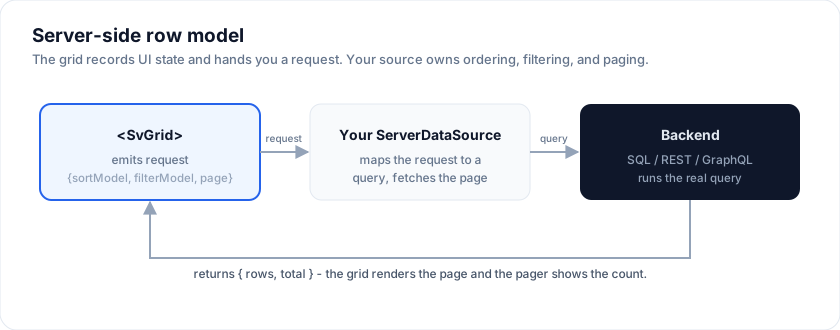
Set `externalSort` / `externalFilter` so the grid records UI state but lets
your API own ordering, filtering, and pagination. You fetch each page (or chunk)
on demand and feed rows back into `data`. Three patterns are covered above,
ranked by complexity, from plain paginated fetch to cursor-based infinite
scroll.
### Can SvGrid handle millions of rows?
Yes, with server-side or chunked loading plus row/column virtualization - only
the visible window is ever in the DOM. For purely client-side data the grid
scrolls smoothly through 100k+ rows; beyond that, move sort/filter/page to the
server using the patterns on this page.
### Does server-side mode work with TanStack Query or GraphQL?
Yes. The grid is transport-agnostic: it emits sort/filter/page state and
consumes rows, so you can back it with REST, GraphQL, or TanStack Query. See the
related recipes for worked examples.
## More examples
### Loading from REST
Fetches rows from a public REST API with loading skeleton, retry, error surface, and a Reload button.
> Live demo: Loading from REST - https://svgrid.com/demos/79-loading-from-rest/
### Cursor (keyset) pagination
Modern alternative to offset paging: prev / next cursor tokens, stable under writes, O(log N) deep pages.
> Live demo: Cursor (keyset) pagination - https://svgrid.com/demos/113-cursor-pagination/
### Optimistic updates + rollback
UI updates immediately; server validates async; on reject the value rolls back with a toast.
> Live demo: Optimistic updates + rollback - https://svgrid.com/demos/115-optimistic-updates/
### WebSocket live updates
Insert / update / delete deltas merged by id, cell-flash on update, pause / resume, throughput slider.
> Live demo: WebSocket live updates - https://svgrid.com/demos/116-websocket-live-updates/
### Bulk server operations
Multi-row bulk action with configurable concurrency, live progress bar, per-row outcome chip, mid-flight cancel.
> Live demo: Bulk server operations - https://svgrid.com/demos/117-bulk-operations/
### Live 10M-row dashboard
10,000,000-transaction stream behind a mock API: server-side paging, sort, filter, a 1-second live feed, and inline SVG throughput/distribution charts.
> Live demo: Live 10M-row dashboard - https://svgrid.com/demos/118-live-dashboard/
## See also
- [Server-Side Row Model](https://svgrid.com/docs/help/server/server-row-model/) - the packaged
version of every pattern on this page, free and Enterprise.
- [Architecture](https://svgrid.com/docs/help/architecture/) - where the engine sits in the
pipeline.
- [Row pagination](https://svgrid.com/docs/help/rows/row-pagination/) - controlled vs
uncontrolled pagination state.
- [Real-time streaming](https://svgrid.com/docs/help/real-time/) - the live-update pattern (a
different beast: pushes from the server, not polls).
- [Performance benchmarks](https://svgrid.com/docs/help/benchmarks/) - the chunk-loader's
measured behaviour in demo #33.
---
SvGrid is the Svelte 5 data grid (`npm install @svgrid/grid`, MIT). This page: https://svgrid.com/docs/help/server-side-data/ . All docs: https://svgrid.com/llms.txt