# Real-time / streaming updates
How to drive the grid from a WebSocket / SSE / poll. Four patterns
ranked by the rate of change:
1. **Periodic full refresh** - poll for the latest rows, swap the array.
2. **Cell flash on change** - the same swap, but the renderer
highlights cells whose values just changed.
3. **Delta merge with backlog** - WebSocket pushes individual row
patches; you merge them into the in-memory state, optionally
batching while the user has the page paused.
4. **A large sorted grid under a tick feed** - ticks batched per frame
into one transaction; the grid repairs the sort around the rows that
changed instead of re-sorting them all.
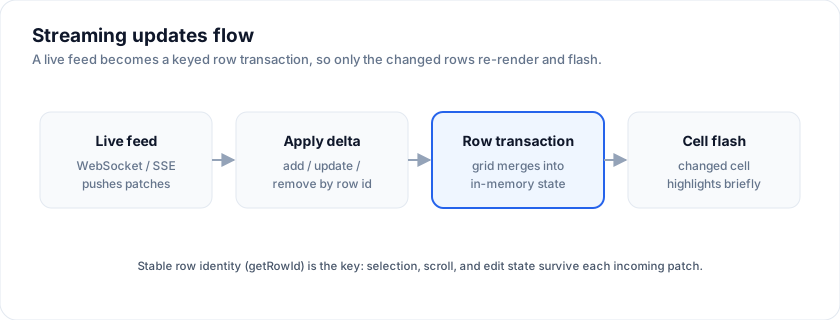
Try a streaming order desk - cell flashes on every change, pause / resume,
disconnect / reconnect, configurable throughput slider:
> Live demo: Real-time / streaming - https://svgrid.com/demos/34-realtime-orders/
## Pattern 1: periodic full refresh
The simplest reactive pattern. Poll every N seconds, hand the new
array down.
Every example below runs against this setup:
```svelte
```
```svelte
```
The grid re-renders the visible rows; virtualization keeps the cost
proportional to the viewport, not the dataset.
**Use when:** dataset is small (< 1000 rows), update rate is low (≥ 5 s),
"freshness" is the only requirement.
**Avoid when:** the user is mid-edit on a cell. A full swap mid-edit
will close the editor. Pause your refresh while
`onActiveCellChange` reports a non-null active cell.
## Pattern 2: cell flash on change
Same swap, but each cell snippet tracks its previous value and renders
a brief highlight when it differs.
```svelte
{#snippet PriceCell(props: { row: Order })}
{@const changes = diff(props.row.id, props.row)}
{fmtMoney(props.row.price)}
{/snippet}
```
```css
.flash {
animation: flash-bg 800ms ease-out;
}
@keyframes flash-bg {
from { background: rgba(250, 204, 21, 0.4); }
to { background: transparent; }
}
```
**Use when:** user wants to spot changes. The stock-ticker pattern.
**Avoid when:** the flash interferes with selection or accessibility -
add `prefers-reduced-motion` guards if the flash is purely
decorative.
## Pattern 3: delta merge with backlog
The grown-up pattern for higher-rate updates. The server pushes
individual row patches; you maintain an in-memory map and reassign the
array when needed.
```svelte
```
A few production knobs:
- **Debounce the resignment.** A WebSocket spitting out 20 patches per
second creates 20 array allocations per second. Batch into the next
`requestAnimationFrame`:
```ts
let pendingPatches: Order[] = []
let scheduled = false
function applyPatch(patch: Order) {
pendingPatches.push(patch)
if (scheduled) return
scheduled = true
requestAnimationFrame(() => {
const next = new Map(rowsMap)
for (const p of pendingPatches) next.set(p.id, p)
rowsMap = next
pendingPatches = []
scheduled = false
})
}
```
- **Out-of-order safety.** Each patch carries a server-side sequence
number; drop patches older than the latest you've applied for that
row. The streaming demo (#34) shows this with `lastSeq` per row.
- **Disconnect handling.** On `ws.onclose`, set a status flag the user
sees ("reconnecting…") and reconnect with exponential backoff. The
demo shows the recovery flow.
## Pause during edit / selection
A common mistake: updates fly in while the user is mid-paste or
mid-edit. The fix is two flags:
```ts
let isEditing = $state(false)
let hasSelection = $state(false)
const isInteracting = $derived(isEditing || hasSelection)
$effect(() => {
if (isInteracting) {
paused = true
} else if (paused) {
resume()
}
})
```
Wire to the grid:
```svelte
(isEditing = true)}
onCellValueChange={() => (isEditing = false)}
onRowSelectionChange={(selection, rows) => (hasSelection = rows.length > 0)}
/>
```
`onRowSelectionChange` receives two positional arguments - the
`{ [rowId]: true }` record and the array of selected rows.
There is no dedicated editing-state callback today, so the edit flag is
assembled from the two ends of the edit: a double-click opens the
editor, and a committed value closes it. That leaves one gap - an edit
abandoned with `Escape` commits nothing, so clear the flag on the
wrapper's `onkeydown` too:
```svelte
{ if (e.key === 'Escape') isEditing = false }}>
```
If your app starts edits itself through `api.startEditing()` /
`api.stopEditing()`, set the flag at those call sites instead - you
already know the state there, and it covers every exit path.
## Backpressure (when the server is too fast)
If your producer can outrun the UI's frame budget, sample down at the
client. Drop intermediate patches for the same row; only the newest
one survives:
```ts
function applyPatch(patch: Order) {
// pendingPatches is keyed by row id so a fast-moving row only
// commits its NEWEST value per frame.
pendingPatches.set(patch.id, patch)
/* ...schedule rAF... */
}
```
For 1000 rows updating at 5 Hz, this caps the work at 1000
assignments per frame regardless of the actual message rate. The
streaming demo's "throughput slider" stresses this exact path.
## Pattern 4: a large sorted grid under a tick feed
A blotter is sorted by something that ticks, and it has more rows than the
patterns above assume. Two facts decide the design.
**Which of the two update paths you take.** Writing a field through a
`$state` proxy (`rows[i].price = x`) re-renders that one cell and nothing
else: the row model caches on the array reference, which did not change, so
the sort and the filters are stale for that row until something replaces the
array. Replacing the array (`api.applyTransaction`, or `rows = next`) runs the
row model, and the order is current again. For a sorted blotter the second
path is the correct one, and the question is how often. Adding or removing a
row through the proxy (`rows.push(...)`, `rows.splice(...)`) is tracked on its
own: the row count is a dependency, so the grid rebuilds without you replacing
the array. It is the right call for a user clicking "Add row" and the wrong one
for a tick feed, which changes values rather than the row count.
**What a data change costs at that row count.** Every array replacement used
to re-sort every row - 100,000 rows in about 30 ms in the engine alone, so a
feed ticking faster than that could not keep up. The grid now repairs the
sort instead: when the new array has the same length and only some of its
objects were replaced, the sorted stage keeps its previous output, drops the
replaced rows, sorts the replacements among themselves and merges them back
in one pass; a 1,000-row tick on 100,000 sorted rows is about 8 ms in the
engine, measured on the [benchmarks page](https://svgrid.com/docs/help/benchmarks/#streaming-updates).
The filtered stage does the same for a replacement whose membership did not
change. The repaired order is exactly the order a full sort would produce.
So the pattern is: batch ticks per animation frame into one
`applyTransaction({ update })`, and never mutate a row in place on this
path. The repair assumes the rows it keeps are unchanged in value as well
as identity, which an immutable update guarantees. A feed that mutates rows
in place must pass a new array with no replacements (`rows = [...rows]`) to
refresh, and that runs the full pipeline.
```ts
// Ticks arrive as JSON batches; the newest price per id wins the frame.
const pending = new Map()
let frame: number | null = null
socket.onmessage = (e) => {
for (const [id, last] of JSON.parse(e.data).t) pending.set(id, last)
if (frame === null) frame = requestAnimationFrame(flush)
}
function flush() {
frame = null
const byId = new Map(api.getData().map((r) => [r.id, r]))
const update = []
for (const [id, last] of pending) {
const row = byId.get(id)
if (row) update.push({ ...row, last, direction: last > row.last ? 'up' : 'down' })
}
pending.clear()
api.applyTransaction({ update }) // one data change, one pipeline run
}
```
When the repair does not apply and the full pipeline runs instead: the tick
added or removed rows (structural), it replaced more than a quarter of the
rows, the sort or filter state changed in the same frame, grouping is
active (group rows are rebuilt from the sorted output), or a replaced text
value is one the ranked text sort had never seen. None of these is wrong,
only slower, and each is the full-sort cost above.
The [market blotter demo](https://svgrid.com/demos/495-market-blotter-100k/)
runs this at 100,000 rows with a live frame-time readout, over an in-page
socket or your own (`?ws=`).
## Combining with sort + filter
The grid's sort + filter run AFTER your patches land in `rows`. Two
implications:
- **A row that no longer matches the filter disappears.** Expected.
- **The active row may move.** When `onActiveCellChange` fires with a
new index because the row above shifted, your toolbar / detail panel
should follow.
If you're using a side detail panel keyed on row id (not index),
this is a non-issue - the detail stays bound to the order even as
the row moves.
## Frequently asked questions
### How do I show real-time data in SvGrid?
Drive the grid's `data` from a WebSocket, SSE, or poll. This page covers three
patterns ranked by update rate: periodic full refresh, targeted row patches via
`getRowId`, and high-frequency cell updates with change-flash highlighting.
### Will the grid keep my scroll and selection on live updates?
Yes, if you give rows a stable identity with `getRowId`. Then selection,
expansion, edit state, and scroll position survive incoming updates instead of
resetting on every refresh.
### How fast can SvGrid update?
Fast enough for tick-by-tick feeds. The stock-market demo updates 25 symbols
every 250 ms with green/red cell flashes while sorting and selection stay
live, and the market blotter demo keeps 100,000 rows sorted under tens of
thousands of updates a second. Batch the ticks per animation frame into one
`applyTransaction`; the engine cost of a 1,000-row tick on 100,000 sorted
rows is on the [benchmarks page](https://svgrid.com/docs/help/benchmarks/#streaming-updates).
## See also
- [Server-side data](https://svgrid.com/docs/help/server-side-data/) - the pull side of
remote data.
- [Saved views](https://svgrid.com/docs/help/saved-views/) - persist a "live mode on / off"
toggle alongside the rest of the view config.
- [Performance benchmarks](https://svgrid.com/docs/help/benchmarks/) - measured per-frame cost
of the patterns above, and the cost of a tick on a sorted grid.
- [Transactions](https://svgrid.com/docs/help/rows/transactions/) - the `applyTransaction`
contract and what an update batch costs.
- [Svelte trading grid](https://svgrid.com/svelte/trading-grid/) - the
blotter landing page: the 100,000-row demo, the formats and the flash.
---
SvGrid is the Svelte 5 data grid (`npm install @svgrid/grid`, MIT). This page: https://svgrid.com/docs/help/real-time/ . All docs: https://svgrid.com/llms.txt