# Production deployment
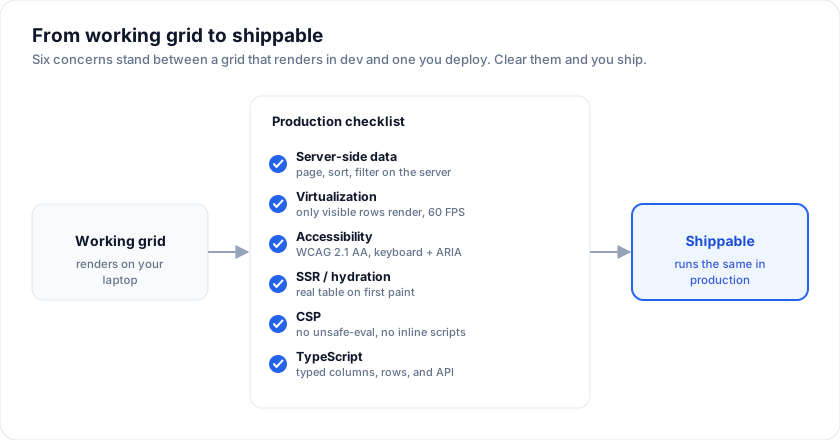
The checklist that turns "it works on my laptop" into "it ships". One
page per concern; each concern is one paragraph + the code that
matters.
> Live demo: Admin template - https://svgrid.com/demos/22-admin-template/
## 1. Pin your versions
The examples on this page run against these rows:
```svelte
```
```json
{
"dependencies": {
"@svgrid/grid": "1.0.0",
"@svgrid/enterprise": "1.0.0"
}
}
```
Pre-1.0, prefer exact pins (no `^`, no `~`). The
[changelog](https://svgrid.com/docs/changelog/) annotates breaking changes; the
[API stability page](https://svgrid.com/docs/help/api-stability/) names which exports are
under the semver promise.
## 2. Bundle size: what actually ships
Measured gzipped, with Svelte excluded as a peer dependency:
| What you import | Gzipped | Minified |
| ----------------------------------------------------- | ------- | -------- |
| Headless core (`createGrid` + `createCoreRowModel`) | ~2 KB | ~7 KB |
| Full `` render component (everything) | ~77 KB | ~340 KB |
Add ~9 KB gzipped for the render component's CSS. Charts, date/time
editors, menus, and export split into `import()` chunks (~64 KB total)
that load on demand. Re-measure with `pnpm size`.
The `` component is batteries-included: virtualization, Excel-style
filters, inline editing, grouping, tree, master/detail, and accessibility are
all in that one import. For a smaller footprint, use the headless core and
render your own markup, registering only the features you need.
Enterprise adds per feature you import:
| Enterprise module | Approx KB | Peer deps |
| ------------------- | --------- | ------------------------------- |
| `exportGrid` (csv/tsv/html) | ~6 KB | - |
| + xlsx | ~6 KB | `jszip` (loaded on first xlsx call) |
| + pdf | ~9 KB | `pdfmake` (loaded on first pdf call) |
| `importData` | ~7 KB | `jszip` (xlsx only) |
| AI helpers | ~3 KB | -. You bring your provider. |
| `createPivotModel` | ~4 KB | - |
Use the **subpath imports** to avoid pulling features you don't use:
```ts
import { exportGrid } from '@svgrid/enterprise/export' // export only
import { createPivotModel } from '@svgrid/enterprise/pivot' // pivot only
```
## 3. Peer dependencies
| Peer dep | When you need it | Install |
| ---------- | ------------------------------------------------------------------ | ----------------------------------- |
| `svelte` | Always. SvGrid renders against Svelte 5. | `pnpm add svelte` |
| `jszip` | xlsx export OR xlsx import. | `pnpm add jszip` |
| `pdfmake` | PDF export. | `pnpm add pdfmake` |
Both `jszip` and `pdfmake` are dynamic imports - the bundle splits and
loads them on the first call. Nothing ships in your initial chunk until
the user actually clicks "Export to xlsx".
## 4. Lazy-load Enterprise at route boundaries
If only one route in your app needs export, gate `installEnterprise` behind a
dynamic import so the rest of the app doesn't ship the Enterprise bundle:
```svelte
(api = next)} />
{#if pro}
{/if}
```
## 5. License the Enterprise pack
```ts
// main.ts (or +layout.svelte for SvelteKit)
import { setLicenseKey } from '@svgrid/enterprise'
if (import.meta.env.VITE_SVPRO_KEY) {
setLicenseKey(import.meta.env.VITE_SVPRO_KEY)
}
```
Enterprise comes with a **30-day evaluation period**. Loaded without a
key it works, and displays a small watermark and a console message about
the Enterprise package. Set the key once at app startup; both disappear.
Don't commit the key to source control. Inject via env (Vite reads
`VITE_*` variables at build time; SvelteKit reads `$env/static/public`).
For per-tenant deployments where each tenant has their own key, set
the key inside the consumer's bootstrap, never inside the library
package.
## 6. CSP-safe deployment
The recommended `Content-Security-Policy` header:
```
Content-Security-Policy:
default-src 'self';
script-src 'self';
style-src 'self' 'unsafe-inline';
img-src 'self' data:;
font-src 'self' data:;
connect-src 'self';
frame-ancestors 'none';
base-uri 'self';
form-action 'self';
```
No `'unsafe-eval'`, no `'unsafe-inline'` on `script-src`. SvGrid
Community + Enterprise run clean under this policy. [Demo 16](https://svgrid.com/demos/16-csp-compliant/)
includes a runtime self-check.
If you ship in an iframe (embedded analytics, dashboards), add
`frame-ancestors` to the host's CSP to allow the embed.
## 7. SSR
For SvelteKit:
```ts
// +page.server.ts
export async function load() {
const rows = await db.query('select * from people limit 100')
return { rows }
}
```
```svelte
```
The first paint contains the data in a real `
` (good for SEO +
LCP). Hydration only attaches event listeners. See
[demo 19](https://svgrid.com/demos/19-ssr/) for a sandboxed
JS-disabled iframe that proves the markup is meaningful pre-hydration.
## 8. Performance budgets
Targets that have held up in production:
| Surface | Target | What you do if you miss it |
| ---------------------------------- | -------------------- | ---------------------------------------------------------------- |
| Time to first row visible | < 200 ms | Lazy-load Enterprise. Defer non-critical columns. Smaller initial page. |
| Scroll FPS (10k rows, virtualized) | 60 FPS | Cap `overscan`. Avoid `cell` render functions that allocate per render. |
| Sort over 100k rows | < 60 ms | Set `editorType` on numeric / date columns so `sortFns.number` / `sortFns.date` get used instead of `sortFns.auto`. |
| Filter input → re-render | < 30 ms | Debounce server-side filters; the local filter UI is already ≤ 16 ms for 10k rows. |
| Export 10k rows to xlsx | < 1 s | Don't include columns you're going to hide. Use `columns: [...]` to project. |
The [benchmarks page](https://svgrid.com/docs/help/benchmarks/) has the reproducible numbers.
## 9. Error boundaries
The render component throws on truly broken state (e.g. a `field` that
doesn't exist on any row). Wrap in a Svelte error boundary or guard
with `if (rows.length === 0)` for empty data. The grid's `emptyMessage`
prop covers the empty case without crashing.
```svelte
{#snippet failed(error, reset)}
Grid failed: {error.message}
{/snippet}
```
## 10. Monitoring + observability
The grid emits everything you'd want to observe via callbacks:
`onSortingChange`, `onFiltersChange`, `onRowSelectionChange`,
`onCellValueChange`. Wire them into your analytics / logging:
```ts
function track(event: string, payload: object) {
// sentry, posthog, your own beacon - pick one
}
track('grid.sort', { clauses: s })}
onFiltersChange={(f) => track('grid.filter', { columns: f.columns.length })}
onCellValueChange={(e) => track('grid.edit', { column: e.columnId })}
/>
```
## A production-shaped grid
Everything a real screen tends to turn on at once: virtualization for the row
count, a stable `getRowId` so selection survives a refetch, and the footer
totals people ask for on day two.
```svelte
r.id}
sortable
filterable
summary
pageable
pageSize={25}
/>
```
## See also
- [Why headless?](https://svgrid.com/docs/why-headless/) - the architectural decision
behind Community + Enterprise.
- [API stability](https://svgrid.com/docs/help/api-stability/) - the semver promise and what
it covers.
- [Security](https://svgrid.com/docs/help/security/) - peer-dep table, SBOM, vulnerability
handling, data residency.
- [Browser support](https://svgrid.com/docs/help/browser-support/) - tested matrix, mobile,
build tools.
---
SvGrid is the Svelte 5 data grid (`npm install @svgrid/grid`, MIT). This page: https://svgrid.com/docs/help/production/ . All docs: https://svgrid.com/llms.txt