# Pivot tables - Enterprise
A built-in pivot model that turns a flat data set into a row-axis tree,
a nested column-axis header, and one aggregated cell per
`(row-path × col-path × measure)` triple. Ships in **`@svgrid/enterprise`**.
For the pivot built up from one prop to a designer and a chart, see [Pivot: from rows to a pivot table](https://svgrid.com/docs/help/pivot/start/); this page is the reference.
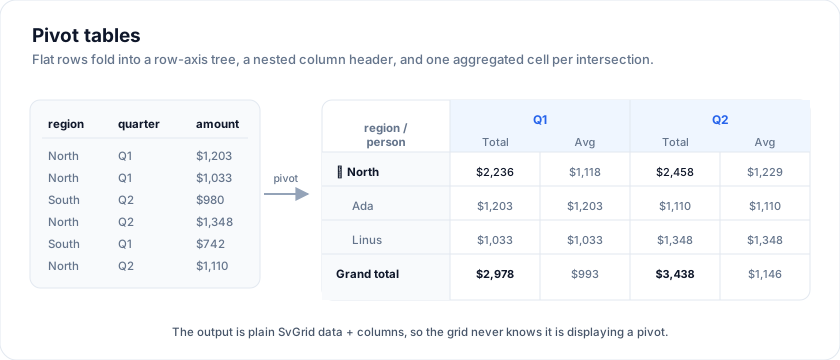
The output is plain SvGrid data + columns, so the rendering pipeline is
the same one you already understand - the grid never knows it is
displaying a pivot.
> Live demo: Pivot - Table + Designer - https://svgrid.com/demos/52-pivot-table/
## Minimal example
```ts
import { createPivotModel } from '@svgrid/enterprise'
import {
SvGrid, tableFeatures, rowSortingFeature, rowExpandingFeature,
} from '@svgrid/grid'
const features = tableFeatures({ rowSortingFeature, rowExpandingFeature })
const pivot = createPivotModel(orders, {
rows: ['region', 'salesPerson'],
cols: ['quarter'],
values: [
{ field: 'amount', agg: 'sum', label: 'Total', format: { type: 'currency', currency: 'USD' } },
{ field: 'amount', agg: 'avg', label: 'Avg' },
],
})
```
```svelte
```
The result:
| region / salesPerson | 2024 Q1 Total | 2024 Q1 Avg | 2024 Q2 Total | ... | Grand total |
| -------------------- | ------------- | ----------- | ------------- | --- | ----------- |
| (group) North | $48,210 | $1,203 | ... | ... | $211,090 |
| Ada | $12,400 | $1,033 | ... | ... | $58,200 |
| Linus | $35,810 | $1,348 | ... | ... | $152,890 |
| (group) South | ... | ... | ... | ... | ... |
| **Grand total** | $182,300 | $1,287 | ... | ... | $812,440 |
## Via the imperative API
When you've called `installEnterprise(api)`, the same builder hangs off the
api object so the designer UI can rebuild on every config change
without re-importing:
```ts
import { installEnterprise } from '@svgrid/enterprise'
const pro = installEnterprise(api)
function applyPivot(config: PivotConfig) {
const result = pro.pivot.build(config)
pivotRows = result.rows
pivotColumns = result.columns
}
```
`pro.pivot.buildFrom(data, config)` accepts an arbitrary array - useful
for previewing a designer's config against a small sample before
committing.
## The `PivotConfig` shape
```ts
type PivotConfig = {
/** Outer-most first. Each entry becomes one level of row grouping. */
rows: ReadonlyArray
/** Outer-most first. Each entry becomes one level of column grouping. */
cols: ReadonlyArray
/** One or more measures aggregated under each column-axis leaf. */
values: ReadonlyArray>
/** Grand-total row at the bottom. Default `true`. */
grandTotalRow?: boolean
/** Grand-total column on the right. Default `true`. */
grandTotalCol?: boolean
/** Subtotal rows between row groups. Default `true`. */
rowSubtotals?: boolean
/** Sort axis values per dim level. Defaults to numeric/alpha. */
colSort?: (a: unknown, b: unknown, level: number) => number
rowSort?: (a: unknown, b: unknown, level: number) => number
}
type PivotValueConfig = {
field: keyof TData & string
agg: PivotAggregatorId | PivotAggregator
label?: string
format?: CellFormatConfig
}
type PivotAggregatorId =
| 'sum' | 'avg' | 'min' | 'max'
| 'count' | 'countDistinct'
| 'first' | 'last'
```
For anything beyond the built-ins, pass a function: `agg: (values) =>
weightedAvg(values, weights)`.
## The `PivotRow` shape
Every entry in `result.rows` is a plain object:
```ts
type PivotRow = {
__pivotId: string
__pivotKind: 'group' | 'subtotal' | 'leaf' | 'grandTotal'
__pivotDepth: number // 0 for top-level groups / grand total
__pivotLabel: string // first-column label
__pivotParentId: string | null // for filterCollapsedPivotRows; null = always visible
__pivotExpandable: boolean // true for group rows with descendants
[columnId: string]: unknown // value cells, keyed by leaf column id
}
```
## Expandable rows
Each `group` row carries `__pivotExpandable: true` and each descendant
carries `__pivotParentId` pointing at its containing group. To make the
pivot collapsible: track an "expanded" `Set` of group ids and
run the rows through `filterCollapsedPivotRows`:
```svelte
```
The first column's cell renderer is the natural place to draw the
expand/collapse chevron - check `__pivotExpandable` and `__pivotKind`
on the row:
```svelte
{#snippet labelCell(ctx)}
{@const row = ctx.row.original}
{#if row.__pivotExpandable}
{/if}
{row.__pivotLabel}
{/snippet}
```
Pass `true` to `filterCollapsedPivotRows` to bypass filtering (all rows
visible); pass an empty `Set` to collapse everything to subtotals only.
Use `__pivotKind` to style subtotal / grand-total rows differently:
```svelte
({
'pv-group': row.__pivotKind === 'group',
'pv-subtotal': row.__pivotKind === 'subtotal',
'pv-grand': row.__pivotKind === 'grandTotal',
})}
/>
```
(The `rowClass` callback itself is on the
[Missing features](https://svgrid.com/docs/help/missing-features/) list; until it ships, target
rows via `data-pivot-kind` on a custom row snippet.)
## Pivot designer UI
The pivot model is pure - drop a new config in, get a new
`{ rows, columns }` back. Wrapping this in a drag-and-drop designer is
the demo's job, not the engine's:
- Four drop zones: Filters / Rows / Columns / Values.
- Each zone is a plain `ondragover` / `ondrop` target.
- When the user drops a measure into Values, prompt for the aggregator
or default to `sum`.
- Persist the `PivotConfig` to `localStorage` for cheap "saved views".
See demo [52 - Pivot table + Designer](https://svgrid.com/demos/52-pivot-table/)
for a full ~400-line example.
## Charting a pivot
A pivot and a chart answer the same question in two shapes, so one layout
drives both. `pivotToChartSpec(result, options)` turns the `{ rows, columns }`
the engine produces into a `ChartSpec` for the free `SvChart`:
- The row-axis leaves are the categories. With nested rows the parents form
a second axis tier (`categoryGroups`), so the axis reads "Americas | Brazil,
Canada, ..." rather than repeating a bare leaf label.
- The column-axis leaves are the series: "Q1", "Q2", or "Q1 · Revenue" when
the layout carries more than one measure. With no column field there is one
series per measure.
- Subtotal rows and the grand-total row and column are left out unless
`includeTotals` is set; a chart of the parts should not also draw their sum.
- The measure's format comes along: pass its `format` and a cell the table
shows as "$469,662" charts as "$470k" on the axis and "$469,662" in the
tooltip. With one measure the value axis is named after it.
- An empty cell (an average over no rows is `null`) is a gap on the chart,
not a zero bar; a sum over no rows is the 0 the engine wrote.
```svelte
```
| Option | Meaning |
| --- | --- |
| `type` | Chart type. Default `'bar'`. Any category type reads the same shape; a pie takes the first series. |
| `stacked` | Stack the series. |
| `includeTotals` | Keep the grand-total row and column as a category and a series. Default off. |
| `maxCategories` | Chart the first N row leaves only. |
| `format` | The measure's `CellFormatConfig`; becomes `valueFormat`, `currency` and `locale` on the spec. Percentage points get a formatter that appends the sign. |
| `yAxisTitle` | Name the value axis; default the measure's label when there is one measure, `null` for none. |
The designer does this for you: `` (on by
default) puts a Table / Chart toggle in its toolbar and `defaultView="chart"`
opens on the chart. The chart view offers every shape a pivot can take (bar,
line, area, lollipop, pareto, the three radial forms, pie, funnel, waterfall,
radar, heat map, stream) with Stacked, 100% and Horizontal where the type
uses them, the chart's own toolbar (PNG, SVG, PDF, print, copy) and its
spoken summary. It passes the value chips' format when they agree; a layout
that mixes a currency and a count formats plainly rather than putting a "$"
on the count. Demo 359 below is that component.
The grid's own Chart panel does the same in pivot mode. With `pivot` and
`charting` on one grid, the pivot bar carries the Chart toggle and the panel
charts the pivot on screen: row groups as categories, column groups as
series, the measures' format on the axis, totals left out. The data pickers
step aside (there is nothing to choose; a note says so) and the Type select
keeps the shapes a pivot can take. Stacked, 100% and Horizontal, the Format
tab, the builder, saved charts, export and Describe all still apply, and a
click on a bar filters the innermost row dimension when the grid has a column
for it, which re-runs the pivot over the rows that pass. Flip pivot mode off
and the panel charts the flat rows again with the pickers back.
```svelte
```
## Performance notes
The engine is a single pass over the input rows: it builds a row-axis
tree and a column-axis tree, then for each (row-path × col-path)
combination runs each measure aggregator over the matched source rows.
For an N-row dataset with R row-axis combos and C col-axis combos, the
cost is roughly `O(N + R * C * V)` where V is the number of measure
configs. In practice that means a 100k-row source pivots in under
~100 ms when the row+col cardinality is under a few hundred. For
million-row sources, run the pivot on the server and pass the result
straight into `data` / `columns`.
## Frequently asked questions
### Does SvGrid support pivot tables?
Yes, in the paid `@svgrid/enterprise` add-on. `createPivotModel` turns a flat data set
into a row-axis tree with a nested column-axis header and one aggregated cell
per (row-path × col-path × measure). The Community package does not include
pivoting.
### How is pivot different from grouping?
Grouping (in Community) rolls rows up along the row axis only. Pivot also spreads
a field across the column axis with nested headers and computes a measure for
each row/column intersection.
### Can I chart a pivot table?
Yes, three ways, all from the same layout: `pivotToChartSpec` turns a
computed pivot into a `ChartSpec` for the free chart (rows as categories,
columns as series); `` flips between the table
and that chart in its toolbar; and a grid with `pivot` and `charting` on it
charts the pivot on screen in its Chart panel. See
[Charting a pivot](#charting-a-pivot).
### Can I export a pivot table?
Yes. A pivot view exports to Excel/PDF/CSV like any other grid view through the
same `@svgrid/enterprise` export helpers.
## More examples
### Pivot mode grid
Built on : a docked tool panel with a PIVOT MODE toggle, field checklist, and Columns / Rows / Values wells (drag-and-drop). OFF renders the flat participant grid (column groups, flags, ratings, inline filter row); ON pivots Language -> Country x Game with heat-mapped avg measures.
> Live demo: Pivot mode grid - https://svgrid.com/demos/360-pivot-mode-grid/
> Video: Pivot mode in SvGrid
### Pivot - Drill-through
Click any pivot value cell - leaf, subtotal, or grand total - and the right rail opens with the source facts behind the aggregate. Total + count + average always match the cell.
> Live demo: Pivot - Drill-through - https://svgrid.com/demos/122-pivot-drill-through/
### Pivot - Totals + Subtotals
Live toggles for grandTotalRow / grandTotalCol / rowSubtotals on createPivotModel. Subtotals get a Σ badge, the grand-total row is tinted accent, the grand-total column is an amber stripe.
> Live demo: Pivot - Totals + Subtotals - https://svgrid.com/demos/123-pivot-totals/
### Pivot - OLAP cube
Full BI dashboard around an OLAP cube: page header, 5 KPI tiles with QoQ sparklines, left slicer rail (region multi-select, year picker, country search, view-mode, density, heatmap toggle), cube in Tabular form (one column per row dim), right insights rail (top YoY movers, top contributors).
> Live demo: Pivot - OLAP cube - https://svgrid.com/demos/124-pivot-olap/
### Pivot - Linked charts
Pivot cube wired to a horizontal bar chart + multi-year line chart. Click any cube row to drill the charts one level deeper (region → country → product); scope KPI strip tracks selection; charts are zero-dep inline SVG.
> Live demo: Pivot - Linked charts - https://svgrid.com/demos/125-pivot-charts/
### Pivot - Analysis workspace
Excel-style pivot analysis: left-rail field picker (search + checkboxes) feeding four wells (Rows / Columns / Data / Filters), live re-pivot on every layout change, click-to-cycle aggregator chips, data-bar Total Spend cells + amber Avg Rating strips, subtotal + grand-total row tints.
> Live demo: Pivot - Analysis workspace - https://svgrid.com/demos/166-pivot-analysis-workspace/
### Pivot - Designer component
SvPivotDesigner: self-contained, enterprise-ready pivot authoring with a left-rail field picker (search + grouped), four drop wells (Filters / Columns / Rows / Values), drag-and-drop between wells, per-chip aggregator + filter menus, presets toolbar, and an inline pivot grid driven by createPivotModel. Single bindable `layout` prop so the page can persist or restore it.
> Live demo: Pivot - Designer component - https://svgrid.com/demos/168-pivot-designer/
> Video: Pivot designer in SvGrid
### Pivot chart
One drag-drop pivot layout, two synced views: renders the SAME Rows / Columns / Values as either an expandable pivot grid or a chart (Columns -> series, Values -> measure). Powered by the enterprise pivot engine.
> Live demo: Pivot chart - https://svgrid.com/demos/359-pivot-chart/
## See also
- [Charts](https://svgrid.com/docs/help/charts/) - the chart the pivot feeds, and every option `pivotToChartSpec` hands it.
- [Column groups](https://svgrid.com/docs/help/columns/column-groups/) - multi-level column
headers; pivot uses these for the column-axis tree.
- [Demo 52 - Pivot table + Designer](https://svgrid.com/demos/52-pivot-table/)
- [Data export and printing - Enterprise](https://svgrid.com/docs/help/export/) - the result of
`createPivotModel` exports like any other grid view.
---
SvGrid is the Svelte 5 data grid (`npm install @svgrid/grid`, MIT). This page: https://svgrid.com/docs/help/pivot/ . All docs: https://svgrid.com/llms.txt