# Grouping & aggregation
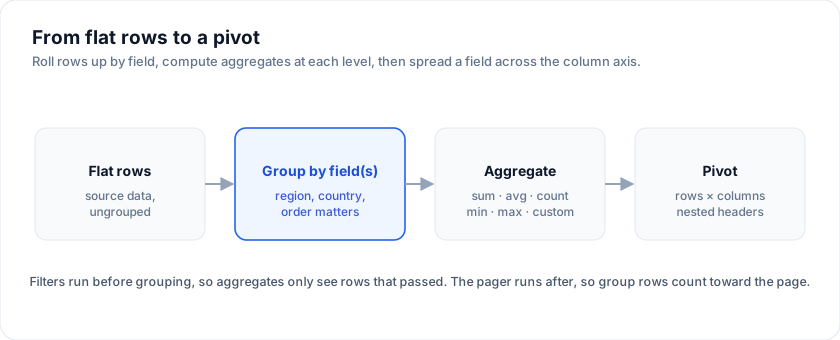
Roll rows up by one or more columns and compute aggregates (sum, avg,
count, min, max, custom) at each group level. Powered by
`columnGroupingFeature` plus per-column `aggregate` config.
Try it: drag a column into the group-by lane, then change aggregators
per column:
> Live demo: Grouping + aggregation - https://svgrid.com/demos/07-grouping-aggregation/
## Minimal example
The examples on this page run against these rows:
```svelte
```
```svelte
```
The grid emits one group row per unique department value, with the
group cell showing the rolled-up salary sum + average performance.
Click the chevron on a group row to expand its children.
## Setting the group-by
Three ways, ranked by ergonomic order:
1. **The column menu.** When the user opens a header's menu, "Group
by this column" toggles that column in/out of the group-by list.
2. **The `groupBy` prop.** Seeds the group-by list and re-applies
whenever the prop's own value changes, so it works both as initial
state and as a controlled value. A group-by set from the menu or the
API is not clobbered while the prop stays put.
3. **The imperative API.** `api.setGroupBy(['department', 'role'])`
for toolbars / saved views.
`groupBy` is ignored when `treeData` is set - a row cannot be both a
hierarchy node and bucketed under a group banner.
The group order is significant - `['region', 'country']` rolls up
country inside region; reverse the array to flip the hierarchy.
## Built-in aggregators
| Aggregator | Returns | Behaviour on empty groups |
| ---------- | ---------------------------------------------------- | ------------------------- |
| `'sum'` | Sum of numeric cell values | `0` |
| `'avg'` | Arithmetic mean (with safe divide-by-zero) | `null` |
| `'count'` | Number of leaf rows | `0` |
| `'min'` | Smallest value (numeric or `Intl.Collator`-comparable) | `null` |
| `'max'` | Largest value | `null` |
`'sum'` / `'avg'` / `'min'` / `'max'` cast values to `Number`. If the
column has non-numeric values mixed in, those rows are skipped.
## Custom aggregator
Pass a function instead of a string for any group-aware computation:
```ts
{
field: 'orders',
header: 'Top customer',
aggregate: (rows) => {
const top = rows.reduce(
(acc, r) => !acc || r.orders > acc.orders ? r : acc,
null,
)
return top?.name ?? '-'
},
}
```
The callback gets every leaf row in the group (already filtered).
Return whatever the cell should display - string, number, or a
formatted value.
## Custom group cell rendering
By default the group cell shows `key (n)` - e.g. "Engineering (12)".
Override via the column's `cell` template:
```svelte
{#snippet GroupCell(props: { row: GroupRow })}
{props.row.groupKey}
({props.row.subRows.length} reports)
{/snippet}
```
The `row.groupKey` is the unique group value (the department name in
the example). `row.subRows` is the children. `row.depth` is the
nesting level (useful for indentation when you group by multiple
columns).
## Aggregating string columns
Strings work with `'count'`, `'min'`, `'max'`, and any custom
aggregator. For sum / avg you'll get `NaN` because the cast to
`Number` fails - the grid renders this as `-` by default.
A useful custom aggregator for strings:
```ts
{
field: 'tags',
aggregate: (rows) => {
const set = new Set()
for (const r of rows) for (const t of r.tags) set.add(t)
return Array.from(set).join(', ')
},
}
```
## Performance
Aggregation runs once per group-by change, NOT per scroll frame. The
cost is O(n) for `count` / `sum` / `avg`, O(n log n) for `min` / `max`
because the engine sorts to find the extreme.
For a 100k-row dataset grouped by two columns with three aggregators,
the pipeline adds ~36 ms to the initial paint (see
[Performance benchmarks](https://svgrid.com/docs/help/benchmarks/)). After that, scroll is
unaffected - the renderer hands each visible group its precomputed
value.
## Group expansion state
`expanded` is owned by the engine by default; you can hoist it for
saved-views purposes:
```svelte
(controlledExpanded = next)}
/>
```
`onExpandedChange` fires for every path that changes expansion: a click
on a group banner, `api.setRowExpanded()`, and
`api.expandAllGroups()` / `api.collapseAllGroups()`. It receives the
full next map, so writing it straight back into `expanded` (as above) is
safe and will not loop.
The shape is `Record`. Group row ids are built from the
grouping path rather than the display label - grouping by `department`
gives `group_department_Engineering`, and adding `role` beneath it gives
`group_department_Engineering_role_Senior`. Tree rows key off the
engine's row id instead, so set `getRowId` if you want those keys to be
your own ids. Capture the map from `onExpandedChange` rather than
hand-building the keys.
## Sticky group rows
`stickyGroupRows` keeps the banner of the group a row belongs to (and the
banners of the groups above it) under the header while the group's rows
scroll past, so a screen deep inside a large group still says where it
is. Under virtualization the band shows a copy of each ancestor banner,
clickable like the original; without virtualization the banners
themselves stick. Off by default; the same prop serves tree data and the
[server-side row model](https://svgrid.com/docs/help/server/server-grouping/#sticky-group-rows).
## Group sort vs leaf sort
The sort UI sorts within the active sort scope:
- When grouping is OFF, sort applies to all rows.
- When grouping is ON, sort applies WITHIN each group - groups stay
in alphabetical (or group-aggregator) order; only the leaves inside
each group reorder.
To sort the groups themselves by their rolled-up value, set the sort
on the aggregated column AFTER setting the group-by. The grid
recognises that the column is aggregated and sorts the group rows
instead of the leaves.
## Filtering vs grouping
Filters run BEFORE grouping (see [Architecture](https://svgrid.com/docs/help/architecture/) for
the pipeline order). The aggregator only sees rows that passed the
filter. This is what makes "department salary sum, filtered to active
employees only" work without any extra config.
## Pivot vs group-by
When the question is "group by row dimensions, also group by column
dimensions, also pick aggregators per measure" - that's a pivot. The
[pivot helpers](https://svgrid.com/docs/help/pivot/) build a different data structure
optimised for that shape. Use group-by when you only roll up rows;
use pivot when you also roll up columns.
## Display modes
`groupDisplayMode` decides where group state is drawn:
| Mode | Result |
| --- | --- |
| `groupRows` (default) | A full-width banner row per group. Unchanged behaviour. |
| `singleColumn` | One synthetic **Group** column holding every level, indented by depth. |
| `multipleColumns` | One synthetic column per grouped field. |
```svelte
```
Both column modes hide the grouped **source** columns, because their values
move into the auto column - showing both would just duplicate them. They also
render the group row as an ordinary row, which is the real reason to use them:
its aggregate cells then line up under the columns they belong to instead of
sitting in a full-width strip.
Tune the combined column with `autoGroupColumnHeader` (default `"Group"`) and
`autoGroupColumnWidth` (default `220`). In `multipleColumns` each column takes
its name from the source column's header.
## Group footers (subtotal rows)
`groupFooters` closes each group with a subtotal row:
```svelte
```
The footer is a clone of the group banner, so it already carries that group's
aggregates and renders through the normal cell path - each total lands under
its own column instead of in a full-width strip. It is not expandable and has
no expander.
Only columns with an `aggregate` produce a value, the same ones that populate
the banner.
## Grand total row
`grandTotalRow` appends a single totals row for the whole filtered set:
```svelte
```
It is independent of `groupFooters` - use it on a flat grid for a bottom totals
line, or together for subtotals *and* a total:
```svelte
```
Three things to know:
- It aggregates the **leaf** rows, so turning grouping on does not double-count
(the group banners already carry subtotals).
- It follows the **filtered** set, not the raw data - filter the grid and the
total moves with it.
- With `pageable`, it is appended only on the **last** page, so a total never
appears mid-dataset. The value still covers every row, not just that page.
Columns without an `aggregate` render blank, and if no column declares one the
row is skipped entirely.
## Grouping with pagination
`pageSize` budgets **data** rows. Group banners and footers do not count
against it:
```svelte
```
A page holds `pageSize` real rows and reprints the banners those rows sit
under, so a group split across a page boundary is labelled on both pages - the
way a spreadsheet repeats group headers across a page break. Footers are
inserted after paging, so switching them on never pushes data onto the next
page.
A collapsed group is the visible unit and takes one page slot itself; an
expanded one is a header and takes none.
## Frequently asked questions
### How do I group rows in SvGrid?
Register `columnGroupingFeature` and group by one or more columns. Each group
renders a collapsible header row, and you attach an `aggregate` per column to
compute sum, avg, count, min, max, or a custom reducer at every group level.
### What aggregation functions does SvGrid support?
Built-in `sum`, `avg`, `count`, `min`, and `max`, plus custom aggregators -
any function that reduces a group's rows to a single value. Aggregates compute
at each group level and at the grand-total footer.
### Is grouping the same as a pivot table?
No. Grouping rolls rows up along the row axis. A pivot table also spreads a
field across the column axis with nested headers - that is the `@svgrid/enterprise`
pivot model. See [Pivot tables](https://svgrid.com/docs/help/pivot/) for the column-axis version.
## More examples
### Group display modes + footers
Switch between groupRows banners, a single combined Group column, and one column per grouped field. groupFooters closes each group with a subtotal row under the real columns. Paging counts DATA rows, so pageSize means what it says: a page reprints the banners its rows sit under, and footers never eat the budget.
> Live demo: Group display modes + footers - https://svgrid.com/demos/427-group-footers/
### Group panel (drag & drop)
DevExpress / Kendo-style Group Panel: drag chips into the panel to group, drag inside to reorder grouping levels, × to ungroup. Drives api.setGroupBy() under the hood.
> Live demo: Group panel (drag & drop) - https://svgrid.com/demos/89-group-panel/
## Try it
Grouping is a prop, and the aggregate shown on each group header comes from the
column. Add `summary` and the same reducers total the whole filtered set in the
footer.
```svelte
```
## Two levels deep
`groupBy` is an array, and the order is the nesting order. Every level gets its
own aggregate row, computed over the leaf rows beneath it rather than over the
level above.
```svelte
```
> Video: Learn SvGrid 6: grouping and totals (https://www.youtube.com/watch?v=U39CKHyrdqQ)
## See also
- [Architecture overview](https://svgrid.com/docs/help/architecture/) - where grouping sits in
the pipeline.
- [Pivot tables](https://svgrid.com/docs/help/pivot/) - the column-axis version.
- [Row pagination](https://svgrid.com/docs/help/rows/row-pagination/) - the paging stage runs
AFTER grouping, so group rows count toward the page size.
- [Demo #07 Grouping + aggregation](https://svgrid.com/demos/07-grouping-aggregation/)
- the source for the example above.
---
SvGrid is the Svelte 5 data grid (`npm install @svgrid/grid`, MIT). This page: https://svgrid.com/docs/help/grouping-aggregation/ . All docs: https://svgrid.com/llms.txt