<!-- https://svgrid.com/docs/help/export/ - SvGrid documentation as markdown. Index of every page: https://svgrid.com/llms.txt -->

# Data export and printing

**CSV / TSV / JSON export and copy-to-clipboard are free** in the community
**[@svgrid/grid](https://www.npmjs.com/package/@svgrid/grid)** - the commodity
"data out" every grid needs. The richer formats - **Excel (xlsx)**, **legacy
Excel (xls)**, **PDF**, styled **HTML**, **XML**, **Markdown**, multi-sheet
workbooks, password protection, conditional-format export, and the drop-in
export menu - ship in the paid
**[@svgrid/enterprise](https://www.npmjs.com/package/@svgrid/enterprise)** add-on,
which reuses the exact same serializers so the two tiers feel like one product.

For the report built step by step, with a live grid under most steps, see [Export: a report to Excel and PDF](https://svgrid.com/docs/help/export/report/); this page is the reference.
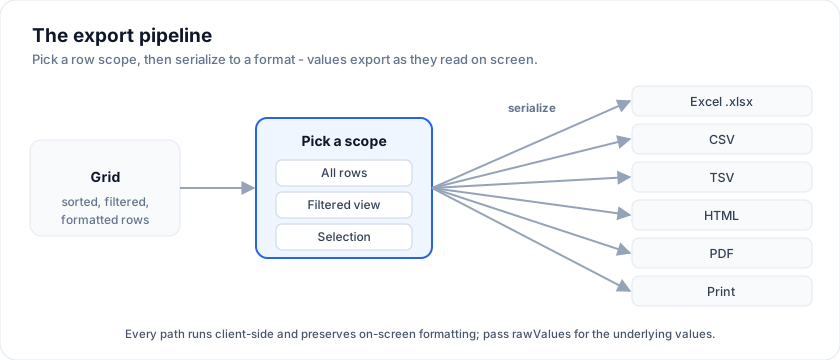
![Pick a row scope, then serialize the grid to Excel, CSV, TSV, HTML, PDF, or Print.](https://svgrid.com/docs-media/grid-export.svg)

| Capability | Package |
| ---------- | ------- |
| CSV / TSV / JSON export, copy-to-clipboard (TSV / CSV / Markdown) | **Free** (`@svgrid/grid`) |
| Excel `.xlsx` (typed cells, styles, conditional formatting, tables, multi-sheet) | Enterprise |
| PDF, styled HTML, XML, legacy `.xls`, password-protected export | Enterprise |
| `exportValue` hook, conditional-format export, `SvExportMenu`, `print()` | Enterprise |

## Free: CSV / TSV / JSON + clipboard

The community grid's `SvGridApi` carries four zero-dependency methods - no
license, no peer deps:

The examples on this page run against these rows:

```svelte
<script lang="ts">
  import { SvGrid, type GridColumns, tableFeatures, rowSortingFeature, columnFilteringFeature } from '@svgrid/grid'

  type Person = {
    id: number
    name: string
    email: string
    department: string
    age: number
    salary: number
    city: string
    startDate: string
    active: boolean
  }

  type Order = {
    id: string
    customer: string
    product: string
    quantity: number
    total: number
    status: 'pending' | 'shipped' | 'delivered'
    orderedAt: string
  }

  type Row = Person

  const features = tableFeatures({ rowSortingFeature, columnFilteringFeature })

  const people: Person[] = [
    { id: 1, name: 'Ada Lovelace',   email: 'ada@example.com',   department: 'Engineering', age: 36, salary: 142000, city: 'London',   startDate: '2021-03-01', active: true },
    { id: 2, name: 'Grace Hopper',   email: 'grace@example.com', department: 'Engineering', age: 45, salary: 168000, city: 'New York', startDate: '2019-07-15', active: true },
    { id: 3, name: 'Linus Torvalds', email: 'linus@example.com', department: 'Platform',    age: 54, salary: 155000, city: 'Portland', startDate: '2020-01-20', active: false },
    { id: 4, name: 'Radia Perlman',  email: 'radia@example.com', department: 'Networking',  age: 49, salary: 161000, city: 'Seattle',  startDate: '2022-09-05', active: true },
    { id: 5, name: 'Barbara Liskov', email: 'barbara@example.com', department: 'Platform',  age: 52, salary: 172000, city: 'Boston',   startDate: '2018-11-11', active: true },
  ]

  let rows = $state<Person[]>(people)

  const columns: GridColumns<Person> = [
    { field: 'name',       header: 'Name',       width: 200 },
    { field: 'department', header: 'Department', width: 150 },
    { field: 'city',       header: 'City',       width: 140 },
    { field: 'age',        header: 'Age',        width: 90 },
    { field: 'salary',     header: 'Salary',     width: 130, format: { type: 'currency', currency: 'USD' } },
  ]
</script>
```

```ts
await api.exportCsv({ filename: 'orders' })   // orders.csv (BOM + Excel-friendly)
await api.exportTsv()                         // grid.tsv
await api.exportJson({ rows: 'selected' })    // grid.json, checked rows only
await api.copyToClipboard({ format: 'tsv' })  // paste straight into Excel / Sheets
```

Every method:

- defaults to the **current view** (`rows: 'selected' | 'all'` to change),
- formats values **as shown on screen** (currency, dates) - pass
  `rawValues: true` for the underlying values,
- accepts a `columns: string[]` field subset (in that order),
- runs on a chunked, cancelable loop (`signal`, `onProgress`) so a 100k-row
  export never freezes the tab,
- returns the serialized text; pass `download: false` to skip the download
  and just get the string.

```svelte
<script lang="ts">
  import { SvGrid, tableFeatures, type SvGridApi } from '@svgrid/grid'
  let api = $state<SvGridApi<any, Row> | null>(null)
</script>

<button onclick={() => api?.exportCsv({ filename: 'orders' })}>Export CSV</button>
<button onclick={() => api?.copyToClipboard()}>Copy for Excel</button>
<SvGrid data={rows} columns={columns} features={features} onApiReady={(a) => (api = a)} />
```

The rest of this page covers the **Enterprise** formats.

Try the export bar below - downloads run in your browser; the bundled
license key removes the unlicensed watermark:

> Live demo: Export + Print - https://svgrid.com/demos/21-export-and-print/

## What it is

`@svgrid/enterprise` augments the `SvGridApi` you already get from
`<SvGrid onApiReady>` with two methods:

- `api.exportData({ format, filename?, columns?, rows?, pageOrientation? })`
- `api.print({ title?, columns?, rows?, orientation? })`

Both methods default to **the currently displayed rows** - sort, filter,
or paginate the grid, and the export reflects that view automatically.

## When to use it

- Reporting flows where users want to take the grid offline (spreadsheets,
  emailed PDFs).
- Compliance / audit trails that require a printable artifact.
- Quick CSV/TSV pulls for downstream pipelines.

If you only need machine-readable data, prefer CSV / TSV - they have no
peer dependencies and produce the smallest files. Use xlsx / PDF only
when the recipient expects formatted documents.

## Minimal example

```svelte
<script lang="ts">
  import { SvGrid, tableFeatures, rowSortingFeature, type SvGridApi, type ColumnDef } from '@svgrid/grid'
  import { installEnterprise, type EnterpriseGridApi } from '@svgrid/enterprise'

  // Without a key, the feature still works but the grid shows an
  // "unlicensed" watermark and the console emits a one-time nudge directing
  // users to the pricing page. After you buy, call setLicenseKey(yourKey)
  // once at startup.

  const features = tableFeatures({ rowSortingFeature })

  type Order = { company: string; product: string; price: number }
  const rows: Order[] = [
    { company: 'ACME',  product: 'Widget',  price: 19.95 },
    { company: 'Globex', product: 'Gadget', price: 49.00 },
  ]
  const columns: ColumnDef<typeof features, Order>[] = [
    { field: 'company', header: 'Company' },
    { field: 'product', header: 'Product' },
    { field: 'price',   header: 'Price', format: { type: 'currency', currency: 'USD' } },
  ]

  let api = $state<EnterpriseGridApi<typeof features, Order> | null>(null)

  function onReady(next: SvGridApi<typeof features, Order>) {
    api = installEnterprise(next)
  }
</script>

<button onclick={() => api?.exportData({ format: 'xlsx', filename: 'orders' })}>
  Export Excel
</button>
<button onclick={() => api?.exportData({ format: 'pdf', filename: 'orders', pageOrientation: 'landscape' })}>
  Export PDF
</button>
<button onclick={() => api?.print({ title: 'Orders' })}>
  Print
</button>

<SvGrid data={rows} columns={columns} features={features} onApiReady={onReady} />
```

## Install

```bash
pnpm add @svgrid/enterprise
# Optional - install only the peers you actually use:
pnpm add jszip     # required for xlsx
pnpm add pdfmake   # required for pdf
```

CSV, TSV, HTML, and Print have **no extra dependencies**. The peer
dependencies are lazy-loaded only when you call the format that needs
them.

## Licensing

`@svgrid/enterprise` has a tiered license gate:

| Key state                                  | Behavior |
| ------------------------------------------ | -------- |
| No key set (`setLicenseKey()` not called)  | Feature works. Grid shows an unlicensed watermark linking to svgrid.com/pricing; console.log emits a one-time nudge. |
| A key that is not your license key         | Same as no key: the feature works, with the watermark and a one-time console warning. |
| Your license key                           | Works silently. |

Buy a production key at <https://svgrid.com/pricing/> ($599 / developer /
year). To evaluate, you need no key at all: everything runs with a watermark.

## Reference

### `setLicenseKey(key: string): void`

Stores the key in module state. Call once at app startup (e.g. in
`main.ts`). Subsequent calls overwrite.

### `clearLicenseKey(): void` · `hasValidLicense(): boolean` · `dismissUnlicensedNudge(): void`

Programmatic helpers. `hasValidLicense()` is useful when you want UI to
branch on license status. `dismissUnlicensedNudge()` removes the
watermark and stops the MutationObserver - call it after setting a
valid key if you loaded the module without one during testing.

### `installEnterprise(api): EnterpriseGridApi`

Mutates the given `SvGridApi` to add `exportData` and `print`. Returns
the same object with the augmented type, so existing references keep
working.

### `api.exportData(opts)` - `Promise<void>`

| Option            | Type                                                  | Default              | Notes |
| ----------------- | ----------------------------------------------------- | -------------------- | ----- |
| `format`          | `'xlsx' \| 'xls' \| 'pdf' \| 'csv' \| 'tsv' \| 'html' \| 'json' \| 'xml' \| 'md'` | required | `xlsx` needs `jszip`, `pdf` needs `pdfmake`. `xls` / CSV / TSV / HTML / JSON / XML / Markdown are dependency-free. |
| `pdf`             | `PdfExportOptions`                                    | -                    | PDF layout: page size, margins, title / subtitle / logo, theme colors, column widths, repeated header, page numbers. See "PDF options". |
| `conditionalFormats` | `ConditionalFormat[]`                              | -                    | Same array as `<SvGrid conditionalFormats>`; carried into pdf / xlsx / html. See "Conditional formatting in exports". |
| `freezeHeader`    | `boolean`                                             | `true`               | Freeze the header row (xlsx / xls). |
| `freezeColumns`   | `number`                                              | pinned cols          | Freeze this many leading columns (xlsx / xls). Defaults to the grid's left-pinned columns. |
| `autoFitColumns`  | `boolean`                                             | `true`               | Size columns to content (xlsx / xls); a column's explicit `width` wins. |
| `precisionSafe`   | `boolean`                                             | `false`              | Export long integer IDs (> 15 digits) as text so Excel's float precision doesn't round them (xlsx / xls). |
| `excelTable`      | `boolean \| { totalsRow?; style? }`                   | -                    | Wrap single-sheet xlsx in a native Excel Table (filter dropdowns, banded rows; `{ totalsRow: true }` adds SUM formulas). |
| `download`        | `boolean`                                             | `true`               | When false, return the {@link ExportResult} without downloading. |
| `filename`        | `string`                                              | `"grid"`             | Extension is appended if missing. |
| `columns`         | `{ field; header?; format?; align?; exportValue? }[]` | grid's own columns   | Drives column selection + header labels. Auto-derived from the grid (with each column's `format`) when omitted. See `exportValue` below. |
| `rows`            | `ReadonlyArray<TData> \| 'displayed' \| 'selected' \| 'all'` | `'displayed'`  | `'displayed'` = current filtered/sorted/paged view, `'selected'` = checked rows, `'all'` = full dataset, or pass an explicit array. |
| `rawValues`       | `boolean`                                             | `false`              | By default the exporter writes the **formatted display value** (what you see). Set `true` to write raw underlying values (numbers stay numeric in xlsx). |
| `autoGroup`       | `boolean`                                             | `true`               | Carry the grid's active row grouping into xlsx outline rows. Pass your own `groupBy` to override, or `false` to ignore. |
| `csv`             | `{ delimiter?; eol?; bom? }`                          | `{ ',', '\r\n', BOM }` | CSV / TSV tuning. UTF-8 BOM is on by default so Excel opens it without mojibake. |
| `onProgress`      | `(p) => void`                                         | -                    | Progress for large exports: `{ phase, ratio, row?, total? }`, `phase` = `'project' \| 'serialize' \| 'write'`. |
| `signal`          | `AbortSignal`                                         | -                    | Cancel an in-flight export (checked between chunks). Rejects with `AbortError`. |
| `pageOrientation` | `'portrait' \| 'landscape'`                           | `"portrait"`         | PDF only. |
| `merges`          | `{ row; col; rowSpan?; colSpan? }[]`                  | `[]`                 | Merged cells (xlsx / pdf). Zero-based **body** row/col (header excluded). Single-sheet only; mutually exclusive with `groupBy` / `hierarchical`. |

### Faithful values (what you see is what you export)

By default the export renders each cell the way the grid does on screen: a
column with `format: { type: 'currency', currency: 'USD' }` exports `$19.95`,
a date column exports its formatted date, a percent column exports `42%`. This
holds for **every** format (csv / tsv / html / pdf / xlsx). Pass
`rawValues: true` to write the underlying values instead (e.g. feeding a data
pipeline that wants the numeric `19.95`).

For columns whose on-screen value comes from a **custom cell renderer**, a
`fieldFn`, or a lookup, give the column an `exportValue` hook - it takes
precedence over `format` and the raw field:

```ts
await api.exportData({
  format: 'xlsx',
  columns: [
    { field: 'company', header: 'Company' },
    // a column rendered with a custom snippet on screen:
    { field: 'status', header: 'Status', exportValue: (row) => STATUS_LABELS[row.status] },
  ],
})
```

### Export only what's selected

```ts
// current view (default)
await api.exportData({ format: 'xlsx' })
// only the checked rows
await api.exportData({ format: 'xlsx', rows: 'selected' })
// the entire underlying dataset, ignoring filters/paging
await api.exportData({ format: 'csv', rows: 'all' })
```

### Large exports: progress + cancel

CSV / TSV / HTML are serialized natively (no peer dependency) and stream in
chunks, yielding to the event loop so a big export doesn't freeze the tab:

```ts
const controller = new AbortController()
await api.exportData({
  format: 'csv',
  rows: 'all',
  signal: controller.signal,
  onProgress: ({ ratio }) => updateProgressBar(ratio),
})
// controller.abort() rejects the export with an AbortError
```

### Excel-native numbers (xlsx)

A single-sheet `xlsx` export writes numeric, currency, percent, and date
columns as **real typed cells** with an Excel number format - so Excel can sum
and sort them, and they still display formatted (currency symbol, thousands,
`%`, date pattern) - via SvGrid's own OOXML writer. Set `rawValues: true` for
unformatted raw values. The grouped-outline, multi-sheet, image, and merged-cell
paths use the bundled writer (formatted-string cells). The legacy `xls` format
is always typed.

### Excel fidelity: freeze, auto-fit, hyperlinks

`xlsx` and `xls` exports polish the spreadsheet automatically:

- **Freeze header** - the header row stays visible when scrolling. On by
  default; `freezeHeader: false` to disable, `freezeColumns: n` to also freeze
  leading columns.
- **Auto-fit column widths** - columns are sized to their content. On by
  default (`autoFitColumns: false` to disable); a column's explicit `width`
  (pixels) always wins.
- **Hyperlinks** - give a column a `link(row)` hook to render clickable links.
  Works in `xlsx`, `xls`, `html`, `pdf`, and `print`.

Single-sheet `xlsx` is written by SvGrid's own OOXML writer, so numbers/dates
stay typed with number formats, conditional-format colors are **real per-cell
fills**, and freeze/widths/hyperlinks all apply. (Grouped/outline, multi-sheet,
embedded-image, and merged-cell exports use the bundled writer.)

```ts
await api.exportData({
  format: 'xlsx',
  freezeHeader: true,        // default
  columns: [
    { field: 'name', header: 'Company', width: 220,
      link: (row) => `https://crm.example.com/accounts/${row.id}` },
    { field: 'revenue', header: 'Revenue', format: { type: 'currency', currency: 'USD' } },
  ],
})
```

Conditional-format colors (data bars / color scales) already render as real
cell fills in `xlsx`, which is higher fidelity than the writer's built-in
rule-only conditional formatting - so we keep the per-cell approach.

### Get the file instead of downloading (`download: false`)

`exportData` returns an **`ExportResult`** for the dependency-free paths
(csv/tsv/html/json/xml/md, xls, pdf, single-sheet xlsx) so you can preview,
upload, email, or attach the file. With `download: false` it builds and returns
the file **without** triggering a browser download:

```ts
const res = await api.exportData({ format: 'xlsx', download: false })
// res: { blob, filename, mime, rowCount, byteSize }
await uploadToStorage(res.blob, res.filename)
```

The grouped / multi-sheet / image / blanket-styled xlsx paths use the vendored
writer, which downloads directly and returns `undefined` (and throws on
`download: false`).

### Excel Table (filter dropdowns + totals row)

Wrap a single-sheet xlsx in a native **Excel Table** - the user gets column
filter dropdowns, banded rows, structured references, and (optionally) a totals
row with live `SUM()` formulas:

```ts
await api.exportData({ format: 'xlsx', excelTable: { totalsRow: true } })
// or just `excelTable: true` for the table without a totals row
```

Column widths auto-fit and leading **pinned columns are frozen automatically**
(override with `freezeColumns`). For long IDs, `precisionSafe: true` writes them
as text so Excel's 15-digit float limit doesn't silently round `1002000300040005`.

### JSON / XML / Markdown

```ts
await api.exportData({ format: 'json' })  // array of { field: value } - defaults to raw values
await api.exportData({ format: 'xml' })   // <rows><row><field>value</field>…
await api.exportData({ format: 'md' })    // GitHub-flavored Markdown table (great for docs / LLMs)
```

JSON defaults to **raw** values (real numbers/dates) since it's a data format;
pass `rawValues: false` for formatted strings. XML and Markdown use the
formatted display values.

### Copy to clipboard

`api.copyExport(opts)` serializes to the clipboard instead of downloading a
file - handy for "copy these rows into a spreadsheet or an email":

```ts
await api.copyExport({ format: 'tsv' })          // pastes into Excel / Sheets as columns (default)
await api.copyExport({ format: 'md', rows: 'selected' })  // Markdown table of the checked rows
await api.copyExport({ format: 'html' })         // rich text/html - keeps the table when pasted
```

Supported formats: `csv`, `tsv`, `html`, `json`, `xml`, `md`. `html` writes
both `text/html` (rich paste) and a `text/plain` fallback. Needs a secure
context and a user gesture (call it from a click).

### Conditional formatting in exports

Pass the same `conditionalFormats` array you give `<SvGrid>` to carry the grid's
color scales, data bars, icon sets, and predicate rules into the **styled**
formats - PDF, xlsx, and HTML (and `print()`):

```ts
const conditionalFormats = [
  { type: 'colorScale', columns: ['score'], min: '#dcfce7', max: '#fee2e2' },
  { type: 'rule', columns: ['status'], when: ({ value }) => value === 'Overdue', background: '#fecaca' },
]

await api.exportData({ format: 'pdf', conditionalFormats })
await api.exportData({ format: 'xlsx', conditionalFormats }) // real cell fills in Excel
await api.print({ conditionalFormats })
```

Cell background, text color, and bold carry through as **real cell fills** in
`xlsx` (single-sheet), `xls`, `html`, and `pdf`; icon sets prepend their glyph
to the cell text.

In **xlsx**, **data bars** and **color scales** become **native Excel
conditional formatting** (`<conditionalFormatting>` rules) - Excel draws and
recomputes them itself, so they're interactive, not a static snapshot.
Predicate `rule` formats stay as computed per-cell fills. In the other styled
formats (`xls` / `html` / `pdf`) a data bar degrades to a light fill of the bar
color (cells can't hold a partial-width bar). The data formats (csv / tsv /
json / xml / md) are unstyled, so conditional formatting is ignored there.
Grouped PDF exports skip conditional formatting (the group/subtotal rows own the
layout).

### PDF options

The PDF is built from a full pdfmake document you control via `pdf`:

```ts
await api.exportData({
  format: 'pdf',
  filename: 'orders',
  pdf: {
    pageSize: 'A4',            // 'A4' | 'A3' | 'A5' | 'LETTER' | 'LEGAL'
    pageOrientation: 'landscape',
    title: 'Q3 Orders',
    subtitle: 'Generated by Ops',
    logo: logoDataUrl,        // top-left image (data URL)
    headerColor: '#334155',   // header row fill
    zebra: true,              // striped rows
    columnWidths: '*',        // '*' fill, 'auto', or a per-column pt array
    // repeatHeader (default true), showPageNumbers (default true) also available
  },
})
```

The header row repeats on every page, each page gets a `Page X of Y` +
date footer, per-column alignment is honored, and wide grids auto-switch to
landscape (override with `pdf.pageOrientation`).

The PDF looks like the grid it came from. With `pdf.matchTheme` (default
true) the exporter reads the mounted grid's computed colours - header fill
and text, body text, the zebra stripe, the lines, a group row's fill - so a
grid on the Ember theme or a Theme Builder palette prints in those colours
rather than the slate defaults. A dark theme lends only its header: the
page is white, so its body text and stripes would not read. The order of
precedence is explicit `pdf` colours (`headerColor`, `headerTextColor`,
`textColor`, `zebraColor`, `borderColor`, `groupColor`, ...), then
`styles`, then the theme, then the defaults. `styles.headerRow` /
`styles.rows` / `styles.rowAlternate` / `styles.cells` (A1 references, row
1 being the header) apply to the PDF table the way they do to xlsx and
html, `header` / `footer` lines print above and below the table, and
`merges` span data cells.

When the grid is grouped, the PDF carries the grouping: a bold **group header**
per cluster (nested for multi-level grouping) and a **subtotal row** summing the
number / currency columns - matching the xlsx outline export. It's on by
default (`autoGroup`); pass `groupBy` to override or `autoGroup: false` to get a
flat table.

#### Charts and a KPI strip

A report is rarely just the table. `pdf.charts` prints charts with it: hand
over the rendered chart's element (the `SvChart` wrapper or its `<svg>`) and
the export rasterises it at 2x through the chart's own PNG path, so the page
gets the picture on screen, theme and all; or pass an image data URL you
already have. Each takes a `title`, a `caption` and a `width` in pt
(default: the content width). `pdf.kpis` prints a strip of headline numbers
above the table, each with a label, the value and an optional `delta` line
in its own colour:

```svelte
<div bind:this={chartEl}><SvChart {spec} /></div>

<button onclick={() => api.exportData({
  format: 'pdf',
  filename: 'q3-report',
  pdf: {
    title: 'Q3 Orders',
    kpis: [
      { label: 'Revenue', value: '$1.24M', delta: '+4.2% vs Q2', color: '#16a34a' },
      { label: 'Orders', value: '842' },
      { label: 'Avg order', value: '$1,473', delta: '-1.1%', color: '#ef4444' },
    ],
    charts: [{ element: chartEl, title: 'Revenue by region', caption: 'Displayed rows, grouped by region' }],
    chartsPosition: 'above',      // or 'below' the table
  },
})}>Export report</button>
```

A chart block never splits across a page break. `resolvePdfCharts` and
`buildPdfDocDefinition` are exported for a document you assemble yourself.

#### Merged cells

Pass `merges` to write real merged regions into the sheet. Row / column
indices are zero-based over the exported **body** (the header row is not
counted), and the shape lines up with the grid's own `MergeSpec`:

```ts
// Merge the first two data rows of column 0, and span a 3-column banner
await api.exportData({
  format: 'xlsx',
  merges: [
    { row: 0, col: 0, rowSpan: 2 },   // vertical merge (e.g. a repeated group key)
    { row: 5, col: 0, colSpan: 3 },   // horizontal merge (a section banner)
  ],
})
```

To export the merges you already show in the grid, take your `MergeSpec[]`
(`{ rowIndex, columnId, rowspan, colspan }`) and map `columnId` to its column
index: `{ row: m.rowIndex, col: colIndex(m.columnId), rowSpan: m.rowspan, colSpan: m.colspan }`.

Throws on missing peer (`jszip` / `pdfmake`), revoked / malformed
license, or empty result set. With no license set, it runs but the
grid is watermarked.

### `api.print(opts?)` - `Promise<void>`

Opens a new window with a paginated, printable rendering of the grid and
triggers the browser print dialog. This is the **zero-dependency "Save as PDF"**
route: it uses the browser's own engine, so it has excellent font + CSS
fidelity (including CJK / RTL) and needs no `pdfmake`. The header row repeats on
every page, values print **formatted** (matching the grid), and columns keep
their alignment.

| Option        | Type                                   | Default     |
| ------------- | -------------------------------------- | ----------- |
| `title`       | `string`                               | `"Grid"`    |
| `subtitle`    | `string`                               | -           |
| `logo`        | `string` (data URL)                    | -           |
| `columns`     | `{ field; header?; format?; align? }[]`| grid's own columns |
| `rows`        | `ReadonlyArray<TData> \| 'displayed' \| 'selected' \| 'all'` | `'displayed'` |
| `rawValues`   | `boolean`                              | `false`     |
| `orientation` | `'portrait' \| 'landscape'`            | `"portrait"` |
| `pageSize`    | `string` (e.g. `'A4'`, `'Letter'`)     | browser default |
| `margin`      | `string` (e.g. `'14mm'`)               | `'14mm'`    |
| `zebra`       | `boolean`                              | `true`      |
| `headerColor` | `string`                               | `'#f1f5f9'` |

Browsers may block the popup unless `print()` is called from a user
gesture (a click handler is fine - automatic on-load print is not). Page
numbers come from the browser's own print header/footer.

**`exportData({ format: 'pdf' })` vs `print()`** - use PDF export for a
programmatic, silent file download with full layout control (see "PDF
options"); use `print()` when you want best-fidelity output and the user to
pick print or "Save as PDF" from the dialog.

## Drop-in Export menu (`SvExportMenu`)

Rather than wiring your own toolbar, drop in the bundled `SvExportMenu`
component. It renders an "Export" button with a format picker, a row-scope
toggle (current view / selected / all), and a built-in progress bar + Cancel
for large exports:

```svelte
<script lang="ts">
  import { SvGrid, type SvGridApi } from '@svgrid/grid'
  import { installEnterprise, SvExportMenu, type EnterpriseGridApi } from '@svgrid/enterprise'

  let api = $state<EnterpriseGridApi<typeof features, Order> | null>(null)
</script>

<div class="toolbar">
  <SvExportMenu {api} filename="orders" />
</div>

<SvGrid data={rows} columns={columns} features={features}
  onApiReady={(a) => (api = installEnterprise(a))} />
```

| Prop         | Type                                             | Default                     | Notes |
| ------------ | ------------------------------------------------ | --------------------------- | ----- |
| `api`          | `EnterpriseGridApi \| null`            | required        | Button is disabled until the api is ready. |
| `filename`     | `string`                               | `'grid'`        | Base name, no extension. |
| `formats`      | `ExportFormat[]`                       | xlsx/xls/pdf/csv/tsv/html | Which formats to offer, in order. |
| `allowScope`   | `boolean`                              | `true`          | Show the current-view / selected / all toggle. |
| `allowColumns` | `boolean`                              | `true`          | Show per-column include checkboxes (choose which columns to export). |
| `allowCopy`    | `boolean`                              | `true`          | Show "Copy for Excel" (tsv) + "Copy Markdown" clipboard actions. |
| `allowPrint`   | `boolean`                              | `false`         | Show a "Print…" action (`api.print`). |
| `scope`        | `'displayed' \| 'selected' \| 'all'`   | `'displayed'`   | Initial row scope. |
| `label`        | `string`                               | `'Export'`      | Button text. |
| `conditionalFormats` | `ConditionalFormat[]`            | -               | Carried into pdf / xlsx / html exports. |

The menu is sectioned into **Rows** (scope), **Columns** (a picker), and
**Download** (each format shown with an icon + one-line description), plus
**copy-to-clipboard** and optional **print** actions. It's **keyboard
accessible** (arrow keys move between items, Tab is trapped inside, Esc closes
and returns focus to the button, with `role="menu"` / `menuitem`), handles
errors inline (missing peer dependency, empty grid), and wires `onProgress` +
an `AbortController` for you.

For large exports, the single-sheet xlsx writer builds in **chunks that yield to
the event loop** (and zips asynchronously), so the tab stays responsive and
`onProgress` ticks; pass a `signal` to cancel.

## Gotchas

- **Empty grids** - both `exportData` and `print` throw if there are no
  displayed rows. Catch the error and show a notice in the UI.
- **Column ordering** - if you don't pass `columns`, the export uses
  `Object.keys(rows[0])` order. Pass `columns` explicitly when the row
  shape doesn't match the column order you want.
- **Cell formatters** - column-level format hints (date, number, currency,
  percent) are applied to the exported value by default, so the file matches
  the grid. Custom snippet renderers are **not** auto-serialized - give those
  columns an `exportValue` hook (see "Faithful values" above), or set
  `rawValues: true` if you want the raw underlying values.
- **Print popup blocked** - `print()` resolves but the browser silently
  blocks the new window. Always trigger from a user click, and surface
  the thrown error.
- **Bundle size** - the vendored exporter is ~50 KB minified. It is
  loaded lazily on first call so it does not bloat the initial bundle
  for users who never export.

## Frequently asked questions

### How do I export a Svelte data grid to Excel?

Install `@svgrid/enterprise`, call `installEnterprise(api)`, then call the export helper with
`format: 'xlsx'`. The exporter writes a real OOXML workbook in the browser - no
server round-trip. CSV, TSV, PDF, and HTML use the same call with a different
format.

### What's the difference between `xls` and `xlsx`?

`xlsx` is the modern OOXML workbook (Excel 2007+); it needs the `jszip` peer
dependency and supports the richest output (styles, images, multi-sheet,
formulas). `xls` is the **legacy Excel 2003 XML Spreadsheet** format: pick it
for maximum compatibility with old Excel installs or systems that only accept
`.xls`. It has **no peer dependency**, streams in the browser, and keeps
numbers and dates typed (so sums and sorting still work in Excel) with number
formats applied. It's single-sheet - use `xlsx` for multi-tab workbooks.

```ts
await api.exportData({ format: 'xls', filename: 'orders' })
```

### Is export part of the free Community package?

No. Export and printing ship in the paid `@svgrid/enterprise` add-on. The free
`@svgrid/grid` package covers the full grid (sorting, filtering, grouping,
editing, virtualization) but not export/print/pivot/import.

### Does exporting bloat my bundle?

No. The ~50 KB exporter is lazy-loaded on the first export call, so users who
never export never download it.

## More examples

### Password-protected export

PBKDF2 (100k iters) + AES-GCM 256 client-side. Strength meter, encrypt + download, in-page decrypt tool to verify the round-trip. Enterprise pack maps to ECMA-376 Agile encryption.

> Live demo: Password-protected export - https://svgrid.com/demos/93-password-protected-export/

### Formulas preserved in xlsx

Builds a real OOXML workbook in the browser via JSZip; computed columns export as <f>...</f> formula cells. Open in Excel and the math recomputes when you edit a number.

> Live demo: Formulas preserved in xlsx - https://svgrid.com/demos/101-formulas-in-xlsx/

### Export grouped grid to Excel

A flat sales grid (Region → Country) exported via api.exportData({ format: "xlsx", groupBy }) which uses Smart's NATIVE Excel row outline grouping. Opens in Excel with +/- buttons in the row header gutter for every group level.

> Live demo: Export grouped grid to Excel - https://svgrid.com/demos/126-export-grouped-grid/

### Export pivot grid to Excel

createPivotModel leaves projected into an xlsx via api.exportData with groupBy: ["region"] - each region becomes an Excel outline group. Engine column ids ("pv__Q1__m0") translate to readable headers ("Q1 · Revenue").

> Live demo: Export pivot grid to Excel - https://svgrid.com/demos/127-export-pivot-grid/

### Export - Formatting, scope + XLS

Faithful export: currency / date / percent render as shown (toggle raw values), pick a row scope (view / selected / all), legacy .xls (Excel 2003 XML, no jszip), an exportValue hook, and the drop-in SvExportMenu.

> Live demo: Export - Formatting, scope + XLS - https://svgrid.com/demos/201-export-formatting-and-xls/

### Export - Grouped PDF + Print

Group the grid and export: the PDF + xlsx carry bold group headers and per-cluster subtotal rows (auto-carried from grouping state). Polished Print is the zero-dependency "Save as PDF" route with a repeated header and title.

> Live demo: Export - Grouped PDF + Print - https://svgrid.com/demos/202-export-pdf-grouped-and-print/

## Try the export API

Every exporter is on the grid api and takes the same
`GridExportOptions`. `rows: 'displayed'` is the default and is almost always
what a user means by "export this" - it follows their filter and sort.

```svelte
<script lang="ts">
  let api = $state<SvGridApi<{}, Person> | null>(null)
</script>

<div>
  <button type="button" onclick={() => api?.exportCsv({ filename: 'people' })}>CSV</button>
  <button type="button" onclick={() => api?.exportTsv({ filename: 'people' })}>TSV</button>
  <button type="button" onclick={() => api?.exportJson({ filename: 'people' })}>JSON</button>
  <button type="button" onclick={() => api?.print()}>Print</button>
</div>

<SvGrid data={people} {columns} sortable filterable onApiReady={(next) => (api = next)} />
```

Sort or filter first, then export: the file follows the view.

## Exporting a subset

`columns` restricts the fields and fixes their order, and `rawValues` decides
whether the file carries what the screen shows or what the row holds. The
salary column is the one to watch - formatted it is `$142,000`, raw it is
`142000`, and a spreadsheet can only do arithmetic on the second.

```svelte
<script lang="ts">
  let api = $state<SvGridApi<{}, Person> | null>(null)
</script>

<div>
  <button type="button" onclick={() => api?.exportCsv({ filename: 'formatted', columns: ['name', 'salary'] })}>
    Name + salary, as displayed
  </button>
  <button type="button" onclick={() => api?.exportCsv({ filename: 'raw', columns: ['name', 'salary'], rawValues: true })}>
    Name + salary, raw values
  </button>
</div>

<SvGrid data={people} {columns} onApiReady={(next) => (api = next)} />
```

---

SvGrid is the Svelte 5 data grid (`npm install @svgrid/grid`, MIT). This page: https://svgrid.com/docs/help/export/ . All docs: https://svgrid.com/llms.txt
