Editing - overview
Inline editing is a single prop on <SvGrid>. Try it - double-click
any cell, type to replace, hit Enter to commit. Tab moves to the
next editable cell:
Open the live example: Inline editing (Editing)
<SvGrid {data} {columns} features={features} enableInlineEditing={true} />
To make a specific column editable, give it an editorType:
const columns: ColumnDef<typeof features, Person>[] = [
  { field: 'firstName',  header: 'First',  editorType: 'text' },
  { field: 'age',        header: 'Age',    editorType: 'number' },
  { field: 'joinedAt',   header: 'Joined', editorType: 'date' },
  { field: 'active',     header: 'Active', editorType: 'checkbox' },
]
A column with no editorType is read-only even when
enableInlineEditing={true}.
How a user edits
| Action | Keys | Outcome |
|---|---|---|
| Enter edit mode | Enter / F2 / double-click |
Editor opens on the active cell |
| Commit and move down | Enter / Shift+Enter |
Saves the new value and moves the cursor a row down (up with Shift); stays put on the last row |
| Commit and move right | Tab / Shift+Tab |
Saves and moves a column right (left with Shift), wrapping at the end of the row |
| Commit into the block | Ctrl+Enter |
Saves the entry into every editable cell of the selected block and stays put; one undo |
| Cancel | Esc |
Discards |
Two more rules make a run of entries feel like a sheet. A run of Tabs
remembers the column it started in, and the Enter that ends the run goes
down from that column: type across A1, B1 and C1 with Tab, press Enter, and
the cursor is on A2 for the next record. An arrow key or a click ends the
run. And inside a selection of more than one cell the cursor stays inside
it: Enter walks down a column and wraps to the top of the next, Tab walks
along a row and wraps to the start of the next, both come back to the first
cell after the last, and the selection stays put, so a block can be filled
without reaching for the mouse. Both rules apply whether the key commits an
edit or just moves the cursor, and getEntryStep from @svgrid/grid is the
pure function behind them if you need the same stepping elsewhere.
A click on the cell that is already active also opens the editor, the way a
second click on a selected file name starts a rename. editOnSecondClick={false}
turns that off; the spreadsheet shell does, since Excel edits on double-click
or F2 only.
A text column with editorMultiline: true takes line breaks: Alt+Enter
inserts one and the editor grows a line per break, while Enter still commits.
It is the spreadsheet's shape of a multi-line cell; editorType: 'textarea'
is the other, where Enter itself is the line break and Ctrl+Enter commits.
What gets saved
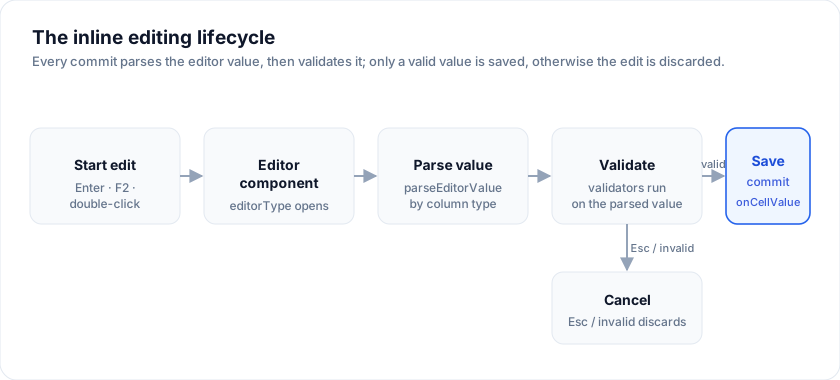
When the user commits, the grid:
- Parses the editor's string value through
parseEditorValuefor the column'seditorType. - Writes the parsed value into the grid's internal data copy.
- Fires
onCellValueChangewith{ rowIndex, columnId, oldValue, newValue, row }. - Fires a re-render.
To round-trip edits to your source, attach a callback:
<SvGrid
  {data} {columns} features={features}
  enableInlineEditing={true}
  onCellValueChange={(e) => savePersonField(e.row.id, e.columnId, e.newValue)}
/>
See Saving values for the full patterns (per-edit, batch-from-snapshot, cascade recompute).
Frequently asked questions
How do I enable inline editing in SvGrid?
Set the inline-editing prop on <SvGrid> and give editable columns an
editorType. Then double-click a cell (or press F2), type to replace, and press
Enter to commit; Tab moves to the next editable cell.
What cell editors does SvGrid provide?
Built-in editors for text, number, checkbox, date, select, rich-select, and
textarea, chosen per column via editorType. You can also supply a custom
editor through the cellEditor slot.
Does SvGrid mutate my data array when editing?
No. Commits are written to the grid's internal working copy, not the array you
passed in, so cancel/undo is possible. Subscribe to onCellValueChange to
persist edits to your own state or backend.
More examples
Cell validation (validate hook)
Declarative per-column validate() hook, Handsontable-style. Invalid cells - including bad data already in the source on load - highlight red with the reason as a tooltip, and re-check live as you edit.
Excel-style fill handle
Walks through every fill pattern the engine detects: numeric series (an even step continues it; an uneven run continues its linear trend, as Excel's AutoFill does), date series, weekday sequence, reverse-fill, horizontal fill, copy-mode.
The handle follows the grid's pattern rules (a series, weekdays, "Item 1"),
and processCellForFill runs ahead of them: it receives the source value
and how far the target sits from it, and returns the value to write or
undefined to leave it to the pattern. Double-click the handle to fill
down as far as the neighbouring column has data. A drag is one undo.
Transcript
With cell selection on, every range gets a fill handle at its corner. Select the two seed cells of the numeric series.
Drag the handle to the right. Ten and twenty become a series in steps of ten, filled as far as you drag.
Weekdays and dates continue the same way. A single seed switches to copy mode and repeats the value.
Every filled cell goes through the normal edit pipeline, so validation and change tracking still apply.
Drag a range to move or copy it
Grab the border of a selected block and drag it somewhere else and the values move; hold Ctrl (Cmd) as you drop and they are copied. On by default with cell selection - see Drag a range to move or copy it.
Transcript
Inline editing in SvGrid is one prop. Set enableInlineEditing and double-click any cell to start.
Type a new value and press Enter to commit it.
Columns pick their own editor. Department is a list, so double-clicking it opens a dropdown, and one click picks the value.
Every change is tracked. The pending edits card counts what is not saved yet, and Save changes commits the batch.
See also
- Start / stop editing
- Parsing values
- Saving values
- Provided editors
- Validation
- Drag a range to move or copy it
Live examples
- Inline editing - Typed editors (text/number/checkbox/date) with dirty tracking + save.
- Cell validation (validate hook) - Declarative per-column `validate()` hook, spreadsheet-style. Invalid cells - including bad data already in the source on load - highlight red with the reason as a tooltip, and re-check live as you edit.
- Excel-style fill handle - Walks through every fill pattern the engine detects: numeric series, date series, weekday sequence, reverse-fill, horizontal fill, copy-mode.
- Drag a range to move / copy - Grab the border of a selected block and drag it somewhere else: the values move, or copy when Ctrl / Cmd is held at drop time. The rectangle moves whole or not at all - a drop that would run off the grid or land on a read-only column is refused - and Ctrl+Z walks the whole thing back.
Related articles
- Inside SvGrid: The Inline Editing Engine - How SvGrid handles inline cell editing - typed editors, an event-based commit model, undo/redo, and why the grid never touches your data directly.