# Column pinning
Pinning sticks a column to the **left** or **right** edge of the viewport so
it does not scroll horizontally with the rest.
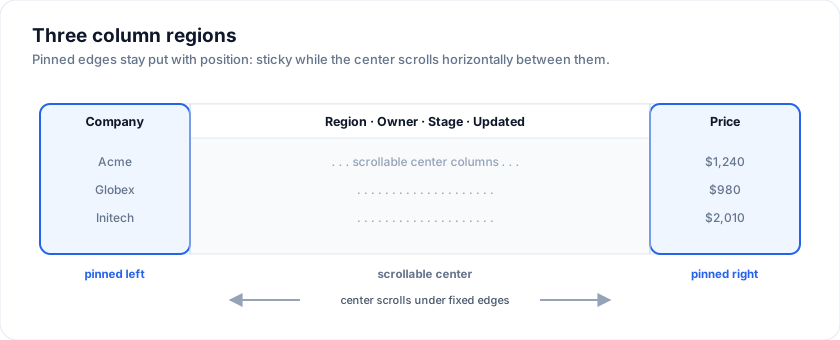
Live demo - pin Company left, Price right, scroll the middle:
> Live demo: Column pinning + freezing - https://svgrid.com/demos/25-column-pinning/
## Through the column menu
Every column header has a menu (the `⋮` button). The menu has "Pin left" /
"Pin right" / "Unpin" items.
## Drag to pin
`pinSplitter` draws a divider at the right edge of the left-pinned columns
(or of the row numbers when none are pinned). Drag it right to pin the
columns it passes, left to unpin them; it snaps to column edges and shows how
many columns it will pin.
> Live demo: Drag to pin columns - https://svgrid.com/demos/510-column-pin-splitter/
```svelte
```
- The columns stay where they are on screen: a column you unpin does not
jump back to where it was declared, and `onColumnOrderChange` reports the
order when it changes.
- It leaves 120px for the columns that scroll and never pins every column.
- Escape drops a drag. From the keyboard, Tab to the divider: the arrow keys
pin or unpin one column, Home unpins them all. It is a `separator` that says
how many columns are pinned.
- Its words come from `localization.text`: `pinSplitterLabel`,
`pinSplitterHint`, `pinSplitterNone`, `pinSplitterOne` and
`pinSplitterMany` (`{count}` is the number of pinned columns).
- The grid loads it only when the prop is on.
## Programmatically
`SvGridApi` exposes `setColumnPinning` and `getColumnPinning` for
read / write from outside the grid:
The examples on this page run against these rows:
```svelte
```
```svelte
(api = next)} />
```
For initial pinning at mount, use the `initialColumnPinning` prop on
``:
```svelte
```
`getColumnPinning()` returns `{ left: string[]; right: string[] }` -
the array order is the visible order along the pinned edge.
## Rendering
- Pinned-left columns sit at the start of the visible row, with `position:
sticky; left: px; z-index: 3`.
- Pinned-right columns sit at the end of the visible row, with `position:
sticky; right: px; z-index: 3`.
- Offsets cascade - second-left column sits at the cumulative width of
the first.
## Styling
Pinned columns are visually differentiated from the scrollable middle
through three layered cues:
1. **A distinct background tint** so the pinned strip reads as "frozen"
even before you scroll.
2. **A 1-pixel divider** on the inside edge (the side facing the
scrollable region) and a soft drop shadow that fades into the
scroll area.
3. **A bolder header** font weight so the frozen header reads as part
of the grid chrome.
All three cues are driven by CSS custom properties. Override them to
match your design system:
| Token | Default | Used for |
|-----------------------------|---------------------------------------------------------------------------|--------------------------------|
| `--sg-pinned-bg` | `color-mix(in oklab, var(--sg-header-bg) 92%, var(--sg-accent) 8%)` | Body cells in pinned columns |
| `--sg-pinned-header-bg` | `color-mix(in oklab, var(--sg-header-bg) 86%, var(--sg-accent) 14%)` | Header cells in pinned columns |
| `--sg-pinned-divider` | `var(--sg-border)` | The 1-pixel inside-edge line |
| `--sg-pinned-shadow-color` | `rgba(15, 23, 42, 0.22)` | The drop shadow into the scroll area |
> **Keep the pinned background opaque.** When you override `--sg-pinned-bg`
> with `color-mix`, the two percentages **must sum to 100%**. If they add up
> to less (e.g. `60% + 20% = 80%`), CSS scales the result's alpha down to
> `0.8` - the pinned column turns semi-transparent and the scrolling middle
> columns bleed through it. Always pair the percentages as `N%` / `(100 - N)%`.
The fallbacks compute a subtle accent-tinted background from your
existing header background, so a pinned column never looks identical
to the rest of the grid even if you don't set anything. That works
well for a low-chroma accent. If yours is saturated, the derived tint
can get loud enough to compete with your selection colour - name a
neutral fill instead and let the divider and shadow carry the
boundary:
```css
.themed-host {
--sg-pinned-bg: var(--sg-row-alt-bg);
--sg-pinned-header-bg: var(--sg-header-bg);
--sg-pinned-divider: var(--sg-border);
--sg-pinned-shadow-color: rgba(94, 72, 52, 0.18);
}
```
To opt out of the tint and match the body exactly:
```css
.themed-host {
--sg-pinned-bg: var(--sg-bg);
--sg-pinned-header-bg: var(--sg-header-bg);
}
```
Or to make pinned columns *very* obvious - useful for high-density
financial grids where the user must instantly know which side is
frozen:
```css
.themed-host {
--sg-pinned-bg: color-mix(in oklab, var(--sg-bg) 80%, var(--sg-accent) 20%);
--sg-pinned-header-bg: color-mix(in oklab, var(--sg-bg) 70%, var(--sg-accent) 30%);
--sg-pinned-divider: var(--sg-accent);
}
```
### Hover, selection, and zebra rows
The pinned tint sits *under* the hover, selection, and zebra row
backgrounds via stacked `linear-gradient` paints. That means:
- Hovering a row in a pinned cell shows the pinned tint *with* the
hover overlay on top - the user still sees the row highlight.
- Selecting a row layers the selection colour over the pinned tint.
- Zebra rows re-paint the pinned cell so the alternating row
background doesn't leak through the pin.
You don't need to override anything for these states to work; they
follow `--sg-row-hover-bg`, `--sg-selection-bg`, and the pinned tokens
automatically.
## Multiple pinned columns
Multiple pins are stacked in the order they were pinned. The first-pinned
column is the outermost.
## Gotchas
- Pinning **plus** column virtualization is supported. The pinned columns
are always rendered, as their own runs either side of the virtual window;
the columns between them stay virtualized, so a wide grid with pinned
edges renders only the columns in view plus the pinned ones.
- If you have so many pinned columns that they exceed the viewport width
there is no horizontal scrollbar within the pinned regions - the user
loses access to the non-pinned middle. Pin only "anchor" columns
(identifier, action, status) and keep the count single-digit.
## Try it
Pinning is a grid-level prop naming column ids, not a flag on the column.
Scroll the grid sideways: Name stays at the left edge, Salary at the right.
```svelte
```
## Pinning both edges
Pinned columns stay put while the middle scrolls. Narrow the browser and the
two pinned columns hold their edges while Department and City pan between them.
```svelte
```
## See also
- [Column state](https://svgrid.com/docs/help/columns/column-state/)
- [`SvGridApi` reference](https://github.com/sv-grid/sv-grid/blob/main/docs/reference/SvGridApi.md) - `setColumnPinning` / `getColumnPinning` signatures.
---
SvGrid is the Svelte 5 data grid (`npm install @svgrid/grid`, MIT). This page: https://svgrid.com/docs/help/columns/column-pinning/ . All docs: https://svgrid.com/llms.txt