# Integrated charts
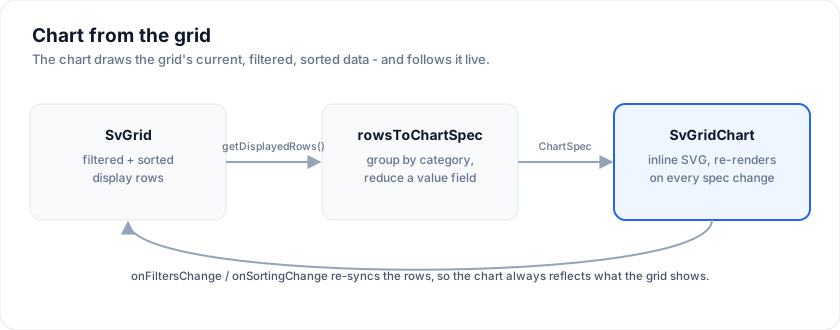
SvGrid can chart its own data with no external charting library. Two pieces:
- **`SvGridChart`** - a component that renders a `ChartSpec` as inline SVG
(bar, line, area, pie, scatter, candlestick, box plot and a dozen more) with
configurable axes, hover tooltips, a clickable legend that toggles series
(or pie slices) on and off, reference lines and bands, time and numeric
axes, and a visually-hidden data table for screen readers.
- **`rowsToChartSpec(rows, opts)`** - aggregates flat rows (group by a
category field, reduce a value field) into a `ChartSpec`, with optional
sorting and top-N + "Other" bucketing.
Feed it `api.getDisplayedRows()` and the chart reflects the grid's current,
filtered, sorted data - the "chart from the grid" enterprise feature.
The examples on this page import from `@svgrid/grid`:
```svelte
```
```svelte
{ api = a; sync() }}
onFiltersChange={sync} onSortingChange={sync} />
```
## Pages
- [Getting started](https://svgrid.com/docs/help/charts/start/): rows to a spec, a spec by hand, titles, number format, sizing.
- [Chart types](https://svgrid.com/docs/help/charts/types/): bars, lines and areas with stack groups, scatter, and the other twenty-odd from waterfall to chord.
- [Charting a pivot](https://svgrid.com/docs/help/pivot/#charting-a-pivot): one pivot layout as a table and a chart, through `pivotToChartSpec` or the designer's Chart view (Enterprise).
- [Chart gallery](https://svgrid.com/docs/help/charts/gallery/): fourteen full-size charts, one per family, with real data and the switches each family needs.
- [Axes, scales and styling](https://svgrid.com/docs/help/charts/axes-and-styling/): the axis model, reference lines and bands, markers, data and series labels, legends, responsive rules, decimation.
- [Interaction](https://svgrid.com/docs/help/charts/interaction/): tooltips and crosshair pills, zoom, sync, context menu, animation, drilldown, keyboard, selection, notes, drawing tools.
- [Financial charts](https://svgrid.com/docs/help/charts/financial/): candlesticks, indicators and panes, resampling, last price and flags.
- [Accessibility and localization](https://svgrid.com/docs/help/charts/accessibility/): what the chart says to assistive technology, keyboard, forced colors, localeText.
- [Charting from the grid](https://svgrid.com/docs/help/charts/from-the-grid/): the chart panel, cross-filtering, the builder, linked charts, export.
- [API reference](https://svgrid.com/docs/help/charts/api/): every ChartSpec field and helper, with the page that explains it.
## More examples
### Axes, titles and styling
> Live demo: Axes, titles and styling - https://svgrid.com/demos/434-chart-axes-styling/
### Synchronized charts with zoom, pan and presets
> Live demo: Synchronized charts with zoom, pan and presets - https://svgrid.com/demos/436-chart-sync-zoom/
### Financial workbench
> Live demo: Financial workbench - https://svgrid.com/demos/437-chart-financial-workbench/
## See also
- [SvGridChart props](https://svgrid.com/docs/help/ui-components/sv-grid-chart/)
- [SvChartPanes](https://svgrid.com/docs/help/ui-components/sv-chart-panes/)
- [The `` web component](https://svgrid.com/docs/help/web-components/sv-chart/)
---
SvGrid is the Svelte 5 data grid (`npm install @svgrid/grid`, MIT). This page: https://svgrid.com/docs/help/charts/ . All docs: https://svgrid.com/llms.txt