<!-- https://svgrid.com/docs/help/base/collaboration/ - SvGrid documentation as markdown. Index of every page: https://svgrid.com/llms.txt -->

# People, comments and files

A tracker one person fills in needs a status column and little else. Once a
team uses it, people want to see who a task is assigned to, who changed the
status and when, a thread of comments on the task, and the mockups attached
to it, kept somewhere that survives a reload. This page adds those to the
task tracker from [Build a project tracker](https://svgrid.com/docs/help/base/start/).

> Live demo: Hiring tracker - https://svgrid.com/demos/514-base-hiring-tracker/

> SvGrid Base is part of the **Suite edition** of `@svgrid/enterprise`. Without a key it runs with a watermark.

In the demo, double-click a candidate's card on the pipeline (or switch to
"All candidates" and press Space on a row), change the Stage, leave a
comment, and watch the Activity column on the right of the record.

The base cannot know who your users are or where your files and comments
live. You tell it with four calls in the browser; the change log needs
nothing:
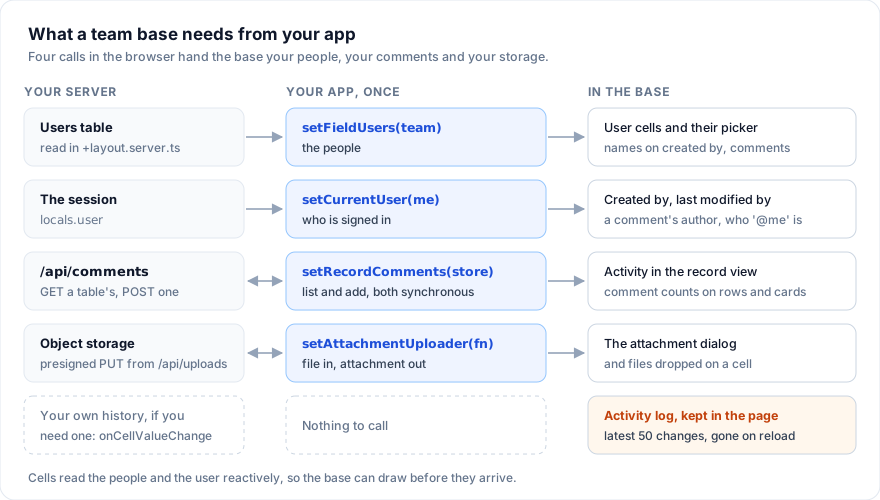
![Your users table goes to setFieldUsers and the session to setCurrentUser, which feed user cells, created by, last modified by and comment authors; setRecordComments connects the record view's Activity to your comments endpoint; setAttachmentUploader sends files to your storage through a presigned URL; the activity log is kept in the page](/docs-media/base-collaboration.svg)

Each step below works on its own.

## 1. List the people

User fields pick from one list of people that you hand to the base. A person
is a `FieldUser`:

```ts
import { setFieldUsers, type FieldUser } from '@svgrid/enterprise/base'

const team: FieldUser[] = [
  { id: 'u1', name: 'Ana Ruiz', email: 'ana@example.com', avatarUrl: 'https://cdn.example.com/ana.jpg' },
  { id: 'u2', name: 'Ben Okafor', email: 'ben@example.com' },
  { id: 'u3', name: 'Cleo Park', email: 'cleo@example.com' },
]

// In the browser only; step 2 shows where in SvelteKit.
setFieldUsers(team)
```

Give the tasks a `user` field for the owner and one with `multiple` for
reviewers. The cell stores ids, never names, so renaming a person renames
them everywhere:

```ts
const columns = [
  { field: 'task', header: 'Task', fieldType: 'text' },
  { field: 'status', header: 'Status', fieldType: 'singleSelect', fieldProps: { options: STATUS } },
  { field: 'assignee', header: 'Assignee', fieldType: 'user' },
  { field: 'reviewers', header: 'Reviewers', fieldType: 'user', fieldProps: { multiple: true } },
]

const data = [
  { id: 't1', task: 'Write the brief', status: 'Todo', assignee: 'u1', reviewers: ['u2', 'u3'] },
  { id: 't2', task: 'Pick the fonts', status: 'In progress', assignee: 'u2', reviewers: [] },
]
```

A cell draws an avatar and the name. With several people it overlaps up to
four avatars and writes the first name with a count: "Ben Okafor +1".
`avatarUrl` is used when it is an `http(s):`, `blob:` or `data:image` URL;
anything else, or no URL, draws the initials on a color worked out from the
name, so a person keeps the same color on every page. An id that is not in
the list shows as the id itself.

Editing a user cell opens a panel with a "Find a person" box and the people
from the list, each with their avatar; typing filters them. If the list is
empty the panel says "No people (setFieldUsers)". Text pasted or filled into
a user cell is matched against each person's id, name and email, ignoring
case; a multiple field takes them comma-separated and drops repeats. A name
that matches nobody stays as typed, so check pasted data. Copying a user cell
writes the names, so a copy and paste between records keeps the people.
`fieldProps.default` takes an id for new rows. The field reference has the
[user field's properties](https://svgrid.com/docs/help/fields/#declare-columns-by-type).

A Kanban view can stack by a single user field (`stackBy: 'assignee'`): one
lane per person in the list, plus "Uncategorized" while some task has nobody.
Dragging a card to a lane reassigns the task through the grid's edit path,
so it counts as an edit.

## 2. Say who is signed in

`setCurrentUser` names the person using the page. Several things read it:

- `createdBy` fills new rows with their id, and `lastModifiedBy` writes it
  on every edit it watches.
- Each comment is saved with their id as `by`.
- Each change in a record's activity is noted with their id.
- A filter condition with the value `'@me'` (`ME`) matches them.
- Your own code can read it with `getCurrentUser()`.

In SvelteKit the session is on the server, so load the person and the team
in a layout and hand both to the base in the browser:

```ts
// src/routes/(app)/+layout.server.ts
import { redirect } from '@sveltejs/kit'
import type { LayoutServerLoad } from './$types'
import { db } from '$lib/server/db'

export const load: LayoutServerLoad = async ({ locals }) => {
  if (!locals.user) redirect(303, '/login')
  const team = await db.query(
    'select id, name, email, avatar_url as "avatarUrl" from users where team_id = $1 order by name',
    [locals.user.teamId],
  )
  return { me: { id: locals.user.id, name: locals.user.name }, team: team.rows }
}
```

```svelte
<!-- src/routes/(app)/+layout.svelte -->
<script lang="ts">
  import type { Snippet } from 'svelte'
  import { setCurrentUser, setFieldUsers, type FieldUser } from '@svgrid/enterprise/base'

  let { data, children }: { data: { me: FieldUser; team: FieldUser[] }; children: Snippet } = $props()

  // Again when the data changes: a sign-in as someone else.
  $effect.pre(() => {
    setFieldUsers(data.team)
    setCurrentUser(data.me)
  })
</script>

{@render children()}
```

The four setters on this page write state shared by the whole module, so
call them in the browser only: an `$effect` as here (it does not run during
server rendering), `onMount`, or behind `browser` from `$app/environment`.
Called at the top of a component's `<script>`, they would also run on the
server and hand one request's team and user to the next. Cells and pickers
read both values reactively, so the base can draw before they arrive. The signed-in person does not have to be in the team list for
their name to show, but they only appear in the picker if they are.

Now add who made each task and when, and give a new task to whoever adds it:

```ts
import { getCurrentUser, type BaseTable } from '@svgrid/enterprise/base'

const tasks: BaseTable = {
  id: 'tasks',
  name: 'Tasks',
  primaryField: 'task',
  data,
  columns: [
    ...columns,
    { field: 'createdBy', header: 'Created by', fieldType: 'createdBy' },
    { field: 'createdAt', header: 'Created', fieldType: 'createdTime', fieldProps: { dateFormat: 'friendly' } },
  ],
  props: {
    rowAdder: { label: 'Add task', defaults: () => ({ status: 'Todo', assignee: getCurrentUser()?.id ?? null }) },
  },
}
```

Both fields are read-only. Every record the base makes gets the current user
and the time: "+ Add row", a form, the record menu, "+ Add a card" on a
Kanban, a calendar day. Last modified fields start out the same way. Rows
you load keep whatever your database sends.

On sign-out, call `closeRecord()`, then `setCurrentUser(null)` and
`setFieldUsers([])`.

## 3. Add a "My tasks" view

A filter condition on a user field compares it with a person's id. The value
`'@me'` (exported as `ME`) stands for whoever is signed in when the filter
runs, so one view works for everyone:

```ts
import { ME, type FieldView } from '@svgrid/enterprise/base'

const views: FieldView[] = [
  {
    id: 'mine',
    name: 'My tasks',
    type: 'grid',
    state: {
      advancedFilter: {
        kind: 'fieldFilter',
        conjunction: 'or',
        conditions: [
          { column: 'assignee', kind: 'select', op: 'is', value: ME },
          { column: 'reviewers', kind: 'multi', op: 'hasAnyOf', value: [ME] },
        ],
      },
    },
  },
  { id: 'all', name: 'All tasks', type: 'grid' },
]
```

In the Filter panel the person picker lists "Me" first, so users can build
the same view themselves. The condition reads "Assignee is me".

A single user field filters with the select operators (`is`, `isNot`,
`isAnyOf`, `isNoneOf`), a multiple one with `hasAnyOf`, `hasAllOf`,
`isExactly` and `hasNoneOf`; both also have `isEmpty` and `isNotEmpty`.
Created by and last modified by filter the same way, so "Created by is me"
works too. The [filter conditions](https://svgrid.com/docs/help/fields/#filter-conditions) table
lists them all.

The view stores `'@me'`, not an id, so it can be saved with the other views
(`onViewsChange`, or the `views` inside `onTablesChange`) and Ben sees his own
tasks when he opens it.

## 4. Open a record

`expandRows` with `showRowNumbers` turns the row number into a checkbox and an
expand button:

```svelte
<SvBase bind:tables editable showRowNumbers expandRows onTablesChange={save} />
```

A record opens from the expand button, from Space on a selected cell (not a
checkbox cell, and only with `expandRows`), from "Expand record" in the
right-click menu, from a gallery card, from a double click (or F2) on a
Kanban card, from a calendar event and from a Gantt task.

![A candidate open as a record: each field with its type icon on the left, and the Activity column on the right with "Ana Ruiz changed Stage" to Offer, her comment below it and the comment box](https://svgrid.com/docs-media/base-collaboration.png)

The record shows:

- The primary field as the title.
- Every field with its type icon and name, drawn as its cell draws it. A click
  opens the cell's own editor; the value is written through the grid's edit
  path, so undo, validation, `onCellValueChange` and last-modified fields work
  the same as in the cell. Read-only fields say "read-only".
- Fields hidden in the view, folded under "Show N hidden fields" and marked
  "hidden in the grid". They are read-only here.
- Activity on the right: changes and comments, oldest first, with "just now",
  "5 minutes ago", "3 hours ago" or the date. The box under them takes a
  comment; Ctrl+Enter (Cmd+Enter) or Comment sends it. A base without
  `editable` still takes comments.
- Previous and next buttons that step through the rows in the view's order,
  and "3 of 12".

A record with comments shows how many by its row number (the pointer over the
row swaps the count for the checkbox and expand button) and as a badge on its
Kanban card. The card's badge opens the record with the comment box focused,
as does "Comment" in the right-click menu of a row or a card.

On a narrow screen the activity moves under the fields. If an edit makes the
record leave the view's filter, the record says "This row is not in the
grid's view any more." and the footer "Not in view (12 records)". Previous
and next still work: they move to the records that were before and after it.

App code opens a record with the grid api that `onApiReady` hands it:

```ts
import { openRecord, closeRecord } from '@svgrid/enterprise/base'

let api: unknown
// <SvBase ... onApiReady={(a) => (api = a)} />

openRecord({ api, rowId: 't1' })
openRecord({ api, rowId: 't1', focus: 'comment' }) // with the comment box focused
closeRecord(api)
```

`closeRecord()` closes whatever record is open, from anywhere: call it on
sign-out or when the route changes. `closeRecord(api)` closes it only when it
is open on that grid. A custom field type's `cell` component gets the grid
as `ctrl` (with `row.id`), and `openRecord({ ctrl, rowId })` takes that too.
A button field's `fieldProps.onClick` receives `{ row, rowId, columnId, api }`,
so a button can open its own record.

## 5. Keep comments in your backend

Without a store, comments live in memory and are gone on reload. A comment is
a `RecordComment`, and a store is two functions:

```ts
export type RecordComment = { id: string; rowId: string; tableId?: string; text: string; at: number; by?: string }

export type RecordCommentContext = { tableId?: string; api: unknown }

export type RecordCommentStore = {
  list: (rowId: string, api: unknown, context: RecordCommentContext) => ReadonlyArray<RecordComment>
  add: (rowId: string, comment: RecordComment, api: unknown, context: RecordCommentContext) => void
}
```

`rowId` is the record's id (its `id`, or the table's `getRowId`). In
`<SvBase tables>`, `context.tableId` (and the comment's `tableId`) names the
table, so Tasks `1` and Milestones `1` are two records; with one table it is
undefined. `at` is milliseconds since 1970, `by` the id of the person who was
signed in. The record view makes `id`, `at` and `by` itself and calls `add`.
A store written for `list(rowId, api)` and `add(rowId, comment, api)` still
works.

Both functions are synchronous, and `list` runs often: for the open record,
and for every row the grid draws (with `expandRows`) and every Kanban card,
to show the comment count. So fetch a whole table's comments once into reactive state and answer
from it. Because `list` runs inside the base's reactive code, the counts and
the record draw again when the fetch lands:

```ts
// src/lib/comments.svelte.ts
import { browser } from '$app/environment'
import { toast } from '@svgrid/grid'
import { setRecordComments, type RecordComment, type RecordCommentStore } from '@svgrid/enterprise/base'

type ByRecord = Record<string, ReadonlyArray<RecordComment>>

// Each table's comments by record id, fetched once per table.
let byTable = $state.raw<Record<string, ByRecord>>({})
const asked = new Set<string>()

function put(table: string, rowId: string, list: ReadonlyArray<RecordComment>) {
  byTable = { ...byTable, [table]: { ...byTable[table], [rowId]: list } }
}

async function load(table: string) {
  asked.add(table)
  const res = await fetch(`/api/comments?table=${encodeURIComponent(table)}`)
  if (!res.ok) return void asked.delete(table)
  const grouped: Record<string, RecordComment[]> = {}
  for (const c of (await res.json()) as RecordComment[]) (grouped[c.rowId] ??= []).push(c)
  byTable = { ...byTable, [table]: grouped }
}

const store: RecordCommentStore = {
  list(rowId, _api, { tableId = '' }) {
    if (!asked.has(tableId)) void load(tableId)
    return byTable[tableId]?.[rowId] ?? []
  },
  add(rowId, comment, _api, { tableId = '' }) {
    const mine = () => byTable[tableId]?.[rowId] ?? []
    // Shown at once; the server's copy replaces it, or it goes away again.
    put(tableId, rowId, [...mine(), comment])
    fetch('/api/comments', {
      method: 'POST',
      headers: { 'content-type': 'application/json' },
      body: JSON.stringify({ id: comment.id, tableId, rowId, text: comment.text }),
    })
      .then(async (res) => {
        if (!res.ok) throw new Error(`HTTP ${res.status}`)
        const saved = (await res.json()) as RecordComment
        put(tableId, rowId, mine().map((c) => (c.id === comment.id ? saved : c)))
      })
      .catch(() => {
        put(tableId, rowId, mine().filter((c) => c.id !== comment.id))
        toast.error('Your comment was not saved')
      })
  },
}

// On the server this cache would be shared by every request.
if (browser) setRecordComments(store)
```

Import the file once, in the page that shows the base. The failure notice
needs one `<SvToaster />` from `@svgrid/grid` in the app.
`setRecordComments(null)` goes back to memory. For a table with a very large
discussion, have the endpoint return counts per record and fetch a record's
comments when it opens.

The endpoint takes the author and the time from the server, never from the
request body:

```ts
// src/routes/api/comments/+server.ts
import { error, json } from '@sveltejs/kit'
import type { RequestHandler } from './$types'
import { db } from '$lib/server/db'

export const GET: RequestHandler = async ({ url, locals }) => {
  if (!locals.user) error(401, 'Sign in first')
  const tableId = url.searchParams.get('table') ?? ''
  // `at` is a bigint column; the cast hands it back as a number, not a string.
  const { rows } = await db.query(
    'select id, table_id as "tableId", row_id as "rowId", text, at::float8 as at, author as "by" from comments where team_id = $1 and table_id = $2 order by at',
    [locals.user.teamId, tableId],
  )
  return json(rows)
}

export const POST: RequestHandler = async ({ request, locals }) => {
  if (!locals.user) error(401, 'Sign in first')
  const body = (await request.json()) as { id?: unknown; tableId?: unknown; rowId?: unknown; text?: unknown }
  const text = String(body.text ?? '').trim().slice(0, 4000)
  if (typeof body.id !== 'string' || typeof body.rowId !== 'string' || !text) error(400, 'Bad comment')
  const tableId = typeof body.tableId === 'string' ? body.tableId : ''
  const comment = { id: body.id, tableId, rowId: body.rowId, text, at: Date.now(), by: locals.user.id }
  await db.query(
    'insert into comments (id, team_id, table_id, row_id, text, at, author) values ($1, $2, $3, $4, $5, $6, $7)',
    [comment.id, locals.user.teamId, comment.tableId, comment.rowId, comment.text, comment.at, comment.by],
  )
  return json(comment, { status: 201 })
}
```

The activity names the author from the people list: a `by` that is not in
`setFieldUsers` (and is not the current user) shows as "Someone", and a
comment with no `by` shows as "You". Keep people who left the team in the
list, or return their name from your own data.

Comments other people add show once the cache changes. To see them while the
base is open, call `put` from your realtime channel or a poll.

## 6. Upload files

An attachment cell holds an array of `Attachment`: `id`, `url`, `name`,
`type` (the MIME type), and optional `size`, `width`, `height` and
`thumbnailUrl` (a smaller image the cell uses instead of `url`). The
[attachments section](https://svgrid.com/docs/help/fields/#attachments) of the field reference has
an example value.

Without an uploader, added files stay in the page as `blob:` URLs and are
gone on reload. `setAttachmentUploader` sets the function every attachment
column uses. It gets the `File` and an `AttachmentUploadContext`: `row` (the
record), `columnId`, a `signal` that aborts when the user removes the file
or closes the dialog, and `onProgress(fraction)` with a value from 0 to 1.
It returns the attachment.

This one asks your server for a presigned URL and sends the bytes straight
to object storage. It uses `XMLHttpRequest` because `fetch` reports no upload
progress:

```ts
// src/lib/uploads.ts
import { browser } from '$app/environment'
import { setAttachmentUploader, type AttachmentUploader } from '@svgrid/enterprise/base'

const upload: AttachmentUploader = async (file, { columnId, signal, onProgress }) => {
  const res = await fetch('/api/uploads', {
    method: 'POST',
    headers: { 'content-type': 'application/json' },
    body: JSON.stringify({ name: file.name, type: file.type, size: file.size, columnId }),
    signal,
  })
  if (!res.ok) throw new Error(res.status === 413 ? 'File is too large' : `Upload refused (${res.status})`)
  const { id, uploadUrl, fileUrl } = (await res.json()) as { id: string; uploadUrl: string; fileUrl: string }

  await new Promise<void>((resolve, reject) => {
    const xhr = new XMLHttpRequest()
    xhr.open('PUT', uploadUrl)
    xhr.setRequestHeader('content-type', file.type || 'application/octet-stream')
    xhr.upload.onprogress = (e) => e.lengthComputable && onProgress(e.loaded / e.total)
    xhr.onload = () => (xhr.status < 300 ? resolve() : reject(new Error(`Storage said ${xhr.status}`)))
    xhr.onerror = () => reject(new Error('Network error'))
    xhr.onabort = () => reject(new Error('Cancelled'))
    signal.addEventListener('abort', () => xhr.abort(), { once: true })
    xhr.send(file)
  })

  return { id, url: fileUrl, name: file.name, type: file.type, size: file.size }
}

if (browser) setAttachmentUploader(upload)
```

The message of the error you throw is what the user reads on the failed tile,
next to Retry and Remove, so write it for them.

The server checks the user and the size, signs a URL for one key, and keeps
a row per file:

```ts
// src/routes/api/uploads/+server.ts
import { error, json } from '@sveltejs/kit'
import type { RequestHandler } from './$types'
import { db } from '$lib/server/db'
import { presignPut } from '$lib/server/storage'

const MAX = 25 * 1024 * 1024

export const POST: RequestHandler = async ({ request, locals, url }) => {
  if (!locals.user) error(401, 'Sign in first')
  const { name, type, size } = (await request.json()) as { name: string; type: string; size: number }
  if (!(size > 0 && size <= MAX)) error(413, 'File is too large')
  const id = crypto.randomUUID()
  const safe = String(name).replace(/[^\w.-]+/g, '_')
  const key = `${locals.user.teamId}/${id}/${safe}`
  await db.query('insert into files (id, team_id, key, type) values ($1, $2, $3, $4)', [id, locals.user.teamId, key, type])
  return json({ id, uploadUrl: await presignPut(key, type), fileUrl: `${url.origin}/api/files/${id}/${safe}` })
}
```

`fileUrl` points at your app, not at the bucket. A presigned read URL
expires, and a cell keeps its URL for as long as the record exists. Serve
`/api/files/[id]/[name]` with a `GET` that checks the user and the team,
looks up the key by `id` and answers `redirect(303, signedReadUrl)`:
thumbnails, the preview and Download all follow the redirect, and old records
keep working.

The URL is absolute and ends in the file name for the sake of copy and
paste. Copying an attachment cell writes the files' URLs, and a paste
attaches each `http(s)` URL it finds, taking the name from the path and the
type from its extension. A relative URL would show fine in the cell but be
dropped on paste, and a URL without the name would come back as a file named
by its id, an image drawn as a chip.

The column limits what the dialog takes with
[`AttachmentFieldProps`](https://svgrid.com/docs/help/fields/#attachments): `accept` (as for
`<input accept>`, such as `'image/*,.pdf'`), `maxFiles` (default 20) and
`maxSize` in bytes (default 25 MB). A file over a limit is listed under the
tiles with the reason, such as "At most 1 file", "Larger than 2 MB" or "Not
an accepted type". A URL added in the dialog, and text pasted into a cell,
are checked the same way, their type read from the extension: what fails is
dropped, the rest is kept. The field editor offers `accept` and `maxFiles`;
`maxSize` is set in code:

```ts
const photo = {
  field: 'photo',
  header: 'Photo',
  fieldType: 'attachment',
  fieldProps: { accept: 'image/*', maxFiles: 1, maxSize: 2 * 1024 * 1024 },
}
```

`fieldProps.upload` sets an uploader for one column instead of the app's.

### What the user sees

The cell shows images as thumbnails and other files as chips with the
extension and the name, as many as the column width holds, then "+N". Enter
or a double click opens the dialog: add files with "Add files", by dropping,
by pasting files, or by pasting a URL into "or paste a URL". Each upload is a
tile with its percent and a bar; Done reads "Uploading 2..." and stays
disabled until they finish. Tiles can be dragged to reorder, or moved with
Alt+Left and Alt+Right; Delete removes one. Cancel or Escape leaves the cell
as it was and aborts the uploads still running.

Files can also be dropped straight on a cell. Each one uploads on its own,
with a thin progress bar along the bottom of the cell, and the ones that
upload are written to the cell in one edit. A file over a limit shows in a
"Not added" toast and an upload that throws in an "Upload failed" toast, each
with the file name and the reason; the others still land. The toasts need
the same `<SvToaster />` as the comment store. Uploads still running when the
cell goes away (scrolled out, or the table switched) are aborted through
`signal`.

Enter on a tile, or a click on its picture, opens the preview: images inline,
PDFs in an iframe, anything else as its name with a Download link. Left and
Right step through the files. For the PDF frame your storage has to send
`application/pdf` and allow the page to frame it.

## 7. Track who changed what

`lastModifiedTime` and `lastModifiedBy` change on every edit to the record by
default. With `watch: 'specific'` they change only when one of `watchFields`
does, which turns them into "status changed at" and "status changed by":

```ts
const stamps = [
  { field: 'updatedAt', header: 'Last modified', fieldType: 'lastModifiedTime', fieldProps: { dateFormat: 'friendly' } },
  { field: 'statusAt', header: 'Status changed', fieldType: 'lastModifiedTime', fieldProps: { watch: 'specific', watchFields: ['status'] } },
  { field: 'statusBy', header: 'Status changed by', fieldType: 'lastModifiedBy', fieldProps: { watch: 'specific', watchFields: ['status'] } },
]
```

`watchFields` holds column ids: the column's `id`, or its `field` when it has
none. The time is an ISO string; the person is the current user's id. With
nobody signed in, the time still moves and the person stays as it was. A
commit that leaves the value as it was (an editor opened and closed with
Enter) is not an edit: nothing is stamped and `onCellValueChange` does not
fire. An automation's `updateRecord` moves the time but not the person.

The stamp is written into the row before `onCellValueChange` fires, so the
event's `row` already holds it. If you save cell by cell, the event names
only the edited column: send the stamps along, or have the server write
`updated_at` and `updated_by` from its own clock and session, which a
browser cannot fake. With `onTablesChange` or a table `source` ([Keep a base
in a database](https://svgrid.com/docs/help/base/data/)) the stamps travel with the rest of the row.

## The activity log

Every edit through the grid is noted for the record: a typed value, a paste,
a fill, a clear, a checkbox click, a card dragged to another lane, an edit in
the record view, files added in the dialog or dropped on a cell. Each note
holds the time, the current user's id, the column and the new value, and the
record view writes it as "Ana Ruiz changed Status" over the value as the cell
shows it, or "(cleared)". A field an automation's `updateRecord` sets is
noted under the automation's name: "Automation: Done ticks the box changed
Done".

The log lives in memory and keeps the latest 50 changes of each record. In
`<SvBase tables>` it is kept by base, table and record id, so it survives
switching tabs; with one table it is kept per grid. It is not exported, and
it is gone after a reload. Changes made by your code replacing `tables` or
`data` are not noted.

If the team needs a history that lasts, record it yourself from
`onCellValueChange` (`columnId`, `oldValue`, `newValue`, `row`) on the
server, where you know who is signed in.

## The record menu

Right-click a record in a base's grid:

| Item | What it does |
| --- | --- |
| Expand record | Opens the record, with or without `expandRows` |
| Comment | Opens the record with the comment box focused |
| Insert record above, Insert record below | A new record beside this one with the values of the fields the view groups by, so it stays in the group; editing starts on its first field |
| Duplicate record | A copy below, with lists copied; autonumber, created and last modified fields get fresh values |
| Copy, Paste | The grid's own cell copy and paste |
| Delete record | Asks "Delete record?" ("Write the brief is deleted, and its links from other records go with it."), then removes it and fires `onRowsDelete` |

Without `editable`, only Expand record, Comment and Copy show. A new record
from the menu is made the way "+ Add row" makes one: the `rowAdder` defaults,
a new id, the next autonumber, the current user in created by, and `onRowAdd`
fired, so a table with a database writes it. The grid scrolls to it. A Kanban
card's right-click menu has Expand record and Comment, and with `editable`
"Move to" a lane, Duplicate record and Delete record. Passing your own
`contextMenu` to `SvBase` replaces the grid's menu.

## Pitfalls

- **No current user, no author.** Without `setCurrentUser`, new rows get
  `null` in created by, and an edit leaves last modified by as it was, so
  the field names whoever edited last while signed in.
- **People are page-wide.** `setFieldUsers` and `setCurrentUser` set one list
  and one person for every base on the page. Two bases for two teams on one
  page share them.
- **Records need real ids.** Comments and the activity are keyed by row id:
  each record's `id`, or `getRowId`. With one table a record without an `id`
  falls back to its index, so its comments move to another record when a row
  above it is deleted. In `<SvBase tables>` every record without an `id`
  shares the id `''`, and with it one thread. Give every record an id.
- **Your store tells tables apart by id only.** In memory, each `<SvBase>`
  keeps its own comments and activity, even when two bases on one page use
  the same table ids. Your comment store gets the table id and nothing about
  the base: if two bases share one store and their table ids, key the store
  by something of your own as well. With `serverIds: true` a new record
  keeps the page's id until the table loads again; re-key its comments when
  the insert returns.
- **`'@me'` is whoever runs the filter.** Before `setCurrentUser` it
  matches no one; the grid filters again once a user is set. In an
  automation's condition it is the person whose edit set it off, and on the
  server runner, where nobody is signed in, it matches no one.
- **A URL's type is its extension.** Under `accept: 'image/*'` a URL with no
  extension is refused, and a URL's size is checked only when it is known.
  The browser checks are for the user; check types and sizes on the server
  too.
- **Storage keeps what the cell drops.** Removing a file, Cancel after an
  upload finished, or deleting the record leaves the object in the bucket.
  Clean up on the server, for example files no record has pointed at for a
  day.
- **`fieldProps.upload` does not survive JSON.** A function in a column is
  lost when you store columns in a database through `onTablesChange`. Use
  `setAttachmentUploader` and branch on `columnId` instead.

## Next

- [Linked records](https://svgrid.com/docs/help/base/linked-records/): tasks that point at milestones,
  people that point at teams, and the records that link back.
- [Formulas](https://svgrid.com/docs/help/base/formulas/): fields worked out from other fields.
- [Views](https://svgrid.com/docs/help/base/views/): grids, boards, calendars and galleries over the same
  records.
- [Forms](https://svgrid.com/docs/help/base/forms/): let people outside the team add records.
- [Your own field type](https://svgrid.com/docs/help/base/custom-field-type/): a cell of your own, with the
  grid's `ctrl` to open records from it.
- [Automations](https://svgrid.com/docs/help/base/automations/): tell the assignee when a task is blocked.

---

SvGrid is the Svelte 5 data grid (`npm install @svgrid/grid`, MIT). This page: https://svgrid.com/docs/help/base/collaboration/ . All docs: https://svgrid.com/llms.txt
