# Automations
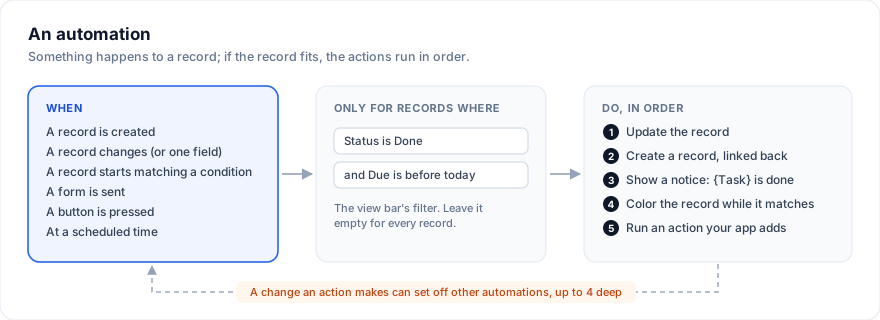
An automation does something on its own when something happens to a
record: a task set to Done ticks its Done box, a new request goes to Todo, a
blocked task tells its owner, a button starts the work. Each table of a base
has its own, under "Automations" in the view bar.
> Live demo: Project tracker - https://svgrid.com/demos/504-project-tracker/
In the demo, set a task's Status to Done, press Start in the Kick off
column, or send the Request a task form, then open "5 automations" and look
at Runs.
## Add one
Open "Automations" in the view bar and press "+ New automation". The dialog
has three parts:
- **When**: what sets it off.
- **Only for records where**: a condition written with the view bar's
filter, so it compares a select's option, a person, a linked record's name
or "within the past week" the way the filter does. Leave it empty for
every record.
- **Do**: the actions, in order.
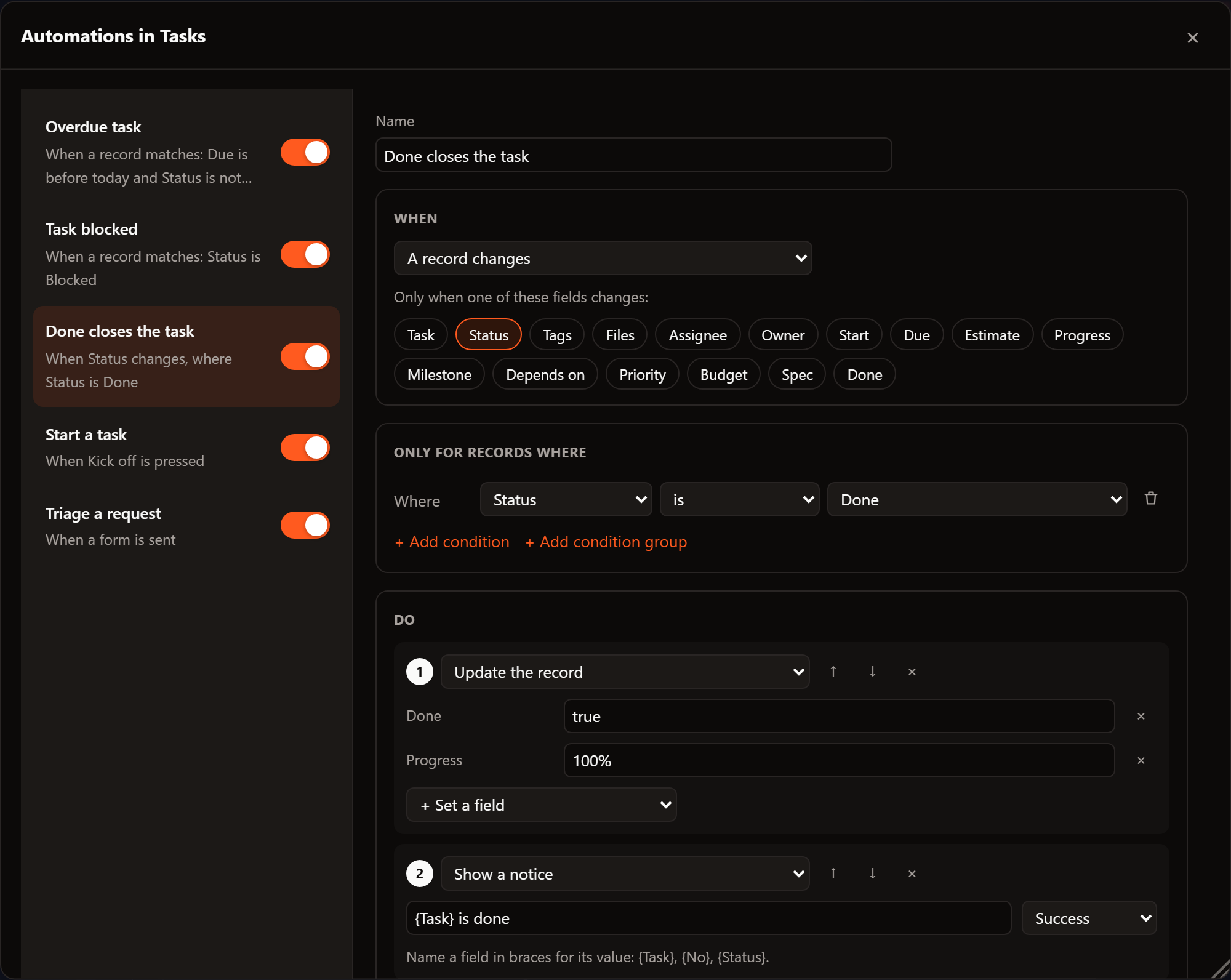
Every change is kept as you make it. "Run now" tries the automation on the
record you pick, as if its trigger had happened.
## When
| Trigger | Runs |
|---|---|
| A record is created | When a record is added: "+ Add row", a form, a board lane, a calendar day, another automation |
| A record changes | When a record is edited; pick fields to run only when one of them changes. A link made from the other table counts: adding a guest to an event from Guests changes the event's Guests field |
| A record matches a condition | When a record starts to match the condition. It does not run again while the record keeps matching |
| A form is sent | When a form view sends a record; pick the form, or any form of the table |
| A button is pressed | When a Button field is pressed on a record |
| At a scheduled time | Every day at 9, every Monday, every hour, or a cron expression: once for each record that matches the condition then, or once with no record |
A paste or a fill that changes several cells of one record is one change to
it.
## Do
| Action | What it does |
|---|---|
| Update the record | Sets fields of the record that set it off |
| Create a record | Adds a record to any table of the base; "Link it back" fills a link field of the new record with the record that set it off |
| Show a notice | A toast; `{Field name}` is that field of the record |
| Color the record while it matches | Colors the whole row, or some fields, for as long as the record matches the condition |
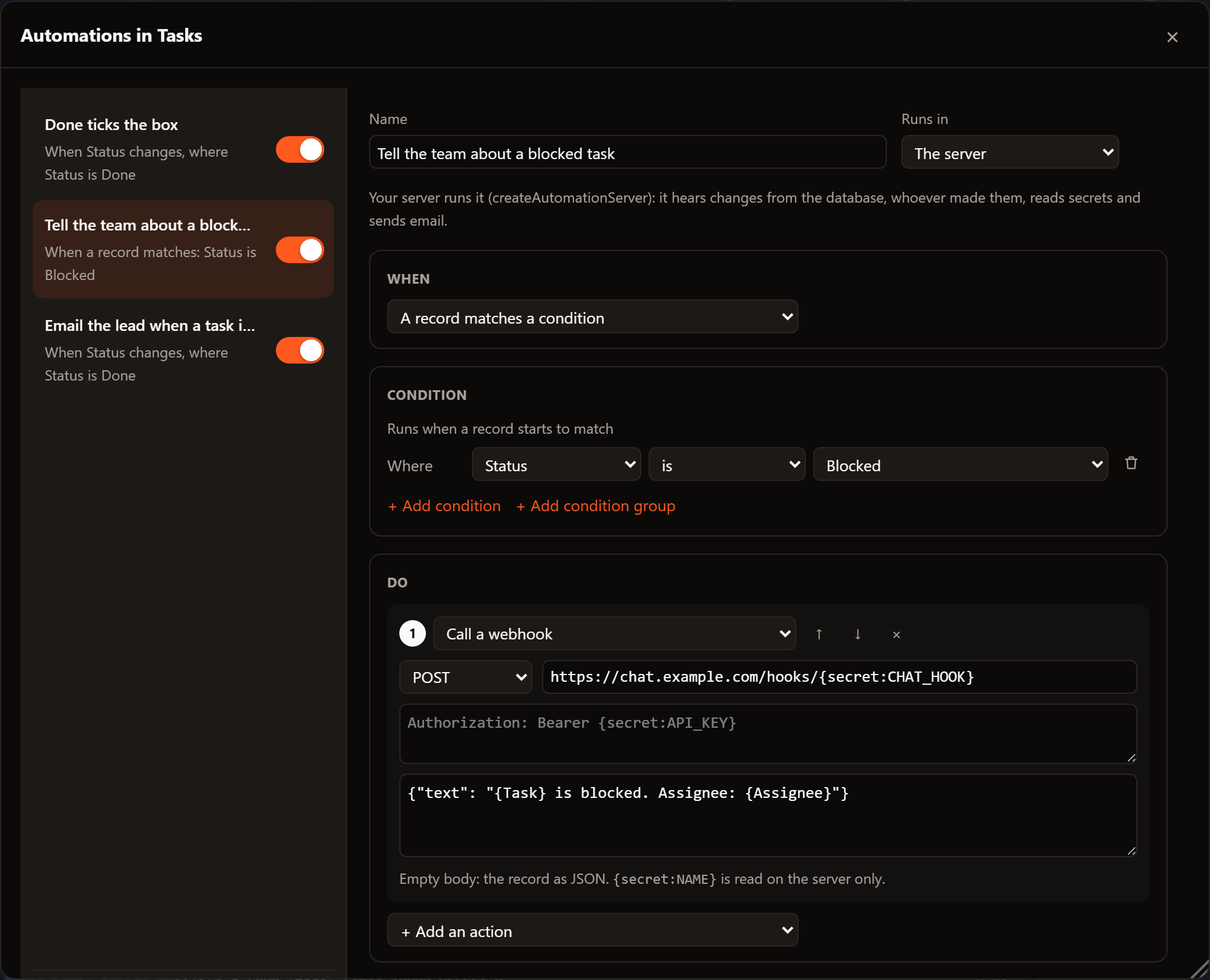
| Call a webhook | POSTs the record (or a body you write) to a URL: a team chat, your API. Secrets as `{secret:NAME}`, read on the server only |
| Send an email | To, subject and text with field names; sent by the [server](#on-the-server) |
| Your own actions | Anything the app adds with `registerAutomationAction` |
A webhook's URL, headers and body name fields in braces, and secrets as
`{secret:NAME}`; leave the body empty to send the record as JSON:
Values are written as the field shows them:
| Field | Write |
|---|---|
| Single or multiple select | The option's name: `Done`, `Bug, Risk` |
| Person | The person's name: `Ana Ruiz` |
| Checkbox | `true` or `false` |
| Number | `42`; in a percent field, `100%` |
| Date | `2026-11-01`, `today`, `today+7`, `today-1`, `now` |
| Link | A record's name, several with commas, or `{record}` for the record that set it off |
| Any text | Text with fields in braces: `{Task} follow-up` |
| Any field | Nothing, to clear it |
## Runs
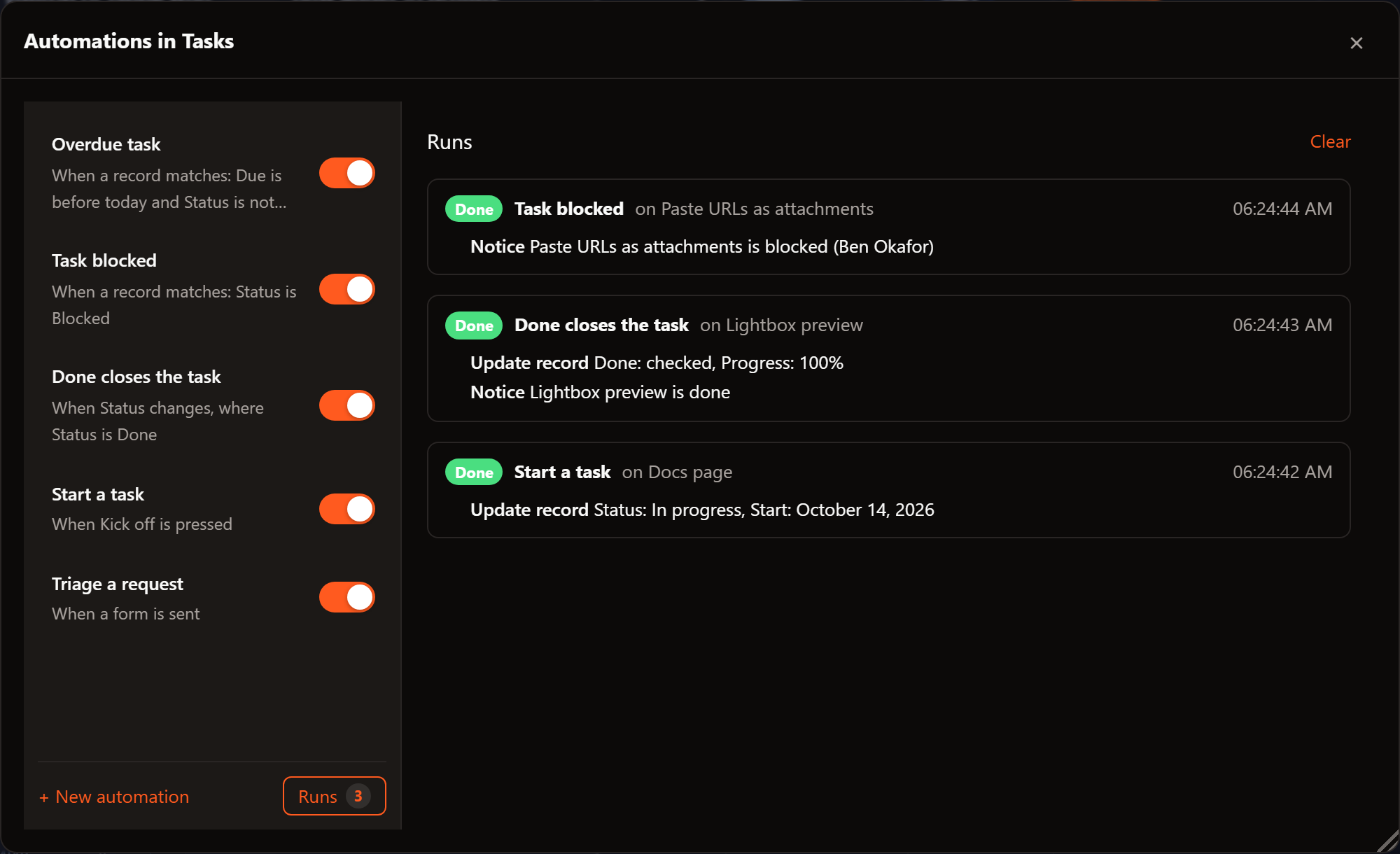
Every run is listed under Runs, newest first, with what each action did and
the record it ran on. A failed action stops the run there and says why.
## In code
A table's automations are its `automations`, plain data you can store with
the rest of the table:
```ts
import type { BaseAutomation } from '@svgrid/enterprise/base'
const statusIs = (value: string) => ({
kind: 'fieldFilter' as const,
conjunction: 'and' as const,
conditions: [{ column: 'status', kind: 'select' as const, op: 'is' as const, value }],
})
export const taskAutomations: BaseAutomation[] = [
{
id: 'done',
name: 'Done closes the task',
enabled: true,
trigger: { type: 'recordUpdated', fields: ['status'] },
condition: statusIs('Done'),
actions: [
{ type: 'updateRecord', values: { done: 'true', progress: '100%' } },
{ type: 'notify', message: '{Task} is done', severity: 'success' },
],
},
{
id: 'blocked',
name: 'Open an issue for a blocked task',
enabled: true,
trigger: { type: 'recordMatches' },
condition: statusIs('Blocked'),
actions: [{ type: 'createRecord', table: 'issues', values: { title: 'Unblock {Task}', owner: '{Assignee}' }, linkField: 'task' }],
},
]
```
```svelte
console.log('save', t)} />
```
Automations edited in the dialog reach `onTablesChange` with the rest of the
table. Automations need ``; one table is a list of one.
Notices need one `` in the app.
## Your own actions
`registerAutomationAction` adds an action to the dialog's list. It runs in
the page, so call your own server for anything that needs a secret:
```ts
import { registerAutomationAction } from '@svgrid/enterprise/base'
registerAutomationAction('post-to-chat', {
label: 'Post to the team chat',
run: async ({ record, text }) => {
if (!record) return 'No record'
const res = await fetch('/api/chat', {
method: 'POST',
headers: { 'content-type': 'application/json' },
body: JSON.stringify({ message: `${text('Task')} needs a hand (${text('Assignee')})` }),
})
if (!res.ok) throw new Error(`Chat answered ${res.status}`)
return 'Posted'
},
})
```
An automation runs it with `{ type: 'run', action: 'post-to-chat' }`. What it
returns is the run's detail; what it throws is the run's error.
## Where they run
Each automation says where it runs, under "Runs in":
- **This browser** (the default): in the page of the person who made the
change, right away and once. A change that arrives from someone else
through [realtime](https://svgrid.com/docs/help/base/data/#changes-made-elsewhere) does not run it again
in your page. Scheduled ones run while the base is open.
- **The server**: in your server, for every change to the database, whoever
or whatever made it, with secrets and email. Set it up as below.
Either way, a change an automation makes is an ordinary change: with a
[source](https://svgrid.com/docs/help/base/data/), it is written to the database like an edit. What an
action changes can set off other automations, up to four deep; past that the
run stops and says so, so two automations that answer each other cannot loop.
## On the server
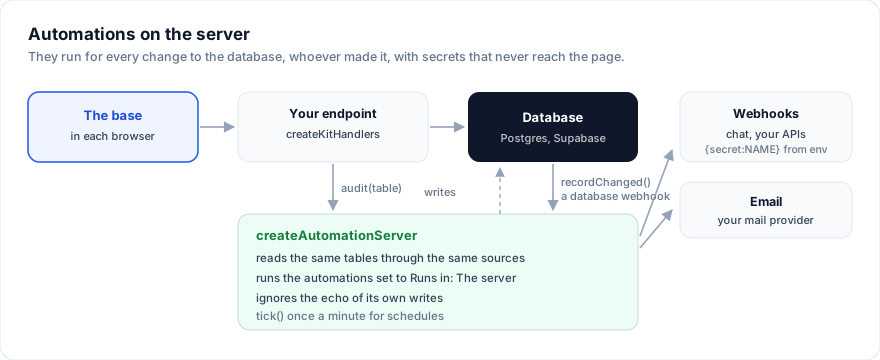
`createAutomationServer` runs the automations set to "The server". It reads
the same tables, with the same automations, through sources of its own.
Keep the tables in one module both sides import, each side handing in its
own way to reach the data:
```ts
// src/lib/tables.ts: the tables, for the browser and for the server.
import { baseSource, type BaseTable } from '@svgrid/enterprise/base'
import type { ServerDataSource } from '@svgrid/grid'
export function trackerTables(source: (table: string) => ServerDataSource>): BaseTable[] {
return [
{
id: 'tasks',
name: 'Tasks',
primaryField: 'name',
data: [],
columns: [
{ field: 'name', header: 'Task', fieldType: 'text' },
{ field: 'status', header: 'Status', fieldType: 'singleSelect', fieldProps: { options: [{ value: 'Todo' }, { value: 'Blocked' }, { value: 'Done' }] } },
{ field: 'owner_email', header: 'Owner email', fieldType: 'email' },
],
automations: [
{
id: 'blocked',
name: 'Tell the team about a blocked task',
enabled: true,
runOn: 'server',
trigger: { type: 'recordMatches' },
condition: { kind: 'fieldFilter', conjunction: 'and', conditions: [{ column: 'status', kind: 'select', op: 'is', value: 'Blocked' }] },
actions: [
{ type: 'webhook', url: 'https://hooks.slack.com/services/{secret:SLACK_HOOK}', body: '{"text": "{Task} is blocked"}' },
{ type: 'email', to: '{Owner email}', subject: '{Task} is blocked', body: 'Someone marked {Task} as blocked.' },
],
},
],
source: baseSource(source('tasks')),
},
]
}
```
The server side, in a SvelteKit app:
```ts
// src/lib/server/automations.ts
import pg from 'pg'
import { createAutomationServer } from '@svgrid/enterprise/base'
import { createSqlDataSource, type EntitySchema } from '@svgrid/enterprise'
import { env } from '$env/dynamic/private'
import { trackerTables } from '$lib/tables'
const pool = new pg.Pool({ connectionString: env.DATABASE_URL })
const schemas: Record = {
tasks: {
name: 'tasks',
fields: [
{ field: 'id', type: 'text', primaryKey: true },
{ field: 'name', type: 'text' },
{ field: 'status', type: 'text' },
{ field: 'owner_email', type: 'text' },
],
},
}
// Your mail provider's client.
declare const mailer: { send: (m: { from: string; to: string[]; subject: string; text: string }) => Promise }
export const automations = createAutomationServer({
tables: trackerTables((table) =>
createSqlDataSource({
schema: schemas[table]!,
table,
dialect: { placeholders: '$', ilike: true },
execute: async (sql, params) => (await pool.query(sql, params)).rows,
}),
),
// {secret:SLACK_HOOK} in a webhook reads SLACK_HOOK from the environment.
secrets: (name) => env[name],
sendEmail: (m) => mailer.send({ from: 'tracker@example.com', ...m }),
onRun: (run) => {
if (run.status !== 'ok') console.error('automation failed', run)
},
})
```
Then tell it about changes, in whichever way fits your app:
- **Through your endpoint.** Pass its `audit` hook to `createKitHandlers`:
every create, update and delete through the endpoint reaches it, with the
record as stored. It compares with what it read last, so it needs a server
that stays up between requests.
```ts
// src/routes/api/[table]/+server.ts
import { createKitHandlers, createSqlDataSource, type EntitySchema } from '@svgrid/enterprise'
import { automations } from '$lib/server/automations'
declare const schema: EntitySchema
declare const source: ReturnType
export const { POST } = createKitHandlers({ schema, source, audit: automations.audit('tasks') })
```
- **From the database.** A Supabase database webhook, or a Postgres trigger
that posts the old and new row, hands over both sides of the change.
Nothing has to stay in memory, so it suits serverless hosts too:
```ts
// src/routes/api/automations/changes/+server.ts
import { error } from '@sveltejs/kit'
import { env } from '$env/dynamic/private'
import { automations } from '$lib/server/automations'
export async function POST({ request }: { request: Request }) {
if (request.headers.get('x-webhook-secret') !== env.WEBHOOK_SECRET) error(401, 'No')
// Supabase sends { type, table, record, old_record }.
const change = await request.json()
await automations.recordChanged(change.table, { before: change.old_record, after: change.record })
return new Response('ok')
}
```
- **By reading the table again**, when all you know is that it changed:
`automations.tableChanged('tasks')`.
Scheduled automations run on `tick()`. Call it once a minute: from a cron
job your host runs against an endpoint, or a timer in a long-running server.
Two ticks in one minute run them once.
```ts
// src/routes/api/automations/tick/+server.ts: called by your host's cron every minute.
import { automations } from '$lib/server/automations'
export async function POST() {
const runs = await automations.tick()
return new Response(JSON.stringify({ ran: runs.length }))
}
```
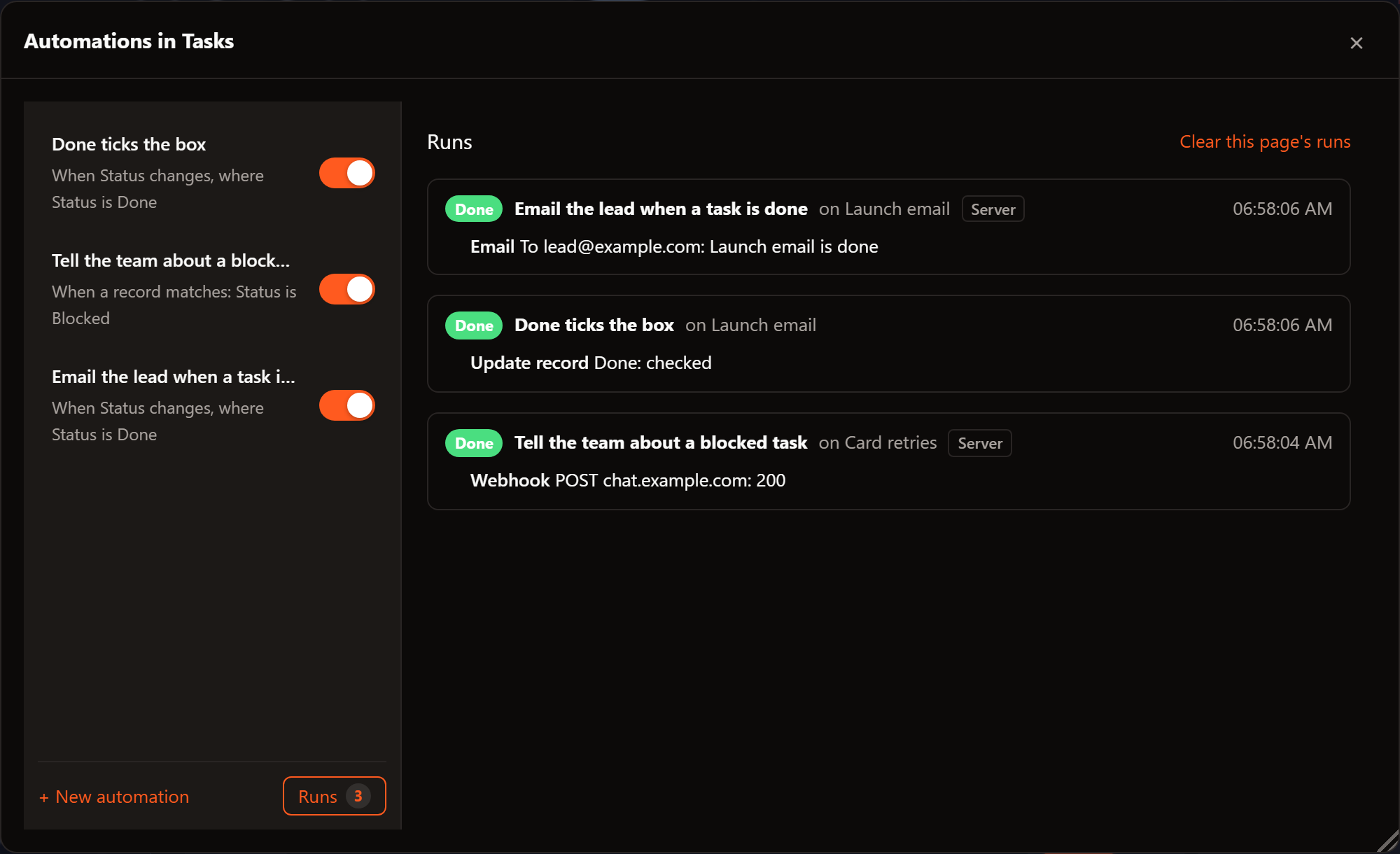
The server's runs show in the dialog next to the page's, tagged Server,
when the base can fetch them:
```ts
// src/routes/api/automations/runs/+server.ts
import { json } from '@sveltejs/kit'
import { automations } from '$lib/server/automations'
export function GET() {
return json(automations.runs)
}
```
```svelte
fetch('/api/automations/runs').then((r) => r.json())} />
```
The server ignores the echo of its own writes (the webhook the database
sends for a change it made), so one change runs each automation once.
The [Postgres demo](https://svgrid.com/docs/help/base/postgres/) runs a server in the page, standing in
for yours: set a task to Blocked and its chat message shows under "Sent by
the server"; run `update tasks set status = 'Blocked' where id = 't9'` and it
runs for that change too.
## See also
- [Keep a base in a database](https://svgrid.com/docs/help/base/data/)
- [Field types](https://svgrid.com/docs/help/fields/): the view bar's filter, which conditions use
---
SvGrid is the Svelte 5 data grid (`npm install @svgrid/grid`, MIT). This page: https://svgrid.com/docs/help/base/automations/ . All docs: https://svgrid.com/llms.txt