# 5. Theme and density
> Step 5 of 6 · [← Features](https://svgrid.com/docs/getting-started/4-features/) · [Next: Going to production →](https://svgrid.com/docs/getting-started/6-going-to-production/)
## Start with a preset
Before hand-writing any tokens: 20 design-system presets ship with the package,
each a single stylesheet with a full light + dark palette. One import re-themes
the whole grid.
> Designing in Figma? The [SvGrid Design Kit](https://www.figma.com/community/file/1689644521333526144)
> has the Ember and shadcn/ui presets as variable modes, with every color named
> after its `--sg-*` token. See [Figma design kit](https://svgrid.com/docs/help/figma/).
The examples on this page run against these rows:
```svelte
```
```ts
import '@svgrid/grid/themes/shadcn.css'
```
Available: `ember` (SvGrid's own look), `shadcn`, `tailwind`, `material`,
`fluent`, `carbon`, `antd`, `bootstrap`, `atlassian`, `salesforce`, `sap`,
`github`, `linear`, `notion`, `vercel`, `excel`, `nord`, `dracula`,
`catppuccin`, `ag-alpine`.
Each preset defines every token the grid and the UI components read - including
the semantic status colors (`--sg-danger`, `--sg-success`, `--sg-warning`,
`--sg-info`) and the focus ring, which follows the preset's accent. Presets
flip with `data-theme="dark"` automatically (see below).
Override individual tokens after the import to adjust a preset, or skip presets
entirely and declare the tokens yourself - that is the rest of this page.
## Declaring tokens yourself
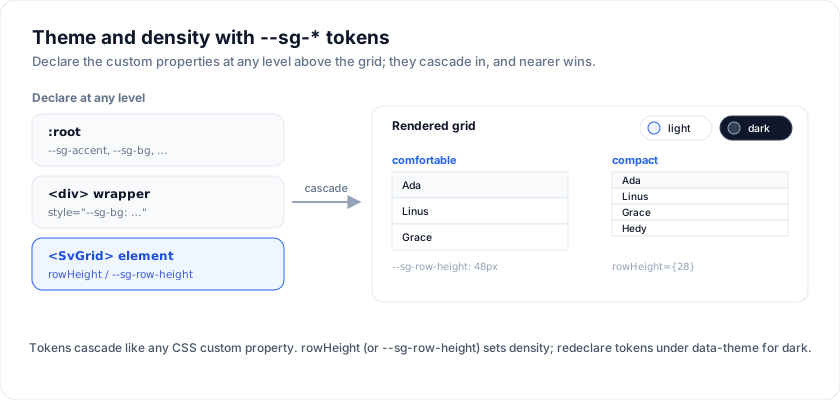
The render component (``) ships its own scoped styles. You
re-theme it by declaring `--sg-*` CSS custom properties at any level
above the grid - `:root` for the whole app, a wrapper `
` for one
instance, or directly on the `` element itself.
## Token surface
The 20-odd tokens the renderer reads:
| Token | What it paints |
| -------------------------------- | ------------------------------------------- |
| `--sg-bg` | Cell background |
| `--sg-fg` | Cell text |
| `--sg-muted` | Secondary text (footers, subtitles) |
| `--sg-border` | Cell + header borders |
| `--sg-header-bg` / `--sg-header-fg` | Header row |
| `--sg-row-alt-bg` | Zebra rows |
| `--sg-row-hover-bg` | Row + cell hover |
| `--sg-selection-bg` | Selected cell / row tint |
| `--sg-accent` | Sort indicator, focus ring, primary buttons |
| `--sg-focus-ring` | Keyboard focus outline |
| `--sg-input-bg` / `--sg-input-border` | Inline editor + filter inputs |
| `--sg-pill-active` / `-fg` | "Active" status pills |
| `--sg-pill-pending` / `-fg` | "Pending" status pills |
| `--sg-pill-inactive` / `-fg` | "Inactive" status pills |
| `--sg-scrollbar-*` (10 tokens) | Custom-painted scrollbars |
## Light + dark via `data-theme`
The gallery flips themes by writing `dark` or `light` to
`html[data-theme]`. Every token redeclares under that selector:
```css
:root {
--sg-bg: #ffffff;
--sg-fg: #0f172a;
--sg-border: #e2e8f0;
--sg-header-bg: #f1f5f9;
--sg-row-alt-bg: #f8fafc;
--sg-row-hover-bg: #eef2ff;
--sg-accent: #2563eb;
}
html[data-theme='dark'] {
--sg-bg: #0f172a;
--sg-fg: #f1f5f9;
--sg-border: #334155;
--sg-header-bg: #1e2433;
--sg-row-alt-bg: #1b2230;
--sg-row-hover-bg: #232b3c;
--sg-accent: #3b82f6;
color-scheme: dark;
}
```
Toggling is one line in the app shell:
```svelte
```
## Per-instance theming
Because the tokens are plain custom properties they cascade. To style a
single grid, wrap it in a `
` that sets its own values:
```svelte
```
The [`10-custom-cells-and-themes`](https://svgrid.com/demos/10-custom-cells-and-themes/)
demo applies three full palettes (light / dark / high-contrast) this way.
> Live demo: Custom cells + themes - https://svgrid.com/demos/10-custom-cells-and-themes/
## Density
Density is a **prop, not a token**. The virtualizer has to know each
row's height as a number before it can position rows, so it cannot be
resolved from CSS - the grid writes the height as an inline style on
every row, which would override a stylesheet rule anyway.
Set `rowHeight` on ``. Numeric, in pixels; drives the row
height and the active-cell hit box. The default is `30`.
```svelte
```
Common steps: `28` compact, `30` normal, `46`-`48` comfortable. For
rows whose height depends on their content, set `autoRowHeight`
instead and the grid measures each row.
A user-facing "density selector" is half a dozen lines:
```svelte
```
## Sizing the grid
The wrapper renders inside whatever container you give it. The
`containerHeight` prop sets the scrollable shell height:
```svelte
```
For a flex-grow layout the canonical recipe is:
```svelte
…
```
The `min-h-0` is the bit that bites. Flex children default to
`min-height: auto`, which prevents the inner scroll container from
shrinking, which makes the whole page scroll instead of the grid.
## Full Tailwind integration
If your app uses Tailwind, see [Tailwind integration](https://svgrid.com/docs/help/tailwind/)
for: install + PostCSS config, `@custom-variant` so the `dark:`
modifier follows `data-theme`, the override hooks for the stable
`.sv-grid-*` class names, and the anti-patterns (don't `@apply` inside
grid selectors, don't put utility classes on grid children, don't
fight column widths in CSS).
## Try it
There is no `density` prop - row height is the density control, and it is one
number. Compact for a screen someone scans all day, comfortable for one they
read.
```svelte
```
## Re-theming with tokens
The grid reads `--sg-*` custom properties, so a theme is a block of variables on
any ancestor - no theme file, no build step.
```svelte
```
> Video: Learn SvGrid 7: themes, dark mode and density (https://www.youtube.com/watch?v=yhJMpkQ0Kww)
Transcript: A grid that looks like a grid library is a grid that never ships. Theming here is CSS custom properties, not utility classes and not a config object. Twenty presets ship with the package, and importing one stylesheet is the whole setup. What a preset sets is a list of custom properties, which means you can set them yourself when one is close but not right. Same five people as before. A wrapper, and a handful of properties on it. Background, text, border, the header colours, the accent, the hover. They cascade like any other custom property, so this theme is scoped to this one grid rather than the page. The whole file, so nothing is hidden: the rows, the columns, a wrapper around the grid, and the properties on that wrapper. Here is that file running. Nine declarations, and nothing about the grid was configured to accept them. Density is separate from colour, and it is the setting people actually argue about. Row height is a prop, so the compact table and the comfortable one are the same component with one number changed. Dark mode is not a second stylesheet you maintain. Every preset declares a light palette and a dark one, and an attribute on the document element picks which is live. Every surface follows, including the parts you never styled. The density control here is the same row height prop behind a dropdown, which is what it usually becomes: a preference you save per user rather than a decision you make once for everybody. The theme builder on the site edits these tokens live and hands you the CSS at the end. Every property is listed on the page below. See you in lesson eight.
---
SvGrid is the Svelte 5 data grid (`npm install @svgrid/grid`, MIT). This page: https://svgrid.com/docs/getting-started/5-theme-and-density/ . All docs: https://svgrid.com/llms.txt