# Schema designer (embeddable)
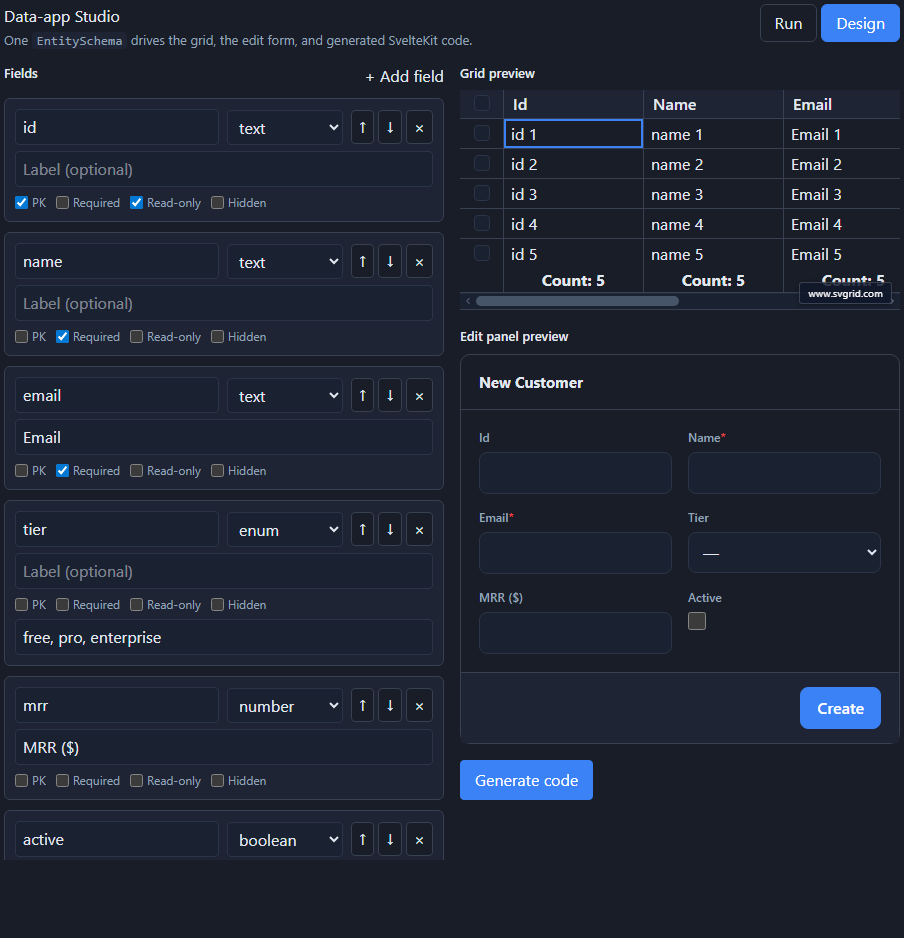
`SvSchemaDesigner` is a small, **embeddable, single-entity** component: drop it into
your own app to author one `EntitySchema` visually - add fields, set types and
validation - and see the grid and edit form update live. It's controlled (you own
where the schema is stored), so it's the building block for a "let users customize
this table" screen.
> **Looking for the full app builder?** The rich, multi-screen designer you get
> from `npx @svgrid/studio designer` - grids, charts, dashboards, boards,
> schedulers, and master-detail across many entities, with data binding and
> code-behind - is a different component, [`SvStudioDesigner`](https://svgrid.com/docs/enterprise/studio/app-designer/),
> opened locally with [`npx @svgrid/studio designer`](https://svgrid.com/docs/enterprise/studio/launch/).
> Use this page's `SvSchemaDesigner` when you only need to design one entity, or to
> embed a schema editor inside your own product.
## Usage
```svelte
(schema = s)} />
```
## Props
| Prop | Type | Description |
| --- | --- | --- |
| `schema` | `EntitySchema` | The schema being designed. |
| `onChange` | `(schema) => void` | Fires on every edit with the new schema. Omit for a read-only preview. |
| `showPreview` | `boolean` | Show the live grid + edit-panel preview. Default `true`. |
## What you can edit
- **Add / remove / reorder** fields.
- Per-field **type** (`text`, `number`, `boolean`, `date`, `datetime`, `enum`,
`relation`, `json`), **label**, and flags: **primary key**, **required**,
**read-only**, **hidden**.
- **Enum options** (comma-separated) and **relation** target for relation fields.
The right panel shows the resulting grid (`schemaToColumns`) and the edit form
(`SvGridEditPanel`) live, so you see exactly what the schema produces.
## Save, load, import, export
The designer is **controlled** - it never persists anything itself. `onChange`
hands you the new `EntitySchema`; you decide where it lives (localStorage, a file,
your backend). Because an `EntitySchema` is plain JSON, "export" is
`JSON.stringify` and "import" is `JSON.parse` back into `schema` - no special
format:
```svelte
```
Drop an [AI-introspected schema](https://svgrid.com/docs/enterprise/studio/ai-generation/) straight into `schema` and
refine it here, or omit `onChange` entirely for a read-only preview of a schema
you already have.
## Generate code
The **Generate code** button runs the shared `scaffold()` and shows the emitted
files (schema module, `+server.ts`, `+page.svelte`) - the same output as the
[CLI](https://svgrid.com/docs/enterprise/studio/cli/). Because it is one shared core, the designer, CLI, and
[AI generator](https://svgrid.com/docs/enterprise/studio/ai-generation/) all produce identical code.
## Human-in-the-loop with AI
A common flow: let the [AI generator](https://svgrid.com/docs/enterprise/studio/ai-generation/) draft an
`EntitySchema` from your database, then refine it in the designer (tweak labels,
mark fields hidden, add validation) before generating - AI drafts, you approve.
## See also
- [The EntitySchema](https://svgrid.com/docs/enterprise/studio/schema/) - the model the designer edits
- [Edit forms & validation](https://svgrid.com/docs/enterprise/studio/edit-forms/) · [Code generation](https://svgrid.com/docs/enterprise/studio/code-generation/)
---
SvGrid is the Svelte 5 data grid (`npm install @svgrid/grid`, MIT). This page: https://svgrid.com/docs/enterprise/studio/designer/ . All docs: https://svgrid.com/llms.txt