What's New in SvGrid Pro - Export, Pivot, Import, Print, and AI
A tour of the sv-grid-pro feature pack - Excel and PDF export, data import, printing, pivot tables, and an AI assistant - and when it is worth the upgrade.
The SvGrid Community core is free, MIT-licensed, and complete enough to ship real products. But some teams need the features that turn a data grid into a reporting and analysis tool. That is what sv-grid-pro adds. Here is what is in the pack today and how to think about whether you need it.
Data export - Excel, PDF, CSV, TSV, HTML
The most-requested feature for any grid is "can I get this in Excel?" Pro answers it for every format:
<script lang="ts">
  import { SvGrid } from 'sv-grid-pro'
  let api

  function exportExcel() {
    api.exportData({ format: 'xlsx', fileName: 'report.xlsx' })
  }
</script>

<button onclick={exportExcel}>Export to Excel</button>
<SvGrid data={rows} columns={columns} bind:api />
Exports honor the current view - the active sort, filters, and selection - and use your column formatters, so a currency column lands in Excel as a real number and a date as a date.
Data import
Export's counterpart: bring spreadsheet data back in. Import lets users load XLSX or CSV files into the grid, map columns, and validate rows before they commit - useful for bulk data entry and migration workflows.
A dedicated print view lays the grid out for paper: repeating headers, sensible page breaks, and a clean monochrome style, so "File > Print" produces a usable document instead of a clipped screenshot.
Pivot tables
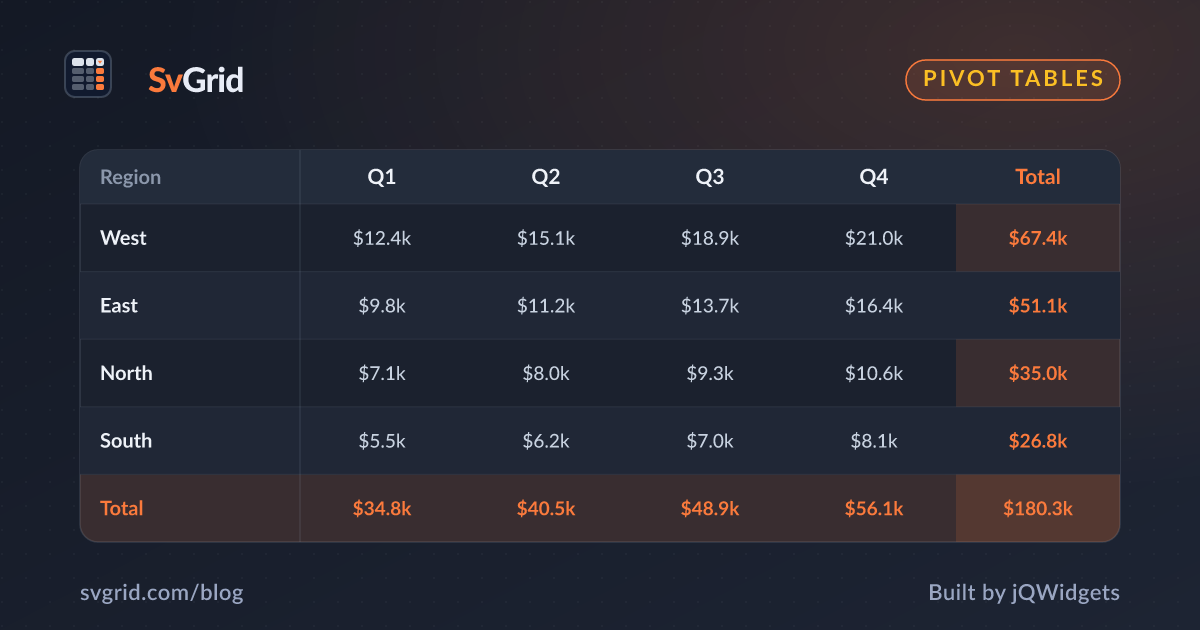
Pivoting turns flat rows into a cross-tab summary - revenue by region and quarter, headcount by department and level - without leaving your app. Define rows, columns, and aggregated values, and the pivot recomputes live as the data changes.
const pivot = {
  rows: ['region'],
  columns: ['quarter'],
  values: [{ field: 'revenue', aggregate: 'sum' }],
}
AI assistant
The Pro pack includes an AI assistant that can answer questions about the data in the grid and help users build views - filters, groupings, and summaries - in natural language. Combined with the SvGrid MCP server, it is part of our broader push to make the grid work as well for AI-driven workflows as for human ones.
Lazy by design
Pro features do not bloat your bundle. Export and import lazy-load their dependencies only when a user actually triggers them, so a grid that never exports never pays for the export code.
Do you need Pro?
A simple test: if your users only view, sort, filter, and edit data, Community is all you need - and it is free for commercial use. If they need to export to Excel, print reports, import spreadsheets, or pivot for analysis, Pro pays for itself on the first feature request you do not have to build yourself.
Pro is licensed per developer: a Single Application license at $599 and a Multiple Application license at $999, each a perpetual license with a year of updates and support that renews automatically (cancel anytime). See pricing for the details.
Frequently asked questions
What does sv-grid-pro add over the free Community core?
Data export (Excel, PDF, CSV, TSV, HTML), data import, printing, pivot tables, and an AI assistant. The Community core - sorting, filtering, editing, virtualization, grouping - stays free and MIT-licensed.
Do Pro features increase my bundle size if I do not use them?
No. Export and import lazy-load their dependencies only when triggered, so features you do not use add no weight to your bundle.