Data Grid vs Data Table - What's the Difference?
The terms overlap, but they point at different capability levels. Here is how to tell them apart and pick the right abstraction before you start building.
The two terms are often treated as synonyms, and for small read-only interfaces that is fine. But when you are choosing a library - or explaining to a product manager why a "simple table" turned into a six-week project - the distinction matters.
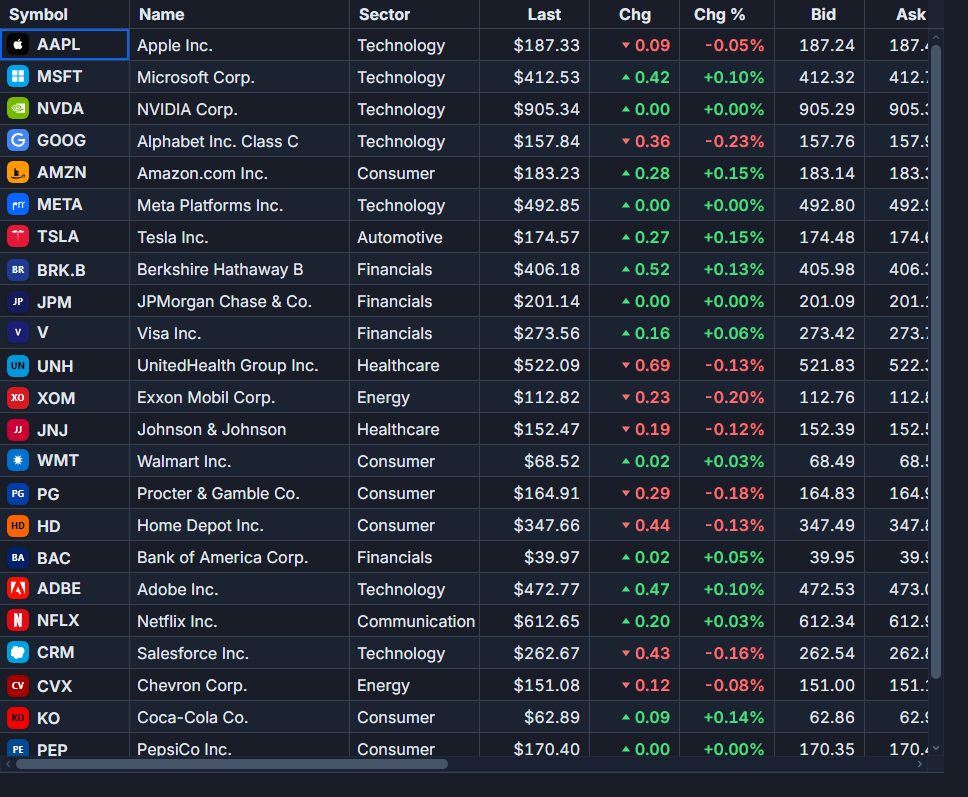 A live market grid in SvGrid.
The core difference
A data table is an enhanced <table>. It renders rows and columns, maybe lets users sort by clicking a header or filter with a text box. The mental model is a report - static, readable, disposable. You look at it, you close the tab.
A data grid is an application surface. Users do work inside it: edit cells, select ranges, group and aggregate, navigate with the keyboard, export, handle tens of thousands of rows without the browser choking. The mental model is closer to a spreadsheet than a report.
The practical line between the two is around three capabilities: virtualization, inline editing, and server-side data. Once you need any of those, you are building a grid whether you call it that or not.
What "table" libraries typically give you
A sorting, filtering table in Svelte is maybe 40 lines of code or a thin library like svelte-headless-table. You get:
- Column sort (click to toggle ascending/descending)
- Basic text filter per column or globally
- Optional pagination
That is perfectly reasonable for a settings page, a transaction log with under 500 rows, or an admin list view. You do not need a heavy grid for those.
<!-- A simple table - no library needed -->
<script lang="ts">
  let { rows } = $props()
  let sortCol = $state('name')
  let sortDir = $state<'asc' | 'desc'>('asc')

  const sorted = $derived(
    [...rows].sort((a, b) => {
      const v = a[sortCol] < b[sortCol] ? -1 : a[sortCol] > b[sortCol] ? 1 : 0
      return sortDir === 'asc' ? v : -v
    })
  )
</script>

<table>
  <thead>
    <tr>
      {#each ['name', 'status', 'amount'] as col}
        <th onclick={() => {
          sortDir = sortCol === col && sortDir === 'asc' ? 'desc' : 'asc'
          sortCol = col
        }}>{col}</th>
      {/each}
    </tr>
  </thead>
  <tbody>
    {#each sorted as row}
      <tr>
        <td>{row.name}</td>
        <td>{row.status}</td>
        <td>{row.amount}</td>
      </tr>
    {/each}
  </tbody>
</table>
This works until it does not. DOM rendering 2,000 rows slows noticeably in most browsers. Inline editing requires wiring up state for every cell. Grouping with aggregation is a complete rewrite. Server-side paging with filters needs a custom adapter. Each of those is a discrete jump in complexity, and they do not compose well on top of a basic table.
When you are actually building a grid
If any of these are true, you need a grid:
- Row count exceeds a few thousand (virtualization is not optional at scale)
- Users edit cells - either individual fields or bulk updates
- Data loads from a server and changes based on filters, sort, or page
- You need grouping, tree structure, or master-detail expansion
- Cell selection, copy/paste, or keyboard navigation is part of the UX
- Export to CSV or Excel is on the roadmap
The decision usually becomes obvious in the first product review. Someone asks "can users edit that inline?" or "what happens with 50,000 rows?" and the answer requires a grid.
How SvGrid handles the spectrum
SvGrid registers features explicitly, which means you pay for what you use. A read-only grid with sorting and pagination is about fifteen lines:
<script lang="ts">
  import SvGrid from '@svgrid/grid'
  import type { ColumnDef } from '@svgrid/grid'

  const columns: ColumnDef[] = [
    { id: 'name',   field: 'name',   header: 'Name',   width: 200 },
    { id: 'status', field: 'status', header: 'Status', width: 120 },
    { id: 'amount', field: 'amount', header: 'Amount', width: 100, type: 'number' },
  ]

  const data = $state([
    { name: 'Acme Corp',   status: 'active',   amount: 4200 },
    { name: 'Globex',      status: 'inactive', amount: 1800 },
    { name: 'Initech',     status: 'active',   amount: 9100 },
  ])
</script>

<SvGrid {data} {columns} sortable pageable />
When requirements grow, you add features to the same component without switching libraries:
<script lang="ts">
  import SvGrid from '@svgrid/grid'
  import {
    tableFeatures,
    rowSortingFeature,
    columnFilteringFeature,
    rowSelectionFeature,
    rowPaginationFeature,
    createServerDataSource,
    type ColumnDef,
    type SvGridApi,
    type TableFeatures,
  } from '@svgrid/grid'

  // Feature registration - pay only for what you use
  const features = tableFeatures({
    rowSortingFeature,
    columnFilteringFeature,
    rowSelectionFeature,
    rowPaginationFeature,
  })

  // Server-side data source - filters, sort, and page applied server-side
  const ds = createServerDataSource({
    fetch: async ({ page, pageSize, sort, filters }) => {
      const params = new URLSearchParams({
        page: String(page),
        size: String(pageSize),
        ...(sort[0] ? { sortCol: sort[0].id, sortDir: sort[0].desc ? 'desc' : 'asc' } : {}),
      })
      const res = await fetch(`/api/orders?${params}`)
      const json = await res.json()
      return { rows: json.data, total: json.total }
    },
  })

  const columns: ColumnDef<typeof features>[] = [
    { id: 'id',       field: 'id',       header: 'Order ID', width: 100, pinned: 'left' },
    { id: 'customer', field: 'customer', header: 'Customer',  width: 200 },
    { id: 'product',  field: 'product',  header: 'Product',   width: 180 },
    { id: 'qty',      field: 'qty',      header: 'Qty',       width: 80, type: 'number' },
    { id: 'total',    field: 'total',    header: 'Total',     width: 100, type: 'number' },
    { id: 'status',   field: 'status',   header: 'Status',    width: 120 },
  ]

  let api = $state<SvGridApi>()
  let selectedCount = $derived(api?.getSelectedRows().length ?? 0)
</script>

{#if selectedCount > 0}
  <div class="toolbar">
    {selectedCount} selected
    <button onclick={() => api?.clearRowSelection()}>Clear</button>
  </div>
{/if}

<SvGrid
  data={ds}
  {columns}
  {features}
  sortable
  filterable
  pageable
  showFilterRow={true}
  virtualization={true}
  rowHeight={36}
  onApiReady={(a) => { api = a }}
/>
The important design point: the two examples use the same <SvGrid> component. There is no "simple version" and "advanced version" to migrate between. You add capabilities incrementally, and the grid handles the underlying complexity.
The phrasing problem
One reason this confusion persists is that marketing copy for grid libraries almost always says "data table" because it tests better in search. People search for "Svelte data table" more often than "Svelte data grid." So libraries that are fully-capable grids describe themselves with table language to capture that traffic.
Read the feature list, not the headline. If a library supports virtualization, server-side data, and inline editing, it is a grid regardless of what it calls itself on the landing page.
Where to draw the line in practice
My rule of thumb: if the interface is read-only and fits on one page of data without virtualization, a plain table is fine and a grid is unnecessary overhead. Once any of the following appear in requirements, switch to a grid from the start:
- Editable cells, even just one column
- Row count over 500 (be conservative here - DOM tables degrade before you expect)
- Data fetched and filtered from an API
- Any form of grouping, aggregation, or drill-down
- Export functionality beyond a simple "download CSV" button
Starting with a grid and not using its features costs you almost nothing. Starting with a plain table and then realizing you need grouping and server-side data costs you a rewrite. The conservative choice is to default to a grid for anything that lives in a real application.