Building a CRM Contacts Table in Svelte
How to build a CRM contacts grid with avatar cells, status badges, inline editing, named views per rep, and bulk actions using SvGrid.
Sales reps spend more time inside a contacts table than any other screen in a CRM. That makes it one of the harder grids to get right - it needs rich cells for scannability, inline editing that doesn't interrupt flow, per-rep saved views, and selection-based bulk actions. This post builds that grid end to end with SvGrid.
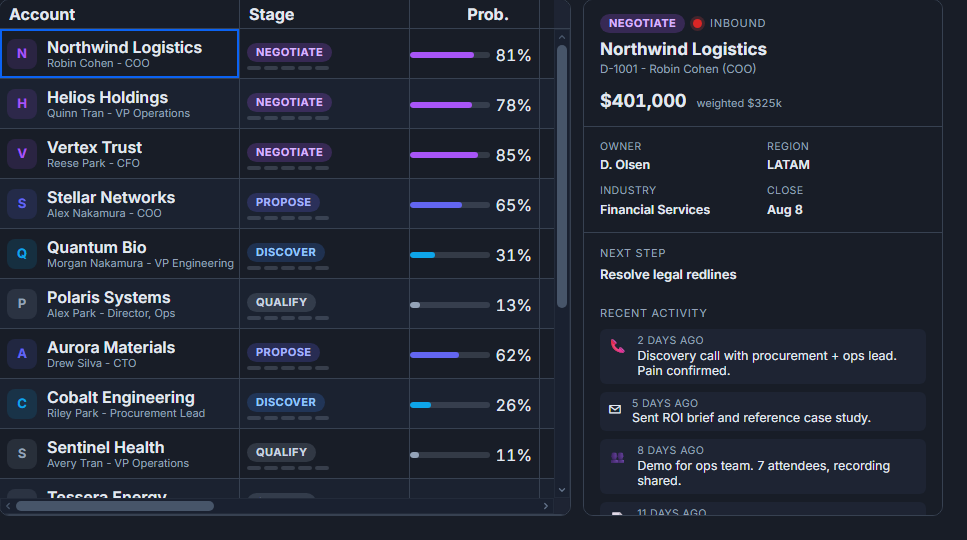 A CRM pipeline built with SvGrid.
Column design: rich cells over raw text
A contacts table that shows only plain strings forces reps to read carefully. Mix in visual encoding from the start.
The column set I reach for on most CRM grids:
- Contact - avatar + name + email stacked in a custom snippet
- Status - a colored badge (Lead, Active, Churned, Lost)
- Owner - a small avatar with the rep's name
- Deal value - numeric with currency formatting
- Last contacted - date, with age-based conditional formatting to surface stale contacts
- Actions - icon buttons pinned to the right edge
<script lang="ts">
  import SvGrid from '@svgrid/grid'
  import type { ColumnDef } from '@svgrid/grid'
  import type { Contact } from '$lib/types'

  let myApi: ReturnType<typeof createGrid> | undefined

  const columns: ColumnDef<Contact>[] = [
    {
      id: 'contact',
      header: 'Contact',
      width: 220,
      pinned: 'left',
      cell: contactCell,
    },
    {
      id: 'status',
      field: 'status',
      header: 'Status',
      width: 120,
      cell: statusBadge,
    },
    {
      id: 'owner',
      field: 'ownerName',
      header: 'Owner',
      width: 160,
      editable: true,
    },
    {
      id: 'dealValue',
      field: 'dealValue',
      header: 'Deal Value',
      width: 130,
      type: 'number',
      editable: true,
      format: { type: 'currency', currency: 'USD' },
    },
    {
      id: 'lastContacted',
      field: 'lastContacted',
      header: 'Last Contacted',
      width: 150,
      type: 'date',
      conditionalFormat: [
        {
          condition: ({ value }) => {
            const days = (Date.now() - new Date(value).getTime()) / 86400000
            return days > 30
          },
          style: { color: '#b91c1c', fontWeight: 'bold' },
        },
      ],
    },
    {
      id: 'actions',
      header: '',
      width: 90,
      pinned: 'right',
      cell: actionsCell,
    },
  ]
</script>

{#snippet contactCell({ row })}
  <div class="contact-cell">
    <img src={row.original.avatarUrl} alt="" class="avatar" />
    <div>
      <div class="name">{row.original.name}</div>
      <div class="email">{row.original.email}</div>
    </div>
  </div>
{/snippet}

{#snippet statusBadge({ value })}
  <span class="badge badge-{value.toLowerCase()}">{value}</span>
{/snippet}

{#snippet actionsCell({ row })}
  <div class="row-actions">
    <button onclick={() => emailContact(row.original)}>✉</button>
    <button onclick={() => editContact(row.original)}>✎</button>
  </div>
{/snippet}

<SvGrid
  {data}
  {columns}
  sortable
  filterable
  editable
  rowHeight={48}
  showFilterRow={true}
  enableCellSelection={true}
  onApiReady={(api) => { myApi = api }}
/>
The conditionalFormat on lastContacted is one of those small touches that meaningfully changes how reps use the table - stale contacts turn red without any extra UI.
Inline editing that doesn't break the rhythm
The worst thing you can do to a sales rep is open a full edit form just to change a status or reassign an owner. Inline editing keeps them in the table.
Mark editable: true on the columns reps should be able to change. For status, a select editor keeps input constrained. Commit changes server-side with onCellValueChange and roll back on failure - that's the optimistic update pattern.
<script lang="ts">
  import SvGrid from '@svgrid/grid'

  async function handleCellChange(event: { rowIndex: number; field: string; newValue: unknown; oldValue: unknown; revert: () => void }) {
    const { rowIndex, field, newValue, revert } = event
    try {
      await fetch(`/api/contacts/${contacts[rowIndex].id}`, {
        method: 'PATCH',
        headers: { 'Content-Type': 'application/json' },
        body: JSON.stringify({ [field]: newValue }),
      })
    } catch {
      // Server rejected the update - put the old value back
      revert()
    }
  }
</script>

<SvGrid
  {data}
  {columns}
  editable
  onCellValueChange={handleCellChange}
/>
One thing to consider: if the status field drives badge color, the badge should re-render as soon as the cell commits, not on the next server round-trip. SvGrid's reactive data binding handles this automatically - the snippet reads value from the row and Svelte re-runs it when the cell changes.
Named views per rep
Reps naturally develop personal slices of the contacts table: "My leads this quarter", "Untouched in 30 days", "Closing this month". Building that into the grid - rather than asking the backend to serve pre-filtered endpoints - gives each rep agency without backend work.
The approach: createNamedViews backed by localStorageViews so each browser session persists its own views. Optionally, sync the active view name to the URL so a rep can share their current filter set with a colleague.
<script lang="ts">
  import SvGrid, { createNamedViews, localStorageViews } from '@svgrid/grid'

  const namedViews = createNamedViews({
    storage: localStorageViews('crm-contacts'),
    defaults: [
      {
        name: 'My leads',
        state: {
          filters: [
            { field: 'status', operator: 'equals', value: 'Lead' },
            { field: 'ownerName', operator: 'equals', value: currentUser.name },
          ],
          sort: [{ field: 'lastContacted', dir: 'asc' }],
        },
      },
      {
        name: 'Stale (30+ days)',
        state: {
          filters: [
            {
              field: 'lastContacted',
              operator: 'lessThan',
              value: new Date(Date.now() - 30 * 86400000).toISOString(),
            },
          ],
        },
      },
    ],
  })

  // Expose view switching in UI
  function applyView(name: string) {
    namedViews.apply(name)
  }

  function saveCurrentView(name: string) {
    namedViews.save(name)
  }
</script>

<div class="view-bar">
  {#each namedViews.list() as view}
    <button onclick={() => applyView(view.name)}>{view.name}</button>
  {/each}
  <button onclick={() => saveCurrentView(prompt('View name') ?? 'My view')}>
    Save current view
  </button>
</div>

<SvGrid
  {data}
  {columns}
  sortable
  filterable
  showFilterRow={true}
  {namedViews}
  onApiReady={(api) => { myApi = api }}
/>
Views persist across page loads. A rep who sets up "Closing this month" on Monday still sees it on Friday.
Bulk actions: selection as a workflow trigger
Row selection is not just for "select all and export" - in a CRM it's a workflow trigger. Select 12 contacts, assign them to a rep, start an email sequence, add a tag.
The right pattern is a contextual toolbar that appears when rows are selected. The toolbar reads the current selection from the API and dispatches batch operations.
<script lang="ts">
  import SvGrid, { type SvGridApi } from '@svgrid/grid'

  let api: SvGridApi | undefined
  let selectedCount = $state(0)

  function onSelectionChange() {
    selectedCount = api?.getSelectedRows().length ?? 0
  }

  async function bulkAssign(ownerName: string) {
    const rows = api?.getSelectedRows() ?? []
    const ids = rows.map((r) => r.id)
    await fetch('/api/contacts/bulk-assign', {
      method: 'POST',
      headers: { 'Content-Type': 'application/json' },
      body: JSON.stringify({ ids, ownerName }),
    })
    // Update local data so the grid reflects the change immediately
    api?.applyTransaction({
      update: rows.map((r) => ({ ...r, ownerName })),
    })
    api?.clearRowSelection()
  }
</script>

{#if selectedCount > 0}
  <div class="bulk-toolbar">
    <span>{selectedCount} selected</span>
    <button onclick={() => bulkAssign('Alice')}>Assign to Alice</button>
    <button onclick={() => bulkAssign('Bob')}>Assign to Bob</button>
    <button onclick={() => api?.clearRowSelection()}>Clear selection</button>
  </div>
{/if}

<SvGrid
  {data}
  {columns}
  rowSelectable
  onSelectionChange={onSelectionChange}
  onApiReady={(a) => { api = a }}
/>
applyTransaction is the key here. It patches only the changed rows in the grid's internal data without re-fetching everything from the server, so the UI stays consistent immediately and the server confirms asynchronously.
When client-side data isn't enough
A few thousand contacts load fine in the browser. At tens of thousands, or when the org has strict data access rules per rep, you want server-side data. The good news is the grid's UI doesn't change at all - swap data={contacts} for a createServerDataSource and the filtering, sorting, and pagination all delegate to the server.
import { createServerDataSource } from '@svgrid/grid'

const ds = createServerDataSource({
  fetch: async ({ page, pageSize, sort, filters }) => {
    const params = new URLSearchParams({
      page: String(page),
      size: String(pageSize),
      sort: JSON.stringify(sort),
      filters: JSON.stringify(filters),
    })
    const res = await fetch(`/api/contacts?${params}`)
    const json = await res.json()
    return { rows: json.data, total: json.total }
  },
})
Pass data={ds} to the grid and add pageable. Named views work the same way - when a rep activates "My leads", the active filters get forwarded in the next server fetch automatically.
The contacts table ends up being one of those grids where the right architecture pays off fast. Inline editing without optimistic updates feels broken. Views that reset on page load annoy users within a week. Bulk actions that force a page reload cost a rep 20 seconds per batch. Getting those three right means the grid actually gets used instead of worked around.