Conditional Row Styling in SvGrid
Drive row-level background tints, classes, and styles from your data - overdue invoices, failed jobs, VIP records - without touching the DOM directly.
Row-level visual state is one of those things that looks trivial until you actually do it. The "overdue" invoice row should be red, the failed batch job amber, the VIP customer subtly highlighted - and it should stay correct as rows reorder under sorting, get filtered out, and page in from a server data source. That last part is where most naive approaches fall apart.
SvGrid solves this at the column definition level rather than by letting you reach into the DOM. Here is what that means in practice and why the approach scales better than post-render patching.
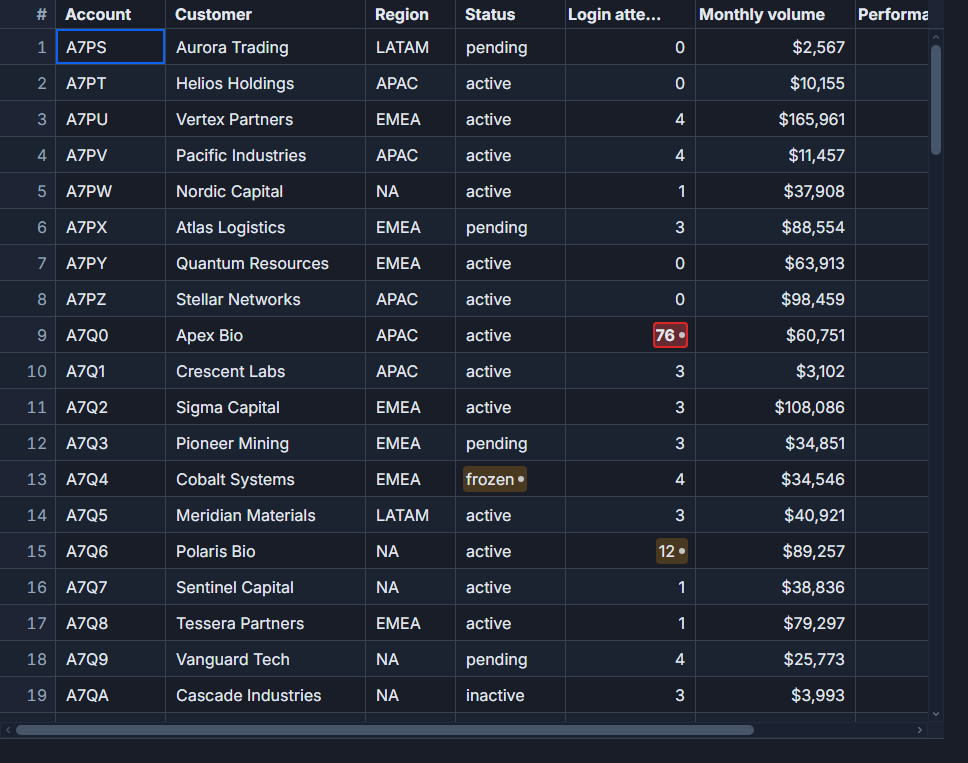 Row-level tints driven directly from record data.
Derive a class from the record, not from the render cycle
The right pattern is a pure function from row data to a CSS class name (or a style object). No refs, no document.querySelectorAll, no onMount gymnastics.
<script lang="ts">
  import SvGrid from '@svgrid/grid'
  import type { ColumnDef } from '@svgrid/grid'

  type Invoice = {
    id: number
    customer: string
    amount: number
    dueDate: string
    paid: boolean
    priority: 'normal' | 'high'
  }

  const today = new Date().toISOString().slice(0, 10)

  function rowClass(row: Invoice): string {
    if (!row.paid && row.dueDate < today) return 'row--overdue'
    if (row.priority === 'high') return 'row--priority'
    return ''
  }

  const columns: ColumnDef<Invoice>[] = [
    { id: 'id',       field: 'id',       header: '#',        width: 60 },
    { id: 'customer', field: 'customer', header: 'Customer', width: 200 },
    { id: 'amount',   field: 'amount',   header: 'Amount',   width: 120, type: 'number' },
    { id: 'dueDate',  field: 'dueDate',  header: 'Due',      width: 120 },
    { id: 'paid',     field: 'paid',     header: 'Paid',     width: 80 },
  ]

  const data: Invoice[] = [
    { id: 1, customer: 'Acme Corp', amount: 4200, dueDate: '2026-06-01', paid: false, priority: 'high' },
    { id: 2, customer: 'Initech',   amount: 890,  dueDate: '2026-07-15', paid: false, priority: 'normal' },
    { id: 3, customer: 'Globex',    amount: 7350, dueDate: '2026-05-20', paid: true,  priority: 'normal' },
  ]
</script>

<SvGrid
  {data}
  {columns}
  {rowClass}
  sortable
/>

<style>
  :global(.row--overdue)   { background: color-mix(in srgb, #e5484d 12%, transparent); }
  :global(.row--priority)  { background: color-mix(in srgb, var(--sg-accent) 10%, transparent); }
</style>
The rowClass prop accepts a function (row: T) => string. SvGrid calls it per visible row during render and applies the returned class to the row element. Because this runs inside the virtualizer's render loop, it stays correct as rows scroll, sort, and filter - you never have stale DOM state from a previous layout.
When to use rowStyle instead of rowClass
For dynamic values - a heatmap where intensity tracks a numeric column - inline styles are more practical than generating a class per value.
<script lang="ts">
  import SvGrid from '@svgrid/grid'
  import type { ColumnDef } from '@svgrid/grid'

  type JobRun = {
    id: string
    name: string
    duration: number  // seconds
    status: 'ok' | 'warn' | 'error'
    errorCount: number
  }

  // Map error count to a red alpha channel
  function rowStyle(row: JobRun): Record<string, string> {
    if (row.status === 'error') {
      const intensity = Math.min(row.errorCount / 10, 1)
      return { background: `rgba(229, 72, 77, ${intensity * 0.25})` }
    }
    if (row.status === 'warn') {
      return { background: 'color-mix(in srgb, #f5a623 10%, transparent)' }
    }
    return {}
  }

  const columns: ColumnDef<JobRun>[] = [
    { id: 'name',       field: 'name',       header: 'Job',      width: 200 },
    { id: 'duration',   field: 'duration',   header: 'Duration', width: 100, type: 'number' },
    { id: 'status',     field: 'status',     header: 'Status',   width: 90  },
    { id: 'errorCount', field: 'errorCount', header: 'Errors',   width: 80, type: 'number' },
  ]
</script>

<SvGrid {data} {columns} {rowStyle} sortable />
Use rowClass when you have a fixed set of states (overdue / priority / archived). Use rowStyle when you are computing values continuously, like a heatmap or a freshness indicator that fades as records age. The two props compose - a row can have both a class and an inline style override.
Combining row tints with cell-level conditional formatting
Row state and cell state are separate concerns. A row can be globally "overdue" (whole row tinted red) while a specific cell inside that row independently triggers its own formatting because its value crossed a threshold.
<script lang="ts">
  import SvGrid from '@svgrid/grid'
  import type { ColumnDef } from '@svgrid/grid'

  type Position = {
    ticker: string
    shares: number
    price: number
    change: number   // percent change today
    alert: boolean
  }

  const columns: ColumnDef<Position>[] = [
    { id: 'ticker', field: 'ticker', header: 'Ticker', width: 90 },
    { id: 'shares', field: 'shares', header: 'Shares', width: 90,  type: 'number' },
    { id: 'price',  field: 'price',  header: 'Price',  width: 100, type: 'number' },
    {
      id: 'change',
      field: 'change',
      header: '% Today',
      width: 110,
      type: 'number',
      conditionalFormat: [
        {
          condition: ({ value }) => value <= -5,
          style: { color: '#e5484d', fontWeight: '700' },
        },
        {
          condition: ({ value }) => value >= 5,
          style: { color: '#30a46c', fontWeight: '700' },
        },
      ],
    },
  ]

  // Row-level: flag the whole row when the position has an open alert
  function rowClass(row: Position): string {
    return row.alert ? 'row--alert' : ''
  }
</script>

<SvGrid
  {data}
  {columns}
  {rowClass}
  sortable
  enableCellSelection
/>

<style>
  :global(.row--alert) {
    outline: 1px solid color-mix(in srgb, #f5a623 60%, transparent);
    outline-offset: -1px;
  }
</style>
The conditionalFormat array on the change column runs independently - a cell goes bold-red at -5% regardless of whether the row has an alert flag. Two orthogonal systems, no coupling.
Accessibility: color cannot be the only signal
A red row is invisible to someone with deuteranopia. The WCAG guidance is explicit: color must not be the sole means of conveying information. Pair every tint with a redundant indicator.
For the overdue invoice case, the right approach is to also show a text badge or icon in the "Status" cell:
{#snippet statusCell({ row })}
  {#if !row.paid && row.dueDate < today}
    <span class="badge badge--overdue" aria-label="Overdue">Overdue</span>
  {:else if row.paid}
    <span class="badge badge--paid">Paid</span>
  {:else}
    <span class="badge badge--pending">Pending</span>
  {/if}
{/snippet}

<!-- In columns: { id: 'status', header: 'Status', cell: statusCell } -->
The row tint gives sighted users an instant scan signal. The badge gives everyone - screen readers included - the actual semantic state. They work together without duplicating logic because both reference the same row data.
Keep the color-mix approach for theme compatibility
Hard-coded background colors break in dark mode. color-mix(in srgb, #e5484d 12%, transparent) overlays a red tint on whatever the cell background is - light or dark, themed or not. You get the warning color without blowing out the background.
The SvGrid CSS tokens (--sg-bg, --sg-accent, --sg-border) give you a consistent palette to mix against. For priority rows it is worth using --sg-accent directly so priority highlights match the grid's current brand color:
:global(.row--priority) {
  background: color-mix(in srgb, var(--sg-accent) 8%, transparent);
}
If you swap the accent color for a different theme, priority rows automatically follow. No need to update the styling logic separately.
Row styling vs group header styling
One thing that trips people up: rowClass applies to data rows, not group header rows. If you use groupable and want to style the group header bands differently (say, a collapsed group of overdue invoices should still show a warning tint), that is done through the group row slot rather than rowClass. For most use cases - invoices, job runs, support tickets - row-level styling on data rows is exactly what you need and group headers can stay neutral.
The short version: derive your row state as a pure function of the record, express it with rowClass or rowStyle, pair every color signal with a text or icon redundancy, and use color-mix so your highlights survive theme switches. That is the whole pattern.