Inside SvGrid: Grouping, Trees, and Master-Detail
Three different ways to show hierarchy in a data grid, unified under one expansion model in SvGrid - the design decision and how each feature actually works.
Hierarchy is where most data grids start fragmenting. Grouping gets its own system, tree data gets another, master-detail gets a third. They look different in the UI so they feel like they should be different in the engine. That was the wrong call, and we caught it early.
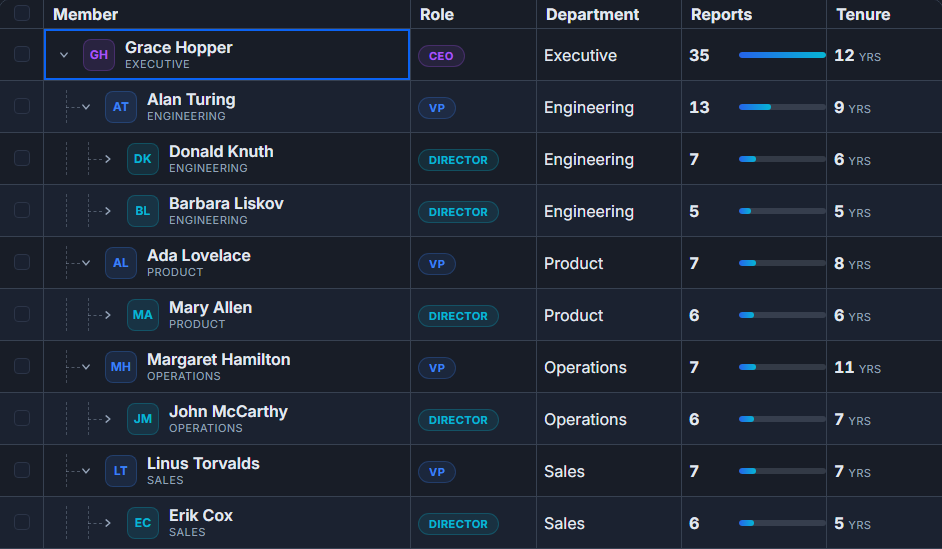 Grouping, trees, and master-detail on one expansion model.
The shared shape underneath
Strip the surface off all three features and you find the same thing: a row that reveals additional content when opened. The "additional content" differs - it's auto-generated group rows for grouping, child rows from your data model for trees, and arbitrary detail markup for master-detail. But the machinery is identical: toggle a boolean, animate the transition, update the viewport height, handle keyboard navigation.
Building three separate systems for that would mean three implementations of scroll position calculation, three implementations of keyboard expand/collapse, three places to track "which rows are currently open." Instead we built rowExpandingFeature as a single mechanism in the core and expressed all three on top of it.
import {
  tableFeatures,
  rowExpandingFeature,
  columnGroupingFeature,
  rowSortingFeature,
  columnFilteringFeature,
} from '@svgrid/grid'

// The same feature powers grouping, tree rows, and master-detail
const features = tableFeatures({
  rowExpandingFeature,
  columnGroupingFeature,
  rowSortingFeature,
  columnFilteringFeature,
})
One model, three rendering modes. Expand and collapse behave the same way - same keyboard shortcuts, same animation, same scroll behavior - regardless of which feature you're using.
Grouping without aggregation is a toy
Server-side grouping is common. Client-side grouping without aggregation is basically useless. Hiding 200 sales rows under a "EMEA" header gives you nothing you didn't already have. The value is the summary: total revenue per region, average score per team, row count per category.
Aggregation is defined on the column, not on the group. That means the same aggregation applies at every level of a multi-level groupBy, and the column's formatter runs on the aggregated value so group totals get the same currency symbol or percentage rendering as the cells below them.
import SvGrid from '@svgrid/grid'
import type { ColumnDef } from '@svgrid/grid'

type SaleRow = {
  rep: string
  region: string
  product: string
  revenue: number
  units: number
}

const columns: ColumnDef<typeof features, SaleRow>[] = [
  { id: 'rep',     field: 'rep',     header: 'Rep',     width: 160 },
  { id: 'region',  field: 'region',  header: 'Region',  width: 130 },
  { id: 'product', field: 'product', header: 'Product', width: 150 },
  {
    id: 'revenue',
    field: 'revenue',
    header: 'Revenue',
    width: 130,
    type: 'number',
    aggregate: 'sum',
    format: { type: 'currency', currency: 'USD' },
  },
  {
    id: 'units',
    field: 'units',
    header: 'Units',
    width: 100,
    type: 'number',
    aggregate: 'sum',
  },
]
<SvGrid
  {data}
  {columns}
  {features}
  groupable
  sortable
  filterable
  onApiReady={(api) => {
    // Group by two levels; aggregation rolls up automatically
    api.setGroupBy(['region', 'product'])
  }}
/>
The imperative API also lets you collapse or expand programmatically, which matters when you want to open the grid with only one group expanded on load:
onApiReady={(api) => {
  api.setGroupBy(['region'])
  api.collapseAllGroups()
  api.setRowExpanded('group:EMEA', true)
}}
Tree data: nested children vs. lazy-loaded subtrees
Tree data is different from grouping because the hierarchy comes from your data model, not from grouping rows by a shared field value. A file system, an org chart, a bill of materials - these have parent-child relationships that exist in the source data.
The simplest form is a flat array where each row carries a parentId. SvGrid builds the tree internally. For deeply nested structures or async data sources, you can provide a loadChildren callback that fires the first time a parent row is expanded. The subtree is never fetched until someone actually opens that branch.
Aggregation up the tree works the same way it does for grouping: a parent folder can show the total size of everything inside it, and that number is computed by walking the expanded subtree. The column definition doesn't change - aggregate: 'sum' means sum at every level, whether those levels come from groupBy or from a parentId tree.
Master-detail: the Svelte 5 advantage
Master-detail is where native Svelte 5 gives a real edge over framework-agnostic grids. A detail panel is not a special grid construct with its own limited API. It is a Svelte snippet. You write whatever markup you want - a nested SvGrid showing order line items, a chart built with SvGridChart, a form with bound inputs, a map. The expansion model provides the open/close machinery and the row height adjustment; you supply the content.
{#snippet orderDetail({ row })}
  <div class="detail-panel">
    <h4>Order #{row.orderId} - Line Items</h4>
    <SvGrid
      data={row.lineItems}
      columns={lineItemColumns}
      rowHeight={28}
    />
    <div class="order-notes">
      <strong>Notes:</strong> {row.notes ?? 'None'}
    </div>
  </div>
{/snippet}

<SvGrid
  {data}
  {columns}
  {features}
  detail={orderDetail}
  onApiReady={(api) => { gridApi = api }}
/>
The detail snippet receives the full row object. If the detail needs data that isn't on the row yet - line items fetched from a separate endpoint - you can fetch on first expansion and cache on the row object. The grid doesn't need to know about that; it just calls your snippet with whatever the row contains.
Where state lives during expand/collapse
One detail that matters in practice: expanded state is tracked in $state({}) the same way sorting and filtering state is tracked. That means it survives reactive updates to the data array. If you push new rows into your data source, the previously expanded groups stay expanded. If you close and restore a named view with api.getState() / api.setState(), expansion state is included.
// Save full view state including which groups are open
const snapshot = api.getState()
localStorage.setItem('view', JSON.stringify(snapshot))

// Restore later - expansion state comes back with everything else
const saved = JSON.parse(localStorage.getItem('view') ?? '{}')
api.setState(saved)
This would have been awkward with three separate expansion systems. One state object, one serialization path, one restore call.
The tradeoff we accepted
Unifying on a single expansion model means group rows, tree rows, and detail rows all go through the virtualizer together. For most use cases that's fine. The edge case is master-detail where the detail panel has a variable and unpredictable height - maybe it's a small chart, maybe it's a nested grid with 50 rows. Variable heights require the virtualizer to measure rendered content, which adds a small layout pass on first open.
We decided that was the right tradeoff. The alternative is a fixed-height detail constraint, which is the wrong constraint to force on users. The measurement cost is a one-time payment per row on first open; after that the height is cached.
The full practical guides are in the docs: Grouping and Aggregation, Tree Data and Hierarchies, and Master-Detail Rows. This post is about why they all share the same engine.