AG Grid Alternatives for Svelte Developers
Comparing AG Grid alternatives for Svelte 5 apps - what each option actually gives you, where each falls short, and how to pick one without regret.
Most Svelte developers who ask "is there an AG Grid alternative?" are not asking because AG Grid is bad. They are asking because they have tried wiring it into a Svelte app and the seams show. The callbacks feel imperative, state lives outside Svelte's reactivity system, and every time you update a row you are essentially poking a black box. It works, but it does not feel like the rest of the app.
The real question is: what do you actually need, and which option fits that without forcing you to fight the framework?
What AG Grid does right (and why that bar matters)
Before comparing alternatives, it is worth being clear about what you are giving up if you leave. AG Grid Enterprise is the most capable data grid on the market: pivot, integrated charting, advanced aggregations, server-side row model with infinite scroll, and a decade of edge-case handling around Excel export and keyboard navigation. The community (MIT) tier still covers sorting, filtering, grouping, and pagination at a level that most apps will never exceed.
Any alternative you pick is making a different trade. The honest ones are upfront about it. The dishonest ones claim parity and then bury the caveats.
TanStack Table: maximum control, minimum included
TanStack Table is a headless library - it gives you data logic and you build every pixel of the UI yourself. The Svelte adapter works well, and the API is consistent with the React version, so teams that need the same grid across multiple frameworks often land here.
The downside is proportional to the upside: if you want virtualization, you add @tanstack/svelte-virtual. If you want Excel export, you wire it yourself. If you want inline editing, you build that component. For a simple table with sorting and filtering, this is fine. For a complex data application, you are building a grid on top of a grid library, and that accumulates fast.
TanStack Table is the right call when: you have a design system that needs pixel-level control, or your team already uses TanStack across frameworks and consistency matters more than features.
SVAR Svelte DataGrid: free, multi-framework, capable
SVAR (MIT licensed) is the closest thing to a drop-in feature competitor to AG Grid's community tier in the Svelte space. It supports sorting, filtering, grouping, inline editing, and tree data. It is not built on Svelte 5 runes internally - it is a multi-framework library with a Svelte adapter - but it integrates reasonably well.
The main limitation shows up when you want deep SvelteKit integration: server-side data loading that composes with load functions, state that participates in Svelte's reactivity graph, or snippet-based cell renderers. SVAR does custom cells through components, not Svelte 5 snippets, so you lose some of the ergonomic advantage of writing Svelte 5.
SvGrid: native Svelte 5, full feature grid
SvGrid (@svgrid/grid) is written natively on Svelte 5 runes. That means column state, sort state, filter state, and selection are all plain Svelte $state that you can read, derive from, or bind to without any adapter layer. Custom cells are Svelte 5 snippets. Server-side data composes naturally with load functions.
The feature set covers virtualization, multi-column sorting, Excel-style column filters, grouping, inline editing with undo/redo, tree rows, master-detail, pivot (Enterprise), and server-side data with cursor-based pagination. Here is what a working setup looks like:
<script lang="ts">
  import SvGrid from '@svgrid/grid'
  import {
    tableFeatures, rowSortingFeature, columnFilteringFeature,
    rowSelectionFeature, rowPaginationFeature, rowExpandingFeature,
    type ColumnDef,
  } from '@svgrid/grid'

  type Row = { id: number; name: string; revenue: number; status: string; region: string }

  const features = tableFeatures({
    rowSortingFeature,
    columnFilteringFeature,
    rowSelectionFeature,
    rowPaginationFeature,
    rowExpandingFeature,
  })

  const columns: ColumnDef<typeof features, Row>[] = [
    { id: 'name',    field: 'name',    header: 'Name',    width: 200, pinned: 'left' },
    { id: 'region',  field: 'region',  header: 'Region',  width: 120 },
    {
      id: 'revenue',
      field: 'revenue',
      header: 'Revenue',
      width: 130,
      type: 'number',
      editable: true,
      conditionalFormat: [
        { condition: ({ value }) => value < 10000, style: { color: 'red' } },
        { condition: ({ value }) => value >= 50000, style: { color: 'green', fontWeight: 'bold' } },
      ],
    },
    { id: 'status',  field: 'status',  header: 'Status',  width: 120, cell: statusCell },
    { id: 'actions', header: '',       width: 60,          cell: actionsCell, pinned: 'right' },
  ]

  let data = $state<Row[]>([])
  let api: import('@svgrid/grid').SvGridApi | undefined

  async function loadData() {
    const res = await fetch('/api/accounts')
    data = await res.json()
  }

  $effect(() => { loadData() })
</script>

{#snippet statusCell({ value }: { value: string })}
  <span class="badge" class:active={value === 'active'} class:churned={value === 'churned'}>
    {value}
  </span>
{/snippet}

{#snippet actionsCell({ row }: { row: Row })}
  <button onclick={() => api?.removeRow(row.id)}>Delete</button>
{/snippet}

<SvGrid
  {data}
  {columns}
  {features}
  sortable
  filterable
  editable
  groupable
  pageable
  rowHeight={36}
  showFilterRow={true}
  enableCellSelection={true}
  onApiReady={(a) => { api = a }}
/>
The conditional formatting on revenue requires no external library - it is part of the column definition. The snippet-based cell renderers (statusCell, actionsCell) are normal Svelte 5 snippets, not separate component files.
Server-side data: where the differences compound
Every serious app eventually moves to server-side data. This is where the "Svelte-native or not" distinction becomes concrete rather than philosophical.
With AG Grid, you implement a datasource object with getRows and call grid API methods. It works, but it is entirely outside Svelte's state model - you cannot derive a $derived from the grid's current sort state without bridging it manually.
With SvGrid's createServerDataSource, the fetch function receives the current page, sort, and filter state as plain objects. You call a fetch, return rows and a total, done. You can also pull those values out into reactive state if you need to show them elsewhere in the UI:
import { createServerDataSource, type SvGridApi } from '@svgrid/grid'

const ds = createServerDataSource({
  fetch: async ({ page, pageSize, sort, filters }) => {
    const params = new URLSearchParams({
      page: String(page),
      size: String(pageSize),
    })

    for (const s of sort) {
      params.append('sort', `${s.id}:${s.desc ? 'desc' : 'asc'}`)
    }

    for (const [col, f] of Object.entries(filters)) {
      if (f?.value != null) {
        params.append('filter', `${col}:${f.operator}:${f.value}`)
      }
    }

    const res = await fetch(`/api/accounts?${params}`)
    const json = await res.json()
    return { rows: json.data, total: json.total }
  }
})
Pass ds as the data prop and the grid handles all paging, sorting, and filter triggers automatically, re-fetching when any of them change.
The imperative API gap
One specific thing I have seen trip people up when moving away from AG Grid: the imperative API. AG Grid has a deep one - setFilterModel, refreshCells, flashCells, applyTransaction, and so on. You might be using five of them, or fifty, depending on how complex your app is.
SvGrid's API covers the common cases: setSort, setFilter, clearAllFilters, applyTransaction, getSelectedRows, selectRows, setColumnVisible, autosizeAllColumns, setGroupBy, getState/setState, undo/redo, scrollToRow, startEditing. Here is a quick look at the transaction and state save/restore patterns:
// Apply changes without full re-render
api.applyTransaction({
  add: [{ id: 999, name: 'New Account', revenue: 0, status: 'active', region: 'EU' }],
  update: [{ id: 12, revenue: 48000 }],
  remove: [{ id: 7 }],
})

// Save and restore the full view state (sort, filters, grouping, column widths)
const savedState = api.getState()
localStorage.setItem('grid-view', JSON.stringify(savedState))

// Later...
const restored = JSON.parse(localStorage.getItem('grid-view') ?? '{}')
api.setState(restored)
If you are relying on AG Grid Enterprise features like pivot, server-side row model with delta updates, or deep Excel import, do an honest audit before migrating. Those are not trivial to replicate, and SvGrid's Enterprise tier covers some of them (export, pivot) but not all.
Picking one
The grid category does not have a clear universal winner. It has different winners for different situations:
- Heavy AG Grid Enterprise usage, React/Vue also in play: Stay on AG Grid. The switching cost is not worth it unless the wrapper friction is actively causing bugs.
- New Svelte 5 app, needs sorting/filtering/grouping/editing/server-side data, MIT preferred: SvGrid is the strongest native option.
- Custom design system, need full rendering control, cross-framework team: TanStack Table with your own UI layer.
- MIT, feature-complete, do not care about Svelte 5 runes internally: SVAR is worth evaluating alongside SvGrid.
The SvGrid community tier is MIT and covers enough to build a real production app. Enterprise adds pivot, Excel export, PDF export, and AI-assisted data features if you need them later. The upgrade path is in-place - same component, same API, just a different import for the Enterprise features.
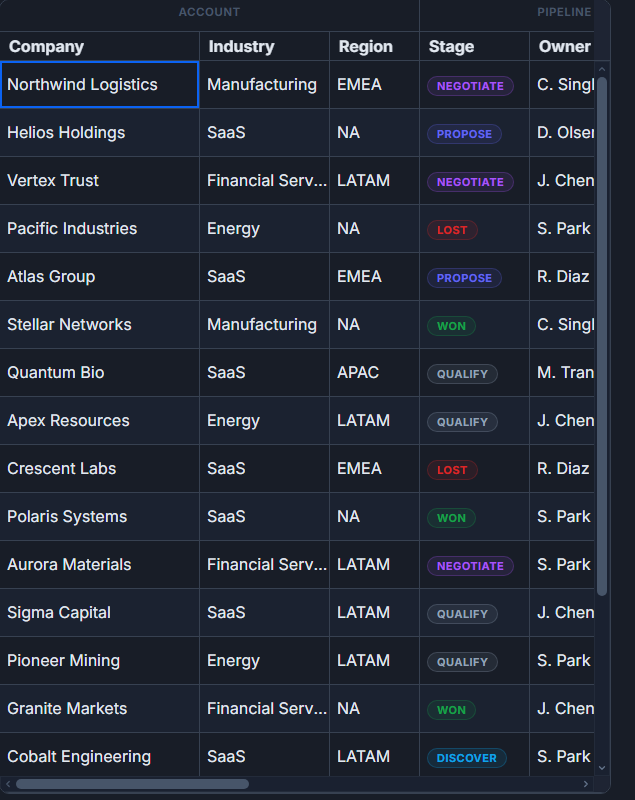 Grouped, multi-level column headers in SvGrid.