Building an Admin User-Management Screen in Svelte
A blueprint for a user-management grid with roles, status badges, inline edits, bulk actions, and server-side data - the patterns that keep this screen secure and usable.
User-management screens are deceptively hard. The grid itself is simple enough - name, email, role, status, a few action buttons - but the edge cases pile up fast: optimistic role changes that need to roll back on rejection, bulk deactivations that should ask for confirmation, privilege escalations that warrant a second prompt, and a backend that has to authorize every single request regardless of what the UI says. Get any of that wrong and you have either a broken experience or a security hole.
Here is the approach I use, built around SvGrid's server-side data source, cell snippets, and the imperative API.
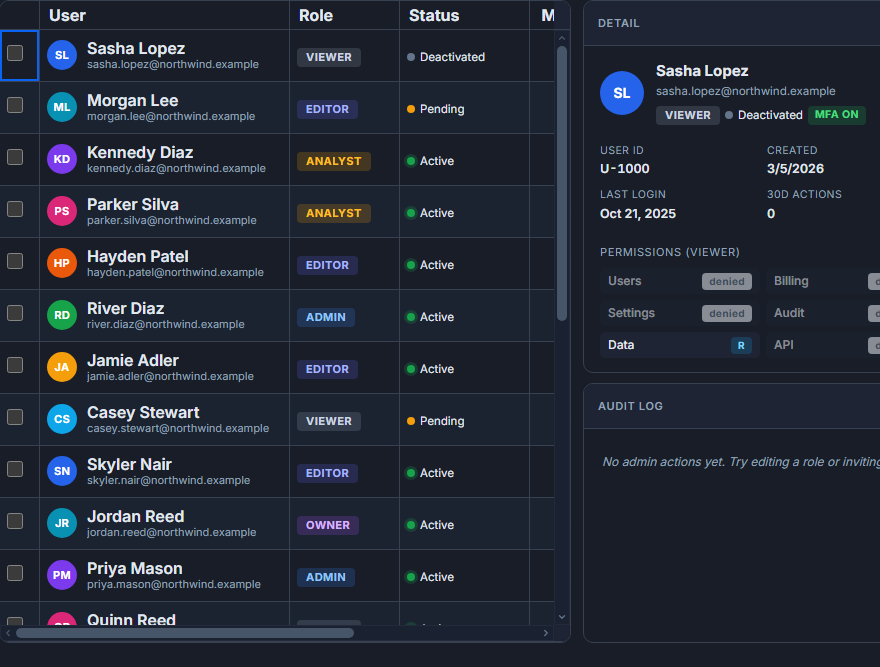 An admin screen built around SvGrid.
Column layout and custom cells
The five columns that matter most on a user management screen are user identity, role, status, last activity, and an actions slot. Pinning the identity left and the actions right keeps both visible during horizontal scroll on narrower viewports.
<script lang="ts">
  import SvGrid from '@svgrid/grid'
  import { createServerDataSource, type ColumnDef } from '@svgrid/grid'
  import RoleCell from './RoleCell.svelte'
  import StatusBadge from './StatusBadge.svelte'

  let api: import('@svgrid/grid').SvGridApi

  type User = {
    id: string
    name: string
    email: string
    avatarUrl: string
    role: 'Admin' | 'Editor' | 'Viewer'
    status: 'active' | 'invited' | 'suspended'
    lastActive: string
  }

  const ds = createServerDataSource({
    fetch: async ({ page, pageSize, sort, filters }) => {
      const params = new URLSearchParams({
        page: String(page),
        size: String(pageSize),
        ...(sort[0] ? { sortField: sort[0].id, sortDir: sort[0].desc ? 'desc' : 'asc' } : {}),
      })
      const res = await fetch(`/api/admin/users?${params}`, {
        credentials: 'include',
      })
      if (!res.ok) throw new Error('Failed to load users')
      const json = await res.json()
      return { rows: json.data, total: json.total }
    },
  })

  const columns: ColumnDef<any, User>[] = [
    {
      id: 'name',
      header: 'User',
      field: 'name',
      width: 220,
      pinned: 'left',
      cell: userIdentityCell,
    },
    {
      id: 'role',
      header: 'Role',
      field: 'role',
      width: 140,
      editable: true,
      cell: roleCell,
    },
    {
      id: 'status',
      header: 'Status',
      field: 'status',
      width: 120,
      cell: statusCell,
    },
    {
      id: 'lastActive',
      header: 'Last active',
      field: 'lastActive',
      width: 160,
      type: 'date',
    },
    {
      id: 'actions',
      header: '',
      width: 100,
      pinned: 'right',
      cell: actionsCell,
    },
  ]
</script>

{#snippet userIdentityCell({ row })}
  <div class="user-identity">
    <img src={row.original.avatarUrl} alt="" class="avatar" />
    <div>
      <div class="name">{row.original.name}</div>
      <div class="email">{row.original.email}</div>
    </div>
  </div>
{/snippet}

{#snippet roleCell({ row })}
  <span class="badge role-{row.original.role.toLowerCase()}">{row.original.role}</span>
{/snippet}

{#snippet statusCell({ row })}
  <span class="badge status-{row.original.status}">{row.original.status}</span>
{/snippet}

{#snippet actionsCell({ row })}
  <button onclick={() => openUserMenu(row.original)}>...</button>
{/snippet}

<SvGrid
  data={ds}
  {columns}
  pageable
  filterable
  rowHeight={52}
  showGlobalFilter={true}
  enableCellSelection={true}
  onApiReady={(a) => { api = a }}
/>
Inline role editing with optimistic updates and rollback
Role changes are the most frequent operation. An inline dropdown keeps it fast, but role changes are not reversible in most systems and escalating to Admin should surface a confirmation. The pattern I prefer: optimistically apply the change in the UI, fire the API call, and roll back if the server rejects it.
<script lang="ts">
  import SvGrid from '@svgrid/grid'

  let api: import('@svgrid/grid').SvGridApi

  async function handleRoleChange(
    userId: string,
    oldRole: string,
    newRole: string,
    rowIndex: number
  ) {
    if (newRole === 'Admin') {
      const confirmed = await confirm(`Promote this user to Admin?`)
      if (!confirmed) {
        // Roll back the cell immediately
        api.applyTransaction({
          update: [{ id: userId, role: oldRole }],
        })
        return
      }
    }

    try {
      const res = await fetch(`/api/admin/users/${userId}/role`, {
        method: 'PATCH',
        credentials: 'include',
        headers: { 'Content-Type': 'application/json' },
        body: JSON.stringify({ role: newRole }),
      })

      if (!res.ok) {
        // Server rejected - roll back
        api.applyTransaction({
          update: [{ id: userId, role: oldRole }],
        })
        showToast(`Could not change role: ${(await res.json()).message}`)
      } else {
        await logAuditEvent({ userId, field: 'role', from: oldRole, to: newRole })
      }
    } catch {
      api.applyTransaction({ update: [{ id: userId, role: oldRole }] })
      showToast('Network error - role change reverted')
    }
  }
</script>
The applyTransaction call updates the in-memory row data without a full reload, so the grid stays in sync even if the server-side data source would otherwise re-fetch on next navigation.
Bulk deactivation and the confirmation problem
Checking five users and clicking Deactivate should not silently fire five PATCH requests. Show a confirmation that names the count ("Deactivate 5 users?") and treat the whole batch as a single operation that either succeeds or reports partial failure.
<script lang="ts">
  import SvGrid from '@svgrid/grid'

  let api: import('@svgrid/grid').SvGridApi
  let selectedIds: string[] = $state([])

  function onSelectionChange() {
    selectedIds = api.getSelectedRows().map((r: any) => r.id)
  }

  async function bulkDeactivate() {
    if (selectedIds.length === 0) return
    const confirmed = await confirm(
      `Deactivate ${selectedIds.length} user${selectedIds.length > 1 ? 's' : ''}?`
    )
    if (!confirmed) return

    const res = await fetch('/api/admin/users/bulk-deactivate', {
      method: 'POST',
      credentials: 'include',
      headers: { 'Content-Type': 'application/json' },
      body: JSON.stringify({ ids: selectedIds }),
    })

    const result = await res.json()

    // Apply successful updates locally
    const updates = result.succeeded.map((id: string) => ({ id, status: 'suspended' }))
    api.applyTransaction({ update: updates })
    api.clearRowSelection()

    if (result.failed.length > 0) {
      showToast(`${result.failed.length} users could not be deactivated`)
    }
  }
</script>

{#if selectedIds.length > 0}
  <div class="bulk-toolbar">
    <span>{selectedIds.length} selected</span>
    <button onclick={bulkDeactivate} class="danger">Deactivate</button>
    <button onclick={() => api.clearRowSelection()}>Clear</button>
  </div>
{/if}

<SvGrid
  data={ds}
  {columns}
  pageable
  rowHeight={52}
  onApiReady={(a) => { api = a }}
  onRowSelectionChange={onSelectionChange}
/>
What the backend has to verify
This is the part that gets skipped in tutorials and causes incidents. The frontend does role-checking for UX (showing or hiding the "Make Admin" option), but every API endpoint must independently verify:
- The requesting user is actually an admin (not just someone who set a cookie).
- The target user is within the requesting admin's tenant or scope.
- The sort field in server-side requests is a real column (not a SQL injection vector).
- Bulk action IDs all belong to the same tenant before processing any of them.
Sorting validation deserves a mention because it is easy to overlook. When the grid sends sortField: someUserInput to your server, validate it against an allowlist of actual column names before building the query. An attacker who can control that parameter can often extract data from joins they should not see.
// Server-side sort validation (e.g. in a SvelteKit +server.ts)
const SORTABLE_COLUMNS = new Set(['name', 'email', 'role', 'status', 'lastActive'])

export async function GET({ url, locals }) {
  if (!locals.user?.isAdmin) return new Response(null, { status: 403 })

  const sortField = url.searchParams.get('sortField') ?? 'name'
  if (!SORTABLE_COLUMNS.has(sortField)) {
    return new Response(JSON.stringify({ error: 'Invalid sort field' }), { status: 400 })
  }

  const page = Number(url.searchParams.get('page') ?? 1)
  const size = Math.min(Number(url.searchParams.get('size') ?? 25), 100)

  const users = await db.users
    .where({ tenantId: locals.user.tenantId })
    .orderBy(sortField, url.searchParams.get('sortDir') === 'desc' ? 'desc' : 'asc')
    .paginate(page, size)

  return Response.json({ data: users.rows, total: users.count })
}
Audit trail without extra effort
Route every role change and status change through a single handler before it hits the database. You get old value and new value from the applyTransaction flow or from the cell change event - log both. This gives you a complete history of who changed what and when, which is what compliance teams ask for when something goes wrong.
The grid does not need to know about auditing. Keep it in the API layer, call logAuditEvent before committing, and the trail writes itself for every operation the grid triggers.
Filtering and search
Global search across name and email is the most useful filter on a user list. Add role and status filters as quick chips above the grid rather than in the filter row - admins scanning for "all suspended Editors" want to click two things, not open a filter panel. Use api.setFilter to drive those chips programmatically:
// Chip-driven filtering
function filterByStatus(status: string | null) {
  if (status) {
    api.setFilter('status', { operator: 'equals', value: status })
  } else {
    api.clearAllFilters()
  }
}
The server-side data source picks up filter state automatically on the next fetch, so no extra wiring is needed beyond calling setFilter.
A working admin screen does not need to be elaborate. The grid handles display, sorting, filtering, and pagination. Your job is the cell components, the confirmation dialogs, and a backend that says no when it should.